
1. הקדמה
This manual provides essential instructions for the safe and effective operation of your Andoer H8 Compact Digital Camera. Please read this manual thoroughly before using the camera and retain it for future reference.
2. זיכערקייַט אינפֿאָרמאַציע
צו ענשור זיכער אָפּעראַציע, ביטע אָבסערווירן די פאלגענדע פּריקאָשאַנז:
- צי ניט ויסשטעלן די אַפּאַראַט צו וואַסער אָדער נעץ.
- פֿאַרמײַדט צו לאָזן פֿאַלן די קאַמעראַ אָדער אויסשטעלן זי צו שטאַרקע קלאַפּן.
- Keep the camera away from extreme temperatures.
- פּרוּווט נישט צו צענעמען אָדער פאַרריכטן די קאַמעראַ אַליין. קאָנטאַקט קוואַליפֿיצירטע סערוויס פּערסאָנעל.
- Use only the specified charging cable and battery.

בילד באַשרייַבונג: A red triangular warning symbol with an exclamation mark, accompanied by text in multiple languages warning to keep plastic bags away from babies and children to prevent suffocation.
3. פּעקל אינהאַלט
באַשטעטיקן אַז אַלע זאכן זענען פאַראַן אין פּעקל:
- Andoer H8 Digital Camera
- טיפּ-C קאַבלע
- לאַניאַרד
- באַניצער מאַנואַל

בילד באַשרייַבונג: A pink Andoer H8 compact digital camera, displayed with its front and back sides visible, highlighting its compact design and screen.
4. קאַמעראַ איבערview
מאַכט זיך באַקאַנט מיט די קאַמעראַ'ס קאָמפּאָנענטן:
- לענס: קאַפּטשערז בילדער און ווידיאס.
- פלאַש: גיט באַלויכטונג אין נידעריק-ליכט באדינגונגען.
- 2.8-אינטש IPS ווייַז: פֿאַר viewing menus, photos, and videos.
- מאַכט קנעפּל: טוט אָן/אויסלעשן די קאַמעראַ.
- לאָדן קנעפּל: נעמט פאָטאָס.
- פארגרעסער קאָנטראָלס: Adjusts 8x digital zoom.
- נאַוויגאַציע קנעפּלעך: פֿאַר מעניו נאַוויגאַציע און סעלעקציע.
- מאָדע קנעפּל: Switches between photo, video, game, and music modes.
- וסב- C פּאָרט: פֿאַר טשאַרדזשינג און דאַטן אַריבערפירן.
- טף קאַרד שפּעלטל: פֿאַר אַרײַנשטעלן אַ זכּרון קאַרטל.

בילד באַשרייַבונג: An illustration showing the Andoer H8 camera in four different colors (Purple, Blue, Black, Pink) and icons representing its main functions: Photo, Video, Game, Music, and Flash lamp.
5. סעטאַפּ
5.1. טשאַרדזשינג די באַטערי
- Connect the supplied Type-C cable to the camera's USB-C port.
- פֿאַרבינדט דעם אַנדערן עק פֿונעם קאַבל צו אַ USB מאַכט אַדאַפּטער (נישט אַרייַנגערעכנט) אָדער אַ קאָמפּיוטער'ס USB פּאָרט.
- The charging indicator will illuminate. Charging typically takes 2-4 hours.
- אַמאָל גאָר אָנגעלאָדן, קען די אינדיקאַטאָר ליכט זיך ענדערן אָדער זיך אויסלעשן.
5.2. אריינשטעלן א זכרון קארטל (TF קארטל)
The camera supports TF cards up to 32GB (not included).
- Locate the TF card slot on the camera.
- אַרײַנשטעלן די TF קאַרטל מיט די מעטאַל קאָנטאַקטן אַראָפּ ביז עס קליקט אַרײַן אין פּלאַץ.
- To remove, gently press the card until it pops out.
6. אַפּערייטינג ינסטרוקטיאָנס
6.1. מאַכט אויף / אויסגעלאשן
- צו מאַכט אויף, דריקן און האַלטן די מאַכט קנעפּל.
- צו אויסלאָשן, דריק און האַלט ווידער דעם פּאַוער קנעפּל.
6.2. גענומען פאָטאָס
- Turn on the camera and ensure it is in Photo mode (indicated by an icon on the screen).
- Frame your shot using the 2.8-inch IPS display.
- Use the zoom controls to adjust the 8x digital zoom.
- דריק דעם שאטער קנעפל צו כאפן דאס בילד.

בילד באַשרייַבונג: A pink Andoer H8 camera showing a high-definition image on its screen, with text indicating "4800W shot in HD" and "8000x6000 HD resolution," demonstrating its photo capabilities.
6.3. רעקאָרדינג ווידיאס
- Switch the camera to Video mode.
- Press the Shutter button to start recording. A recording indicator will appear on the screen.
- דרוק דעם לאָדן קנעפּל ווידער צו האַלטן די רעקאָרדינג.

בילד באַשרייַבונג: A pink Andoer H8 camera displaying a live video recording on its screen, with "1080P Video recording" and "Recording the good times" text, illustrating its video capture function.
6.4. פּלייַבאַקק
- In Photo or Video mode, press the Playback button (usually indicated by a triangle icon) to enter playback mode.
- Use the navigation buttons to browse through your photos and videos.
- Press the OK/Enter button to view אַ פאָטאָ אָדער שפּיל אַ ווידעא.
6.5. Special Features: Stickers, Frames, and Filters
Enhance your photos with built-in creative options:
- Access these features through the camera's menu settings, typically found in Photo mode.
- Select from 40 kinds of head stickers, 26 photo frames, and 6 filters to customize your images before or after capture (depending on camera firmware).

בילד באַשרייַבונג: A collage demonstrating various creative options available on the camera, including 40 types of cute head stickers, 26 adorable photo frames, and 6 filters, applied to different child portraits.
6.6. מוזיק פּלייבאַק
די קאַמעראַ שטיצט MP3 מוזיק ווידערשפּיל.
- איבערפירן MP3 files to the TF card.
- Switch the camera to Music mode.
- Use the navigation buttons to select and play music.
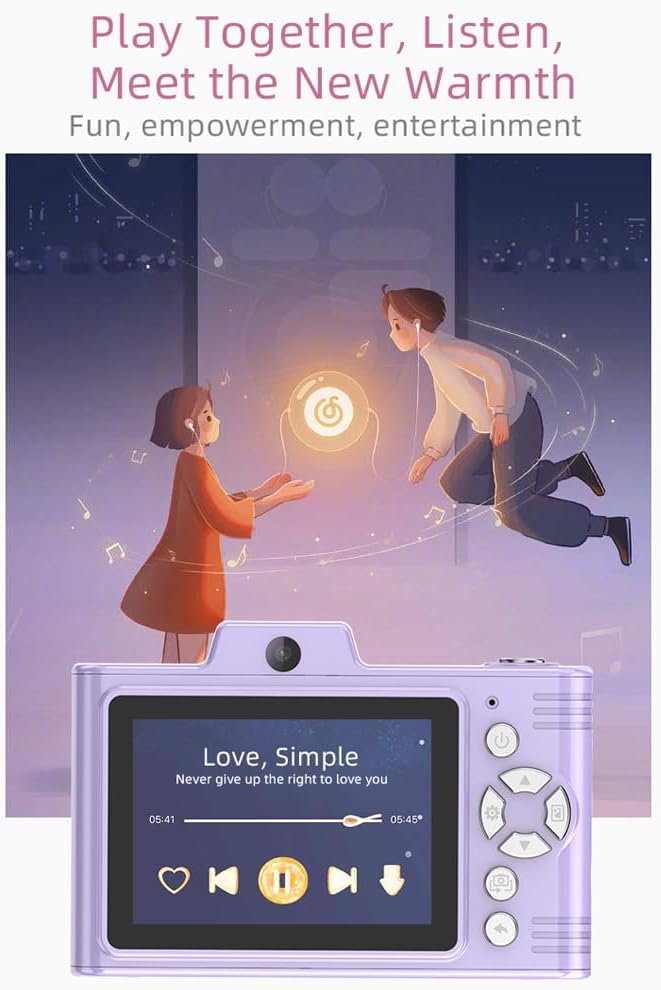
בילד באַשרייַבונג: A purple Andoer H8 camera showing a music player interface on its screen, with song title "Love, Simple" and playback controls, indicating its music playback capability.
6.7. Connecting to a Computer / Transferring Files
You can transfer photos and videos to a computer or phone.
- Connect the camera to your computer using the Type-C cable.
- The camera should appear as a removable disk.
- שלעפּן און פאַלן fileס צו דיין קאָמפּיוטער.
- For phone transfer, use an OTG adapter (not included) if your phone supports OTG functionality.
7. וישאַלט
- רייניקונג: Use a soft, dry cloth to clean the camera body. For the lens, use a specialized lens cleaning cloth.
- סטאָרידזש: Store the camera in a cool, dry place away from direct sunlight and dust. Remove the battery if storing for extended periods.
8. טראָובלעשאָאָטינג
| פּראָבלעם | מעגלעך לייזונג |
|---|---|
| די קאַמעראַ גייט נישט אָן. | Ensure the battery is charged. Reinsert the battery. |
| קען נישט נעמען בילדער/ווידעאס. | Check if a TF card is inserted and has sufficient space. Ensure camera is in the correct mode. |
| בילדער זענען בלערי. | Clean the lens. Ensure adequate lighting. Hold the camera steady. |
| די קאַמעראַ פֿאַרפֿרירט זיך. | אַרויסנעמען און צוריקשטעלן די באַטאַרייע צו ריסעט די קאַמעראַ. |
9. ספּעסאַפאַקיישאַנז
| שטריך | דעטאַל |
|---|---|
| פּראָדוקט מאָדעל | H8 |
| ווייַז סקרין | 2.8 אינטש IPS |
| פאָטאָ פּיקסעל | אַרויף צו 48 מפּ |
| ווידעא האַכלאָטע | 1080 פּ הד |
| דיגיטאַל פארגרעסער | 8x |
| File פֿאָרמאַט | JPG/AVI/MP3 |
| טשאַרדזשינג צייט | בעערעך. 2-4 שעה |
| באַטאַרייע קאַפּאַציטעט | 700 מאַה, 3.7 וו |
| פּראָדוקט וואָג | 110ג |
| פּראָדוקט גרייס | 105.5 X 72 X 46 מם |
| טשאַרדזשינג וואָלtage | DC5V 1A |
| זכּרון שטיצן | TF card (max 32GB) |
| ספּעציעלע פֿעיִקייטן | 40 Head Stickers, 26 Photo Frames, 6 Filters |
| קאַנעקטיוויטי | וסב (טיפּ-C) |
| בילד סטאַביליזאַטיאָן | דיגיטאַל |
| סענסאָר טיפּ | קמאָס |
| בקיעס מדרגה | אָנהייבער |
10. וואָראַנטי און שטיצן
For warranty information and technical support, please refer to the documentation provided with your purchase or contact Andoer customer service directly. Keep your proof of purchase for warranty claims.