
LAUNCH X 431 PRO DYNO
LAUNCH X431 PRO Dyno 2025 Bidirectional Scan Tool User Manual
Model: X 431 PRO DYNO
1. הקדמה
The LAUNCH X431 PRO Dyno 2025 is a state-of-the-art bidirectional scan tool designed for comprehensive vehicle diagnostics. This manual provides detailed instructions for setting up, operating, maintaining, and troubleshooting your device to ensure optimal performance and longevity.
Key features include advanced ECU Coding, OE-Level All System Diagnostics, Bi-directional Active Tests, and over 38 special functions. It supports modern automotive protocols like CAN-FD and DoIP, offering extensive vehicle coverage.
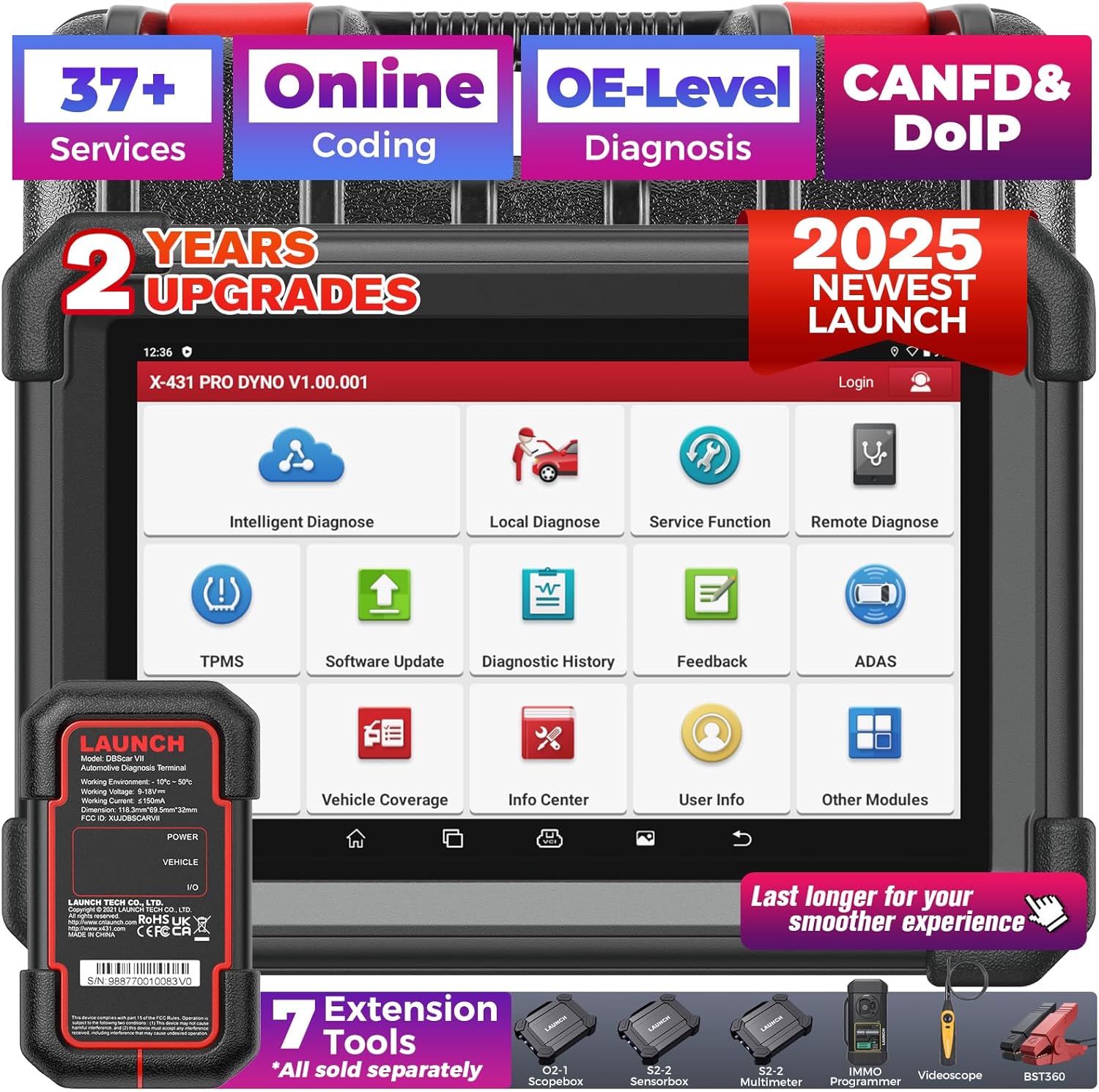
Figure 1.1: LAUNCH X431 PRO Dyno 2025 Scan Tool and its components.
2. וואָס איז אין דער קעסטל
ביים עפענען דעם פעקל, זיכער מאכן אז אלע קאמפאנענטן זענען דא און אין גוטן צושטאנד:
- X-431 PRO fifth generation tablet
- DBSCAR VII diagnostic connector
- Power adapter, 5V / 5A, wire length 1.2m
- Various OBD-II and non-OBD-II adapters (as shown in product images)
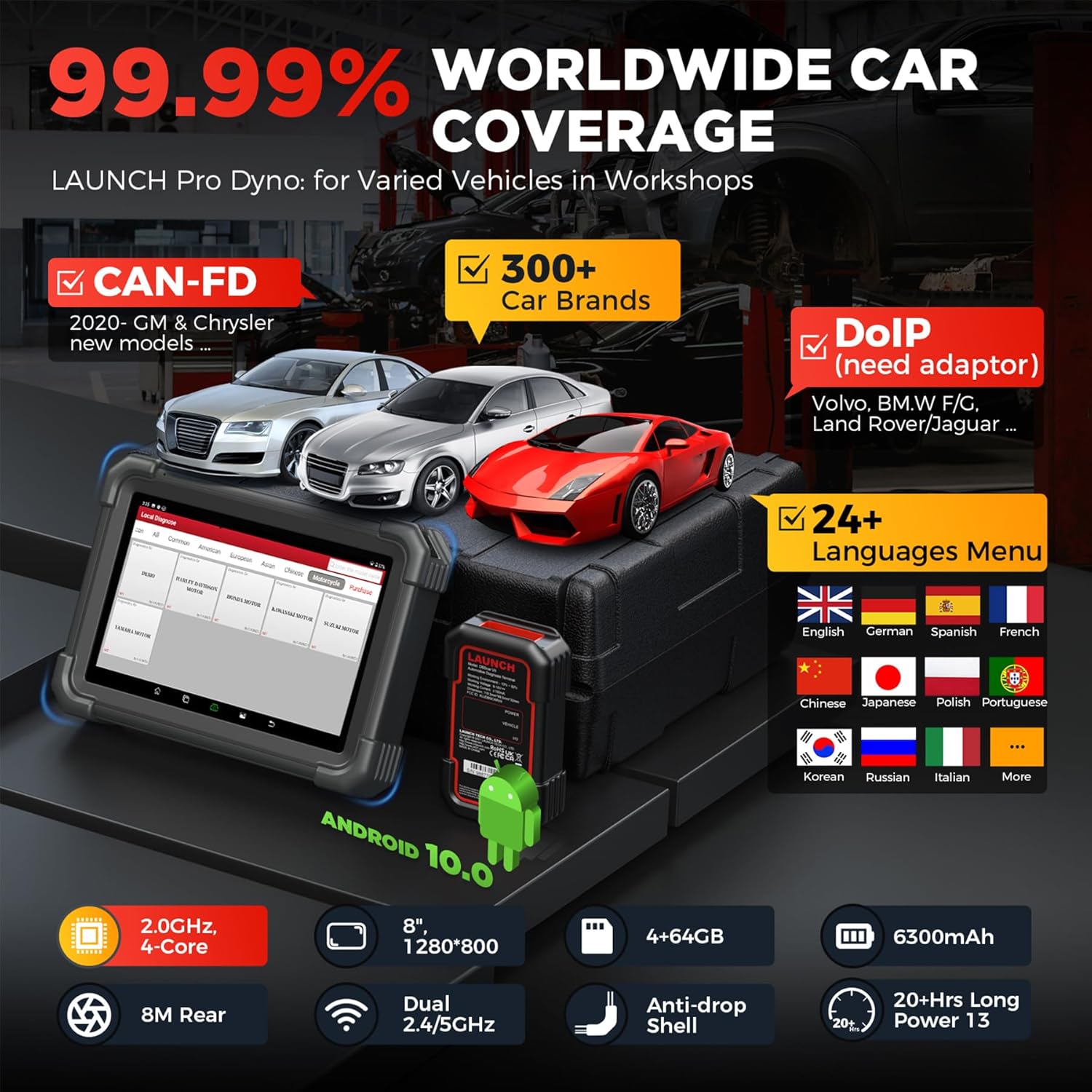
Figure 2.1: The LAUNCH X431 PRO Dyno 2025 scan tool and its comprehensive set of adapters and cables.
3. סעטאַפּ גייד
3.1 ערשטע אײַנפֿיר און קאָנפֿיגוראַציע
- טשאַרדזשינג די מיטל: Connect the provided power adapter to the X-431 PRO Dyno tablet and a power outlet. Allow the device to fully charge before first use. The 6300mAh battery provides over 21 hours of continuous use.
- מאַכט אויף: Press and hold the power button until the LAUNCH logo appears on the 8-inch 1280x800 display.
- שפּראַך סעלעקציע: Follow the on-screen prompts to select your preferred language. The device supports 24 languages including English, French, Spanish, German, and more.
- Wi-Fi קאַנעקשאַן: Connect the device to a stable Wi-Fi network. This is crucial for software updates and online features.
- ווייכווארג דערהייַנטיקן: Navigate to the "Software Update" section. Perform a one-touch smart update to ensure all diagnostic software and vehicle data are current. Regular updates are provided for 2 years free of charge.

Figure 3.1: The software update interface on the LAUNCH X431 PRO Dyno 2025, showing the progress of an update.
3.2 קאַנעקטינג צו פאָרמיטל
- געפינען די OBD-II פּאָרט: Identify the vehicle's OBD-II diagnostic port, typically located under the dashboard on the driver's side.
- Connect DBSCAR VII: Plug the DBSCAR VII diagnostic connector into the vehicle's OBD-II port. Ensure a secure connection.
- אויפשטעלן קאָמוניקאַציע: The DBSCAR VII connects wirelessly via Bluetooth (up to 33ft range) or via Type-C wired connection for stable data transmission. The tablet will automatically detect the VCI.
- צינדונג אן: דרייט די איגנישאַן פונעם אויטאָ צו דער "ON" פּאָזיציע (מאָטאָר אויסגעלאָשן).

Figure 3.2: The DBSCAR VII diagnostic connector (VCI) connected to a vehicle's OBD-II port, illustrating wireless communication with the tablet.
4. אַפּערייטינג ינסטרוקטיאָנס
4.1 אַלע סיסטעם דיאַגנאָסטיקס
The LAUNCH X431 PRO Dyno performs OE-level diagnostics across all accessible vehicle systems (e.g., PCM, ECM, EPS, PDM, BCM, TPMS, SCCM, RADIO, ABS, SRS, etc.).
- אויטאָVIN און סקען: From the main menu, select "Intelligent Diagnose" or "Local Diagnose" and then "AutoVIN" (for 2006+ models) to automatically identify the vehicle. Alternatively, manually select vehicle make, model, and year.
- געזונטהייט באריכט: Initiate a "Health Report" scan to quickly identify all system fault codes (DTCs). The scan tool will display a progress bar and list detected issues.
- לייענען/אויסמעקן DTCs: View detailed descriptions of Diagnostic Trouble Codes. Use the "Clear Codes" function to erase DTCs after repairs are completed.
- לעבעדיקע דאַטן סטרים: Access real-time data parameters from various sensors and modules. Data can be displayed in graphical format for easier analysis.

פיגורע 4.1: איבערview of the all-system diagnostic capabilities, including AutoVIN, Clear Codes, Read Codes, AutoScan, Live Data, and ECU Info.
4.2 Bi-directional Active Tests
This function allows sending commands from the scan tool to vehicle ECUs to test specific components or systems.
- Access Active Test: From the diagnostic menu, select "Active Test" or "Bi-directional Control."
- Select Component: Choose the component you wish to test (e.g., radiator fan, fuel pump, windows, lights, etc.).
- Execute Test: Send commands to activate or deactivate the component and observe its response. This helps in quickly pinpointing faulty parts.

Figure 4.2: Demonstrates the bi-directional control feature, allowing the user to send commands to vehicle components like parking brake, AC clutch, headlamps, ABS pump, and windows/doors.
4.3 ECU קאָדירונג
ECU Coding allows for customization, matching, and recalibration of ECU components.
- Access ECU Coding: Select "ECU Coding" from the main menu or diagnostic functions.
- Perform Operations:
- Setup New ECU Modules: Match, learn, or code new ECU modules after replacement.
- פערזענליכען: Customize vehicle functions (e.g., auto engine start-stop, flashing headlights on alarm, auto side mirrors folding, change dashboard brightness, fuel consumption display, auto door).
- Fix Complex Issues: Recode or calibrate ECUs to resolve performance issues.
- באַמערקונג: Available coding operations vary by vehicle make, model, and year.

Figure 4.3: The ECU Coding interface, showing options for personalizing car settings and optimizing driving experience.
4.4 Special Functions (38+)
The device offers over 38 commonly used special functions for various maintenance and reset services.
- אויל ריסעט סערוויס: Reset engine oil life system.
- EPB צוריקשטעלן: Electronic Parking Brake reset.
- SAS קאַלאַבריישאַן: Steering Angle Sensor calibration.
- ABS בלוטונג: Bleed the Anti-lock Braking System.
- אינדזשעקטאָר קאָדירונג: Write adaptive code for injectors.
- TPMS באַשטעטיק: Tire Pressure Monitoring System reset.
- BMS צוריקשטעלן: Battery Management System reset.
- טראָטל אַדאַפּטיישאַן: Adapt throttle position.
- סאַספּענשאַן מאַטשינג: Adjust suspension parameters.
- And many more, including Gear Learning, Windows Calibration, Sunroof Initialization, AFS Reset, etc.

Figure 4.4: A visual representation of some of the 38+ special functions available, such as Oil Reset, EPB Reset, SAS Calibration, Airbag Reset, BMS Reset, Brake Bleed, TPMS, and Injector Coding.
4.5 נאָך פֿעיִקייטן
- CAN-FD & DoIP Support: Covers modern vehicles using these protocols. A DoIP adapter may be required for some models.
- FCA אויטאָ אויטאָריזאַציע: Provides secure gateway access for 2018+ FCA vehicles.
- ווייטער דיאַגנאָז: Allows for remote technical assistance.
- דיאַגנאָסטיש באַריכט: Generate and print comprehensive diagnostic reports.
- אָנליין באַמערקונגען: Direct communication channel for operational and diagnostic tips.

Figure 4.5: Highlights various features including AutoAuth for FCA SGM, V.A.G Guided Function, CAN-FD & DoIP support, Remote Diagnostic, Online Repair Resources, 8-in-1 Live Data Stream, and Diagnostic Report Print & Share.
5. וישאַלט
Proper maintenance ensures the longevity and optimal performance of your LAUNCH X431 PRO Dyno.
- ווייכווארג דערהייַנטיקונגען: Regularly check for and install software updates to ensure compatibility with new vehicle models and access to the latest features. Updates are free for 2 years.
- רייניקונג: Use a soft, dry cloth to clean the tablet screen and body. Avoid abrasive cleaners or solvents.
- סטאָרידזש: Store the device in its protective case in a cool, dry place when not in use. Avoid extreme temperatures.
- באַטערי זאָרגן: כדי צו פארלענגערן די לעבן פון די באַטעריע, זאָלט איר נישט אָפט אויסלאָדן די באַטעריע. לאָדט דאָס אַפּאַראַט רעגולער אויף, אפילו אויב עס איז נישט אין אַקטיוון באַנוץ.
- VCI קער: Keep the DBSCAR VII connector clean and free of debris. Ensure pins are not bent or damaged.

Figure 5.1: The device and its protective case, emphasizing the importance of proper storage and care.
6. טראָובלעשאָאָטינג
די סעקציע באהאנדלט אלגעמיינע פראבלעמען און זייערע לייזונגען.
| פּראָבלעם | מעגלעך סיבה | לייזונג |
|---|---|---|
| די מיטל טוט נישט מאַכט אויף. | נידעריגע באַטעריע; די מאַכט קנעפּל נישט לאַנג גענוג געדריקט. | Charge the device for at least 30 minutes. Press and hold the power button for 3-5 seconds. |
| קען נישט פאַרבינדן צום אויטאָ. | VCI not properly connected; Ignition off; Bluetooth/Wi-Fi issue. | Ensure VCI is securely plugged into OBD-II port. Turn ignition to ON. Check Bluetooth/Wi-Fi connection on tablet. |
| ווייכווארג דערהייַנטיקונג פיילז. | Unstable Wi-Fi; Insufficient storage. | Ensure strong Wi-Fi signal. Clear some data to free up storage (4+64GB ROM/RAM). |
| Specific function not available for vehicle. | Function not supported by vehicle's ECU; Outdated software. | Verify vehicle compatibility for the specific function. Perform a software update. |
For further assistance, utilize the "Online Feedback" or "Remote Diagnosis" features on the device, or contact customer support.
7. ספּעסאַפאַקיישאַנז
| שטריך | דעטאַל |
|---|---|
| מאָדעל | X 431 PRO DYNO |
| אָפּערייטינג סיסטעם | אַנדרויד 10.0 |
| פּראַסעסער | 4-Core 2.0GHz |
| זכּרון (ראָם/ראַם) | 4 גיגאבייט באַראַן + 64 גיגאבייט ראַם |
| ווייַז | 8-אינטש, 1280x800 רעזאָלוציע |
| באַטערי | 6300mAh (21+ hours continuous use) |
| קאַנעקטיוויטי | Bluetooth (33ft wireless range), Type-C wired, Wi-Fi (Dual 2.4/5GHz) |
| אַפּאַראַט | 8M Rear |
| שטיצט פּראָטאָקאָלס | CAN-FD, DoIP (with adapter) |
| פאָרמיטל קאַווערידזש | 100+ brands, 10000+ models (1996-2025 cars) |
| דימענשאַנז | 17.32"ל x 12.2"בר x 14.57"ה |
| פּונקט וואָג | 15.98 פונט |
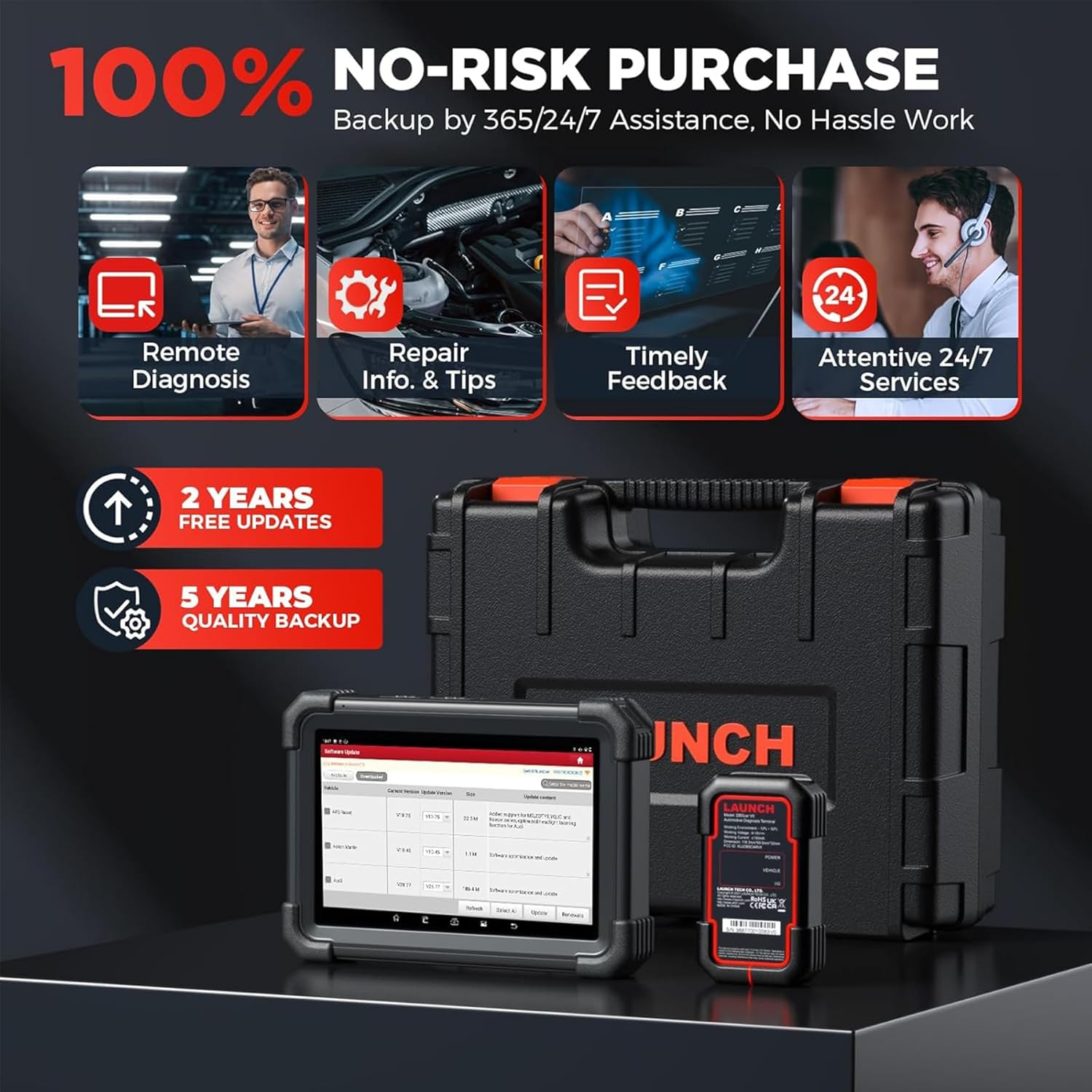
Figure 7.1: Key specifications and worldwide car coverage details for the LAUNCH X431 PRO Dyno 2025.
8. וואָראַנטי און שטיצן
The LAUNCH X431 PRO Dyno comes with a commitment to customer satisfaction and long-term support.
- פרייע ווייכווארג דערהייַנטיקונגען: Enjoy 2 years of subscription-free software updates.
- Quality Backup: The product includes a 5-year quality backup.
- לעבנס-לאַנג טעכנישע הילף: Reliable lifetime technical assistance is offered by a team of experts, available 24/7/365.
- קאָנטאַקט שטיצן: For any issues or inquiries, you can contact customer support at 1-888-756-2936 (Mon-Fri 9:00 AM–6:00 PM EST) or use the "Online Feedback" feature on the device.

פיגורע 8.1: איבערview of the LAUNCH X431 PRO Dyno's main features and support offerings.
9. אפיציעלע פּראָדוקט ווידעאָס
Watch these official videos for a visual guide on using your LAUNCH X431 PRO Dyno.
9.1 LAUNCH X431 PRO DYNO Overview
ווידעא 9.1: דאס ווידעא גיט אן איבערבליקview of the LAUNCH X431 PRO Dyno, highlighting its comprehensive features and wide car model coverage. It demonstrates how the tool can cover more than 98% of car models in the market.
Ask a question about this manual
Ask about setup, troubleshooting, compatibility, parts, safety, or missing instructions. Manuals+ will review the question and use this page’s manual context to help answer it.