
Codnida LC323
Codnida Camera LC323 U Instruction Manual
מאָדעל: LC323
1. הקדמה
This instruction manual provides comprehensive guidance for the installation, operation, and maintenance of your Codnida Camera LC323 U. Please read this manual thoroughly before using the device to ensure proper functionality and safety. Keep this manual for future reference.
2. פּראָדוקט איבערview און קאַמפּאָונאַנץ
The Codnida Camera LC323 U is a wireless security camera designed for surveillance. It features an E27 base for easy installation into standard light bulb sockets, offering a discreet and convenient monitoring solution.

פיגור 2.1: קאַמעראַ קאָמפּאָנענטן
This image displays the Codnida Camera LC323 U with its key components labeled, including the E27 Base, TF card slot, Reset button, Loudspeaker, Working indicator light, Lens, and Microphone.
שליסל קאַמפּאָונאַנץ:
- E27 באַזע: Standard screw-in base for power and mounting.
- טף קאַרד שפּעלטל: For local storage of recordings (MicroSD card not included).
- באַשטעטיק קנעפּל: געניצט צו צוריקשטעלן פאַבריק סעטטינגס.
- הילכיקער: For two-way audio communication and alarm sounds.
- אַרבעט ינדיקאַטאָר: LED light indicating camera status.
- לענס: קאַפּטשערז ווידעא פאָאָtage.
- מיקראָפאָן: פֿאַר אַודיאָ אַרייַנגאַנג בעת צוויי-וועג קאָמוניקאַציע.
3. סעטאַפּ
3.1. ינסטאַלירונג
The Codnida Camera LC323 U is designed for simple, wire-free installation into a standard E27 light bulb socket. Ensure the power to the socket is turned off before installation.
- Locate an E27 light bulb socket in your desired monitoring area.
- Ensure the power supply to the socket is disconnected at the main switch.
- Carefully screw the camera into the E27 socket until it is secure.
- Restore power to the socket. The camera will power on and its indicator light will activate.

פיגור 3.1: גרינגע אינסטאַלאַציע
This image illustrates the straightforward installation process of screwing the Codnida Camera LC323 U into an existing E27 light fixture, highlighting its wire-free setup.
3.2. אַפּ דאַונלאָוד און חשבון רעגיסטראַציע
The camera operates via the CloudEdge application. Download the app from your device's app store (iOS or Android).
- זוכן פֿאַר "CloudEdge" in the App Store or Google Play Store.
- אראפקאפיע און ינסטאַלירן די אַפּלאַקיישאַן.
- Open the CloudEdge app and follow the on-screen instructions to register a new account or log in if you already have one.
3.3. פֿאַרבינדן די קאַמעראַ צו Wi-Fi
After installing the camera and setting up your CloudEdge account, proceed with connecting the camera to your Wi-Fi network.
- In the CloudEdge app, tap the "+" icon to add a new device.
- Select the appropriate camera model (LC323 U) from the list.
- Follow the in-app prompts to connect the camera to your 2.4GHz Wi-Fi network. Ensure your mobile device is connected to the same Wi-Fi network during setup.
- The app will guide you through scanning a QR code with the camera's lens or listening for a connection tone.
- אַמאָל פארבונדן, קענט איר געבן א נאמען פאר אייער קאַמעראַ און אָנהייבן מאָניטאָרינג.
4. אַפּערייטינג ינסטרוקטיאָנס
The CloudEdge app provides full control and access to your Codnida Camera LC323 U's features.

Figure 4.1: CloudEdge App Interface
This image displays the CloudEdge mobile application interface, showing a live camera feed and various control options such as screenshot, two-way talk, record, motion detection settings, PTZ control, and lens switch.
4.1. לייוו View און רעקאָרדינג
Access the live feed of your camera through the CloudEdge app. From the live view screen, you can:
- סקרעענשאָט: כאַפּן נאָך בילדער פון די לעבן פיטער.
- רעקאָרד: Manually start and stop video recording.
- פּלייבאַק: Review רעקאָרדעד פוtage stored on the TF card or cloud storage.
4.2. Motion Detection and Auto Tracking
The camera features intelligent motion detection and auto-tracking capabilities.

Figure 4.2: Motion Detection & Auto Tracking
This image illustrates the camera's ability to detect motion and automatically track moving subjects, such as pets, within its 355-degree horizontal and 50-degree vertical range.
- באַוועגונג דעטעקשאַן: The camera can detect movement and send instant alerts to your mobile device.
- אַוטאָ טראַקינג: When motion is detected, the camera can automatically pan and tilt to follow the moving object.
- סענסיטיוויטי סעטטינגס: Adjust motion detection sensitivity in the app settings to minimize false alarms.
4.3. צוויי-וועגיק אודיאָ
Communicate with individuals near the camera using the two-way audio feature.

פיגור 4.3: צוויי-וועג אודיאָ קאָמוניקאַציע
This image demonstrates the two-way audio functionality, allowing users to speak and listen through the camera via the mobile app, useful for interacting with visitors or deterring unwanted guests.
דריקט דעם מיקראָפאָן בילדל אין דער לייוו view to speak through the camera's loudspeaker. You can also hear audio from the camera's microphone.
4.4. נאַכט זעאונג
The camera provides clear surveillance even in low-light conditions with its color night vision capabilities.

Figure 4.4: 2K HD Quality with Color Night Vision
This image compares a scene captured in daylight with a vibrant color image to the same scene captured at night using the camera's color night vision, demonstrating its ability to provide detailed, colored footagע אין נידעריק-ליכט סביבות.
The camera automatically switches between day and night modes. Infrared (IR) LEDs provide black and white night vision, while integrated white lights enable color night vision when activated.
4.5. Intelligent Sound & White Light Alarm
Enhance security with customizable alarm options.
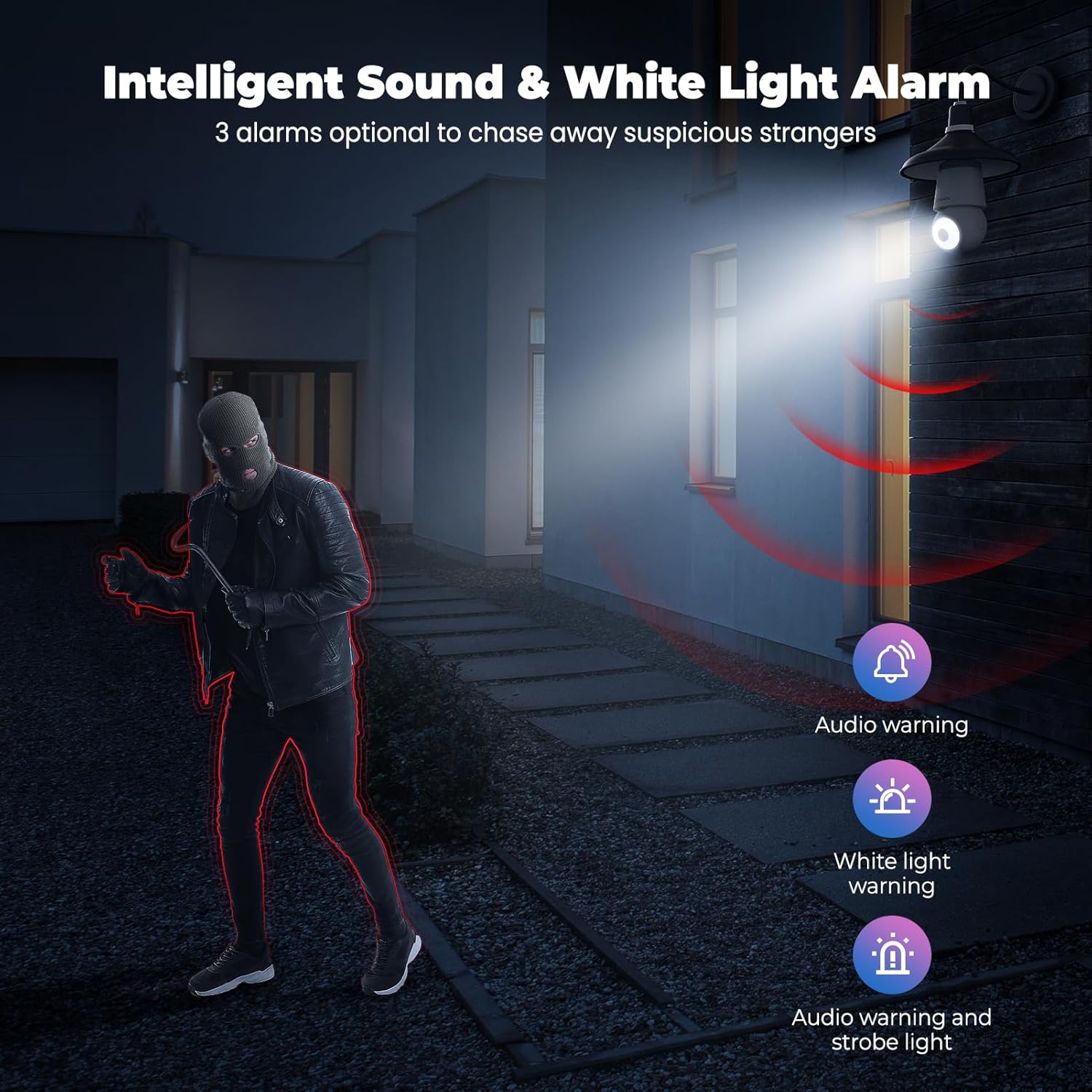
Figure 4.5: Intelligent Sound & White Light Alarm
This image illustrates the camera's alarm features, offering three optional responses to suspicious activity: an audio warning, a white light warning, or a combination of audio and strobe light to deter intruders.
In the app settings, you can configure the camera to trigger an alarm upon motion detection. Options include an audible warning, a bright white light, or a combination of both.
4.6. Human AI Intelligent Analytics
The camera utilizes AI for advanced object recognition.

Figure 4.6: Human AI Intelligent Analytics
This image demonstrates the camera's AI capabilities, which can differentiate and label various objects such as people, cars, animals, and packages within the surveillance area. Note that person analytics are typically free, while other object analytics may require a subscription.
The camera can distinguish between different types of objects (e.g., people, vehicles, animals, packages) to provide more accurate alerts. Person detection is typically a standard feature, while other specific object analytics may require a subscription service.
4.7. 24/7 רעקאָרדינג און סטאָרידזש
The camera supports continuous recording and flexible storage options.
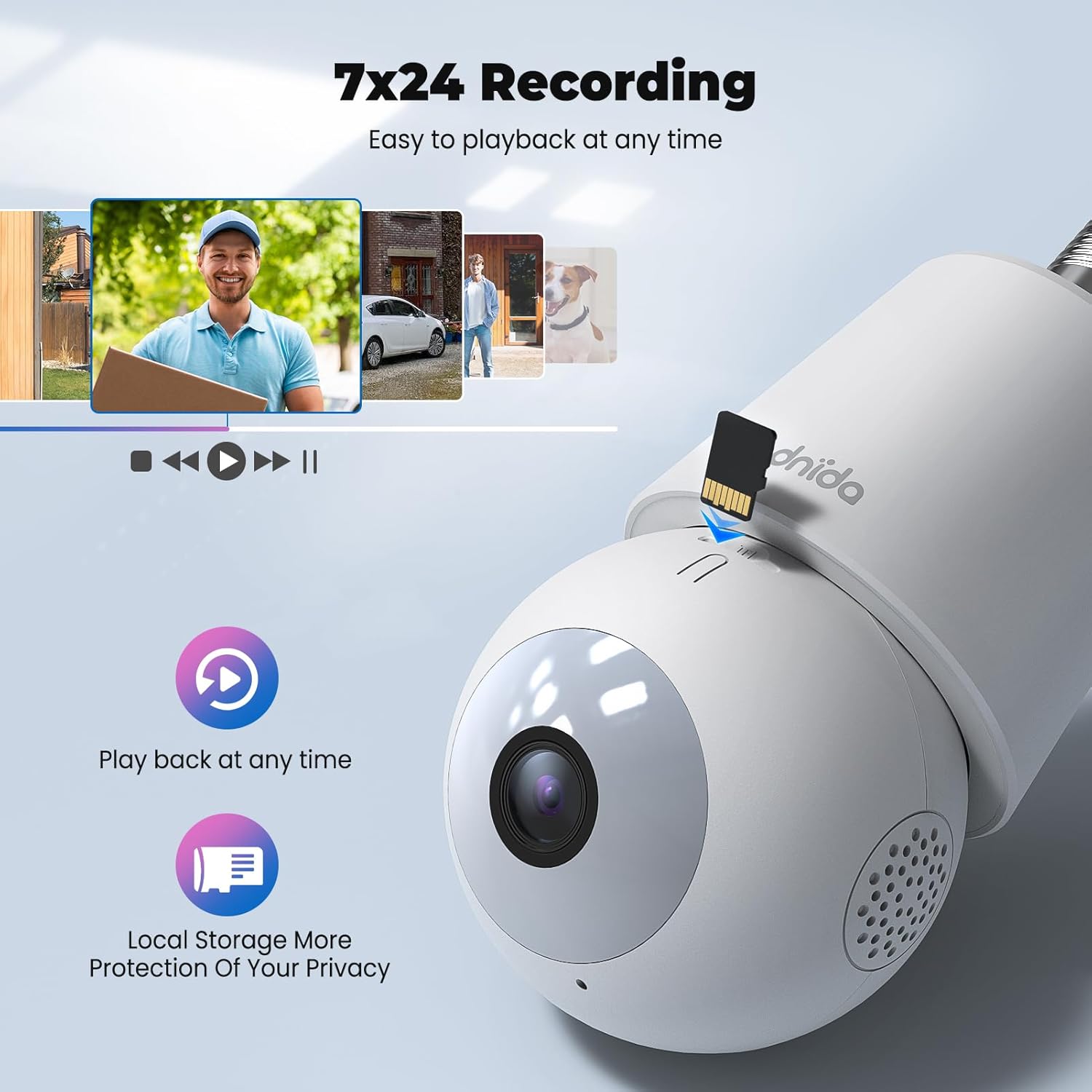
Figure 4.7: 24/7 Recording and Local Storage
This image highlights the camera's ability to record continuously (24/7) and store footage locally on a MicroSD card, ensuring privacy and easy playback of events at any time.
- לאקאלע סטאָרידזש: Insert a MicroSD card (up to 128GB, not included) into the TF card slot for continuous 24/7 recording.
- וואָלקן סטאָרידזש: Optional cloud storage services are available through the CloudEdge app for secure off-site storage and easy access to recorded events.
- פּלייבאַק: לייכט שייַעךview רעקאָרדעד פוtage directly from the app's history or cloud sections.
5. וישאַלט
Regular maintenance ensures optimal performance and longevity of your Codnida Camera LC323 U.
- רייניקונג: ווישט אָפּ די קאַמעראַ לענס און קערפּער מיט אַ ווייכן, טרוקענעם שטאָף צו באַזייַטיקן שטויב און שמוץ. פֿאַרמייַדט ניצן שטרענגע כעמיקאַלן אָדער אַברייסיוו מאַטעריאַלן.
- Firmware דערהייַנטיקונגען: Periodically check the CloudEdge app for available firmware updates. Keeping the firmware updated ensures access to the latest features and security enhancements.
- מאַכט ציקל: If the camera experiences issues, try power cycling it by turning off the power to the E27 socket, waiting a few seconds, and then turning it back on.
6. טראָובלעשאָאָטינג
אויב איר טרעפט פּראָבלעמען מיט אייער קאַמעראַ, זעט די פאלגענדע געוויינטלעכע טראָובלעשווטינג טריט:
| פּראָבלעם | מעגלעך סיבה | לייזונג |
|---|---|---|
| די אַפּאַראַט מאַכט נישט אויף | No power to the E27 socket; camera not screwed in properly. | Ensure the E27 socket has power and the camera is securely screwed in. |
| ניט געקענט צו פאַרבינדן צו ווי-פי | Incorrect Wi-Fi password; camera too far from router; 5GHz Wi-Fi network used. | Verify Wi-Fi password; move camera closer to router; ensure you are connecting to a 2.4GHz Wi-Fi network. Reset the camera and try again. |
| אָפט דיסקאַנעקשאַנז | Weak Wi-Fi signal; network interference. | Improve Wi-Fi signal strength (e.g., use a Wi-Fi extender); reduce interference from other devices. |
| Motion detection not working or too sensitive | Incorrect settings; environmental factors. | Adjust motion detection sensitivity and detection zones in the CloudEdge app. Ensure the camera lens is clean. |
| No recording to TF card | TF card not inserted or faulty; card full; recording settings incorrect. | Ensure TF card is correctly inserted and formatted (if prompted by app); check recording settings in the app. Replace card if faulty. |
If the problem persists, please contact Codnida customer support for further assistance.
7. ספּעסאַפאַקיישאַנז
Detailed technical specifications for the Codnida Camera LC323 U:
- מאָדעל נאָמען: LC323
- פאַבריקאַנט: קאָדנידאַ
- קאַנעקטיוויטי פּראָטאָקאָל: ווי-פי (2.4 גהז)
- ווירעלעסס קאָמוניקאַציע טעכנאָלאָגיע: ווי-פי
- ווידעא כאַפּן האַכלאָטע: 1296p (2K HD)
- דרינענדיק / דרויסנדיק באַניץ: דרויסנדיק
- מאַונטינג טיפּ: Wall Mount (via E27 socket)
- קאָנטראָללער טיפּ: CloudEdge אַפּ
- ליכט מקור: Infrared (for night vision)
- מאַטעריאַל: פּלאַסטיק
- וואָסtage: 10 וואטס
- נומער דימענשאַנז (L x W x H): 50 X 50 X 50 מם
- פּראָדוקט דימענשאַנז: 5 רענטגענ 5 רענטגענ 5 סענטימעטער; 410 ג
- באַטעריז פארלאנגט: ניין
- אַרייַנגערעכנט קאַמפּאָונאַנץ: אַפּאַראַט
8. וואָראַנטי און שטיצן
The Codnida Camera LC323 U typically comes with a manufacturer's warranty. Please refer to the product packaging or the official Codnida webזייטל פֿאַר ספּעציפֿישע וואָראַנטי טערמינען און באַדינגונגען.
For technical support, troubleshooting assistance, or warranty claims, please contact Codnida customer service through their official channels. Contact information can usually be found on the product packaging or their webפּלאַץ.
Ask a question about this manual
Ask about setup, troubleshooting, compatibility, parts, safety, or missing instructions. Manuals+ will review the question and use this page’s manual context to help answer it.