
1. הקדמה
The TECLAST M50 is a 10.1-inch Android 13 tablet designed for versatile use, from entertainment to productivity. It features an Octa-Core processor, 12GB RAM, 128GB internal storage expandable up to 1TB, and supports Dual SIM 4G LTE connectivity. This manual provides essential information for setting up, operating, maintaining, and troubleshooting your device.
2. וואָס איז אין דער קעסטל
Upon unboxing your TECLAST M50 tablet, please ensure all the following items are present:
- TECLAST M50 Tablet
- מאַכט אַדאַפּטער (טשאַרדזשער)
- וסב טיפּע- C קאַבלע
- סים עדזשעקטאָר טול
- באַניצער מאַנואַל
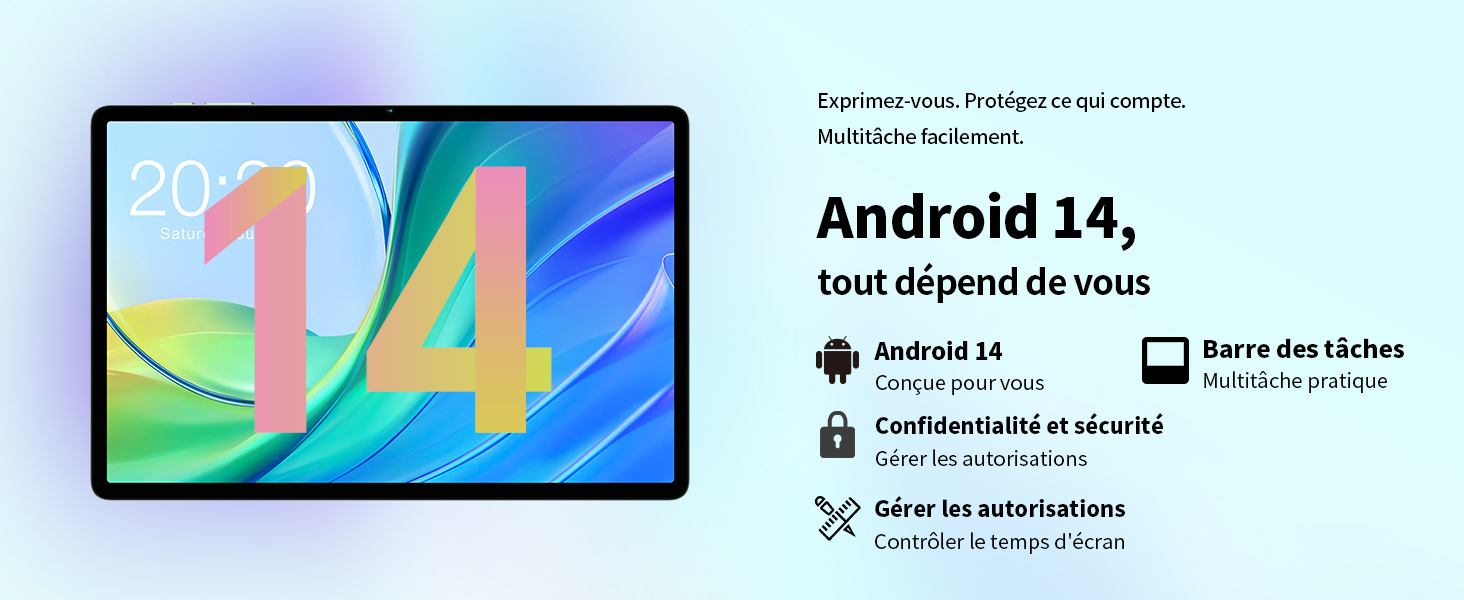
Image: Contents of the TECLAST M50 tablet box, showing the tablet, power adapter, USB cable, SIM ejector tool, and user manual.
3. פּראָדוקט איבערview
The TECLAST M50 tablet features a sleek design with a 10.1-inch display and a lightweight build of approximately 460 grams. It measures 23L x 20l x 1Ép centimeters. Familiarize yourself with the tablet's physical components:

Image: TECLAST M50 tablet from various angles, illustrating the location of the power button, volume controls, USB-C port, 3.5mm headphone jack, and speaker grilles.
שליסל קאַמפּאָונאַנץ:
- מאַכט קנעפּל: געפינען זיך אויף דער זייט, גענוצט צו אנצינדן/אויסלעשן אדער אויפוועקן/שלאפן דעם אפאראט.
- באַנד קנעפּלעך: סטרויערן די אַודיאָ באַנד.
- וסב טיפּ-C פּאָרט: פֿאַר טשאַרדזשינג און דאַטן אַריבערפירן.
- 3.5 מם כעדפאָון דזשאַק: פֿאַרבינדט דראָטיקע כעדפאָונז.
- רעדנער גרילז: Four stereo speakers for enhanced audio output.
- פראָנט אַפּאַראַט: 5MP camera for video calls and facial unlock.
- דערציען אַפּאַראַט: 13MP קאַמעראַ פֿאַר פאָטאָס און ווידיאס.
- סים/מיקראָסד קאַרטל שפּאַלט: Insert SIM cards for cellular connectivity and a MicroSD card for expanded storage.
4. סעטאַפּ
4.1 ערשט טשאַרדזשינג
Before first use, it is recommended to charge the TECLAST M50 tablet for at least 30 minutes. Connect the USB Type-C cable to the tablet's charging port and the power adapter to a wall outlet. The battery icon on the screen will indicate charging status.
4.2 פּאַוערינג אויף / אַוועק
- צו מאַכט אויף: Press and hold the Power button until the TECLAST logo appears.
- צו מאַכט אַוועק: דריק און האלט דעם פּאַוער קנעפּל ביז די פּאַוער אָפּציעס מעניו דערשיינט, און דערנאָך סעלעקטיר 'אויסלאָשן'.
- צו ריסטאַרט: Press and hold the Power button, then select 'Restart'.
4.3 אריינשטעלן סים און מיקראָסד קאַרטלעך
The TECLAST M50 supports dual SIM cards for 4G LTE connectivity and a MicroSD card for storage expansion up to 1TB.
- געפינט די SIM/MicroSD קאַרטל טאַץ אויף דער זייט פון די טאַבלעט.
- שטעקט אריין דעם סים אויסווארף געצייג אין דעם קליינעם לאך לעבן דעם טרעי און דריקט לײַכט ביז דער טרעי קומט ארויס.
- Carefully place your Nano-SIM cards and/or MicroSD card into the designated slots on the tray. Ensure the gold contacts are facing down and the cards are correctly oriented.
- שטופּן דעם טאַץ צוריק אין דער טאַבלעט ביז עס קליקט אַרײַן אין פּלאַץ.

Image: Illustration of inserting SIM cards and a MicroSD card into the tablet's tray.
4.4 ערשטע אַנדרויד סעטאַפּ
After powering on for the first time, follow the on-screen prompts to complete the initial setup process. This includes selecting your language, connecting to a Wi-Fi network, signing in with your Google account, and setting up security features like facial unlock.
5. אַפּערייטינג ינסטרוקטיאָנס
5.1 ווייַז פֿעיִקייטן
The TECLAST M50 features a 10.1-inch TDDI HD display with a resolution of 1280x800 pixels. The TDDI technology integrates touch sensors directly into the LCD, providing a more responsive touch experience. It also supports Widevine L1, allowing for high-definition streaming from platforms like Disney+ and Amazon Prime Video.

Image: Visual representation of the TECLAST M50's 10.1-inch HD display with 1280x800 resolution and IPS wide viewינג ווינקל.
5.2 פאָרשטעלונג און סטאָרידזש
Powered by an Octa-Core UNISOC T606 processor and Mali-G57 GPU, the M50 delivers efficient performance. It comes with 6GB of RAM, expandable to 12GB using virtual memory technology, and 128GB of internal storage. Storage can be further expanded up to 1TB via a MicroSD card.

Image: Details of the UNISOC T606 Octa-Core processor and Mali-G57 graphics processor.

Image: Information on RAM and ROM capacity, including expandable storage options.
5.3 קאַנעקטיוויטי
Stay connected with the TECLAST M50's comprehensive connectivity options:
- Dual SIM 4G LTE: Supports TD-LTE and FDD-LTE networks for mobile data and VoLTE calls.
- צוויי-באַנד Wi-Fi: Connect to 2.4GHz and 5GHz Wi-Fi networks (802.11ac).
- בלועטאָאָטה 5.0: פֿאַר פֿאַרבינדן וויירלעס אַקסעסאָריעס ווי כעדפאָונז און קלאַוויאַטורן.
- גפּס נאַוויגאַציע: Supports GPS, BeiDou, GLONASS, and Galileo for accurate positioning.

בילד: איבערview of Wi-Fi, Bluetooth, and 4G LTE capabilities.

Image: Tablet showing GPS navigation in use.
5.4 אַפּאַראַט פאַנגקשאַנאַליטי
The M50 is equipped with a 13MP rear camera and a 5MP front camera. The rear camera features AI-based auxiliary optimization for improved focus and image results, especially in low-light conditions. The 5MP front camera supports facial unlock for convenient device access.

Image: Details of the tablet's front and rear cameras.
5.5 אַודיאָ סיסטעם
Experience immersive sound with the M50's Momentum III audio system, featuring four stereo speakers and a Smart K amplifier for clear and rich audio output.

Image: Representation of the tablet's 4-speaker audio system.
5.6 אַנדרויד 13 פֿעיִטשערס
The tablet runs on Android 13, offering enhanced privacy controls, a convenient taskbar for multitasking, and improved permission management. It also includes features for parental controls to manage screen time and application access.

Image: Android 13 interface showcasing privacy and multitasking features.

Image: Parental control interface for managing tablet usage.
6. וישאַלט
6.1 באַטערי קער
The TECLAST M50 is equipped with a 6000mAh battery, providing up to 15 hours of usage. To maximize battery life:
- ויסמיידן עקסטרעם טעמפּעראַטורעס.
- Use the provided charger and cable.
- פֿאַרמײַדט אָפֿט גאָר אויסצוליידיקן די באַטעריע.
- פֿאַר לאַנג-טערמין סטאָרידזש, לאָדט די טאַבלעט צו אַרום 50% און מאַכט עס אויס.

Image: Battery capacity and charging method.
6.2 רייניקונג
צו רייניקן אייער טאַבלעט, ניצט אַ ווייכע, לינט-פֿרייע שטאָף. פֿאַר שווערע פֿלעקן, ווישט אַ ביסלampווישט דעם שטאָף מיט וואַסער אָדער אַ פאַרשטעלן רייניגער ספּעציעל דיזיינד פֿאַר עלעקטראָניק. פֿאַרמייַדט ניצן שטרענגע כעמיקאַלן אָדער אַברייסיוו מאַטעריאַלס.
6.3 ווייכווארג דערהייַנטיקונגען
Periodically check for system updates to ensure your tablet has the latest features and security patches. Navigate to סעטטינגס > סיסטעם > סיסטעם דערהייַנטיקונג צו קאָנטראָלירן און ינסטאַלירן בנימצא דערהייַנטיקונגען.
7. טראָובלעשאָאָטינג
If you encounter issues with your TECLAST M50 tablet, try the following basic troubleshooting steps:
- מיטל נישט קער אויף: זיכער מאַכן אַז די באַטאַרייע איז אויפגעלאָדן. פֿאַרבינדט דעם טשאַרדזשער און וואַרט אַ פּאָר מינוט איידער איר פּרוּווט ווידער אָנצוצינדן.
- עקראַן פֿאַרפֿרוירן אָדער נישט רעאַגירנדיק: דריק און האלט דעם פּאַוער קנעפּל פֿאַר בערך 10-15 סעקונדעס צו צווינגען אַ ריסטאַרט.
- Wi-Fi/Bluetooth connectivity issues: Try toggling Wi-Fi/Bluetooth off and on. Restart your tablet and/or your router/Bluetooth device.
- אַפּפּס קראַשן: אויסמעקן דעם קעש און דאַטן פֿאַר דער פּראָבלעמאַטישער אַפּ (סעטטינגס > אַפּפּס > [אַפּ נאָמען] > סטאָרידזש > אויסמעקן קעש/אויסמעקן דאַטן). אויב דער פּראָבלעם בלייבט, דעינסטאַלירט און ריאינסטאַלירט די אַפּ.
- לאַנגזאַמע פאָרשטעלונג: Close unnecessary background apps. Clear cached data. Consider performing a factory reset as a last resort (back up your data first).
- סים קאַרטל נישט דעטעקטירט: Ensure the SIM card is correctly inserted and activated with your carrier. Restart the tablet.
For more complex issues, refer to the official TECLAST support resources.
8. ספּעסאַפאַקיישאַנז
| שטריך | באַשרייַבונג |
|---|---|
| מאָדעל נאָמען | TECLAST M50 |
| אָפּערייטינג סיסטעם | אַנדרויד 13 |
| פּראַסעסער | יוניסאָק ט606 אָקטאַ-קאָר (1.6 גיגאַהערץ) |
| גראַפיקס פּראַסעסער | Mali-G57 MP1 |
| באַראַן | 12 GB (6GB physical + 6GB expansion) |
| אינערלעכער סטאָרידזש | 128 גיגאבייט |
| יקספּאַנדאַבאַל סטאָרידזש | מיקראָסד ביז 1 טב |
| פאַרשטעלן גרייס | 10.1 אינטשעס |
| ווייַז האַכלאָטע | 1280x800 Pixels (TDDI, IPS) |
| דערציען אַפּאַראַט | 13 מפּ |
| פראָנט אַפּאַראַט | 5 מפּ |
| באַטאַרייע קאַפּאַציטעט | 6000 מאַה (22 ווה) |
| באַטעריע לעבן (דורכשניטלעך) | 15 שעה |
| קאַנעקטיוויטי | 4G LTE (Dual SIM), Wi-Fi (802.11ac), Bluetooth 5.0 |
| נאַוויגאַציע | GPS, BeiDou, GLONASS, Galileo |
| אַודיאָ | 4 Stereo Speakers (Momentum III) |
| פּאָרץ | 1x USB Type-C, 1x 3.5mm Headphone Jack |
| וואָג | 460 גראַמז |
| דימענסיעס (L X W X H) | 23 X 20 X 1 סענטימעטער |
9. וואָראַנטי און שטיצן
9.1 וואָראַנטי אינפֿאָרמאַציע
The TECLAST M50 tablet comes with a manufacturer's warranty of 1 יאָר פֿון דעם קויפֿדאַטום. די וואָראַנטי דעקט חסרונות אין מאַטעריאַלן און אַרבעט אונטער נאָרמאַלן באַנוץ. ביטע באַהאַלטן אייער קויפֿבאַווייַז פֿאַר וואָראַנטי קלאַגעס.
9.2 קונה שטיצן
For any questions, technical assistance, or warranty inquiries, please contact TECLAST customer support. Our team provides professional advice and aims to respond to all inquiries within one working day. You can find contact information on the official TECLAST webוועבזייטל אדער דורך אייער הענדלער.
אָנליין רעסורסן: For additional support and FAQs, please visit the official TECLAST webפּלאַץ: TECLAST Brand Store