
Xprinter XP-Q801K
Xprinter XP-Q801K Thermal Receipt Printer User Manual
Model: XP-Q801K
1. הקדמה
This manual provides comprehensive instructions for the setup, operation, and maintenance of your Xprinter XP-Q801K Thermal Receipt Printer. This printer is designed for efficient and reliable receipt printing in various business environments, featuring high-speed direct thermal printing and a USB interface for easy connectivity.

פיגורע 1: פראָנט view of the Xprinter XP-Q801K Thermal Receipt Printer, showing the paper output slot and control buttons.
2. סעטאַפּ
2.1 אַנפּאַקינג
Carefully remove the printer and all accessories from the packaging. Verify that all components are present:
- Xprinter XP-Q801K Thermal Receipt Printer
- מאַכט אַדאַפּטער
- וסב קאַבלע
- Paper Roll (starter)
- באַניצער מאַנואַל (דעם דאָקומענט)
2.2 קאַנעקטינג די פּרינטער
Before connecting, ensure the printer is powered off. Locate the ports on the rear of the printer.
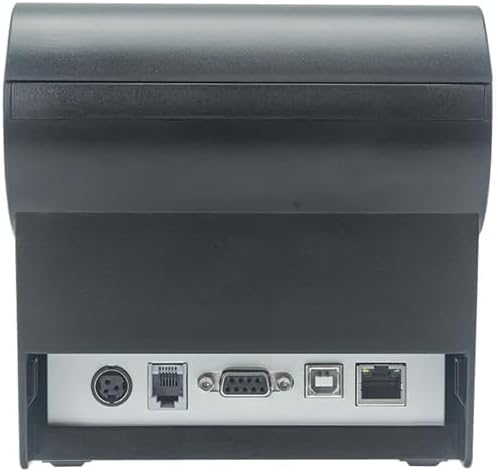
פיגורע 2: דערציען view of the printer, highlighting the power, USB, and other interface ports.
- פאַרבינדן מאַכט: Insert the power adapter cable into the printer's power input port (DC 24V/2.5A) and plug the adapter into a suitable electrical outlet (AC 100-240V, 50-60Hz).
- פאַרבינדן וסב: Connect one end of the provided USB cable to the USB port on the printer and the other end to an available USB port on your computer.
- Cash Drawer (Optional): If using a cash drawer, connect its cable to the cash drawer port (DC 24V/1A) on the printer.
2.3 Loading the Paper Roll
The printer uses 80mm wide thermal paper rolls.
- Open the paper cover by pushing the cover open button (usually located on the side or front).
- Insert the thermal paper roll with the printing surface facing the print head. Ensure the roll is seated correctly in the paper compartment.
- ציעט ארויס א קליינע מאסע פאפיר פארביי דעם שניידער.
- Close the paper cover firmly until it clicks into place.
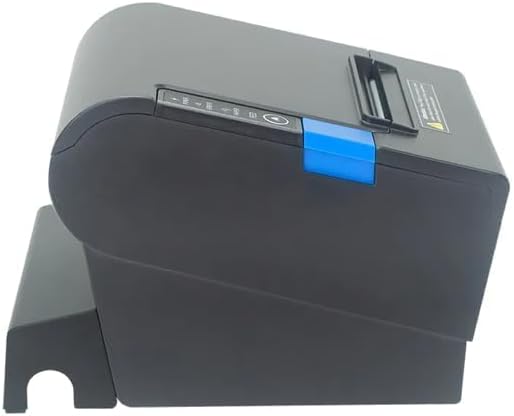
פיגורע 3: זייַט view of the printer, illustrating the paper cover mechanism.
2.4 דרייווער ינסטאַלירונג
The printer requires a driver to communicate with your computer. Drivers are typically available for Windows, Linux, Android, and Mac operating systems.
- For Windows users, the printer often supports plug-and-play installation or requires a specific Windows driver.
- For Linux, Android, and Mac, SDKs (Software Development Kits) are usually provided for integration.
זעט די פאבריקאנט'ס website or the included driver CD/USB drive for the latest drivers and installation instructions specific to your operating system.
3. אפערירן דעם דרוקער
3.1 פּאַוערינג אויף / אַוועק
Locate the power switch on the side or rear of the printer. Flip the switch to the 'ON' position to power on the printer. The 'POWER' indicator light will illuminate. Flip to 'OFF' to power down.
3.2 Indicator Lights and Buttons
The front panel typically features several indicator lights and buttons:
- מאַכט: ווײַזט אָן אַז דער דרוקער איז אנגעצינדן.
- טעות: Illuminates or flashes to indicate an error condition (e.g., paper out, print head overheating, cutter error).
- פּאַפּיר: Indicates that the paper roll is low or out.
- FEED קנעפּל: Press to manually feed paper. Hold to perform a self-test print (if supported by model).
3.3 יקערדיק פּרינטינג
Once the printer is connected and drivers are installed, you can print receipts from your POS software or application. Ensure the printer is selected as the default or active printer in your system settings.
The printer supports various print speeds up to 300 mm/s and automatic paper cutting after each print job.
4. וישאַלט
רעגולערע אויפהאלטונג גאראנטירט אפטימאלע פאָרשטעלונג און פארלענגערט די לעבן פון אייער דרוקער.
4.1 רייניקן דעם דרוק קאָפּ
The print head should be cleaned regularly, especially if print quality degrades.
- Turn off the printer and disconnect the power cable.
- עפענען די פּאַפּיר דעקן.
- ניצט אַ וואַטע שטעכל לײַכטampened with isopropyl alcohol (ethanol) to gently wipe the thermal elements of the print head.
- Allow the print head to dry completely before closing the cover and reconnecting power.
4.2 Cleaning the Cutter
Paper dust can accumulate around the cutter blade, affecting its performance.
- Turn off the printer and disconnect the power cable.
- Carefully remove any visible paper dust or debris from around the cutter blade using a soft brush or compressed air.
- Do not use liquids on the cutter.
4.3 אַלגעמיינע רייניקונג
ווישט אָפּ די אויסערלעכע זייט פון דעם דרוקער מיט אַ ווייכן, טרוקענעם שטאָף.amp שטאָף. ויסמיידן ניצן האַרב קעמיקאַלז אָדער אַברייסיוו קלינערז.
5. טראָובלעשאָאָטינג
די סעקציע באהאנדלט אלגעמיינע פראבלעמען וואס איר קענט באגעגענען מיט אייער פרינטער.
| פּראָבלעם | מעגלעך סיבה | לייזונג |
|---|---|---|
| דער דרוקער גייט נישט אן. | שטראָם קאַבל נישט פארבונדן; שטראָם אַוטלעט דעפעקטיוו; שטראָם קנעפּל אויסגעלאָשן. | Ensure power cable is securely connected. Test power outlet. Turn power switch to 'ON'. |
| קיין דרוקעריי. | Paper out; Paper loaded incorrectly; Driver not installed or incorrect; USB cable loose; Printer not selected. | Load new paper roll. Re-load paper correctly. Install/reinstall correct driver. Check USB connection. Select printer in software. |
| ERROR light is on/flashing. | Paper out; Paper jam; Print head overheating; Cutter error. | Load paper. Clear paper jam. Allow printer to cool down. Check cutter for obstructions. |
| נעבעך דרוק קוואַליטעט. | Dirty print head; Low quality paper; Old paper roll. | Clean the print head (see Section 4.1). Use high-quality thermal paper. Replace old paper rolls. |
אויב די פראבלעם בלייבט נאך פרובירן די לייזונגען, ביטע קאנטאקטירט קאסטומער סופארט.
6. ספּעסאַפאַקיישאַנז
| שטריך | דעטאַל |
|---|---|
| דרוק מעטאָד | דירעקט טערמאַל |
| פּאַפּיר ברייט | 80 מם |
| דרוק ספּיד | 230 מם / s, 260 מם / s, 300 מם / s |
| צובינד | וסב |
| שורה ספּייסינג | 3.75 mm (adjustable by commands) |
| Character Size (ANK) | Font A: 1.5 × 3.0 mm (12 × 24 dots) Font B: 1.1 × 2.1 mm (9 × 17 dots) |
| Character Size (Chinese/Traditional Chinese) | 3.0 × 3.0 mm (24 × 24 dots) |
| באַרקאָדע טייפּס | UPC-A / UPC-E / JAN13 (EAN13) / JAN8 (EAN8) / CODE39 / ITF / CODABAR / CODE93 / CODE128 |
| 2 ד באַרקאָדע | QR Code / PDF417 |
| NV Flash Memory | 256 קב |
| אַרייַנשרייַב מאַכט | אַק 100-240 וו, 50-60 הז |
| רעזולטאַט מאַכט | DC 24V/2.5A |
| קאַש שופלאָד אַרויסגאַנג | DC 24V/1A |
| וואָג | 1.0 קג |
| דימענשאַנז (ד × וו × ה) | 194.5 × 145 × 146.4 מם |
| אַפּערייטינג טעמפּעראַטור | 0~45°C |
| אַפּערייטינג הומידיטי | 10~80% RH |
| קאַטער לעבן | 1.5 מיליאָן קאַץ |
| דרוק קאָפּ לעבן | 150 קילאמעטער |
| אַס קאַמפּאַטאַבילאַטי | Windows, Linux, Android, Mac |
Ask a question about this manual
Ask about setup, troubleshooting, compatibility, parts, safety, or missing instructions. Manuals+ will review the question and use this page’s manual context to help answer it.