
OTOFIX OTOFIX D1 PRO
OTOFIX D1 PROS ECU Coding Diagnostic Scanner User Manual
Model: OTOFIX D1 PRO
א פולשטענדיקע אנווייזונג פאר סעטאַפּ, אָפּעראַציע, וישאַלט און טראָובלעשווטינג.
1. פּראָדוקט איבערview
The OTOFIX D1 PROS is an advanced ECU Coding Diagnostic Scanner designed for professional automotive diagnostics. It offers a wide range of functions including bi-directional control, extensive service resets, and advanced coding capabilities for various vehicle makes and models. This tool is engineered for efficiency and accuracy in vehicle system analysis and repair.

Figure 1: OTOFIX D1 PROS Diagnostic Scanner, VCI, and included carrying case.
2. אויפשטעלן און ערשטע באנוץ
Follow these steps to set up your OTOFIX D1 PROS scanner for the first time:
- אויספּאַקן: Carefully remove all components from the carrying case. The package includes:
- 1 x OTOFIX D1 PRO Tablet (Main Unit)
- 1 x OTOFIX V1 Vehicle Communication Interface (VCI)
- 1 x AC/DC Power Adapter (12V)
- 1 x טיפּ-C וסב קאַבלע
- 1 x Auxiliary Power Outlet Adapter
- 2 x Spare Fuses
- 1 x USB צו עטהערנעט אַדאַפּטער
- 1 x Soft Cloth
- 1 x שנעל רעפערענץ גייד
- 1 x פּאַקינג רשימה
- 1 רענטגענ קעריינג קאַסע
- טשאַרדזשינג די טאַבלעט: Connect the AC/DC Power Adapter to the tablet's charging port and plug it into a power outlet. Ensure the tablet is fully charged before first use. The battery capacity is 15000mAh.
- מאַכט אויף: Press and hold the power button on the tablet to turn it on.
- ערשט קאַנפיגיעריישאַן: Follow the on-screen prompts to select your language, time zone, and connect to a Wi-Fi network. A stable internet connection is required for software updates and online functions.
- VCI פֿאַרבינדונג: Plug the OTOFIX V1 VCI into the vehicle's OBDII port. The VCI will establish a Bluetooth connection with the D1 PROS tablet. Ensure the VCI's indicator lights confirm a successful connection.
3. אַפּערייטינג די מיטל
The OTOFIX D1 PROS offers a comprehensive suite of diagnostic and service functions. Navigate through the intuitive Android 10.0 interface using the 10.1-inch touchscreen display.
3.1. OE-Level Diagnostics
Perform comprehensive diagnostics on all available vehicle systems, including Engine (ECM), Anti-lock Braking System (ABS), Supplemental Restraint System (SRS), Immobilizer (IMMO), Electronic Parking Brake (EPB), Tire Pressure Monitoring System (TPMS), and more. The AutoScan 2.0 feature allows for rapid all-system communication, detecting most system malfunctions within 10 seconds.

פיגורע 2: איבערview of OE-level diagnostic capabilities for various vehicle systems.
Key diagnostic functions include:
- ECU אינפֿאָרמאַציע: Retrieve detailed information about the Electronic Control Units.
- לייענען/אויסמעקן קאָדן: Read Diagnostic Trouble Codes (DTCs) and clear them after repairs.
- לעבן דאַטן: View רעאַל-צייט דאַטן שטראָמען פון פֿאַרשידענע סענסאָרן און קאָמפּאָנענטן.
- Active Tests (Bi-directional Control): Send commands to vehicle actuators to test their functionality, such as radiator fan activation, injector tests, mirror tests, and more. This significantly aids in troubleshooting.

פיגורע 3: עקסamples of active tests and bi-directional controls available.
3.2. ECU Coding and Special Functions
The D1 PROS supports both online and offline ECU coding, allowing for the rematching or recoding of replacement modules (e.g., CEM, ECM, TCM, ABS) and enabling/disabling specific vehicle functions (e.g., automatic mirrors, seatbelt warnings).
- אָנליין קאָדירונג: Supported for brands like VW, Audi, Skoda, Peugeot, Citroen, DS.
- אָפפליין קאָדירונג: Supported for brands like VW, Audi, Bentley, Lamborghini, Bugatti, Porsche, Daihatsu, Benz, Maybach, Land Rover, Jaguar, Subaru, Ford, Mazda, Hyundai, Kia, Chrysler, Opel, Vauxhall, Mitsubishi.
- VAG גיידעד פונקציעס: Provides step-by-step guidance for matching, calibration, and basic settings on VAG vehicles, simplifying complex procedures.
- Hidden Functions Refresh: Unlock or modify hidden features on compatible vehicles.
3.3. 40+ Hot Services and Resets
Access a wide array of common maintenance and service resets, including but not limited to:
- עלעקטראָנישע פּאַרקינג ברעיק (EPB) ריסעט
- אָיל באַשטעטיק
- דיעסעל פּאַרטיקיאַלאַט פֿילטריר (דפף) רידזשענעריישאַן
- סטירינג ווינקל סענסאָר (SAS) קאַלאַבריישאַן
- טייער דרוק מאָניטאָרינג סיסטעם (TPMS) צוריקשטעלן
- באַטעריע פאַרוואַלטונג סיסטעם (BMS) ריסעט
- ינדזשעקטער קאָודינג
- גערגל אַדאַפּטיישאַן
- סאַספּענשאַן קאַליבראַציע
- Brake Bleed
- TEC-learn
- העדלamp אַדזשאַסטמאַנט
- אַפטערטריטמאַנט
- אָדאָמעטער
- אַירבאַג באַשטעטיק
- און פילע מער.

פיגורע 4: עקסamples of the 40+ service and reset functions.
3.4. FCA and Renault SGW Access
The OTOFIX D1 PROS is a licensed scan tool providing diagnostic access to 2018+ FCA (Fiat Chrysler Automobiles) and 2015+ Renault SGW (Security Gateway) equipped models. This allows for diagnostics without needing to dismantle the vehicle's security gateway module.
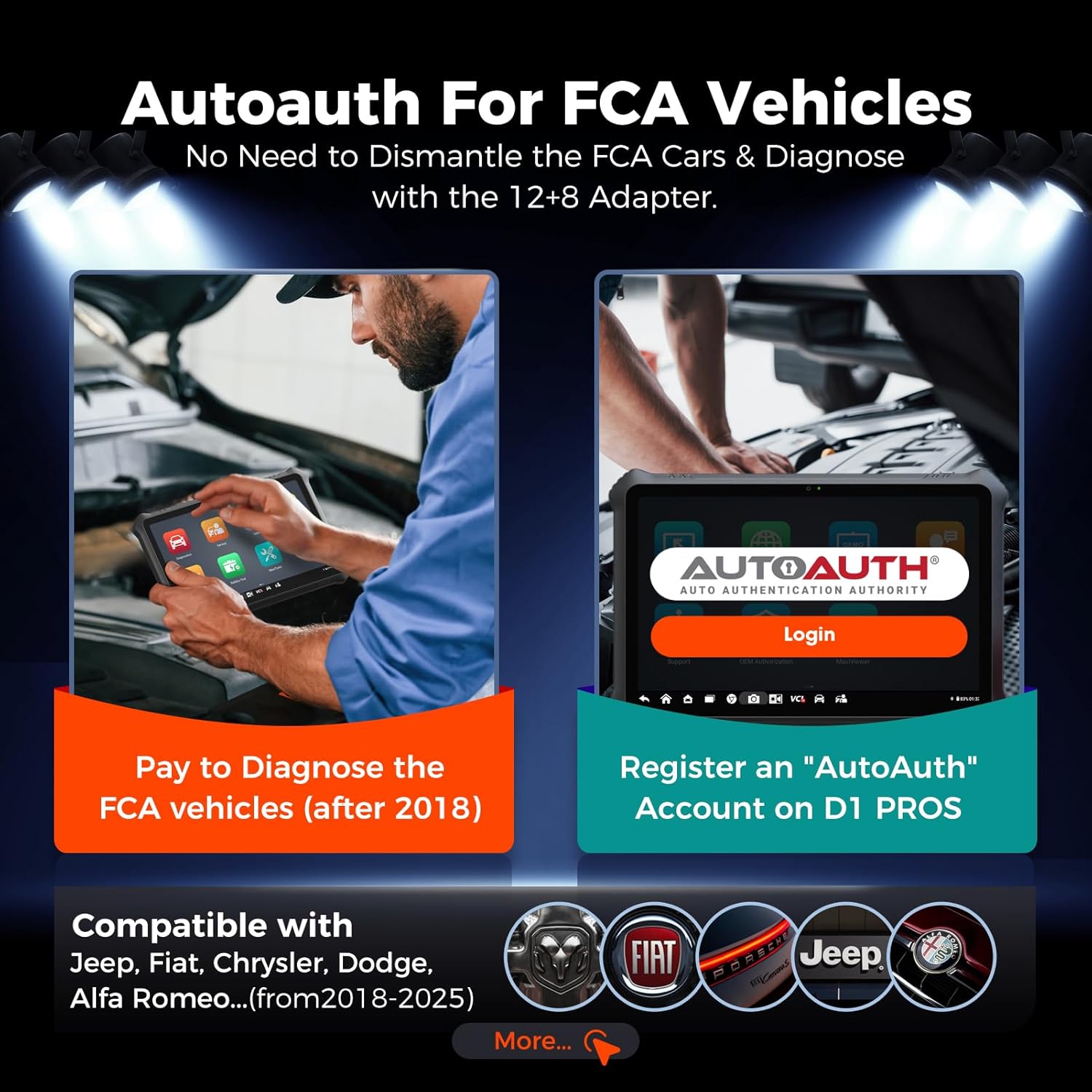
Figure 5: Process for AutoAuth access for FCA vehicles.
3.5. Pre-Post Scanning and Cloud Report Management
The device supports Pre-Post Scanning, which clearly records the vehicle status before and after diagnostics. This feature assists mechanics in developing repair plans and informing customers about the work and cost. Reports can be saved, printed, or emailed. Diagnostic reports can also be stored in the Cloud Server, allowing for easy access, printing, or sharing via QR code or message.
3.6. Video Integration
Note: No official product video URLs were provided in the product data. If available, relevant official product videos from the seller would be embedded here to demonstrate specific features or operations, with a maximum width of 420px and a detailed text description.
4. וישאַלט
To ensure the longevity and optimal performance of your OTOFIX D1 PROS scanner, adhere to the following maintenance guidelines:
- ווייכווארג דערהייַנטיקונגען: Regularly check for and install software updates. The D1 PROS includes 2 years of free software updates from the date of purchase. Updates often include new vehicle coverage, bug fixes, and enhanced functionalities. The device will continue to function even if updates are not renewed after the initial period.
- רייניקונג: Use the provided soft cloth to clean the touchscreen and device body. Avoid abrasive cleaners or solvents.
- סטאָרידזש: Store the device in its original carrying case in a cool, dry place when not in use to protect it from dust, moisture, and physical damage.
- באַטערי זאָרגן: פֿאַר אַן אָפּטימאַלן באַטעריע לעבן, פֿאַרמייַדט צו גאָר אויסלאָדן די באַטעריע אָפט. לאָדט דעם מיטל רעגולער, ספּעציעל אויב עס וועט ווערן געהאַלטן פֿאַר אַ לענגערער צייט.
5. טראָובלעשאָאָטינג
If you encounter issues with your OTOFIX D1 PROS, consider the following common troubleshooting steps:
- מיטל נישט פּאַוערינג אויף: Ensure the battery is charged. Connect the AC/DC adapter and try powering on again.
- VCI פֿאַרבינדונג פּראָבלעמען: Verify the VCI is securely plugged into the vehicle's OBDII port. Check the VCI's indicator lights. Ensure Bluetooth is enabled on the tablet and the VCI is paired. Try restarting both the tablet and the vehicle's ignition.
- Communication Errors with Vehicle: Confirm the vehicle's ignition is on (engine off or running as required by the specific test). Check the OBDII port for any physical damage. Ensure the correct vehicle make, model, and year are selected in the software.
- Function Not Working as Expected: Some advanced functions like ECU programming or specific coding features may have vehicle-specific requirements or limitations. Ensure your software is up-to-date. If a function is advertised but not working, verify vehicle compatibility and consult the support team.
- פּאַמעלעך פאָרשטעלונג: Close any unnecessary applications running in the background. Ensure sufficient storage space is available (128GB internal memory).
6. ספּעסאַפאַקיישאַנז
Detailed technical specifications for the OTOFIX D1 PROS Diagnostic Scanner:

Figure 6: Key hardware features of the OTOFIX D1 PROS.
| שטריך | דעטאַל |
|---|---|
| מאָדעל | OTOFIX D1 PRO |
| אָפּערייטינג סיסטעם | אַנדרויד 10.0 |
| פּראַסעסער | 8-קאָר סי-פּי-יו |
| זכּרון | 4 גיגאבייט באַראַן / 128 גיגאבייט ראַם |
| ווייַז | 10.1-אינטש LCD טאָוטשסקרין, 1920x1200 רעזאָלוציע |
| אַפּאַראַט | Rear: 16MP |
| באַטערי | 15000 מאַה ליטהיום-יאָן |
| קאַנעקטיוויטי | בלועטוט, וויי-פיי, יו-עס-בי טיפ-סי |
| דימענשאַנז | 11.8 X 8.7 X 2 אינטשעס |
| פּונקט וואָג | 2.6 פונט |
| שטיצט פּראָטאָקאָלס | CANFD, DoIP, and more |
| UPC | 850051166275 |
7. וואָראַנטי און שטיצן
וואָראַנטי: The OTOFIX D1 PROS comes with a 1-year quality backup from the manufacturer. Please retain your proof of purchase for warranty claims.
ווייכווארג דערהייַנטיקונגען: Enjoy 2 years of free software updates included with your purchase. After this period, updates can be purchased, but the device will remain functional with its last updated features.
טעכניש שטיצן: For any questions, technical assistance, or support inquiries, please contact the OTOFIX support team:
- בליצפּאָסט: otofixaftersales-amz@outlook.com
- אַוויילאַביליטי: מאָנטיק - פרייטיק, 9:00 אינדערפרי - 6:00 נאָכמיטאָג מזרח צייט (EST)
When contacting support, please provide your product model (OTOFIX D1 PROS) and any relevant details about your issue to facilitate a quicker resolution.
Ask a question about this manual
Ask about setup, troubleshooting, compatibility, parts, safety, or missing instructions. Manuals+ will review the question and use this page’s manual context to help answer it.