
Auronic AU3129 12L
Auronic Electric Air Dehumidifier
Model: AU3129 12L
הקדמה
Thank you for choosing the Auronic Electric Air Dehumidifier. This appliance is designed to effectively remove excess moisture from the air, creating a more comfortable and healthier indoor environment. It is ideal for use in various spaces such as bathrooms, basements, and living areas, helping to prevent issues like mold, mildew, and dampness. Please read this manual thoroughly before operation to ensure proper use, maintenance, and safety.

Figure 1: Auronic Electric Air Dehumidifier (Model AU3129 12L)
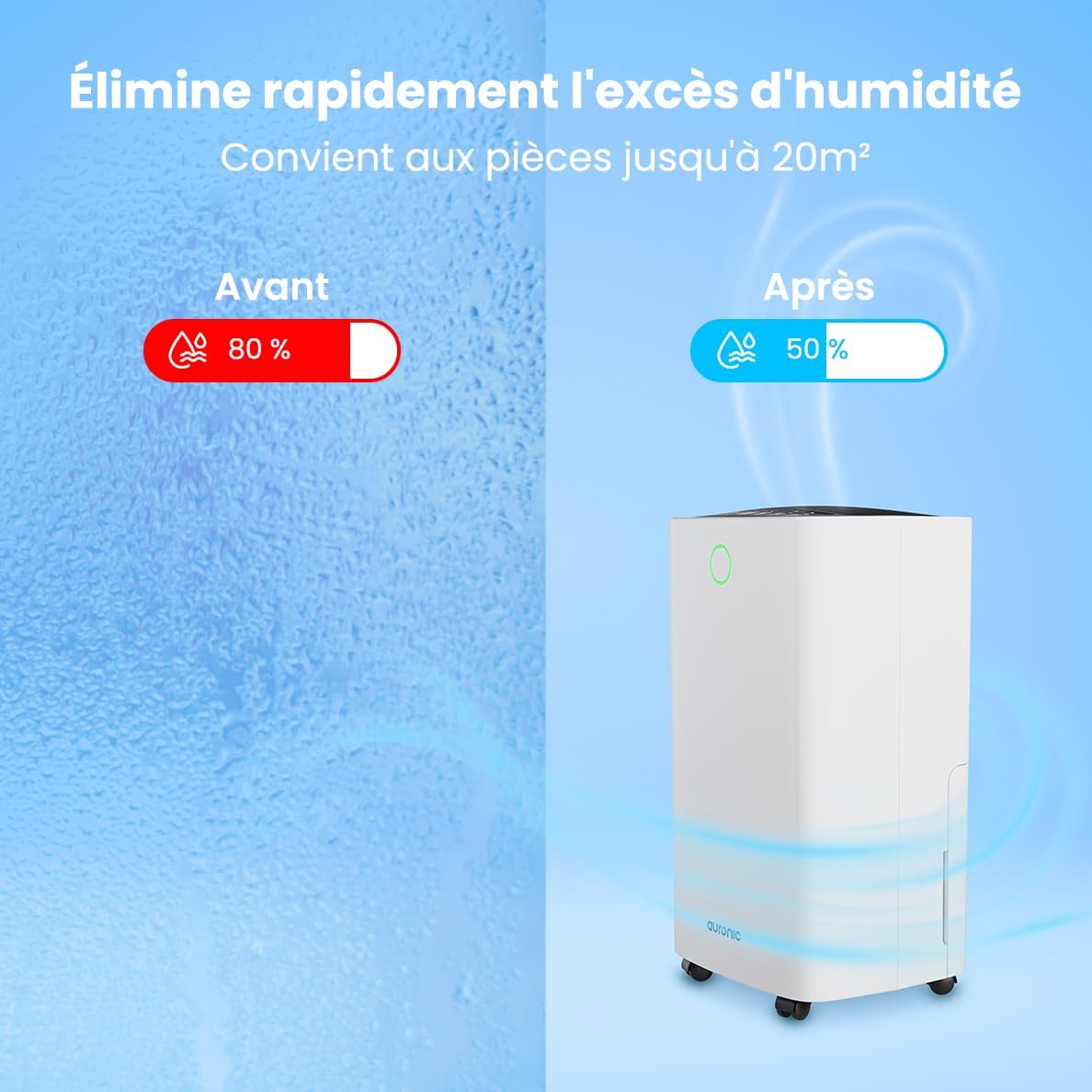
Figure 2: Humidity Reduction Effectiveness
זיכערקייַט אינפֿאָרמאַציע
כדי צו רעדוצירן דעם ריזיקע פון פייער, עלעקטרישן שאק, אדער שאדן, פאלגט שטענדיג די גרונטלעכע זיכערהייט מיטלען:
- לייענען אַלע ינסטראַקשאַנז איידער ניצן די אַפּפּליאַנסע.
- פאַרזיכערן די מאַכט צושטעלן שוועבעלעך די וואָלtage ספּעסיפיעד אויף די שאַץ פירמע.
- ניצט נישט דעם לופט-טרוקענער אויב דער עלעקטרישער שנור אדער פּלאָג איז געשעדיגט.
- שטעלט שטענדיק דעם אַפּאַראַט אויף אַ סטאַבילן, גלייכן ייבערפלאַך.
- Keep the appliance at least 20 cm away from walls or other objects to ensure proper airflow.
- דו זאלסט נישט אַרייַנלייגן פינגער אָדער פרעמד אַבדזשעקץ אין די לופט ינלעט אָדער ווענטיל.
- נעמט ארויס דעם לופט-טרוקענער איידער איר רייניגט, באוועגט, אדער פירט אויס קיין שום אויפהאלטונג.
- דו זאלסט נישט נוצן די אַפּפּליאַנסע אין נאַס אָדער דamp environments where water may splash.
- האַלטן אויס פון דערגרייכן פון קינדער.
- If the unit has been tilted, allow it to stand upright for at least 24 hours before plugging it in.
פּראָדוקט איבערview
Familiarize yourself with the components of your Auronic Dehumidifier.

Figure 3: Dehumidifier Dimensions and Included Accessories

Figure 4: Easy Portability with Wheels and Handle
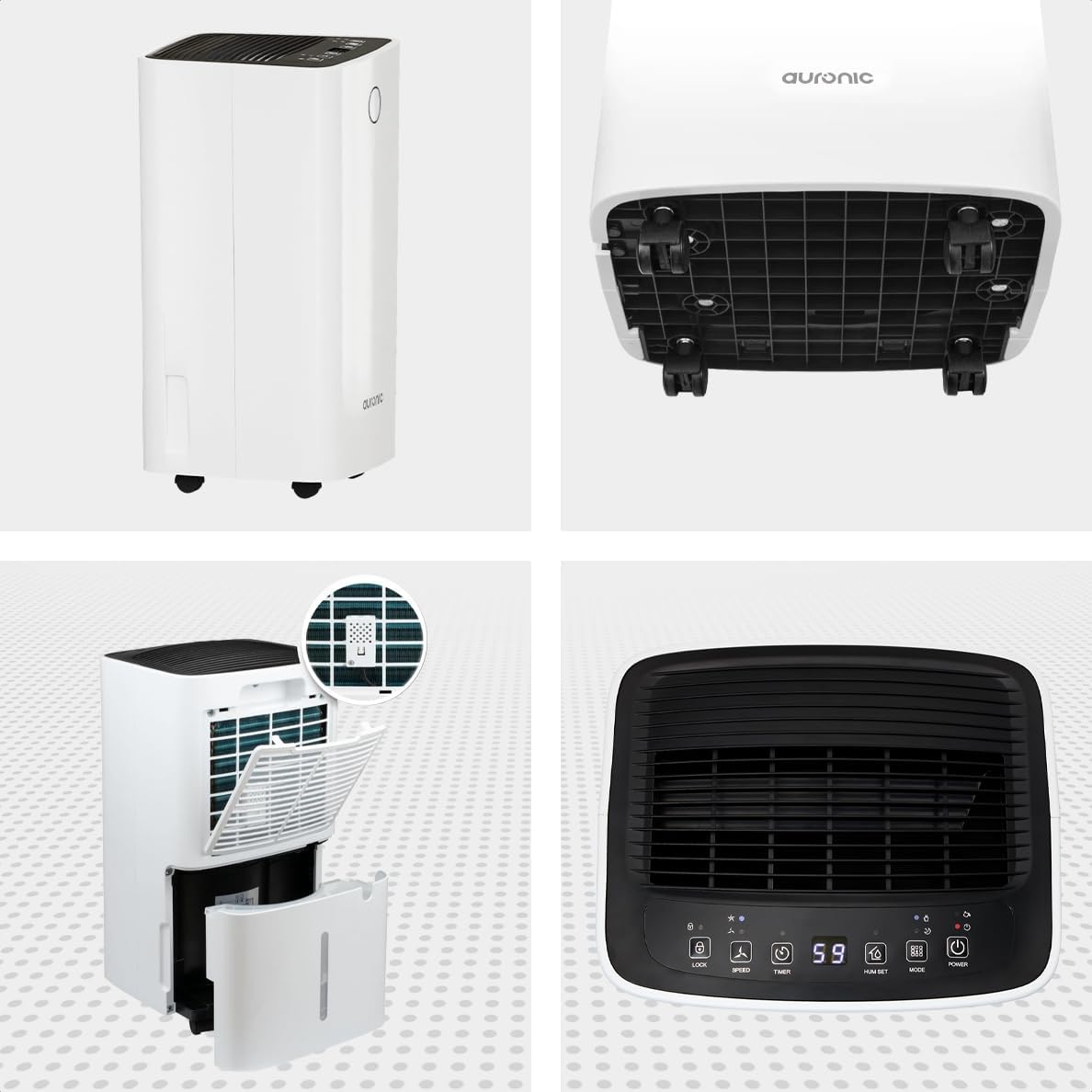
פיגור 5: מולטי-ווינקל View of the Dehumidifier

פיגור 6: קאנטראל פאנעל איבערview
שליסל קאַמפּאָונאַנץ:
- קאָנטראָל פּאַנעל: Intuitive interface for setting modes, humidity levels, and timer.
- לופט ינלעט / אָוטלעט: Where air enters and exits the unit. Ensure these are not obstructed.
- וואַסער טאַנק: Removable 2-liter tank for collecting condensed water.
- קעסיידערדיק פליסן אָוטלעט: Port for attaching a hose for continuous drainage.
- רעדער און האַנטל: פֿאַר גרינג פּאָרטאַביליטי.
- לופט פילטער: Located at the back, helps filter dust from the air.
סעטאַפּ
- אויספּאַקן: נעמט פֿאָרזיכטיק אַרויס דעם לופט-טרוקענער פֿון זײַן פּאַקעט. האַלט די פּאַקעט פֿאַר צוקונפֿטיקע סטאָרידזש אָדער טראַנספּאָרט.
- אָרט: Place the unit upright on a firm, level surface in the desired location. Ensure there is at least 20 cm of clear space around all sides for proper air circulation.
- ערשטע שטאַנדביי: If the unit was tilted during transport, let it stand upright for a minimum of 24 hours before plugging it in. This allows the refrigerant to settle.
- מאַכט קשר: צאַפּן די מאַכט שנור אין אַ גראָונדעד עלעקטריקאַל ווענטיל.
- וואַסער טאַנק: Ensure the water tank is correctly inserted into the unit. The dehumidifier will not operate if the tank is full or improperly seated.
אַפּערייטינג ינסטראַקשאַנז
קאָנטראָל פּאַנעל פאַנגקשאַנז:
| קנעפּל/גראדן | פֿונקציע |
|---|---|
| מאַכט קנעפּל | טורנס די אַפּאַראַט אויף אָדער אַוועק. |
| מאָדע קנעפּל | Cycles through operating modes (e.g., Dehumidify, Laundry Drying, Sleep). |
| Hum Set Button | אַדזשאַסטירט די געוואונטשענע הומידיטי לעוועל (למשל, 40% - 80% RH). |
| טיימער קנעפּל | שטעלט איין דעם אויטאָ-אײַן אָדער אויטאָ-אויס טײַמער (ביז 12 שעה). |
| גיכקייַט קנעפּל | Adjusts fan speed (e.g., High, Low). |
| לאַק קנעפּל | פארשפארט דעם קאנטראל פאנעל צו פארמיידן אקצידענטעלע ענדערונגען. |
| Humidity Indicator LED | Changes color based on current humidity level (e.g., Blue: <45%, Green: 45-65%, Red: >65%). Figure 7: Humidity Indicator LED Explained |
אַלגעמיינע אָפּעראַציע:
- קער אויף: דרוק די מאַכט button. The display will show the current room humidity.
- שטעלן די געוואונטשענע הומידיטי: דרוק די Hum Set button repeatedly to select your desired humidity level. The unit will operate until this level is reached, then cycle on and off to maintain it.
- אויסקלייַבן מאָדע: דרוק די מאָדע button to choose between different operating modes.
- דעהומידיפיקאַטיאָן מאָדע: Standard operation to reduce ambient humidity.
- וועש דרייינג מאָדע: Increases fan speed and continuous operation to assist in drying clothes.

Figure 8: Using the Dehumidifier for Laundry Drying
- שלאָפן מאָדע: Operates at a lower fan speed and reduced noise level for quiet nighttime use.

Figure 9: Silent Operation for Nighttime Use
- שטעלן טימער: דרוק די טיימער button to set an auto-off time (when the unit is on) or an auto-on time (when the unit is off).

Figure 10: Integrated Timer Function
- פאַן גיכקייַט: ניצן די ספּיד button to adjust the fan speed as desired.
- קינד שלאָס: דריקן און האַלטן די שלאָס button for 3 seconds to activate/deactivate the child lock function.
קעסיידערדיק דריינאַדזש:
For continuous operation without emptying the water tank, you can connect the included drain hose to the continuous drain outlet. Ensure the hose is sloped downwards to allow gravity drainage into a suitable receptacle or drain.

Figure 11: Continuous Drainage Setup
וישאַלט
רעגולערע אויפהאלטונג גאראנטירט אפטימאלע פאָרשטעלונג און פארלענגערט די לעבנסדויער פון אייער לופט-טרוקענער.
עמפּטיינג די וואַסער טאַנק:
When the water tank is full, the unit will automatically stop operating and an indicator light will illuminate. Carefully remove the tank, empty the collected water, and reinsert it firmly until it clicks into place.

Figure 12: Removing the 2-Liter Water Tank
רייניקונג די לופט פילטער:
דער לופט פילטער זאָל ווערן ריין געמאַכט יעדע צוויי וואָכן אָדער אָפטער, דיפּענדינג אויף באַניץ און לופט קוואַליטעט.
- קער אַוועק און אָפּשטעקן די דעהומידיפיער.
- געפינען און אַראָפּנעמען דעם לופט פילטער פֿון דער הינטערשטער זײַט פֿון דער אַפּאַראַט.
- Clean the filter with warm, soapy water or use a vacuum cleaner to remove dust.
- שווענקט גוט אויס און לאָזט דעם פילטער גאָר אויסטריקענען אין דער לופט איידער איר לייגט עס צוריק אַרײַן.
רייניקונג פון די איינהייט אויסערליך:
ווישן די יקסטיריער פון די דעהומידיפיער מיט אַ ווייך, דamp שטאָף. דו זאלסט נישט נוצן האַרב קעמיקאַלז אָדער אַברייסיוו קלינערז.
טראָובלעשאָאָטינג
איידער איר קאָנטאַקטירט קונה שטיצע, ביטע באַציט זיך צו די פאלגענדע געוויינטלעכע פּראָבלעמען און לייזונגען:
| פּראָבלעם | מעגלעך סיבה | לייזונג |
|---|---|---|
| דער לופט-טרוקענער צינדט זיך נישט אן. | No power, power cord loose, water tank full or improperly seated. | קאָנטראָלירט די עלעקטרישע פֿאַרבינדונג, ליידיקט אויס און לייגט צוריק אַרײַן דעם וואַסער־טאַנק ריכטיק. |
| קיין וואַסער נישט געזאַמלט. | Room humidity too low, temperature too low, air filter clogged, continuous drain hose connected. | Check room humidity/temperature, clean air filter, ensure continuous drain hose is not connected if tank collection is desired. |
| אַפּאַראַט איז טומלדיק. | Unit not on a level surface, air filter clogged, internal component issue. | Place on a level surface, clean air filter. If noise persists, contact support. |
| Dehumidification is slow or ineffective. | Room size too large, doors/windows open, air inlets/outlets blocked, air filter dirty. | Ensure room is sealed, clear obstructions, clean air filter. |
ספּעסאַפאַקיישאַנז
| שטריך | דעטאַל |
|---|---|
| סאָרט | אַוראָניק |
| מאָדעל נאָמען | Auronic Silent Low Consumption Dehumidifier |
| פּראָדוקט דימענשאַנז (L x W x H) | 21.5 X 47 X 25.5 סענטימעטער |
| פּונקט וואָג | 11 קילאָגראַמס |
| קאַפּאַציטעט (דעהומידיפיקאַציע) | 12 ליטער פּער טאָג |
| וואַסער טאַנק באנד | 2 ליטער |
| מאַכט | 185 וואטס |
| קאָליר | ווייַס |
| ספּעציעלע פֿעיִקייטן | Easy to use, Laundry Drying function, Prevents and effectively eliminates humidity, 2-liter tank, Automatic shut-off. |
| רעקאַמענדיד נוצן | דינער |
וואָראַנטי און שטיצן
Auronic products are manufactured to the highest quality standards. For warranty information, technical support, or service inquiries, please refer to the contact details provided on your purchase receipt or visit the official Auronic website. Please have your model number (AU3129 12L) and purchase date ready when contacting support.
Ask a question about this manual
Ask about setup, troubleshooting, compatibility, parts, safety, or missing instructions. Manuals+ will review the question and use this page’s manual context to help answer it.