
הקדמה
Thank you for choosing the iKF Y3 Wired Retro Headphones. This manual provides essential information for setting up, operating, maintaining, and troubleshooting your headphones. Please read it thoroughly to ensure optimal performance and longevity of your device.

Image: The iKF Y3 Retro Wired Headphones, showcasing their vintagE-ינספּייערד פּלאַן.
פּראָדוקט איבערview
שליסל פֿעיִקייטן
- רעטראָ פּלאַן: Metal steel bars create a vintagE- ינספּייערד עסטעטיש.
- לייטווייט און באַקוועם: Weighing approximately 50g, with breathable, dense sponge ear pads for extended wear.
- HiFi געזונט קוואַליטעט: Equipped with 30mm white magnetic speakers for clear, dual-channel stereo audio.
- Flexible and Convenient: Features a retractable body and manually adjustable earcups for a personalized fit.
- הויך קאַמפּאַטאַבילאַטי: Connects to devices with a standard 3.5mm audio jack, including phones, tablets, and computers.
פּעקל אינהאַלט
זיכער מאַכן אַז אַלע זאכן זענען פאַראַן אין פּעקל:
- 1 x iKF Y3 Wired Headphones
- 1 x באַניצער מאַנואַל
- 2 x Pairs of Replacement Ear Pads (1 Black, 1 Orange)

Image: The iKF Y3 headphones, user manual, and two pairs of ear pads (black and orange) included in the package.
סעטאַפּ
1. צופּאַסן דעם קאָפּבאַנד
Gently extend or retract the metal steel bars of the headband to fit your head comfortably. The earcups can also be manually adjusted for optimal positioning over your ears.

Image: The iKF Y3 headphones demonstrating the ergonomic headband design for a pressure-free fit.
2. זיך פֿאַרבינדן צו אַ מיטל
Locate the 3.5mm audio jack on your device (phone, tablet, laptop, PC). Insert the 3.5mm plug of the iKF Y3 headphones firmly into the audio jack. No additional drivers or software are required for basic audio playback.
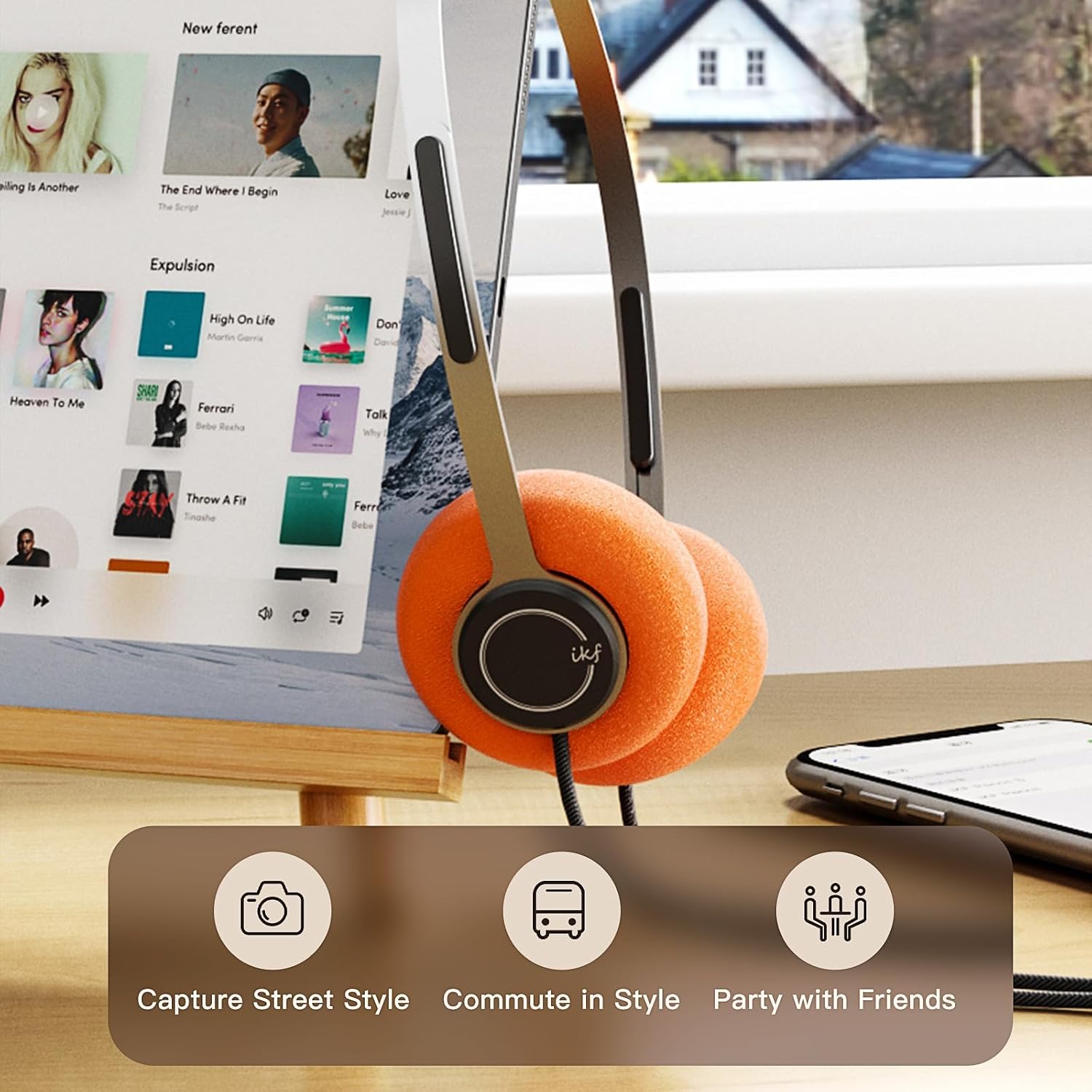
Image: iKF Y3 headphones connected to a tablet, illustrating compatibility with various devices for music and communication.
אַפּערייטינג ינסטראַקשאַנז
באַנד קאָנטראָל
The iKF Y3 headphones feature an inline controller on the cable for convenient volume adjustment:
- פאַרגרעסערן באַנד: Slide the volume button upwards.
- פאַרמינערן באנד: Slide the volume button downwards.
Note: The volume level on your connected device (phone, tablet, PC) will also affect the overall sound output. Adjust both for your preferred listening level.
Call and Media Control
The inline controller also allows for basic call and media management:
- Play/Pause Music / Answer/End Call: Single click the central button.
- אָפּוואַרפן רופן: Long press the central button.
- ווייַטער שפּור: Double click the central button.
- פֿריִערדיקע שפּור: Triple click the central button.

Image: Close-up of the inline controller on the headphone cable, showing the volume slider and multi-function button for media and call control.
וישאַלט
רייניקונג
- Use a soft, dry cloth to wipe the headphones.
- פֿאַר אויער פּאַדס, ווישט אָפּ מיט אַ לייכטן טרוקענע האַנט.amp שטאָף און לאָזט עס גאָר טרוקן אין דער לופט איידער נוצן.
- ויסמיידן ניצן שטרענגע כעמיקאַלן, סאָלוואַנץ, אָדער אַברייסיוו רייניגער.
ריפּלייסינג אויער פּאַדס
The iKF Y3 headphones come with detachable sponge ear cushions, allowing for easy replacement:
- Gently pull off the existing ear pad from the earcup.
- Align the new ear pad with the earcup and carefully stretch it over the edge until it is securely fitted.

Image: Illustration of the detachable sponge ear cushions, highlighting the ease of switching between different styles (black and orange).
סטאָרידזש
Store your headphones in a cool, dry place away from direct sunlight and extreme temperatures. Avoid tangling the cable to prevent damage.
טראָובלעשאָאָטינג
| פּראָבלעם | מעגלעך סיבה | לייזונג |
|---|---|---|
| קיין געזונט | Headphone plug not fully inserted. Device volume too low. Incorrect audio output selected on device. | Ensure 3.5mm plug is fully inserted. Increase volume on both headphones and connected device. Check device audio settings to ensure headphones are selected as output. |
| געזונט איז פאַרקרימט אָדער ומקלאָר | Volume too high. Damaged cable or connector. | Lower the volume. Inspect the cable and 3.5mm plug for any visible damage. Try with another device to isolate the issue. |
| מיקראָפאָן טוט נישט אַרבעטן | Microphone input not selected on device. | Check your device's audio input settings and ensure the headphone microphone is selected. |
ספּעסאַפאַקיישאַנז

בילד: אן עקספלאדירטע view of the iKF Y3 headphone's internal components, highlighting the 30mm neodymium driver for crystal clear sound.
| שטריך | דעטאַל |
|---|---|
| סאָרט | iKF |
| מאָדעל נאָמען | iKF Y3 |
| קאָליר | ברוין |
| קאַנעקטיוויטי טעכנאָלאָגיע | ווייערד |
| כעדפאָון דזשאַק | 3.5 מם דזשאַק |
| אויער פּלייסמאַנט | אויף-אויער |
| ימפּידאַנס | 32 אָהמס |
| סאָונדפּראָאָפינג | געזונט אפגעזונדערטקייט |
| אַודיאָ דרייווער טיפּ | דינאַמיש |
| אַודיאָ דרייווער גרייס | 30 מילאַמיטערז |
| אָפטקייַט ראַנגע | 20 הז צו 20,000 הז |
| פּראָדוקט וואָג | בעערעך. 50 ג |
| קאַמפּאַטאַבאַל דעוויסעס | Computer, Laptop, Mobile Phone |
| פּראָדוקט פֿעיִקייטן | Adjustable Headband, Retro Design, Lightweight, HiFi Sound Quality |
| קאָנטראָל טיפּ | Media Control (Inline Controller) |
| לאַנד פון אָריגין | כינע |
וואָראַנטי און שטיצן
For warranty information and customer support, please refer to the documentation provided with your purchase or contact iKF customer service through their official webזייטל. האַלט דיין קויפן באַווייַז פֿאַר וואָראַנטי קליימז.