
1. הקדמה
The IHSENO Mini WiFi Smart Switch Relay is a compact and intelligent device designed to integrate your traditional lighting and appliances into a smart home system. It operates on 2.4GHz WiFi and is compatible with the Tuya Smart Life App, allowing for remote control, voice commands via Alexa and Google Home, and intelligent scheduling.

בילד 1.1: איבערview of the IHSENO Mini WiFi Smart Switch Relay and its packaging.
שליסל פֿעיִקייטן:
- Mini WiFi Smart Switch: Designed for 2.4GHz WiFi, enabling whole-house intelligence through the Tuya APP.
- Tuya Smart Life App Control: Connects with other smart devices for intelligent scene linkage.
- Customize Different Scene Modes: Allows setting scenes like 'Reading' or 'Movie' and controlling various smart devices.
- Alexa & Google Home Enabled: Supports voice control for hands-free operation.
- סאָליד פּלאַן: Fits into most standard electrical boxes, even with existing wiring.
2. זיכערקייַט אינפֿאָרמאַציע
ביטע ליינט אלע זיכערהייט אינסטרוקציעס קערפול איידער די אינסטאַלאַציע און באַניץ. נישט נאָכפֿאָלגן די אינסטרוקציעס קען רעזולטירן אין עלעקטרישע קלאַפּ, פֿײַער אָדער אַנדערע געפֿאַרן.
- פאַכמאַן ינסטאַלירונג רעקאַמענדיד: Electrical work should be performed by a qualified electrician.
- מאַכט אַוועק איידער ינסטאַלירונג: שטענדיק אָפּשטעקן די מאַכט בײַם קרייַז ברעאַקער איידער איר אינסטאַלירן אָדער סערוויסט דעם מיטל.
- בלויז דרינענדיק נוצן: די דעווייס איז בדעה פֿאַר נוצן אינעווייניק אין טרוקענע ערטער.
- Voltage און קראַנט רייטינגז: צי ניט יקסיד די ספּעסיפיעד וואָלtage (AC 100-240V) and current (3 Amps) ratings.
- וויירינג: Ensure all wiring connections are secure and comply with local electrical codes. Input and output connections cannot be reversed.

Image 2.1: Safety and Certification details for the Mini Smart Switch.
3. סעטאַפּ און ייַנמאָנטירונג
The IHSENO Mini WiFi Smart Switch Relay is designed for easy integration into your existing electrical system. It supports both 1-way and 2-way control setups.
וויירינג דיאַגראַמז:
וויכטיק: Always ensure the power is OFF at the circuit breaker before performing any wiring. Input and output connections cannot be reversed.

Image 3.1: Wiring Method 1 - Direct connection to a lamp and mains power.

Image 3.2: Wiring Method 2 - Connection with a 1-way wall switch.

Image 3.3: Wiring Method 3 - Connection with a 2-way wall switch.
אַפּ פּאָרינג:
- אָפּלאָדירן די טויה סמארט or קלוג לעבן אַפּ פֿון דיין סמאַרטפֿאָן'ס אַפּ סטאָר.
- רעגיסטרירן אָדער קלאָץ אין צו דיין חשבון.
- פאַרזיכערן דיין סמאַרטפאָנע איז קאָננעקטעד צו אַ 2.4GHz WiFi נעץ.
- Power on the smart switch. The indicator light should blink rapidly, indicating it's in pairing mode. If not, refer to the troubleshooting section for resetting the device.
- In the app, tap '+' to add a device. Select 'Electrical' > 'Switch (Wi-Fi)' or allow the app to auto-discover the device.
- גיי די אינסטרוקציעס אויף דעם עקראַן צו פאַרענדיקן דעם פּערינג פּראָצעס.
4. אַפּערייטינג ינסטרוקטיאָנס
Once installed and paired, you can control your IHSENO Mini WiFi Smart Switch Relay through various methods.
4.1. אַפּ ווײַטקאָנטראָל
Control your connected devices from anywhere using the Tuya Smart Life App, as long as your smartphone and the switch are connected to the internet.

Image 4.1: WiFi Remote Control functionality.

Image 4.2: App Remote Control in action, showing control of a lamp.
4.2. קול קאָנטראָל
Integrate your smart switch with Amazon Alexa or Google Assistant for convenient voice commands.
- עפֿנט די אַלעקסאַ אָדער גוגל היים אַפּ.
- Link your Tuya Smart Life account to the voice assistant.
- אַנטדעקן דעוויסעס.
- Use commands like "Alexa, turn on the lamp" or "Hey Google, turn off the kitchen light."
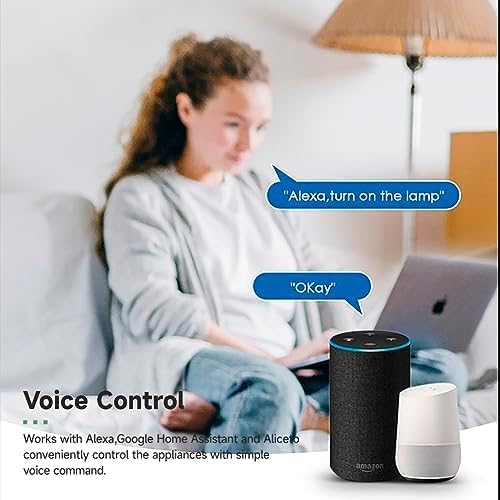
Image 4.3: Voice control with Alexa and Google Home.
4.3. Intelligent Timing and Scene Modes
Set schedules, countdowns, and create custom scene modes within the Tuya Smart Life App.
- צייט: Schedule devices to turn on/off at specific times (e.g., 23:30 Off).
- סייקלינג: Set recurring schedules (e.g., 08:00 ON Everyday).
- קאָונטדאָוון: Set a timer for the device to turn off after a specified duration.
- סצענע מאָדעס: Combine multiple smart devices to activate with a single command or schedule (e.g., 'Movie Night' scene dims lights and turns on entertainment).
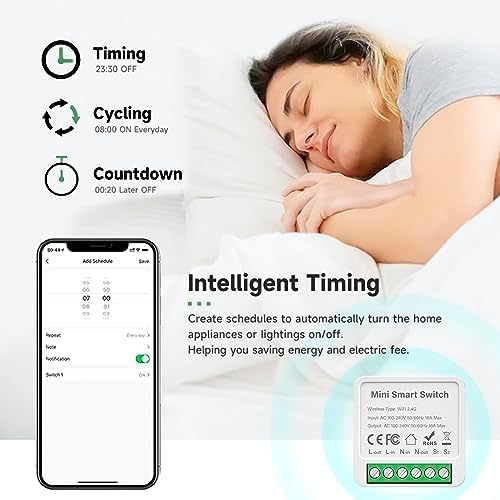
Image 4.4: Intelligent Timing features in the app.
4.4. Sharing Function
Share control of your smart devices with family members through the Tuya Smart Life App.

Image 4.5: Sharing function for family members.
5. וישאַלט
To ensure the longevity and optimal performance of your IHSENO Mini WiFi Smart Switch Relay, follow these simple maintenance guidelines:
- רייניקונג: ניצט אַ ווייכע, טרוקענע שטאָף צו רייניקן דעם אַפּאַראַט. ניצט נישט קיין פליסיקע רייניגער אָדער אַעראָזאָלן.
- סוויווע: Avoid exposing the device to excessive moisture, extreme temperatures, or direct sunlight.
- דורכקוק: Periodically check wiring connections for any signs of wear or looseness.
6. טראָובלעשאָאָטינג
If you encounter issues with your IHSENO Mini WiFi Smart Switch Relay, refer to the following common problems and solutions:
- דעווייס נישט פארבינדן:
- זיכער מאַכן אַז אייער WiFi נעץ איז 2.4GHz. די דעווייס שטיצט נישט 5GHz WiFi.
- Check that the device is powered on and the indicator light is blinking rapidly. If not, power cycle the device or perform a factory reset (refer to app instructions for reset procedure).
- Move the device closer to your WiFi router during pairing.
- Device offline in app:
- Verify your home WiFi network is active and has internet access.
- קאָנטראָלירט די מאַכט צושטעל צום סמאַרט סוויטש.
- Restart your WiFi router.
- שטימע קאנטראל ארבעט נישט:
- Ensure your Tuya Smart Life account is correctly linked to Alexa or Google Home.
- Check the device name in the voice assistant app; ensure it's easy to pronounce and recognize.
- Verify your voice assistant device is connected to the internet.
- פיזישער סוויטש רעאַגירט נישט:
- Ensure all wiring connections are secure and correct according to the diagrams.
- Check if the physical switch itself is functional.
7. ספּעסאַפאַקיישאַנז
Technical specifications for the IHSENO Mini WiFi Smart Switch Relay:

בילד 7.1: דעטאַלירטע פּראָדוקט ספּעציפֿיקאַציעס.
| באַשרייַבונג | דעטאַל |
|---|---|
| סאָרט | IHSENO |
| מאָדעל | B0CF1FYYBN |
| ווירעלעסס טיפּ | וויפי 2.4 ג |
| אַרייַנשרייַב וואָלtage | אַק 100-240 וו 50/60 הז |
| רעזולטאַט חלקtage | אַק 100-240 וו 50/60 הז |
| מאַקס קראַנט שאַץ | 3 Amps (Note: Product image shows 16A Max, but product specifications list 3 Amps. Please verify with product packaging.) |
| מאַונטינג טיפּ | ייבערפלאַך בארג |
| קאָנטאַקט מאַטעריאַל | קופּער |
| מאַטעריאַל | PC V0 (Fireproof) |
| גרייס | 41x20x41mm (approx. 1.6*0.8*1.6 inches) |
| אָפּעראַציע מאָדע | (ON)-ON-OFF |
| באַשטימען טיפּ | 1-וועג |
| באַשטימען סטייל | דרוק קנעפּל |
| אַפּ קאַמפּאַטאַבילאַטי | Smart Life (Support iOS & Android) |
8. וואָראַנטי און שטיצן
IHSENO is committed to providing high-quality products and customer satisfaction.
If you have any questions about this product, please feel free to contact our customer service team. We aim to reply within 24 hours to assist you with any inquiries or issues.
ביטע זעט אייער קויף דאקומענטאציע פאר ספעציפישע גאַראַנטיע טערמינען און באדינגונגען.