
1. הקדמה
This manual provides detailed instructions for the installation, operation, and maintenance of your IHSENO Mini WiFi Smart Switch. This device allows you to convert traditional lighting or appliance switches into smart, app-controlled, and voice-activated systems. Please read this manual thoroughly before installation and use.

Image: The IHSENO Mini WiFi Smart Switch, showing the compact design of the two included modules and their retail packaging.
2. זיכערקייַט אינפֿאָרמאַציע
WARNING: Risk of Electric Shock. Installation should only be performed by a qualified electrician or a person with a thorough understanding of electrical wiring.
- זיכער מאַכן אַז די מאַכט איז אָפּגעטיילט ביים קרייַז ברעאַקער איידער די ינסטאַלירונג אָדער וישאַלט.
- נישט איבערשטייגן די מאַקסימום לאַסט רייטינגז ספּעסיפיעד אין די פּראָדוקט ספּעסיפיקאַציעס.
- Use only indoors in dry locations.
- האַלטן אויס פון דערגרייכן פון קינדער.
- Do not attempt to repair or modify the device. Contact customer support for assistance.

Image: Safety and Certification details, highlighting fireproof material and compliance with FCC, CE, and RoHS standards.
3. פּראָדוקט איבערview
The IHSENO Mini WiFi Smart Switch is a compact module designed to integrate into existing electrical systems, enabling smart control of lights and other appliances. It operates on 2.4GHz WiFi and is compatible with the Tuya Smart Life App, as well as voice assistants like Amazon Alexa and Google Home.
שליסל פֿעיִקייטן:
- Miniature size for easy installation behind switches or in junction boxes.
- 2.4GHz WiFi connectivity.
- Compatible with Tuya Smart Life App for remote control and automation.
- Voice control via Amazon Alexa and Google Assistant.
- Supports 1-way and 2-way switch configurations.
- Timing, cycling, and countdown functions.
- Device sharing with family members.
4. ספּעסאַפאַקיישאַנז
| שטריך | דעטאַל |
|---|---|
| סאָרט | IHSENO |
| מאָדעל | B0CF1DWZVN |
| ווירעלעסס טיפּ | וויפי 2.4 ג |
| אַרייַנשרייַב | אַק 100-240 וו 50/60 הז 16 אַ מאַקס |
| רעזולטאַט | אַק 100-240 וו 50/60 הז 16 אַ מאַקס |
| מאַטעריאַל | PC V0 (Fireproof) |
| גרייס | 41x20x41mm (approx. 1.6 x 0.8 x 1.6 inches) |
| אַפּ קאַמפּאַטאַבילאַטי | Smart Life (Support iOS & Android) |
| באַשטימען טיפּ | 1-way, supports 2-way control |
| מאַונטינג טיפּ | Wall Mount (behind existing switch) |

Image: Product specifications table, detailing technical parameters of the smart switch.
5. ינסטאַללאַטיאָן גייד
Before you begin, ensure the power supply to the circuit is turned OFF at the circuit breaker to prevent electric shock.
וויירינג אינסטרוקציעס:
The IHSENO Mini WiFi Smart Switch requires both Live (L) and Neutral (N) wires for operation. Ensure your electrical box has both available. The input and output connections cannot be reversed.
5.1. Basic 1-Way Wiring (No Physical Switch)
This method connects the smart switch directly to the load (e.g., lamp) and mains power, allowing control solely through the app or voice commands. No traditional wall switch is used in this configuration.

Image: Wiring diagram for direct connection to a lamp and mains power, bypassing a physical switch.
- Connect the Live (L) wire from the mains to the "L-in" terminal on the smart switch.
- Connect the Neutral (N) wire from the mains to the "N-in" terminal on the smart switch.
- Connect the Live (L) wire to the lamp from the "L-out" terminal on the smart switch.
- Connect the Neutral (N) wire to the lamp from the "N-out" terminal on the smart switch.
5.2. 1-Way Wiring with Physical Switch
This method integrates the smart switch with an existing 1-way physical wall switch, allowing both smart control and manual control from the wall switch.

Image: Wiring diagram for integrating the smart switch with a standard 1-way wall switch.
- Connect the Live (L) wire from the mains to the "L-in" terminal on the smart switch.
- Connect the Neutral (N) wire from the mains to the "N-in" terminal on the smart switch.
- Connect the Live (L) wire to the lamp from the "L-out" terminal on the smart switch.
- Connect the Neutral (N) wire to the lamp from the "N-out" terminal on the smart switch.
- Connect one wire from the 1-way physical switch to the "S1" terminal on the smart switch.
- Connect the other wire from the 1-way physical switch to the "L-in" terminal (or a common Live connection point).
5.3. 2-Way Wiring with Physical Switches
This method allows the smart switch to work with two existing physical 2-way switches (also known as 3-way switching in North America), providing smart control while retaining functionality from both wall switches.

Image: Wiring diagram for integrating the smart switch with two 2-way wall switches.
- Connect the Live (L) wire from the mains to the "L-in" terminal on the smart switch.
- Connect the Neutral (N) wire from the mains to the "N-in" terminal on the smart switch.
- Connect the Live (L) wire to the lamp from the "L-out" terminal on the smart switch.
- Connect the Neutral (N) wire to the lamp from the "N-out" terminal on the smart switch.
- Connect the common wire from the first 2-way physical switch to the "S1" terminal on the smart switch.
- Connect the common wire from the second 2-way physical switch to the "S2" terminal on the smart switch.
- Ensure the traveler wires between the two 2-way switches are correctly connected according to standard 2-way wiring practices, and that the Live feed to the switches is properly established.
Note: The controller is only connected to line N and L, not directly to the switch. This smart DIY switch can be used for your old 2-way control switch. You can still control the old switch manually after installation.

Image: Illustration of 2-way control setup, demonstrating how the smart switch integrates with existing parallel or series switches.
6. אָפּעראַציע גייד
6.1. App Control (Tuya Smart Life)
- אראפקאפיע אַפּ: Download the "Tuya Smart" or "Smart Life" app from the App Store (iOS) or Google Play Store (Android).
- רעגיסטרירן/אריינלאָגירן: שאַפֿן אַ חשבון אָדער קלאָץ אין צו דיין יגזיסטינג חשבון.
- לייג דיווייס:
- פאַרזיכערן דיין סמאַרטפאָנע איז קאָננעקטעד צו אַ 2.4GHz WiFi נעץ.
- Power on the smart switch. The indicator light should blink rapidly (pairing mode). If not, refer to the troubleshooting section for reset instructions.
- אין דער אַפּ, דריק "+" אדער "צולייגן מיטל".
- Select "Electrical" -> "Switch (Wi-Fi)" or "Mini Switch".
- גיי די ינסטראַקשאַנז אויף דעם עקראַן צו פאַרבינדן די מיטל צו דיין WiFi נעץ.
- קאָנטראָל: Once added, you can control the switch from anywhere via the app, set schedules, create scenes, and link with other smart devices.

Image: App remote control in action, showing a user controlling a lamp via the Smart Life app on a smartphone.

Image: WiFi remote control diagram, demonstrating how the smart switch can be controlled globally via the internet and a smartphone.
6.2. שטימע קאנטראל (אלעקסא און גוגל היים)
- לינק אקאונט: In your Alexa or Google Home app, enable the "Tuya Smart" or "Smart Life" skill/action and link your account.
- אַנטדעקן דעוויסעס: Ask your voice assistant to "Discover devices" or manually initiate discovery in the app.
- קול קאַמאַנדז: Once discovered, you can use commands such as:
- "אַלעקסאַ, צינד אָן [דיווייס נאָמען]"
- "Hey Google, turn off [device name]"
- "Alexa, set [device name] to 50%" (if dimming is supported by the connected load)
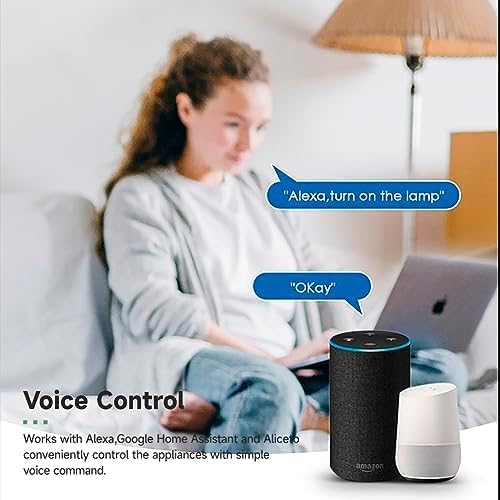
Image: Voice control demonstration, showing interaction with Amazon Alexa and Google Home devices to operate the smart switch.
6.3. Intelligent Timing and Scenes
The Tuya Smart Life app allows for advanced automation:
- צייט: Set specific times for the switch to turn on or off daily.
- סייקלינג: Program the switch to cycle on/off at regular intervals.
- קאָונטדאָוון: Set a timer for the switch to turn off after a specified duration.
- סצענעס: Create custom scenes that trigger the switch based on various conditions (e.g., "Good Morning" scene turns on lights, "Movie Night" scene dims lights).
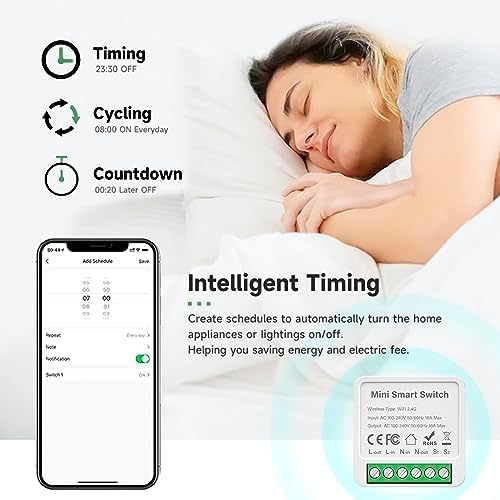
Image: Intelligent timing features, including scheduling, cycling, and countdown functions available in the app.
6.4. Sharing Function
You can share control of your smart switch with family members through the Tuya Smart Life app. This allows multiple users to manage the device from their own smartphones.

Image: Sharing function diagram, showing how device control can be shared among family members or multiple devices can be controlled from one phone.
7. וישאַלט
- האַלטן די מיטל ריין און טרוקן.
- דו זאלסט נישט נוצן האַרב קעמיקאַלז אָדער אַברייסיוו קלינערז.
- Periodically check for firmware updates in the Tuya Smart Life app to ensure optimal performance and security.
- Ensure proper ventilation if installed in an enclosed space, though its low power consumption typically prevents overheating.
8. טראָובלעשאָאָטינג
| פּראָבלעם | מעגלעך לייזונג |
|---|---|
| דיווייס קאנעקט זיך נישט צו דער אפליקאציע |
|
| קול קאָנטראָל איז נישט ארבעטן |
|
| Physical switch not responding |
|
| Device frequently disconnects |
|
9. קונה סערוויס און וואָראַנטי
IHSENO provides customer support for its products. If you encounter any issues or have questions regarding your Mini WiFi Smart Switch, please contact our customer service team.
קאָנטאַקט אינפֿאָרמאַציע:
- For product inquiries or technical assistance, please refer to the contact details provided with your purchase or on the official IHSENO webפּלאַץ.
- Our customer service team aims to reply within 24 hours.
This product comes with a standard manufacturer's warranty. Please refer to your purchase documentation for specific warranty terms and conditions.