
הקדמה
This manual provides detailed instructions for the safe and efficient use of your Blow Portable Bluetooth Speaker, Model 30-391. Please read this manual thoroughly before operating the device and retain it for future reference.
The Blow 30-391 is a versatile portable Bluetooth speaker designed for universal use with smartphones, tablets, computers, and other audio devices. It features Bluetooth 5.0 connectivity, AUX input, Micro USB port, and an integrated microphone for various audio applications.
פּעקל אינהאַלט
באַשטעטיקט אַז אַלע זאכן וואָס זענען אויסגערעכנט אונטן זענען פאַראַן אין אייער פּעקל:
- Blow Portable Bluetooth Speaker (Model 30-391)
- וסב טשאַרדזשינג קאַבלע
- מיקראָפאָן קאַבלע
- באַניצער מאַנואַל (דעם דאָקומענט)
- ווייַט קאָנטראָל

בילד: פראָנט view of the Blow Portable Bluetooth Speaker 30-391, showcasing its RGB lighting, included remote control, and wired microphone.

Image: The USB charging cable and the microphone cable that come with the speaker.
פּראָדוקט פֿעיִקייטן
- קאַנעקטיוויטי: Bluetooth 5.0, AUX-in (3.5mm), Micro USB, USB port, MicroSD card slot.
- אַודיאָ רעזולטאַט: 10 Watts maximum speaker output.
- באַטערי: Integrated 4500 mAh rechargeable battery.
- ספּעציעלע פֿעיִקייטן: Integrated microphone, RGB lighting effects, voice control capability.
- פּאָרטאַביליטי: Compact design with a handle for easy transport.
- קאַמפּאַטאַבילאַטי: Universal compatibility with desktop computers, laptops, smartphones, and tablets.
סעטאַפּ
1. טשאַרדזשינג די ספּיקער
Before first use, fully charge the speaker. Connect the supplied USB charging cable to the Micro USB port on the speaker and the other end to a standard USB power adapter (not included) or a computer's USB port. The charging indicator light will illuminate during charging and turn off when fully charged.
2. פּאָווערינג אויף / אויסגעלאשן
Locate the power switch on the top panel of the speaker. Slide the switch to the "ON" position to power on the speaker. Slide it to the "OFF" position to power off the speaker.

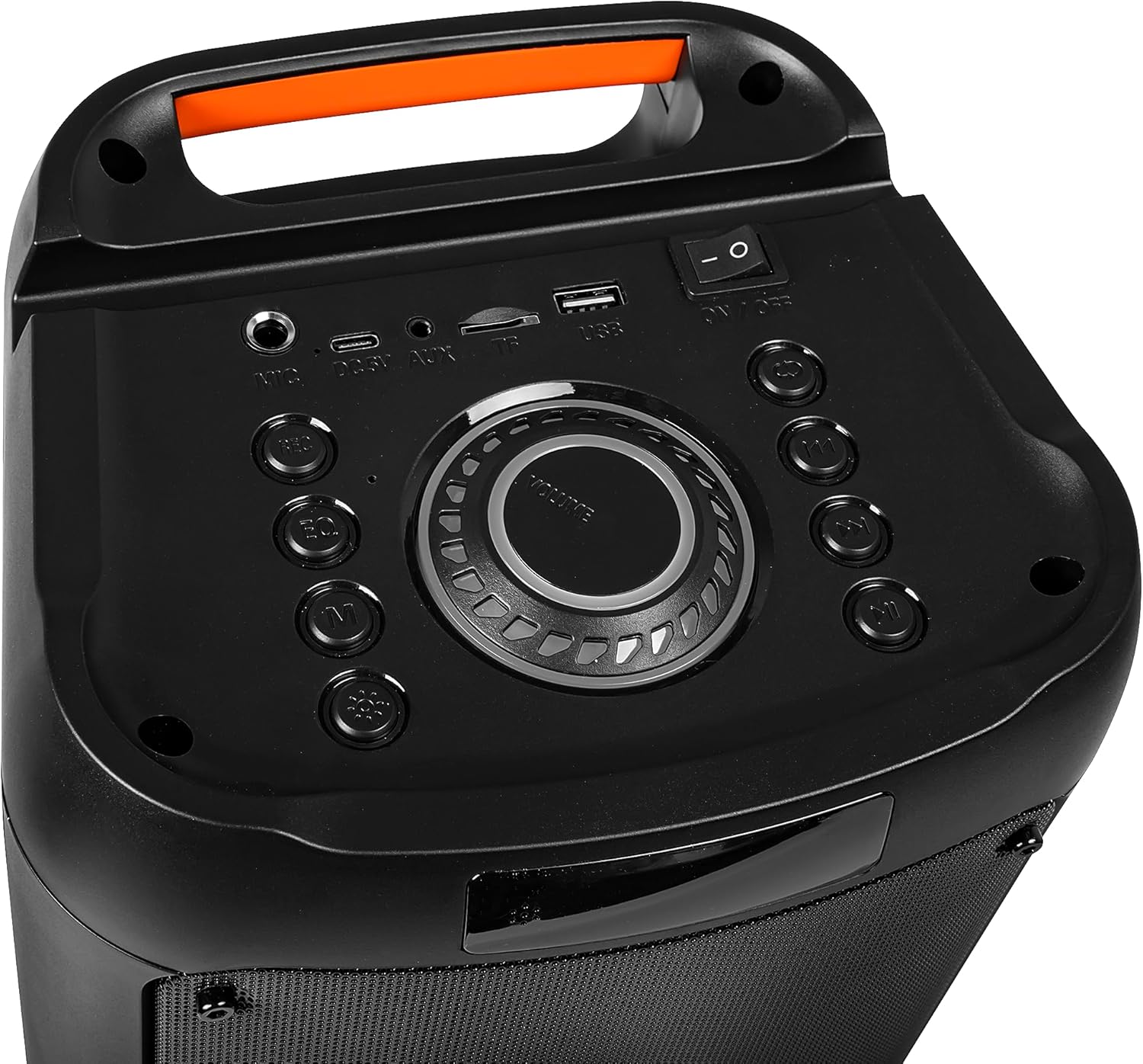
Image: Close-up of the speaker's top control panel, showing the power switch, volume knob, and various input ports.
3. בלועטאָאָטה פּערינג
- צינדט אן דעם רעדנער. עס וועט אויטאמאטיש אריינגיין אין בלוטוט פארבינדונג מאָדוס, אנגעצייכנט דורך א בלינקנדיקע LED ליכט.
- אויף אייער מאָבילער מיטל (סמאַרטפאָן, טאַבלעט, אאז"וו), אַקטיווירט בלועטוט און זוכט פֿאַר פֿאַראַן דעוויסעס.
- Select "Blow 30-391" from the list of devices.
- אַמאָל פּערד, וועט דער רעדנער אַרויסלאָזן אַן אָודאַבאַל באַשטעטיקונג, און די LED ליכט וועט אויפהערן צו בלינקען.
- דער רעדנער וועט זיך אויטאָמאַטיש צוריקבינדן צום לעצטן פארבונדענעם אפאראט ווען עס ווערט אנגעצינדן, אויב דער אפאראט איז אין דער געגנט און בלועטוט איז איינגעשטעלט.
4. AUX קאַנעקשאַן
To connect an external audio device via AUX, use a 3.5mm audio cable (not included). Plug one end into the AUX-in port on the speaker and the other end into the headphone jack or audio output of your device. The speaker will automatically switch to AUX mode.
5. יו-עס-בי/מייקראָ-עס-די ווידערשפּיל
Insert a USB flash drive or a MicroSD card (up to 32GB) containing MP3 audio files into the respective port on the speaker. The speaker will automatically detect the storage device and begin playing music. Use the control buttons to navigate tracks.
אַפּערייטינג ינסטראַקשאַנז
1. קאָנטראָלס איבערview
The speaker features a control panel on the top for easy operation. Refer to the image in the "Setup" section for button layout.
- מאַכט סוויטש: ON/OFF.
- באַנד קנעפּל: Rotate to adjust master volume.
- מאָדע קנעפּל: Press to switch between Bluetooth, AUX, USB, and MicroSD modes.
- שפּיל / פּויזע קנעפּל: דרוק צו שפּילן אָדער פּויזע אַודיאָ.
- פרייַערדיק / ווייַטער שפּור קנעפּלעך: דרוק צו האָפּקען צו די פריערדיקע אָדער ווייַטער שפּור.
- עק קנעפּל: Press to cycle through equalizer presets.
- ליכט מאָדע קנעפּל: Press to change RGB lighting effects.
- מיקראָפאָן אַרייַנשרייַב: Connect the wired microphone here.
2. ניצן די מיקראָפאָן
Connect the supplied wired microphone to the microphone input port on the speaker. Adjust the microphone volume using the dedicated control (if available) or the main volume knob. The integrated microphone allows for voice control and hands-free calling when connected via Bluetooth.
3. RGB לייטינג עפעקטן
The speaker features dynamic RGB lighting. Press the "Light Mode" button on the control panel or remote control to cycle through different lighting patterns or to turn the lights off.
וישאַלט
- רייניקונג: ניצט אַ ווייכע, טרוקענע שטאָף צו רייניקן די אויסערלעכע זייט פון דעם רעדנער. ניצט נישט קיין שרײַבנדיקע רייניגערס אדער סאָלווענטן.
- באַטערי זאָרגן: כדי צו פארלענגערן די לעבן פון די באַטעריע, זאָלט איר נישט אָפט אויסלאָדן די באַטעריע. לאָדט דעם רעדנער רעגולער אויף, אפילו אויב עס ווערט נישט גענוצט פאר לענגערע צייטן.
- סטאָרידזש: האַלט דעם רעדנער אין אַ קיל, טרוקן אָרט אַוועק פון דירעקט זונשייַן און עקסטרעמע טעמפּעראַטורן.
- וואַסער קעגנשטעל: די רעדנער איז נישט וואַסערפּרוף. פֿאַרמייַדט אויסשטעלונג צו וואַסער אָדער איבעריקע פֿײַכטקייט.
טראָובלעשאָאָטינג
| פּראָבלעם | מעגלעך לייזונג |
|---|---|
| דער רעדנער גייט נישט אן. | Ensure the battery is charged. Connect the speaker to a power source using the USB cable. Check the power switch position. |
| קען נישט פארבינדן דורך בלוטוט. | Ensure the speaker is in pairing mode (flashing LED). Make sure your device's Bluetooth is enabled and within range (up to 10 meters). Forget previous pairings on your device and try again. |
| קיין געזונט. | Check the volume level on both the speaker and your connected device. Ensure the correct input mode (Bluetooth, AUX, USB, MicroSD) is selected. Check cable connections for AUX mode. |
| נעבעך געזונט קוואַליטעט. | Ensure the speaker is not too far from the Bluetooth device. Avoid obstacles between the speaker and the device. Try a different audio source or file. |
| מיקראָפאָן טוט נישט אַרבעטן. | Ensure the microphone is securely connected to the input port. Check microphone volume settings. |
ספּעסאַפאַקיישאַנז
| מאָדעל נומער | 30-391 |
| סאָרט | קלאַפּ |
| קאַנעקטיוויטי טעכנאָלאָגיע | Bluetooth 5.0, Auxiliary (3.5mm), Micro USB, USB |
| אַודיאָ רעזולטאַט מאָדע | AUX, בלועטאָאָטה |
| מאַקסימום רעדנער אַרויסגאַנג מאַכט | 10 וואטס |
| באַטאַרייע קאַפּאַציטעט | 4500 מאַה |
| Max Memory Card Size | 32 GB (MicroSD) |
| ספּעציעלע פֿעיִקייטן | Integrated Microphone, RGB Lighting, Voice Control |
| מאַכט מקור | באַטאַרייע פּאַוערד |
| פּראָדוקט דימענשאַנז (L x W x H) | 26 x 46 x 24 ס״מ (אומגעפער) |
| פּראָדוקט וואָג | 3.67 קג (בעערעך) |
| קאָליר | Black (with multicolor RGB lighting) |

בילד: זייט view of the Blow Portable Bluetooth Speaker 30-391, showing its vertical orientation.
בילד: צוריק view of the Blow Portable Bluetooth Speaker 30-391, highlighting the integrated carrying handle.
בילד: דעטאַלירט view of the top control panel, including the power switch, volume knob, and various input ports.

Image: The retail packaging for the Blow Portable Bluetooth Speaker 30-391, showing product features and accessories.
וואָראַנטי און שטיצן
The Blow Portable Bluetooth Speaker 30-391 comes with a limited warranty. Please refer to the warranty card included in your package for specific terms and conditions. For technical support, troubleshooting assistance, or warranty claims, please contact your retailer or the manufacturer directly. Contact information can typically be found on the product packaging or the manufacturer's official webפּלאַץ.
פאַבריקאַנט: קלאַפּ
ASIN: B0CDXQRT9Q