1. הקדמה
This manual provides essential information for the safe and efficient operation of your HYUNDAI Smart TV 42-inch Full HD. Please read this manual thoroughly before using the television and retain it for future reference. This television features a 42-inch Full HD (1920x1080p) display, VIDAA operating system, and integrated smart applications such as Netflix, YouTube, and Prime Video. It also supports Screencast functionality for content sharing from mobile devices.
2. זיכערקייַט אינפֿאָרמאַציע
Always follow basic safety precautions when using this television to reduce the risk of fire, electric shock, and injury. Ensure the television is placed on a stable surface. Do not block ventilation openings. Avoid exposing the television to rain or moisture. Disconnect the power cord during lightning storms or when unused for long periods. Refer to the full safety guidelines in the included safety sheet.
3. סעטאַפּ
3.1 אויספּאַקן און שטאַנד אינסטאַלירן
Carefully remove the television from its packaging. Attach the included stands to the bottom of the television using the provided screws. Ensure the stands are securely fastened before placing the TV upright.

פראָנט view of the HYUNDAI 42-inch Smart TV with its stand, displaying the VIDAA smart interface.
3.2 קאַנעקטינג פונדרויסנדיק דעוויסעס
Your television is equipped with multiple ports for connecting various devices:
- HDMI פּאָרטן (3x): פֿאַרבינדט בלו-רэй שפּילער, שפּיל קאַנסאָולז, אָדער סעט-טאָפּ באָקסעס.
- USB פּאָרטן (2x): פֿאַרבינדט USB סטאָרידזש דעוויסעס פֿאַר מעדיע ווידערשפּיל.
- CI+ שפּעלטל: Insert a CI+ module for encrypted digital channels.
- RJ45 (עטערנעט): פֿאַרבינד זיך צו אייער היים נעץ פֿאַר אינטערנעט צוטריט.
- אָפּטיש רעזולטאַט: פֿאַרבינדן זיך צו אַן עקסטערנעם אַודיאָ סיסטעם.
- כעדפאָון רעזולטאַט: פאַרבינדן כעדפאָונז פֿאַר פּריוואַט צוגעהערט.

זייַט view of the HYUNDAI 42-inch Smart TV, showing various input and output ports including HDMI and USB.
3.3 ערשטע סעטאַפּ וויזאַרד
Upon first power-on, the TV will guide you through an initial setup process. This includes selecting your language, connecting to a Wi-Fi network, and scanning for available channels.
4. אָפּערייטינג
4.1 גרונטלעכע טעלעוויזיע פונקציעס
- מאַכט: Press the power button on the remote control to turn the TV on or off.
- באַנד: ניצט די VOL +/- קנעפלעך צו סטרויערן דעם געזונט לעוועל.
- טשאַנאַלז: Use the CH +/- buttons to change channels or the number buttons for direct channel selection.
- אַרייַנשרייַב מקור: Press the SOURCE button to select between HDMI, USB, TV, and other inputs.
4.2 סמאַרט טעלעוויזיע פֿעיִקייטן (VIDAA OS)
Your HYUNDAI Smart TV runs on the VIDAA operating system, providing access to a variety of applications and features.

The HYUNDAI Smart TV displaying the VIDAA smart interface with various streaming app icons like Netflix, YouTube, Prime Video, and Disney+.
- פאַר-אינסטאַלירן אַפּפּס: Access popular streaming services like Netflix, YouTube, and Prime Video directly from the home screen.
- אַפּ סטאָר: Explore and download additional applications from the VIDAA App Store.
- סקרעענקאסט: Use the Screencast feature to mirror content from your compatible smartphone or tablet to the TV screen.

A smartphone displaying a city skyline next to the HYUNDAI Smart TV, which is mirroring the same image, illustrating the Screencast feature.
5. וישאַלט
5.1 רייניקן דעם טעלעוויזאר
Before cleaning, unplug the power cord from the wall outlet. Use a soft, dry cloth to wipe the screen and cabinet. For stubborn marks, lightly dampen the cloth with water or a mild, non-abrasive cleaner specifically designed for electronics. Never spray liquid directly onto the screen or cabinet.
5.2 ווייכווארג דערהייַנטיקונגען
The television may receive software updates to improve performance and add new features. Ensure your TV is connected to the internet to receive automatic updates. You can also check for updates manually through the TV's settings menu.
6. טראָובלעשאָאָטינג
אויב איר טרעפט פּראָבלעמען מיט אייער טעלעוויזיע, באַזירט זיך אויף די פאלגענדע געוויינטלעכע לייזונגען:
- קיין מאַכט: Check if the power cord is securely plugged into both the TV and the wall outlet. Ensure the power outlet is functional.
- קיין בילד/קלאַנג: Verify the correct input source is selected. Check all cable connections (HDMI, antenna). Try another channel or input device.
- קיין אינטערנעט פֿאַרבינדונג: Ensure your Wi-Fi router is on and functioning. Reconnect to the Wi-Fi network in the TV settings. For wired connections, check the Ethernet cable.
- רימאָוט קאָנטראָל נישט ארבעטן: טוישט די באַטעריעס אין דער ווײַטקאָנטראָל. מאַכט זיכער אַז עס זענען נישטאָ קיין שטערונגען צווישן דער ווײַטקאָנטראָל און דעם טעלעוויזיע'ס IR סענסאָר.
- בילד קוואַליטעט פּראָבלעמען: אַדזשאַסטירן בילד סעטטינגס (ברייטקייט, קאָנטראַסט, שאַרפקייט) אין די טעלעוויזיע מעניו. זיכער מאַכן אַז די אַרייַנשרייַב מקור גיט אַ הויך-קוואַליטעט סיגנאַל.
If problems persist, consider performing a factory reset through the TV's settings menu (note: this will erase all personalized settings and data). For further assistance, contact customer support.
7. ספּעסאַפאַקיישאַנז
| שטריך | באַשרייַבונג |
|---|---|
| מאָדעל נומער | HY-TV42SFHD-001 |
| פאַרשטעלן גרייס | 42 אינטשעס (105 סענטימעטער) |
| האַכלאָטע | גאַנץ הד (1920 רענטגענ 1080 פּ) |
| אָפּערייטינג סיסטעם | VIDAA |
| HDMI פּאָרץ | 3 (version 1.4, 1x ARC) |
| וסב פּאָרץ | 2 (version 2.0) |
| קאַנעקטיוויטי | Wi-Fi, RJ45 (Ethernet) |
| ספּעציעלע פֿעיִקייטן | Smart TV, Netflix, YouTube, Prime Video, Screencast, CI+ |
| Voltage | 230 וואלט |
| פּראָדוקט דימענשאַנז (ב רענטגענ ד x ה) | 96.8 x 23.1 x 62.2 ס״מ (מיט שטאַנד) |
| וואָג | 6.15 קג |
| ענערגיע עפעקטיווקייַט קלאַס | E |
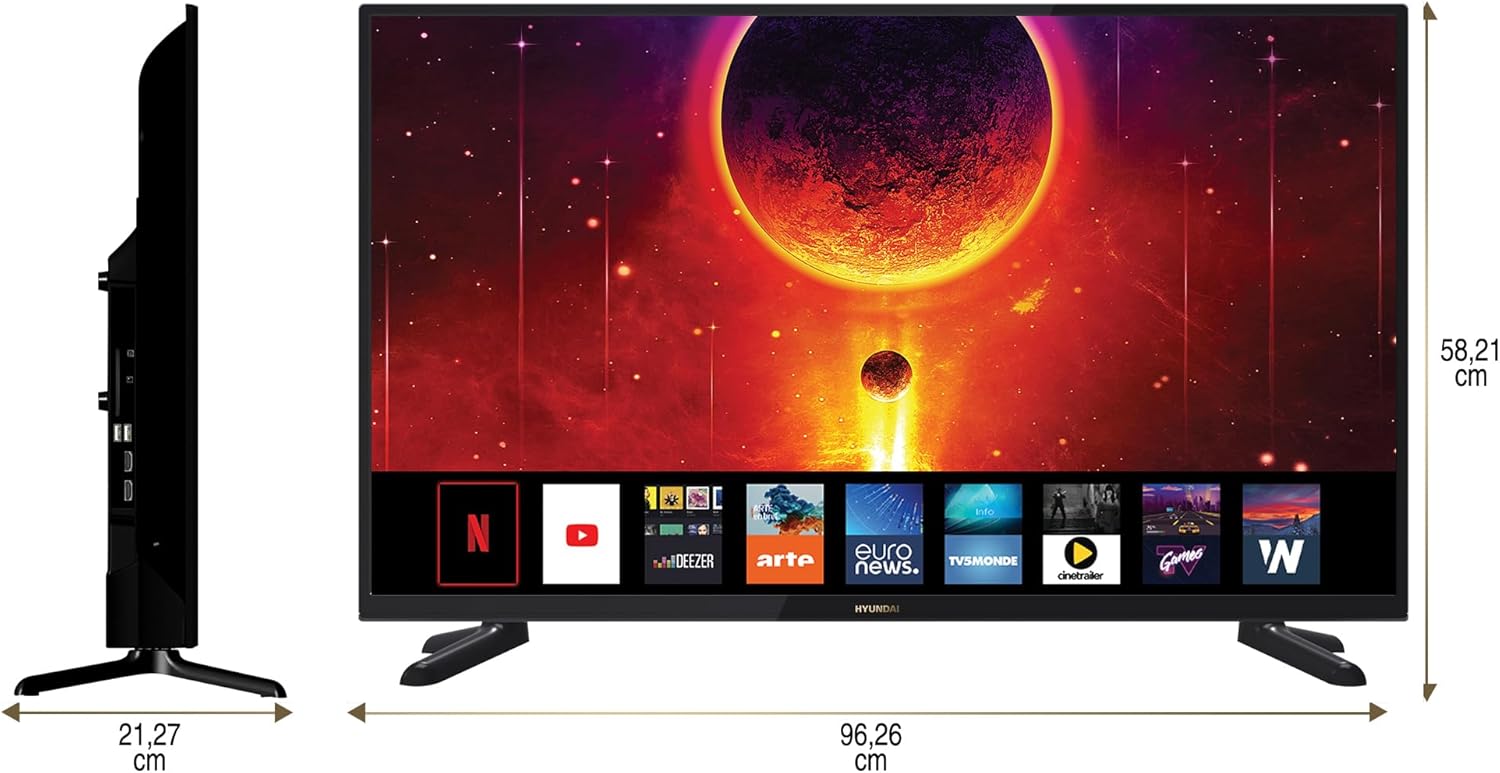
Diagram showing the dimensions of the HYUNDAI 42-inch Smart TV, with a width of 96.26 cm and a height of 58.21 cm.
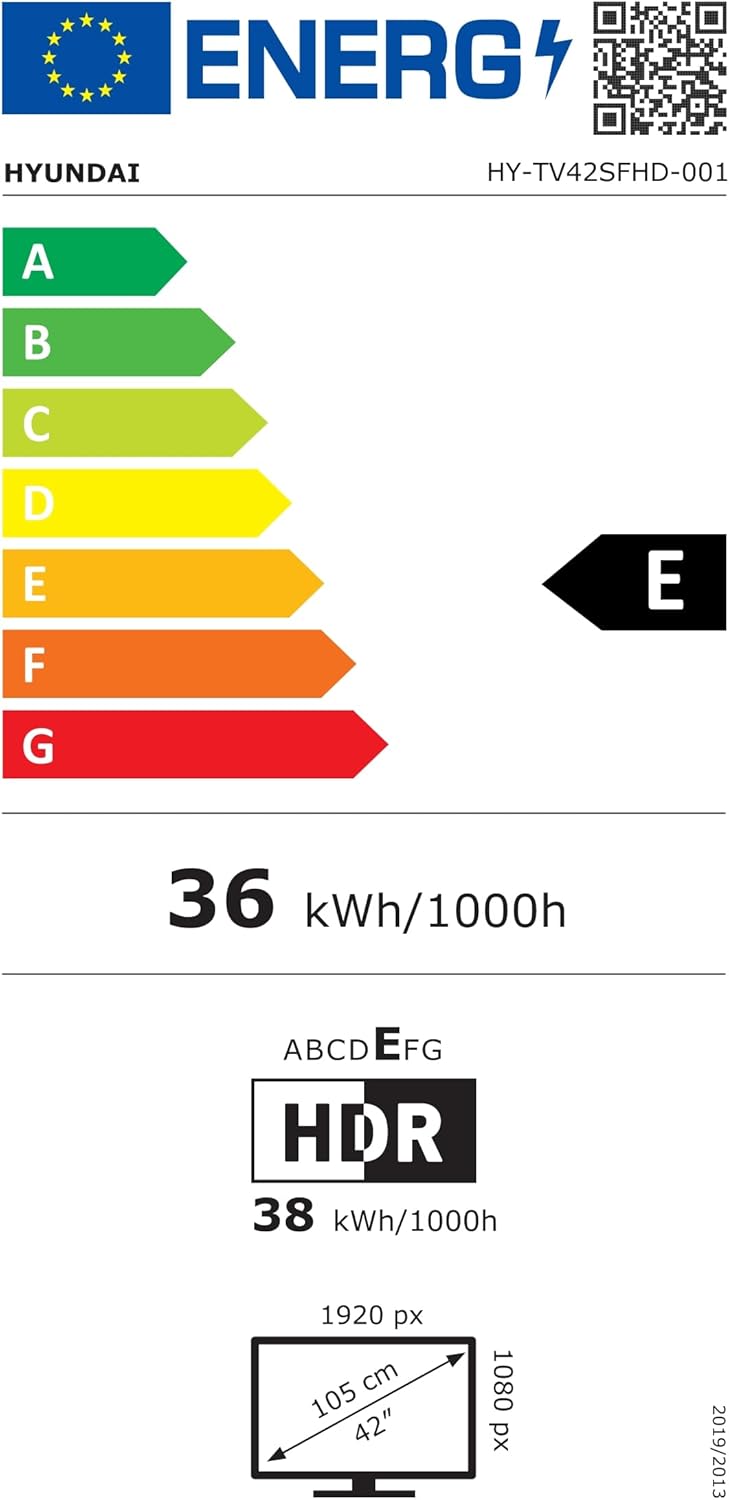
EU Energy Label for the HYUNDAI HY-TV42SFHD-001 television, showing an energy efficiency class of E and energy consumption of 36 kWh/1000h. For more details, visit eprel.ec.europa.eu/qr/1598831.
8. וואָראַנטי און שטיצן
8.1 וואָראַנטי אינפֿאָרמאַציע
Your HYUNDAI Smart TV is covered by a manufacturer's warranty. The specific terms and duration of the warranty may vary by region. Please refer to the warranty card included with your product or visit the official HYUNDAI webפּלאַץ פֿאַר דיטיילד וואָראַנטי אינפֿאָרמאַציע.
8.2 קונה שטיצן
For technical assistance, troubleshooting not covered in this manual, or warranty claims, please contact HYUNDAI customer support. Contact details can typically be found on the official HYUNDAI webוועבזייטל אדער אין דער דאקומענטאציע וואס איז צוגעשטעלט געווארן מיט אייער טעלעוויזיע.


