
1. פּראָדוקט איבערview
The Bmax B6 Plus Mini PC is a compact desktop computer designed for efficient performance in various tasks, from everyday computing to 4K multimedia and multitasking. It features an Intel Core i3-1000NG4 processor, 12GB LPDDR4 RAM, and a 512GB NVMe SSD, with options for storage expansion. This manual provides essential information for setting up, operating, and maintaining your device.
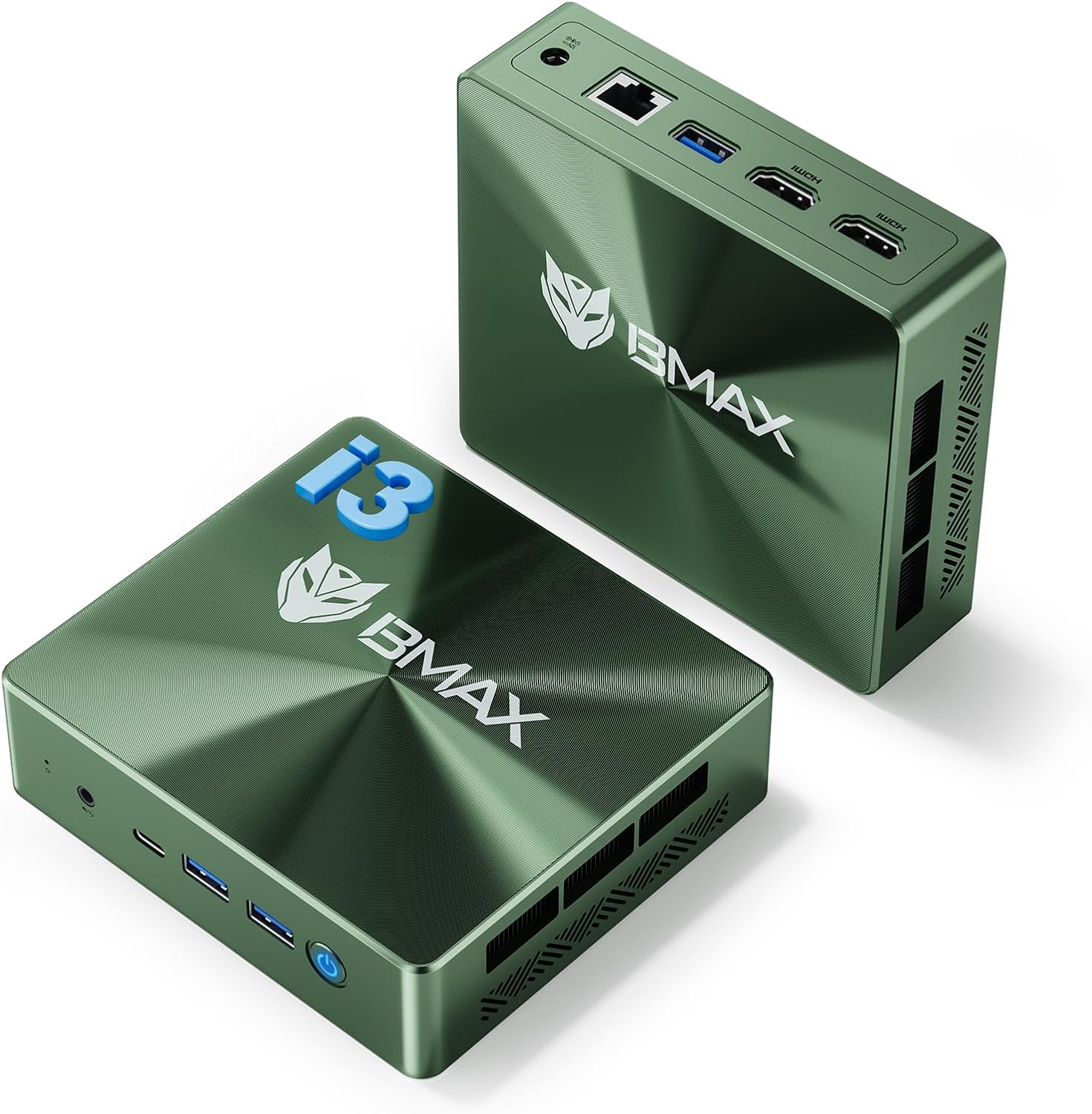
Image 1.1: The Bmax B6 Plus Mini PC, showcasing its compact form factor and available ports on the front and rear.
2. וואָס איז אין דער קעסטל
באַשטעטיקט אַז אַלע זאכן וואָס זענען אויסגערעכנט אונטן זענען אַרייַנגערעכנט אין אייער פּעקל:
- 1 x Bmax Intel Core i3-1000NG4 Mini PC B6 Plus
- 1 x באַניצער מאַנואַל
- 1 X DC 12V/3A מאַכט אַדאַפּטער
- 1 x HDMI קאַבלע
- 1 x וועסאַ מאָונט מיט שרויפן

Image 2.1: All components included with the Bmax B6 Plus Mini PC.
3. סעטאַפּ אינסטרוקציעס
Follow these steps to set up your Bmax B6 Plus Mini PC:
- פאַרבינדן פּעריפעראַלס: Connect your monitor(s) using the HDMI ports or the Type-C port. Connect your keyboard, mouse, and other USB devices to the available USB 3.0 ports.
- נעץ קאַנעקשאַן: For a wired connection, plug an Ethernet cable into the Gigabit Ethernet port. For wireless, ensure Wi-Fi 5 is enabled after initial setup.
- מאַכט קשר: Connect the DC 12V/3A Power Adapter to the mini PC and then to a power outlet.
- ערשטע בוט: Press the power button. The system will boot into Windows 11 Pro. Follow the on-screen instructions to complete the initial Windows setup. It is recommended to keep the Ethernet cable unplugged during the first boot for a smoother setup process.
- VESA Mount Installation (Optional): Use the included VESA bracket and screws to mount the mini PC behind a compatible monitor for a space-saving setup.

בילד 3.1: עקס.ample of VESA mount installation for a tidy workspace.
4. אַפּערייטינג ינסטרוקטיאָנס
4.1. מאַכט אויף / אויסגעלאשן
- מאַכט אויף: Press the power button located on the front of the device.
- מאַכט אַוועק: Use the standard Windows shutdown procedure (Start Menu > Power > Shut down).
- אַוטאָ מאַכט אויף: This feature can be enabled in the BIOS settings to automatically power on the PC when power is restored after an outage.
- וועקן אויף לאַן (WOL): This feature allows you to remotely wake up the PC over a network connection. It can be configured in the BIOS.
4.2. דיספּליי קאָנפיגוראַציע
The Bmax B6 Plus supports up to three 4K@60Hz displays simultaneously, utilizing its two HDMI 2.0 ports and one full-function Type-C port. You can configure display settings within Windows to extend, duplicate, or use only one screen.

Image 4.1: Triple-screen display setup for enhanced productivity.
4.3. קאַנעקטיוויטי
The device offers comprehensive connectivity options:
- וסב 3.0 פּאָרץ: Three ports for connecting various USB devices.
- טיפּ-C פּאָרט: A full-function port supporting data transfer, charging, and 4K video output.
- HDMI 2.0 פּאָרטן: Two ports for connecting displays.
- Gigabit Ethernet (RJ45): For stable, high-speed wired internet.
- Audio/Mic Combo Jack: For headphones or external microphones.
- Wi-Fi 5 (2.4G/5G): Dual-band wireless connectivity.
- בלועטאָאָטה 4.2: פֿאַר פֿאַרבינדן וויירלעס אַקסעסאָריעס.

Image 4.2: Front and rear connectivity ports of the Bmax B6 Plus Mini PC.
5. וישאַלט
5.1. קאָאָלינג סיסטעם
The Bmax B6 Plus features a smart fan and dual copper heat pipes for efficient cooling, ensuring stable performance. To maintain optimal cooling:
- Ensure the ventilation openings on the device are not obstructed.
- Keep the mini PC in a well-ventilated area.
- Periodically clean dust from the vents using compressed air.

בילד 5.1: אינעווייניק view of the advanced smart cooling system.
5.2. סטאָרידזש יקספּאַנשאַן
The mini PC includes a 512GB NVMe SSD and supports storage expansion up to 2TB via dual NVMe slots. Refer to the detailed instructions in the full user manual for safe installation of additional storage.

Image 5.2: Dual NVMe M.2 2280 slots for high-speed storage expansion.
6. טראָובלעשאָאָטינג
6.1. סיסטעם רעקאָווערי
The Bmax B6 Plus includes a user-friendly recovery feature to restore your PC to its factory-fresh condition. This can resolve many software-related issues.
- שריט 1: מאַכט אויף. Power on your Mini PC.
- Step 2: Enter Recovery Mode. As soon as the screen lights up, immediately and repeatedly tap the F9 key until the System Recovery menu appears.
- Step 3: Start the Recovery. איר האָבן צוויי אָפּציעס:
- Using Keyboard: Press the 'Y' key to begin the factory reset.
- Using Mouse: Click the [Restore System] button.
- Step 4: Set Up Windows. Once complete, you will be greeted by the initial Windows setup screen. Simply follow the on-screen instructions to set up your fresh system.

Image 6.1: Steps for utilizing the Bmax Smart Recovery System.
6.2. אַלגעמיינע פּראָבלעמען
- קיין ווייַז: Ensure all display cables are securely connected and the monitor is powered on and set to the correct input.
- קיין מאַכט: Verify the power adapter is correctly connected to both the PC and a working power outlet.
- פּאַמעלעך פאָרשטעלונג: Check for background applications, ensure sufficient free storage space, and consider running system diagnostics.
7. טעכניש ספּעסאַפאַקיישאַנז
| שטריך | דעטאַל |
|---|---|
| פּראַסעסער | Intel Core i3-1000NG4 (up to 3.2 GHz) |
| באַראַן | 12 גיגאבייט LPDDR4 (2133 מעגהערץ) |
| סטאָרידזש | 512 GB NVMe SSD (Expandable up to 2TB via dual NVMe slots) |
| גראַפיקס | ינטעל יריס פּלוס גראַפיקס |
| אָפּערייטינג סיסטעם | Windows 11 Pro (also supports Linux) |
| ווייַז רעזולטאַט | 2x HDMI 2.0, 1x Full-function Type-C (supports 4K@60Hz triple display) |
| וסב פּאָרץ | 3x USB 3.0, 1x Full-function Type-C |
| נעץ | Gigabit Ethernet (RJ45), Wi-Fi 5 (2.4G/5G) |
| ווירעלעסס | בלועטאָאָטה 4.2 |
| דימענשאַנז | בעערעך 4.9 X 4.4 X 1.4 אינטשעס |
| וואָג | בעערעך 16 אונסעס |
8. וואָראַנטי און שטיצן
The Bmax B6 Plus Mini PC comes with a full 1-year warranty. For technical assistance or warranty claims, please contact Bmax customer support.
8.1. קאָנטאַקט שטיצן
- פֿאַר אַמאַזאָן פּערטשאַסאַז: Go to 'Your Orders' on Amazon, find your Bmax product, and select 'Get product support'.
- Direct Support Team: You may also contact the dedicated support team via email at minipcfae@bmaxit.com for any technical questions or general inquiries.

Image 8.1: Bmax customer support contact information.
9. פּראָדוקט ווידעאָ
Video 9.1: Official product video for the Bmax B6 Plus Mini PC, highlighting its features and capabilities. This video demonstrates the compact design, rich interface configuration, efficient cooling, superfast memory, SSD expansion, and various use cases like creating, editing, gaming, and 4K video playback.