
הקדמה
This manual provides detailed instructions for the safe and efficient operation of your CAIWEI X99+ 4K Smart Projector. Please read this manual thoroughly before using the projector and retain it for future reference.
זיכערקייַט אינפֿאָרמאַציע
כדי צו זיכער מאַכן זיכערע אָפּעראַציע און פאַרמייַדן שאָדן, אָבסערווירן די פאלגענדע פאָרזיכטיגקייטן:
- Do not place the projector in boxes or cabinets with poor ventilation properties. Ensure adequate airflow around the device to prevent overheating.
- Avoid direct exposure of the projector lens to sunlight.
- דו זאלסט נישט פאַרשפּאַרן די ווענטאַליישאַן אָופּאַנינגז.
- ניצט נאָר דעם מאַכט אַדאַפּטער וואָס ווערט צוגעשטעלט מיטן פּראָיעקטאָר.
- האַלט דעם פּראָיעקטאָר ווײַט פֿון וואַסער אָדער אַנדערע פֿליסיקייטן.
- פרובירט נישט צו צענעמען אדער פאררעכטן דעם פראיעקטאר אליין. קאנטאקטירט קוואליפיצירטע סערוויס פערסאנעל פאר הילף.
פּעקל אינהאַלט
באַשטעטיקן אַז אַלע זאכן זענען פאַראַן אין פּעקל:
- CAIWEI X99+ Smart Projector
- ווייַט קאָנטראָל
- HDMI קאַבלע
- Power Cable (UK-plug)
- אב קאַבלע
- פּראַדזשעקטער באַג
- באַניצער מאַנואַל (דעם דאָקומענט)
פּראָדוקט איבערview
The CAIWEI X99+ is a smart projector designed for versatile entertainment and presentation needs. It features a native 1080P resolution with 4K support, 800 ANSI lumens brightness, and an integrated Android 9.0 operating system.

Figure 1: CAIWEI X99+ Smart Projector front view, ווייַזןasinג זײַן קאָמפּאַקטן דיזײַן און שליסל פֿעיִקייטן.
שליסל פֿעיִקייטן:
- ווייַז טעכנאָלאָגיע: Native 1920x1080P resolution, 4K support, 800 ANSI lumens, 15500:1 contrast ratio.
- סמאַרט אַס: Android 9.0 with access to over 6000 authorized apps (Netflix, YouTube, Prime Video, etc.).
- זכּרון: 2 גיגאבייט ראַם + 16 גיגאבייט ראָם.
- ווירעלעסס קאַנעקטיוויטי: Dual 2.4G/5G WiFi, Airplay/DLNA/Miracast support, Bluetooth 5.0.
- אַודיאָ: Integrated 10W high-power stereo speakers, Dolby Audio support, 3.5mm audio output.
- בילד פֿאַרבעסערונג: HDR10 processing, MEMC technology for smoother motion.
- אַדזשאַסטמאַנץ: 4D and ±50° vertical/horizontal electronic keystone correction, 40% digital image zoom.
- געווער: Fully sealed optical engine for dust protection and extended lifespan.

Figure 2: Visual representation of the projector's color accuracy, brightness, and image quality in various lighting conditions.
סעטאַפּ
קסנומקס. פּלאַסעמענט
Position the projector on a stable, flat surface or mount it to the ceiling using the four screw holes. Ensure the projector is placed at an appropriate distance from the projection surface to achieve the desired screen size. Maintain adequate ventilation around the unit.
2. מאַכט קאַנעקשאַן
- פֿאַרבינדט דעם מאַכט קאַבל צום פּראָיעקטאָר'ס מאַכט אַרייַנגאַנג פּאָרט.
- שטעקט אריין דעם אנדערן עק פונעם שטראָם־קאַבל אין אַ פּאַסיקן עלעקטרישן ווענטיל.
- דרוק די מאַכט קנעפּל אויף די פּראַדזשעקטער אָדער ווייַט קאָנטראָל צו קער אויף די מיטל.
3. Initial Focus and Keystone Adjustment
Upon initial power-on, the projected image may appear blurry or distorted. Adjust these settings for optimal clarity:
- פאָקוס: דרייט דעם פאָקוס רינג אויף דער פּראָיעקטאָר לינז ביז די בילד איז שאַרף און קלאָר.
- Keystone Correction: Use the remote control to access the keystone correction settings. The projector supports 4D keystone correction and ±50° vertical/horizontal electronic correction to square the image if the projector is not perfectly perpendicular to the screen.
- דיגיטאַל פארגרעסער: Adjust the image size without moving the projector using the digital zoom function (40% zoom out/in).
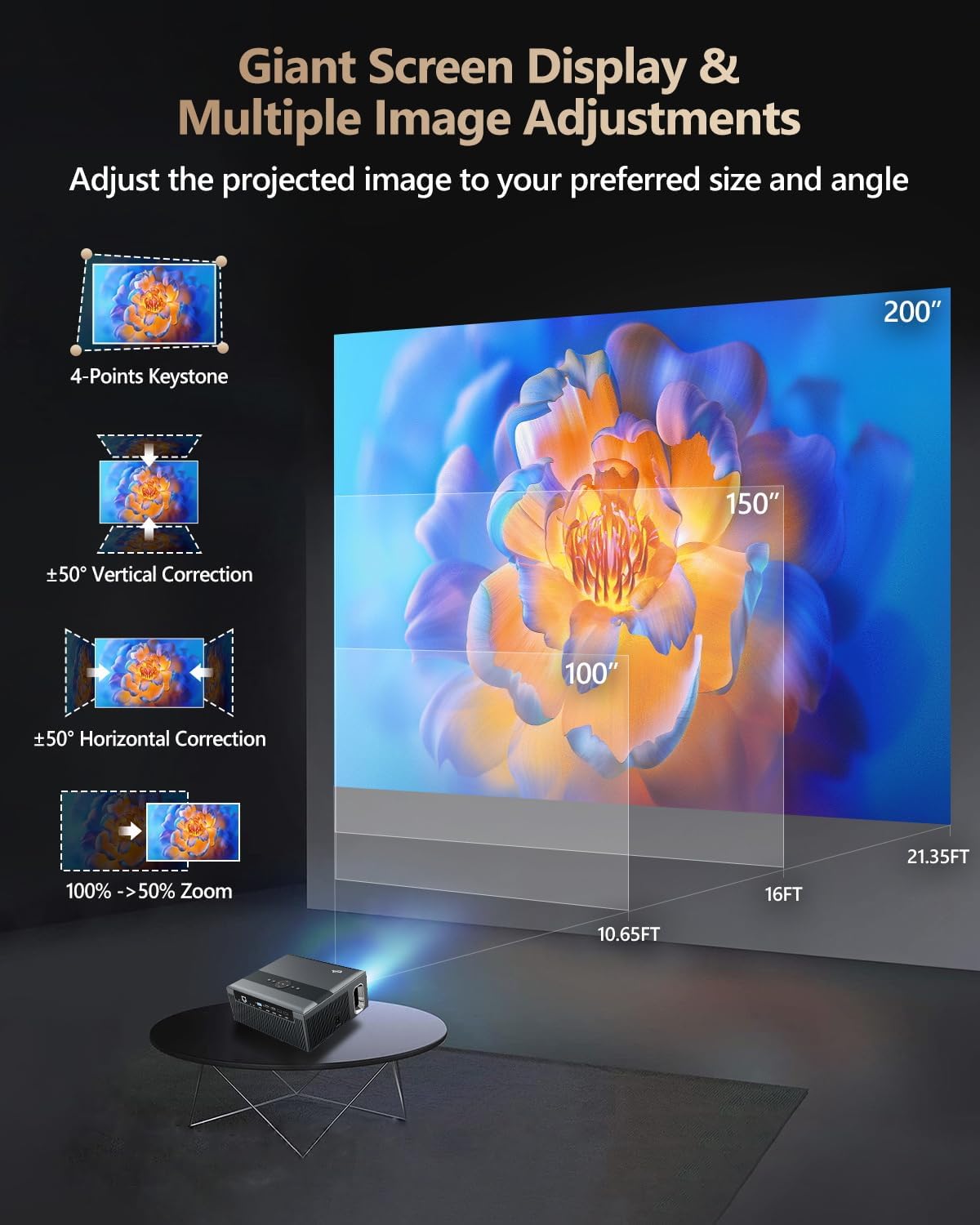
Figure 3: Image adjustment options including keystone correction and digital zoom.
4. נעץ קאַנעקשאַן
Connect the projector to the internet for access to streaming apps and online content.
- ווי-פי: Navigate to the network settings in the Android OS. Select your desired 2.4G or 5G Wi-Fi network and enter the password.
- לאַן (עטערנעט): Connect an Ethernet cable from your router to the RJ45 port on the projector for a wired internet connection.
5. בלועטאָאָטה פּערינג
Pair Bluetooth devices such as external speakers, headphones, mice, keyboards, or gamepads.
- פאַרזיכערן אַז די בלועטאָאָטה מיטל איז אין פּערינג מאָדע.
- On the projector, go to Bluetooth settings within the Android OS.
- Select the desired device from the list and confirm pairing.

Figure 4: Wireless connectivity for streaming and audio.
אַפּערייטינג ינסטראַקשאַנז
1. Android TV OS Navigation
Use the remote control to navigate the Android 9.0 interface. The home screen provides access to installed applications, settings, and input sources.

Figure 5: Android TV 9.0 interface with pre-installed and accessible applications.
2. אַפּ אינסטאַלאַציע און באַניץ
The projector comes with pre-installed apps like Netflix, YouTube, and Prime Video. You can download additional authorized applications from the app store within the Android OS.
- Select an app icon from the home screen to launch it.
- Follow on-screen prompts for login or content selection.
3. Screen Mirroring (Airplay/DLNA/Miracast)
Synchronize your smartphone, tablet, or laptop screen wirelessly to the projector.
- Ensure your device and the projector are connected to the same Wi-Fi network.
- Select the appropriate mirroring function (Airplay for iOS, Miracast for Android/Windows, DLNA for compatible devices) on the projector's interface.
- Initiate screen mirroring from your source device.
4. קאַנעקטינג פונדרויסנדיק דעוויסעס
The projector offers multiple ports for connecting various external devices.

Figure 6: Available input and output ports for external devices.
- הדמי: Connect Blu-ray/DVD players, TV sticks, game consoles (PS5), PCs, or laptops using an HDMI cable. Select the corresponding HDMI input from the projector's source menu.
- וסב: Insert USB flash drives or hard drives into the USB ports to play media files גלייַך.
- ווגאַ: Connect older PCs or laptops using a VGA cable.
- פון: Use the AV cable to connect devices with composite video and stereo audio outputs.
5. אַודיאָ אָוטפּוט
The projector features built-in 10W stereo speakers. For alternative audio experiences:
- בלועטאָאָטה: Pair with external Bluetooth speakers or headphones as described in the Setup section.
- 3.5 מם אַודיאָ אָוט: Connect wired headphones or external speakers using a 3.5mm audio cable.

Figure 7: Projector's integrated audio system.
וישאַלט
1. רייניקונג
- לענס: ניצט אַ ווייכע, לינט-פֿרייע שטאָף ספּעציעל דיזיינד פֿאַר אָפּטישע לענסעס. ניצט נישט קיין שרײַבנדיקע רייניגער.
- עקסטעריע: ווישט אָפּ דעם פּראָיעקטאָר'ס אויסערלעכן אויסזען מיט אַ ווייכן, טרוקענעם שטאָף. פֿאַר שווערע פֿלעקן, ווישט אַ ביסלampען דעם טוך מיט וואסער.
- ווענטילאַטיאָן עפן: Periodically check and gently clean the ventilation openings to ensure unobstructed airflow.
2. Dust Protection
The CAIWEI X99+ features a fully sealed optical engine and an air purifier filter, which significantly reduces dust accumulation and light decay, contributing to a longer service life.

Figure 8: Dust-proof design of the CAIWEI X99+ projector.
3. סטאָרידזש
When not in use for extended periods, store the projector in a cool, dry place, preferably in its original packaging or the provided projector bag, to protect it from dust and physical damage.
טראָובלעשאָאָטינג
אויב איר טרעפט פּראָבלעמען מיט אייער פּראָיעקטאָר, זעט די פאלגענדע געוויינטלעכע פּראָבלעמען און לייזונגען:
| פּראָבלעם | מעגלעך סיבה | לייזונג |
|---|---|---|
| קיין בילד אדער "קיין סיגנאַל" מעסעדזש | אומרעכטע אינפוט מקור אויסגעקליבן; לויזע קאַבל פֿאַרבינדונג; אַפּאַראַט נישט אנגעצונדן. |
|
| בלערי בילד | Focus not adjusted; keystone correction needed. |
|
| קיין געזונט | Volume too low; incorrect audio output selected; external device audio issue. |
|
| ווי-פי קשר ישוז | Incorrect password; out of range; router issues. |
|
| ווייַט קאָנטראָל נישט ארבעטן | טויטע באַטעריעס; שטערונג; פּאָרינג פּראָבלעם. |
|
ספּעסאַפאַקיישאַנז
| סאָרט | CAIWEI |
| מאָדעל | X99+ |
| ווייַז האַכלאָטע | Native 1920 x 1080 (Supports 4K) |
| ברייטנאַס | 800 ANSI Lumens (12000 LED Lumens) |
| קאַנטראַסט פאַרהעלטעניש | 15500:1 |
| אָפּערייטינג סיסטעם | אַנדרויד 9.0 |
| זכּרון | 2 גיגאבייט באַראַן + 16 גיגאבייט ראַם |
| קאַנעקטיוויטי טעכנאָלאָגיע | Bluetooth 5.0, Dual-band Wi-Fi (2.4G/5G), USB, HDMI, VGA, AV, LAN (RJ45) |
| ספּעציעלע פֿעיִקייטן | Built-In Wi-Fi, Portable, Wireless, HDR10, MEMC, Dolby Audio, Sealed Optical Engine, 4D Keystone Correction, Digital Zoom |
| אַודיאָ | 10W High Power Stereo Speakers, 3.5mm Audio Output |
| פּראָדוקט דימענשאַנז | 10.55 X 9.25 X 4.92 אינטשעס |
| פּונקט וואָג | 7.48 פונט |
וואָראַנטי און שטיצן
For warranty information and technical support, please refer to the warranty card included with your product or visit the official CAIWEI webזייטל. קאָנטאַקטירט קונה סערוויס פֿאַר הילף מיט יעדע פּראָבלעם וואָס איז נישט באדעקט אין דעם מאַנואַל.
פאַבריקאַנט: CAIWEI
Webפּלאַץ: CAIWEI Official Store on Amazon