
1. הקדמה
This manual provides detailed instructions for the proper use and maintenance of your Arlec Remote SS3136. This remote control is specifically designed to operate the Arlec Wall Fan AWDC001HA, offering convenient and effortless control over your fan's functions. Please read this manual thoroughly before first use to ensure optimal performance and longevity of your device.
2. פּראָדוקט פֿעיִקייטן
- גרינג קאָנטראָל: Utilizes Infrared technology for seamless communication with your Arlec Wall Fan AWDC001HA from up to 10 meters away.
- לאנג בלייַביק מאַכט: Requires 3 alkaline batteries for extended use.
- גליטשיק פּלאַן: Finished in a sophisticated black color.
- ווערסאַטאַל קאַמפּאַטאַבילאַטי: Designed to control Arlec Wall Fans, specifically model AWDC001HA.
- פּשוט אָפּעראַציע: Features 3 intuitive buttons for easy fan control.
3. פּעקל אינהאַלט
באַשטעטיקן אַז אַלע זאכן זענען פאַראַן אין פּעקל:
- 1 x Arlec Remote SS3136
- 1 x Wall Mount Holder
- 2 רענטגענ מאַונטינג סקרוז
- 2 רענטגענ וואנט פּלאַגז
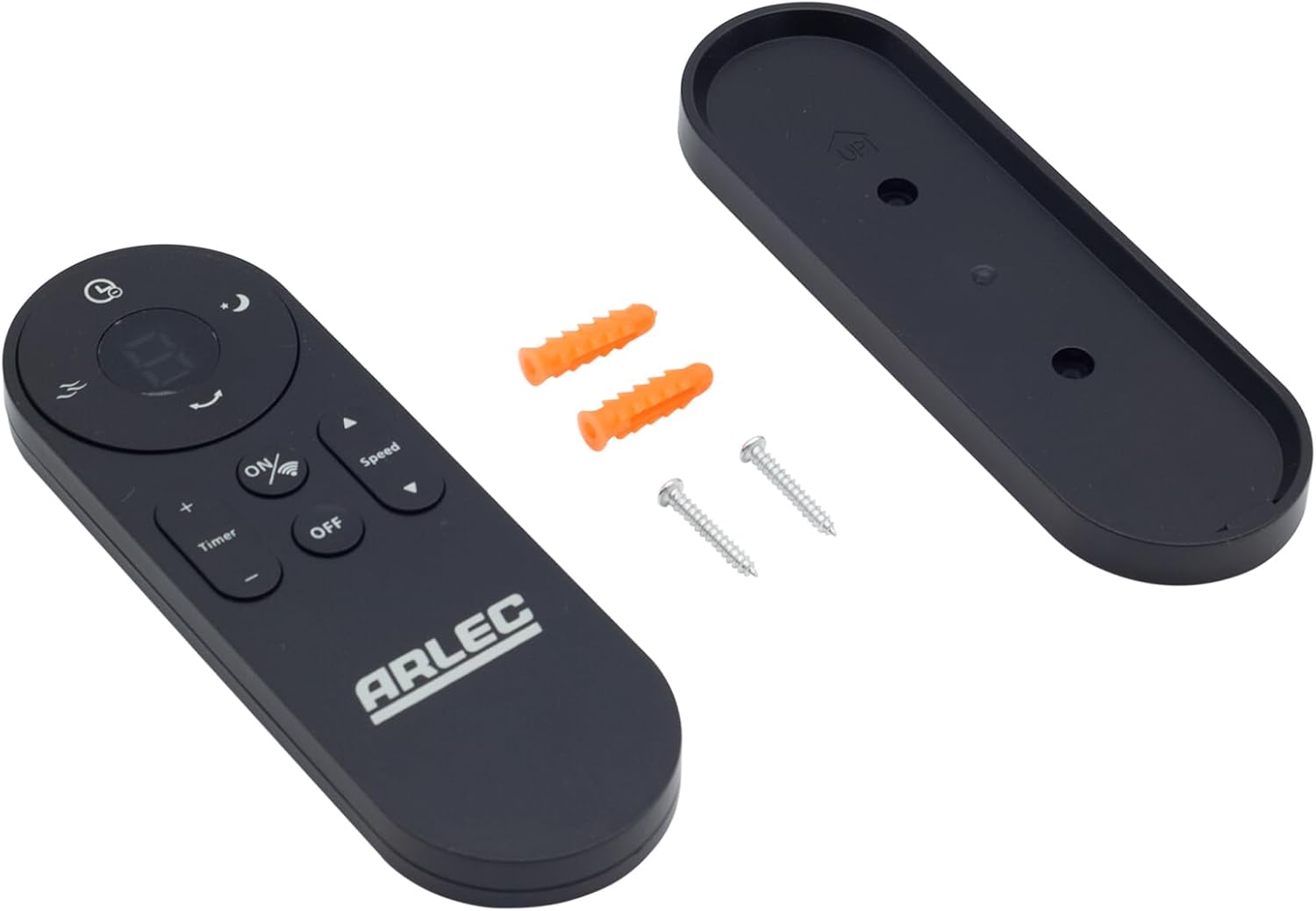
Image: Arlec Remote SS3136 shown with its included wall mount holder, two mounting screws, and two wall plugs, indicating the complete package contents.
4. סעטאַפּ
4.1 באַטאַרייע ייַנמאָנטירונג
- געפֿינען די באַטאַרייע אָפּטייל אויף די צוריק פון די ווייַט קאָנטראָל.
- עפענען די באַטאַרייע אָפּטייל דעקן.
- Insert 3 Alkaline batteries (not included) into the compartment, ensuring the correct polarity (+ and -) as indicated inside the compartment. The remote requires 3 Volts (DC).
- פאַרמאַכן די באַטאַרייע אָפּטייל דעקן סיקיורלי.
4.2 וואַנט מאָונט ינסטאַלירונג (אָפּציאָנאַל)
- Choose a suitable location on a wall for the remote holder.
- Mark the positions for the two mounting screws using the holder as a template.
- Drill pilot holes at the marked positions. Insert the wall plugs if drilling into drywall or masonry.
- Secure the wall mount holder to the wall using the provided screws.
- Place the remote control into the installed holder for convenient storage.
5. אַפּערייטינג ינסטרוקטיאָנס
The Arlec Remote SS3136 features a simple 3-button layout for controlling your Arlec Wall Fan AWDC001HA. Ensure there is a clear line of sight between the remote and the fan's infrared receiver for optimal performance.

בילד: נאָענט-אַרויף view of the Arlec Remote SS3136, highlighting its three main control buttons: ON/OFF, Speed, and Timer.
- ON/OFF קנעפּל: דרוק דעם קנעפּל צו קער די פאָכער אויף אָדער אַוועק.
- גיכקייַט קנעפּל: Use this button to cycle through the available fan speed settings (e.g., Low, Medium, High).
- טיימער קנעפּל: Press this button to set or adjust the fan's timer function. Refer to your Arlec Wall Fan AWDC001HA manual for specific timer intervals.
The remote operates using Infrared (IR) technology. Point the remote directly towards the fan's IR receiver. The effective operating range is up to 10 meters (approximately 33 feet).
6. וישאַלט
- רייניקונג: ווישט אָפּ די ווײַטקאָנטראָל מיט אַ ווייכן, טרוקענעם שטאָף. ניצט נישט קיין שרײַבנדיקע רייניגער אָדער סאָלווענטן.
- באַטערי פאַרבייַט: Replace batteries when the remote's performance degrades or it stops responding. Always replace all 3 batteries at the same time with new alkaline batteries.
- סטאָרידזש: אויב די ווײַטקאָנטראָל וועט נישט ווערן גענוצט פֿאַר אַ לענגערע צײַט, נעמט אַרויס די באַטעריעס כּדי צו פֿאַרמײַדן ליקאַדזש. האַלט אין אַ קיל, טרוקן אָרט.
7. טראָובלעשאָאָטינג
| פּראָבלעם | מעגלעך סיבה | לייזונג |
|---|---|---|
| Remote not responding to fan. |
|
|
| קנעפּלעך זענען קלעפּיק אָדער רעאַגירן נישט. | שמוץ אָדער דעבריס אונטער די קנעפּלעך. | Clean the remote surface with a soft, dry cloth. Avoid liquids. |
8. ספּעסאַפאַקיישאַנז
| אַטריביוט | דעטאַל |
|---|---|
| מאָדעל | SS3136 |
| פאַבריקאַנט | Arlec |
| קאַמפּאַטאַבאַל דעוויסעס | Arlec Wall Fan AWDC001HA |
| קאַנעקטיוויטי טעכנאָלאָגיע | ינפרערעד (IR) |
| נומער פון קנעפּלעך | 3 |
| קאָנטראָללער טיפּ | קנעפּל קאָנטראָל |
| באַטערי טיפּ | Alkaline (3 required) |
| Voltage | 3 וואלטס (דק) |
| אַפּערייטינג קייט | אַרויף צו 10 מעטער |
9. וואָראַנטי און שטיצן
For warranty information and technical support, please refer to the documentation provided with your Arlec Wall Fan AWDC001HA or contact Arlec customer service directly. Keep your purchase receipt as proof of purchase.
פֿאַר ווייטערדיקע הילף, ביטע באַזוכט דעם פאַבריקאַנט'ס באַאַמטער webזייטל אדער קאנטאקט זייער קאסטומער שטיצע ליניע.