
1. הקדמה
This manual provides detailed instructions for the installation, operation, and maintenance of your SECULINK C17-4MP Dual-Band WiFi Dome Security Camera. This camera is designed for outdoor surveillance, featuring 4MP resolution, pan/tilt/zoom capabilities, automatic tracking, human detection, and color night vision. Please read this manual thoroughly before use to ensure proper functionality and safety.
2. פּעקל אינהאַלט
באַשטעטיקן אַז אַלע זאכן זענען פאַראַן אין דיין פּעקל:
- SECULINK C17-4MP Dome Security Camera
- מאַכט אַדאַפּטער (טשאַרדזשער)
- מאָנטירונג שרויפן און וואַנט פּלאַגז
- וואַסערפּרוף קיט פֿאַר נעץ קאַבל (אויב אָנווענדלעך)
- שנעל אָנהייב גייד
3. פּראָדוקט איבערview
The SECULINK C17-4MP camera features a robust dome design suitable for outdoor environments. Key components include:
- אַפּאַראַט לענס: קאַפּטשערז ווידעא פאָאָtage.
- ינפרערעד לעדס: צושטעלן באַלויכטונג פֿאַר נאַכט זעאונג.
- White Light LEDs (Floodlight): Enhance color night vision and act as a deterrent.
- מיקראָפאָן: פֿאַר אַודיאָ אַרייַנגאַנג און צוויי-וועג קאָמוניקאַציע.
- רעדנער: פֿאַר אַודיאָ אַרויסגאַנג און צוויי-וועג קאָמוניקאַציע.
- אַנטענאַז: For dual-band 2.4GHz/5GHz Wi-Fi connectivity.
- מיקראָ סד קאָרט שפּעלטל: שטיצט לאקאלע סטאָרידזש ביז 256 גיגאבייט.
- באַשטעטיק קנעפּל: פֿאַר פֿאַבריק ריסעט.
- מאַכט פּאָרט: דק 12 וו מאַכט אַרייַנשרייַב.

בילד 3.1: איבערview of the SECULINK C17-4MP camera and its mobile application interface.
4. סעטאַפּ
4.1 אַפּ דאַונלאָוד און חשבון רעגיסטראַציע
- אָפּלאָדירן די SECUEYE mobile application from the App Store (iOS) or Google Play Store (Android).
- עפֿנט די אַפּ און פֿאָלגט די אינסטרוקציעס אויף דעם עקראַן צו רעגיסטרירן אַ נײַעם חשבון אָדער זיך אַרײַנלאָגירן אויב איר האָט שוין איינעם.
4.2 אנשטעלן די קאַמעראַ
Connect the provided power adapter to the camera's power port and plug it into an electrical outlet. The camera will initiate its self-test sequence, indicated by a rotating motion and status light changes.
4.3 קאַנעקטינג צו Wi-Fi
The SECULINK C17-4MP supports dual-band Wi-Fi (2.4GHz and 5GHz) for flexible network connectivity.
- Ensure your mobile device is connected to the same Wi-Fi network you intend to connect the camera to.
- In the SECUEYE app, tap the "Add Device" or "+" icon.
- Select your camera model or scan the QR code on the camera (if available).
- Follow the app's instructions to enter your Wi-Fi network name (SSID) and password.
- The app will guide you through the pairing process, which may involve scanning a QR code displayed on your phone with the camera lens or listening for an audio prompt.
- Once connected, the camera's status light will indicate a successful connection (refer to the app or quick start guide for specific light indicators).
4.4 מאָונטינג די אַפּאַראַט
The camera is designed for wall mounting and is IP65/IP66 weatherproof, making it suitable for outdoor installation.
- אויסקלייבן אַ פּאַסיקע מאָנטירונג אָרט וואָס גיט די געוואונטשע viewווינקל און איז אין Wi-Fi ראַנגע.
- Use the mounting template (if provided) or the camera base to mark the drill holes on the wall.
- באָרט לעכער און אַרײַנשטעקן די וואַנט פּלאַגז.
- באַפֿעסטיקן די קאַמעראַ באַזע צו דער וואַנט מיט די צוגעשטעלטע שרויפֿן.
- Attach the camera body to the base.
- Ensure all cable connections are secure and protected from weather using the waterproof kit if necessary.
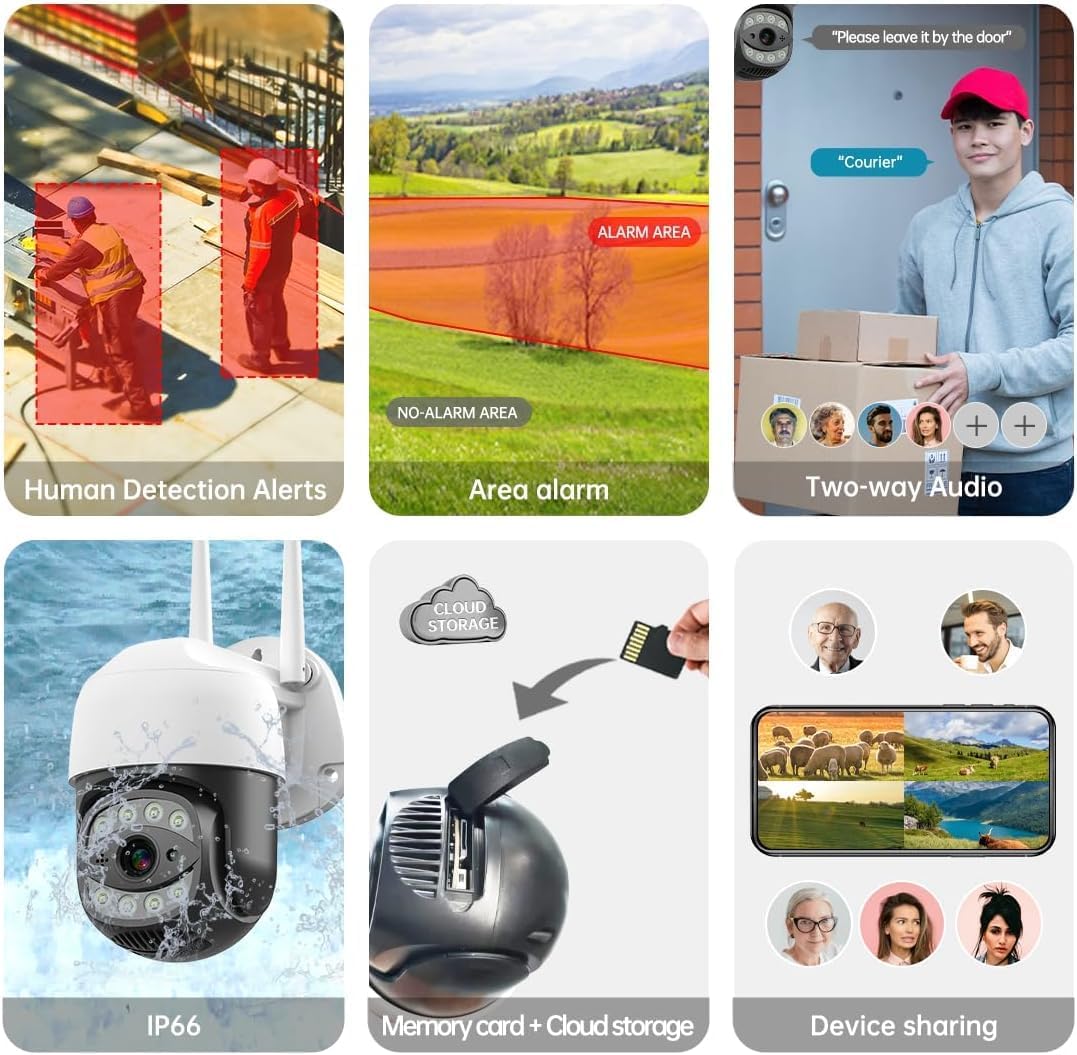
Image 4.1: The SECULINK C17-4MP camera is rated IP66 for dust and water resistance, suitable for various weather conditions.
5. אַפּערייטינג ינסטרוקטיאָנס
5.1 לעבן View און פּלייַבאַקק
צוטריט די לייוו ווידעא פיד און ווידערview רעקאָרדעד פוtage through the SECUEYE app. The camera provides 4MP (2560x1440p) resolution for clear images.

Image 5.1: Visual comparison demonstrating the enhanced clarity of 5MP resolution over lower resolutions.
5.2 Pan, Tilt, and Digital Zoom (PTZ)
קאָנטראָלירן די קאַמעראַ viewing angle remotely using the SECUEYE app. The camera offers:
- האָריזאָנטאַל ראָוטיישאַן: 335 דיגריז
- ווערטיקאַל טילט: 90 דיגריז
- דיגיטאַל פארגרעסער: 10x מאַגנאַפאַקיישאַן
Use pinch-to-zoom gestures on your mobile device to digitally zoom in on specific areas of interest.

Image 5.2: Demonstrates controlling the camera's pan and tilt functions via the mobile app.

Image 5.3: Illustration of the 10x digital zoom feature, allowing closer inspection of details.
5.3 Automatic Tracking and Human Motion Detection
The camera features intelligent detection capabilities to enhance security monitoring.
- אויטאָמאַטישע טראַקינג: When enabled, the camera will automatically detect and follow moving human figures within its field of view, recording their path.
- מענטש באַוועגונג דעטעקשאַן: Advanced algorithms distinguish human activity from other movements (e.g., pets, swaying branches), reducing false alarms.
- אַלערץ: Upon detection, the camera can send real-time alerts to your mobile phone.
- פלאָטליכט און געזונט אַלאַרם: Built-in spotlights activate upon motion detection at night, and a security siren can be triggered as an additional deterrent.

Image 5.4: The camera's AI Humanoid Detection identifies human presence and sends alerts.

Image 5.5: The camera's automatic tracking capability follows detected human movement.

Image 5.6: Illustrates the camera's ability to differentiate human activity from other movements, reducing false alarms.
5.4 נאַכט זעאונג מאָדעס
The camera offers multiple night vision options for clear surveillance in low-light conditions:
- אינפֿראַרויט (IR) נאַכט זעאונג: Uses IR LEDs to provide black and white video in complete darkness, with a range of up to 100ft (30m).
- קאָליר נאַכט זעאונג: Utilizes white light LEDs (floodlight) to capture full-color video at night when motion is detected or manually activated.
- שטערן-ליכט סענסאר: Enhances low-light performance to produce clearer images even without additional illumination.

Image 5.7: Demonstrates the different night vision modes: infrared (black and white), white light (color), and full-color night vision.

Image 5.8: The camera's infrared night vision provides visibility up to 20 meters in darkness.
5.5 צוויי-וועג אַודיאָ
The built-in microphone and speaker allow for real-time two-way communication through the SECUEYE app. You can listen to audio from the camera's location and speak through the camera's speaker.
5.6 סטאָרידזש אָפּציעס
The camera supports two primary storage methods for recorded footage:
- מיקראָ סד קאַרד: Insert a Micro SD card (up to 256GB, sold separately) into the designated slot for local storage. The camera can record 24/7 or motion-triggered videos.
- וואָלקן סטאָרידזש: Optional cloud storage services are available through the SECUEYE app for secure, remote backup of your recordings.
5.7 מיטל ייַנטיילונג
You can share access to your camera's live feed and recordings with family members or trusted individuals through the SECUEYE app, allowing multiple users to monitor the property simultaneously.
6. וישאַלט
To ensure optimal performance and longevity of your SECULINK C17-4MP camera, consider the following maintenance tips:
- ריין די לענס: Periodically wipe the camera lens with a soft, clean, lint-free cloth to remove dust, dirt, or water spots that may affect image clarity. Avoid abrasive cleaners.
- קוק די מאַכט קאַנעקשאַן: Ensure the power adapter and cable remain securely connected and free from damage, especially in outdoor environments.
- Firmware דערהייַנטיקונגען: Regularly check the SECUEYE app for available firmware updates. Updates often include performance improvements, new features, and security enhancements.
- קאָנטראָלירן די ינסטאַלירונג: Periodically check the camera's mounting for stability, especially after severe weather conditions.
7. טראָובלעשאָאָטינג
If you encounter issues with your SECULINK C17-4MP camera, refer to the following common troubleshooting steps:
7.1 קאַמעראַ פֿאַרבינדט זיך נישט צו Wi-Fi
- קוק ווי-פי סיגנאַל: Ensure the camera is within range of your Wi-Fi router. Weak signals can cause connection issues.
- Verify Network Credentials: Double-check that the Wi-Fi network name (SSID) and password entered in the app are correct.
- ראַוטער קאַמפּאַטאַבילאַטי: Confirm your router supports 2.4GHz or 5GHz bands, and that the camera is attempting to connect to a compatible band.
- ריסטאַרט דיווייסאַז: Power cycle both your Wi-Fi router and the camera.
- צוריקשטעלן קאַמעראַ: If issues persist, perform a factory reset on the camera (refer to the quick start guide for reset button location and procedure) and attempt the setup process again.
7.2 שלעכטע בילד קוואַליטעט
- ריין לענס: פאַרזיכערן אַז די אַפּאַראַט אָביעקטיוו איז ריין און פריי פון שמוץ אָדער שמוץ.
- נעץ באַנדווידט: A slow internet connection can affect live stream quality. Check your network speed.
- לייטינג טנאָים: Ensure adequate lighting for optimal image quality, especially for color night vision.
7.3 Motion Detection Not Working or Too Sensitive
- סטרויערן סענסיטיוויטי: In the SECUEYE app settings, adjust the motion detection sensitivity level.
- דעטעקשאַן זאָנעס: Configure specific detection zones to monitor only relevant areas and exclude areas with frequent irrelevant motion (e.g., public roads, swaying trees).
- Check Schedule: Ensure motion detection is enabled for the desired time periods in the app.
7.4 קיין רעקאָרדינג צו SD קאַרטל
- Insert SD Card Correctly: Ensure the Micro SD card is inserted properly into the slot.
- פֿאָרמאַטירונג סד קאָרט: Format the SD card through the camera settings in the SECUEYE app.
- Card Capacity/Health: Ensure the SD card is not full or corrupted. Try a different, known-good SD card if necessary.
- רעקאָרדינג סעטטינגס: Verify that continuous recording or motion-triggered recording is enabled in the app settings.
8. ספּעסאַפאַקיישאַנז
| שטריך | באַשרייַבונג |
|---|---|
| מאָדעל | C17-4MP |
| האַכלאָטע | 4MP (2560x1440p מאַקס) |
| בילד סענסאָר | קמאָס |
| פאָקאַל לענג | 3.6 מם |
| פּאַן ראָוטיישאַן ווינקל | 335 ° האָריזאָנטאַל |
| טילט ראָוטיישאַן ווינקל | 90 ° ווערטיקאַל |
| דיגיטאַל פארגרעסער | 10x |
| נאַכט זעאונג | IR-Cut, Starlight, LED (Color Night Vision) |
| ינפרערעד ווייַטקייט | אַרויף צו 100 פֿיס (30 מעטער) |
| אַודיאָ | Built-in Microphone and Speaker (Two-Way Audio) |
| וואַסער קעגנשטעל | IP65, IP66 (Waterproof) |
| קאַנעקטיוויטי | צוויי-באַנד Wi-Fi (2.4GHz/5GHz), ווייערד עטהערנעט |
| סטאָרידזש | מיקראָ SD קאַרטל (ביז 256 גיגאבייט), וואָלקן סטאָרידזש |
| מאַכט | DC 12V, 9 Watts |
| אַפּערייטינג טעמפּעראַטור | -10°C צו +50°C (14°F צו 122°F) |
| אַפּ קאַמפּאַטאַבילאַטי | סעקויע (iOS, אַנדרויד) |
| דימענשאַנז | 7 x 7 x 5 אינטשעס (פּאַקעט) |
| פּונקט וואָג | 1.2 פונט |
9. וואָראַנטי און שטיצן
פֿאַר וואָראַנטי אינפֿאָרמאַציע און טעכנישע שטיצע, ביטע זען די באַאַמטער SECULINK webזייטל אדער קאנטאקט זייער קאסטומער סערוויס גלייך. האלט אייער קויף קוויטל אלס באווייז פון קויפן פאר גאראנטיע קליימס.
פאַבריקאַנט: SECULINK