
GeekTale F02-02
GeekTale F02-02 סמאַרט דעדבאָלט באַניצער מאַנואַל
Model: F02-02 | Brand: GeekTale
1. הקדמה
This manual provides comprehensive instructions for the installation, operation, and maintenance of your GeekTale F02-02 Smart Deadbolt. Please read this manual thoroughly before installation and use to ensure proper function and safety.
The GeekTale F02-02 is a 4-in-1 keyless entry door lock offering multiple access methods: fingerprint, keypad passcode, Bluetooth app control, and traditional physical keys. It is designed for enhanced security and convenience in residential settings.
2. פּעקל אינהאַלט
באַשטעטיקן אַז אַלע קאָמפּאָנענטן זענען פאַראַן איידער איר הייבט אָן די אינסטאַלאַציע.
- GeekTale F02-02 Smart Deadbolt (Exterior and Interior Assemblies)
- Mounting Hardware (Screws, Bolts)
- Strike Plate and Reinforcement Plate
- פיזישע שליסלען (2)
- ינסטאַללאַטיאָן מוסטער
- באַניצער מאַנואַל

3. ספּעסאַפאַקיישאַנז
| שטריך | דעטאַל |
|---|---|
| מאָדעל נאָמען | פ02-02 |
| סאָרט | GeekTale |
| לאַק טיפּ | ביאָמעטריק דעדבאָלט |
| מאַטעריאַל | אַלומינום |
| ענדיקן טיפּ | פּאָלירט (סאַטין ניקעל) |
| קאָנטראָל מעטאָד | App, Touch (Fingerprint/Keypad) |
| פינגערפּרינט קאַפּאַציטעט | אַרויף צו 50 |
| פּאַססקאָדע קאַפּאַציטעט | אַרויף צו 20 |
| מאַכט מקור | 4 אַאַ באַטעריז (ניט אַרייַנגערעכנט) |
| עמערגענסי מאַכט | וסב- C פּאָרט |
| דימענסיעס (L X W X H) | 2.95 X 2.16 X 5.31 אינטשעס |
| פּונקט וואָג | 1.94 פונט (0.88 קג) |

4. ינסטאַלירונג
The GeekTale F02-02 Smart Deadbolt is designed for easy installation and can replace most existing deadbolts. Ensure your door meets the specifications outlined in Section 3 before proceeding.
4.1 צוגרייטונג
- מכשירים פארלאנגט: Phillips head screwdriver, measuring tape.
- טיר קאַמפּאַטאַבילאַטי: Ensure your door thickness is between 1-3/8" (35mm) and 2-1/8" (54mm). The door hole diameter should be 2-1/8" (54mm). The backset (distance from door edge to center of bore hole) should be 2-3/4" (70mm) or 2-3/8" (60mm).
- באַשטימען טיר האַנדלינג: The lock is reversible for left-handed and right-handed doors.
4.2 שריט-ביי-שריט אינסטאַלאַציע
- אַראָפּנעמען עקסיסטינג דעדבאָלט: Unscrew and remove your current deadbolt from the door.
- אינסטאַלירן לאַטש באָלט: Insert the new latch bolt into the door edge. Ensure the "UP" arrow on the latch bolt faces upwards. Secure with screws.
- ינסטאַלירן עקסטעריאָר אַסעמבלי: Feed the cable from the exterior keypad unit through the door hole. Align the exterior unit with the latch bolt and secure it to the door.
- אינסטאַלירן אינעווייניקסטע מאַונטינג פּלאַטע: Route the cable through the mounting plate. Secure the mounting plate to the exterior assembly using the provided screws.
- פאַרבינדן קאַבל און ינסטאַלירן אינעווייניקסטע אַסעמבלי: Connect the cable from the exterior unit to the interior unit's port. Ensure the thumb-turn spindle is correctly aligned with the latch bolt mechanism. Secure the interior assembly to the mounting plate with screws.
- אינסטאַלירן סטרייק פּלאַטע: אינסטאלירט די סטרייק פּלאַטע און פארשטארקונג פּלאַטע אויף די טיר ראַם, אַליינינג זיי מיט די לאַטש באָלט.
- אַרייַנלייגן באַטעריז: Open the battery cover on the interior unit and insert 4 AA alkaline batteries (not included). Close the cover.
- טעסט אָפּעראַציע: Manually test the deadbolt by rotating the thumb-turn. Ensure it extends and retracts smoothly.

5. אַפּערייטינג ינסטרוקטיאָנס
The GeekTale F02-02 Smart Deadbolt offers multiple ways to lock and unlock your door.
5.1 Initial Setup and App Pairing
- אראפקאפיע אַפּ: זוכן פֿאַר the "GeekTale" app in your smartphone's app store (iOS/Android).
- שאַפֿן אַ חשבון: פֿאָלגט די אינסטרוקציעס אין דער אַפּ צו שאַפֿן אַ באַניצער חשבון.
- לייג דיווייס: In the app, select "Add Device" and follow the prompts to pair your smart deadbolt via Bluetooth. Ensure Bluetooth is enabled on your phone and you are within range of the lock.
- שטעל אדמיניסטראטאר: The first fingerprint or passcode registered through the app will typically be designated as the administrator.

5.2 עפֿענען מעטאָדן
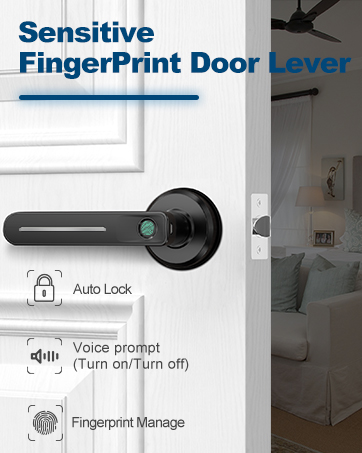
- ופשליסן פינגערפּרינט: Place your registered finger on the fingerprint sensor on the exterior unit. The lock will unlock if the fingerprint is recognized.

Fingerprint unlocking in progress. - פּאַראָל עפענונג: Enter your registered 6-digit passcode on the keypad. The lock will unlock upon correct entry.

Keypad entry with anti-peep function, where random digits can be entered before or after the actual passcode. - App Bluetooth Unlock: Open the GeekTale app on your smartphone, ensure Bluetooth is active, and tap the unlock icon.
- פיזישע שליסל אויפשליסן: In case of battery depletion or electronic malfunction, use the provided physical keys to unlock the deadbolt.
5.3 שלאָס מעטאָדן
- אַוטאָ-שלאָס: The lock can be configured via the app to automatically lock after a set period (e.g., 5-60 seconds) once unlocked.

The auto-lock feature automatically secures the deadbolt after a preset time. - איין-טאטש שלאָס: Press the '#' key on the keypad to manually lock the door from the outside.
- App Bluetooth Lock: Open the GeekTale app on your smartphone and tap the lock icon.
- Manual Lock (Interior): Rotate the thumb-turn on the interior unit to lock the door.
5.4 אַפּ פֿעיִקייטן
- באַניצער פאַרוואַלטונג: Add, modify, or delete fingerprints and passcodes for up to 20 family members.
- אַקסעס לאָג: View a history of lock and unlock events, including method and user.
- Temporary Passcodes: Generate one-time or time-limited passcodes for guests or service providers.
- שטום מאָדע: Enable or disable sound feedback from the lock for quiet operation.
- נידעריק באַטערי אַלערט: Receive notifications when battery levels are low.
- אויטאָ-שלאָס טייַמער: Adjust the duration for the auto-lock feature.


6. וישאַלט
- באַטערי פאַרבייַט: Replace all 4 AA batteries when the low battery alert is triggered. Use only new, high-quality alkaline batteries. Do not mix old and new batteries or different battery types.
- רייניקונג: Clean the lock's exterior surfaces with a soft, dry cloth. Avoid abrasive cleaners or solvents that could damage the finish or electronic components.
- פינגערפּרינט סענסאָר: האַלט דעם פינגערפּרינט סענסאָר ריין און טרוקן פֿאַר אָפּטימאַלער פאָרשטעלונג.
- נויטפאַל מאַכט: If batteries deplete completely, connect a USB-C power bank to the emergency power port on the exterior unit to temporarily power the lock and gain access.
7. טראָובלעשאָאָטינג
| פּראָבלעם | מעגלעך סיבה | לייזונג |
|---|---|---|
| לאַק טוט נישט ריספּאַנד. | טויט באַטעריז. | Replace batteries. Use emergency USB-C power if needed. |
| פינגער־אפדרוק נישט דערקענט. | Finger dirty/wet, sensor dirty, fingerprint not properly registered. | Clean finger and sensor. Re-register fingerprint if issue persists. |
| פּאַראָל אַרבעט נישט. | Incorrect passcode entered, passcode expired (temporary). | Verify passcode. Check app for temporary passcode status. |
| די אַפּ קען נישט פֿאַרבינדן צום שלאָס. | Bluetooth off, phone too far, app issue. | Ensure Bluetooth is on and phone is close. Restart app/phone. |
| Lock grinds or doesn't fully extend/retract. | Misalignment during installation, obstruction. | Check installation alignment. Ensure no obstructions in door frame/latch. |
8. וואָראַנטי און שטיצן
GeekTale provides localized after-sales customer service. For any issues or questions regarding your product, please contact GeekTale customer support through the official channels. Refer to your purchase documentation for specific warranty terms and contact information.
קאָנטאַקט אינפֿאָרמאַציע: ביטע באַזוכן די GeekTale Store on Amazon or refer to the contact details provided with your product packaging.
Ask a question about this manual
Ask about setup, troubleshooting, compatibility, parts, safety, or missing instructions. Manuals+ will review the question and use this page’s manual context to help answer it.