
1. הקדמה
The FXTUL M6 Motorcycle Diagnostic Tool is a comprehensive OBD2 scanner designed for diagnosing and maintaining motorcycles. It features a 5-inch RGB display screen and offers full system coverage, real-time data recording, and printable reports. This manual provides detailed instructions for the proper use and maintenance of your M6 diagnostic tool.

Figure 1: FXTUL M6 Diagnostic Tool, cables, and protective carrying case.
2. פּראָדוקט איבערview
2.1 שליסל פֿעיִקייטן
- סיסטעם דיאַגנאָסיס: Supports engine, ABS, tire pressure, anti-theft, and other systems. Reads and clears Diagnostic Trouble Codes (DTCs), views freeze frame data, displays data streams, and performs active tests.
- 104 Service Functions: Includes ECU reset, oil maintenance lamp reset, CO Trimmer adjustments, TPS adjustments, auto adaptive parameter reset, service light reset, and idling adjustments.
- באַטערי טעסט: Features cranking test, standard test, quick test, and charging test functions.
- Data Recording & Playback: Records diagnostic data for later review און אַנאַליסיס.
- Information Printing: Generates printable reports for diagnostic results, module information, fault codes, and data streams.
- בילד Viewער: Captures and reviews screenshots of the device interface during diagnosis.
- 5-inch RGB Display: High-resolution (800x480) screen with customizable dark and light themes.
- Wide Motorcycle Coverage: Compatible with over 70 motorcycle brands and models globally.
- Free Lifetime Software Upgrade: Connects to a computer via USB for software updates.
- מולטי-שפּראַך שטיצן: Offers various language options for user interface.
2.2 קאָמפּאָנענטן און קאָנטראָלן
The FXTUL M6 device features a user-friendly interface with a clear display and intuitive controls.
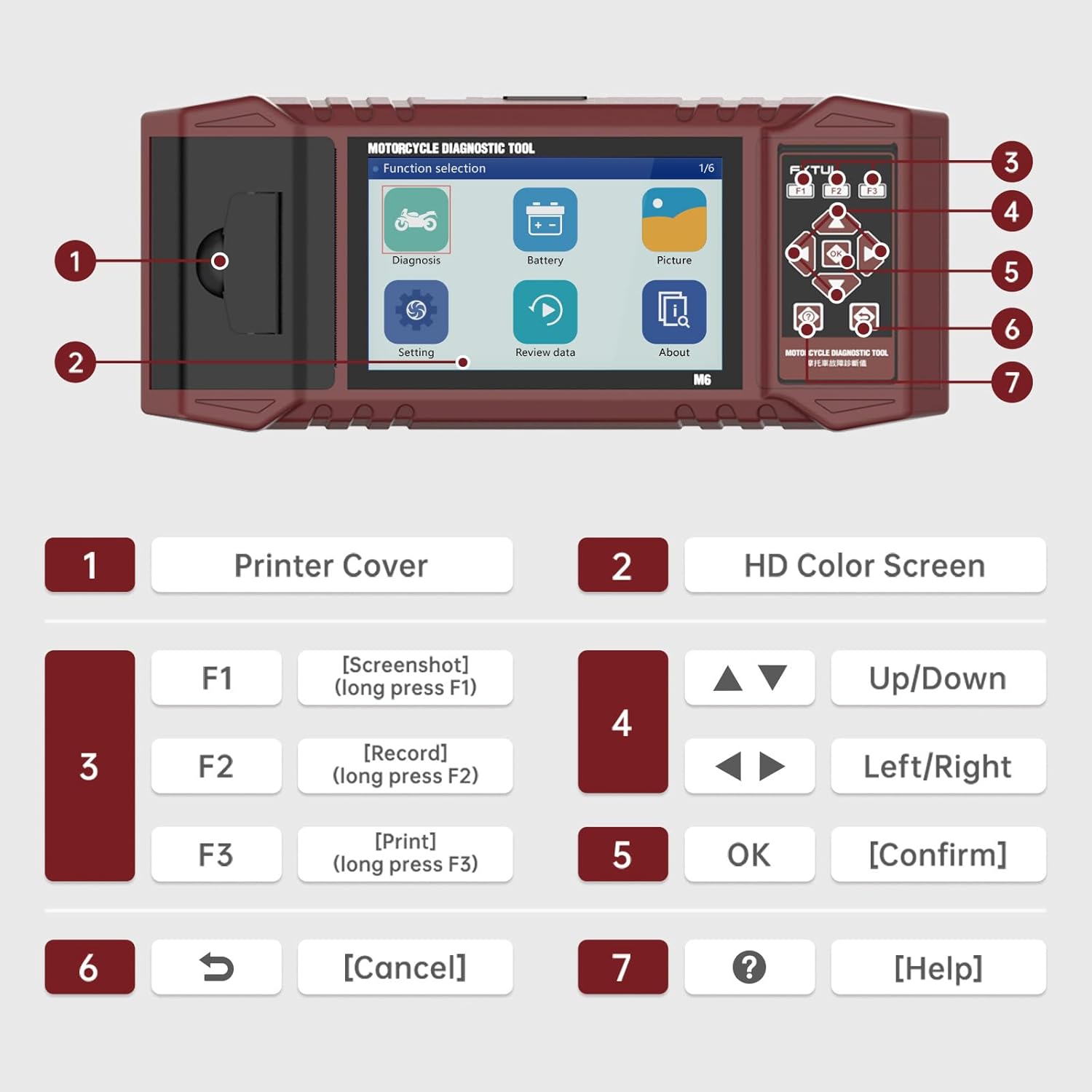
Figure 2: Labeled components and controls of the FXTUL M6 Diagnostic Tool.
| ניין. | קאָמפּאָנענט | פֿונקציע |
|---|---|---|
| 1 | דרוקער קאָווער | Covers the built-in thermal printer. |
| 2 | HD Color Screen | 5-inch RGB display for interface and data. |
| 3 | Function Keys (F1, F2, F3) | F1: Screenshot (long press), F2: Record (long press), F3: Print (long press). |
| 4 | נאַוויגאַציע קיז | Up/Down, Left/Right for menu navigation. |
| 5 | OK דורכפֿאַל | קאַנפערמז סאַלעקשאַנז. |
| 6 | באָטל מאַכן שליסל | Returns to previous screen or cancels operation. |
| 7 | הילף שליסל | Provides contextual help. |
3. סעטאַפּ
- אויספּאַקן: Carefully remove the M6 diagnostic tool and all accessories from the packaging. Verify all components listed in the "What's in the Box" section are present.
- מאַכט קשר: The device is typically powered via the motorcycle's diagnostic port. Ensure the motorcycle's ignition is turned off before connecting the tool.
- פֿאַרבינדן צו מאָטאָציקל: Locate the diagnostic port on your motorcycle. Connect the appropriate diagnostic cable from the M6 tool to the motorcycle's port.
- מאַכט אויף: Turn the motorcycle's ignition to the ON position. The M6 tool should power on automatically. If not, check the connection.
- שפּראַך סעלעקציע: Upon first use, you may be prompted to select your preferred language. Navigate using the arrow keys and confirm with the OK button.
4. אַפּערייטינג ינסטרוקטיאָנס
4.1 סיסטעם דיאַגנאָסיס
This function allows for comprehensive scanning of various motorcycle systems to identify and resolve issues.
- פֿון די הויפּט מעניו, סעלעקטירן "דיאַגנאָז".
- The tool will automatically identify the vehicle model and scan all available systems.
- Review the assembly status and fault codes for each system.
- To read fault codes, select the "Read Fault Codes" option.
- To clear all fault codes, select the "Clear Fault Codes" option. Confirm the action when prompted.

Figure 3: Vehicle System Diagnostic interface for reading and clearing fault codes.
4.2 סערוויס פאַנגקשאַנז
The M6 supports over 100 service functions for various maintenance procedures.
- From the main menu, navigate to the "Service Functions" or similar option (may be under "Diagnosis" depending on software version).
- Select the desired service function from the list (e.g., ECU reset, Oil service light reset, CO adjustment).
- Follow the on-screen prompts to complete the procedure.

פיגורע 4: עקסamples of 104 service functions supported by the tool.
4.3 לייענען דאַטאַ סטרים
View real-time data parameters from the motorcycle's ECU. The data stream waveform graph automatically adapts for easy viewing.
- From the "Diagnosis" menu, select "Data Stream" or "Live Data".
- Choose the specific data parameters you wish to monitor.
- The data will be displayed numerically and can also be viewed as a waveform graph for trend analysis.

Figure 5: Data Stream Display and Waveform Analysis.
4.4 באַטערי טעסט
Perform various tests on the motorcycle's battery.
- From the main menu, select "Battery".
- Choose the desired test: "Cranking Test", "Standard Test", "Quick Test", or "Charging Test".
- Follow the on-screen instructions to perform the test and view רעזולטאַטן.

Figure 6: Battery Test functions interface.
4.5 דאַטן רעקאָרדינג און ווידערשפּיל
Record diagnostic sessions for later review און אַנאַליסיס.
- During a diagnostic process, long-press the F2 key to initiate data recording.
- To play back recorded data, select "Review data" from the main menu.
- Navigate through recorded files and select the one you wish to play back.
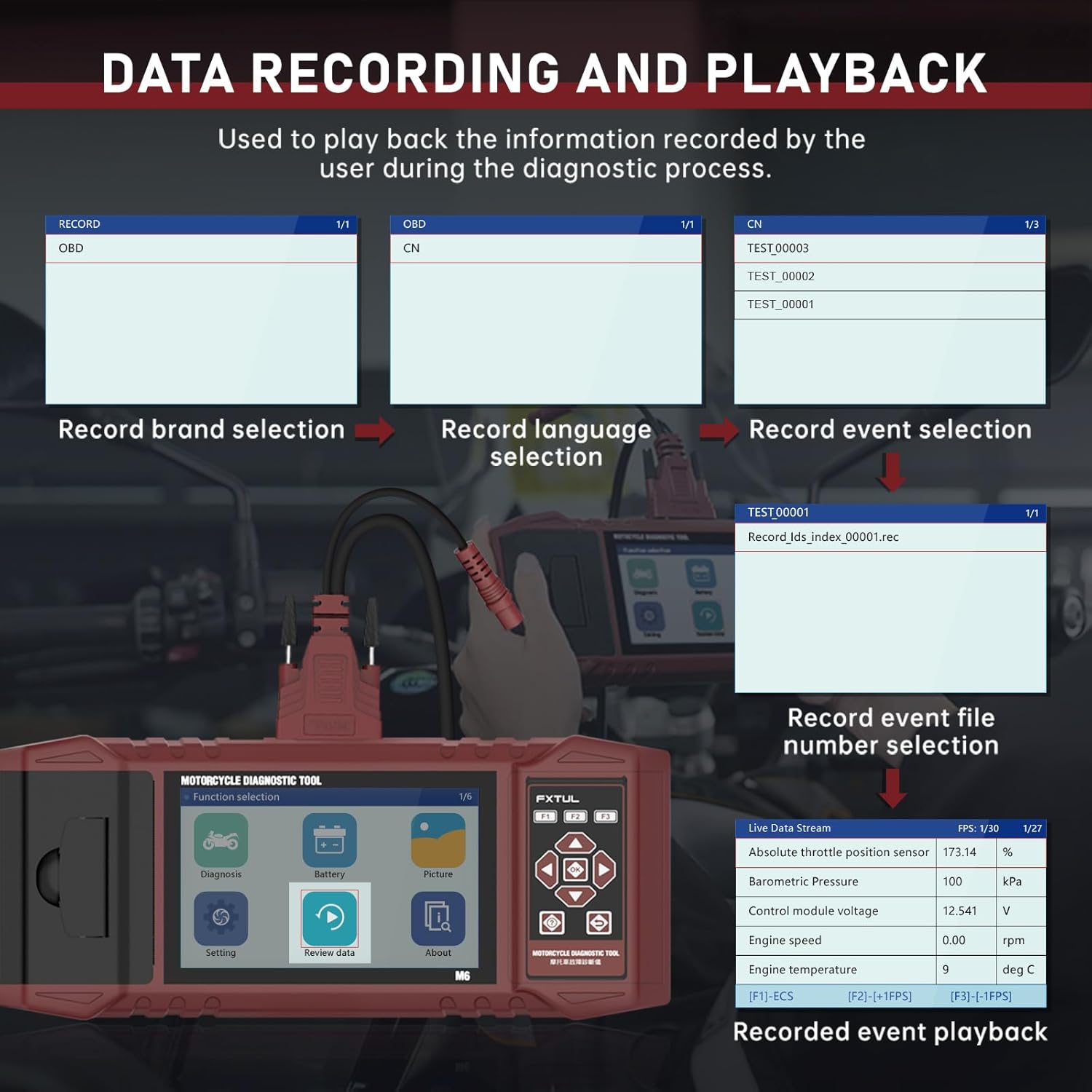
Figure 7: Data Recording and Playback process.
4.6 Information Printing
Print diagnostic reports directly from the device using the built-in printer.
- On any screen displaying information you wish to print (e.g., diagnostic reports, fault codes), long-press the F3 key.
- Input any required user or vehicle information using the on-screen keyboard.
- The device will print the information.

Figure 8: Information Printing function.
4.7 בילד Viewer
Capture screenshots of the device interface and review זיי שפּעטער.
- To capture a screenshot, long-press the F1 key on any interface.
- צו view saved images, select "Picture" from the main menu.
- You can browse through saved images and delete them as needed.

Figure 9: Image Viewer interface for browsing and deleting screenshots.
5. ווייכווארג אַפּגרייד
The FXTUL M6 offers free lifetime software upgrades to ensure compatibility with new motorcycle models and features.
- אראפקאפיע דערהייַנטיקן: Obtain the latest software update files from the official FXTUL webפּלאַץ אָדער דורך קאָנטאַקט קונה שטיצן.
- פאַרבינדן צו קאָמפּיוטער: Connect the M6 device to your computer using a USB cable.
- דיווייס דערקענונג: Wait for the computer to recognize the device. A new drive symbol should appear.
- Replace Folder: Open the new drive. Locate the "DIAGNOSE" folder. Replace this folder with the downloaded "DIAGNOSE" upgrade folder.
- רעבאָאָט: Disconnect the device from the computer and power it on again. The updated software will be loaded.

Figure 10: Software upgrade process via USB connection.
6. טראָובלעשאָאָטינג
- אַפּאַראַט אַרבעט נישט אָן:
- Ensure the diagnostic cable is securely connected to both the M6 tool and the motorcycle's diagnostic port.
- Verify the motorcycle's ignition is turned to the ON position.
- קאָנטראָלירט די מאָטאָרסיקל'ס באַטאַרייע וואָלומעןtage.
- Cannot connect to motorcycle ECU:
- Ensure the correct diagnostic cable for your motorcycle model is being used.
- Verify the motorcycle's ignition is ON and the engine is off (unless specific tests require it to be running).
- Check for any blown fuses in the motorcycle's diagnostic circuit.
- Ensure the M6 software is up to date. Some newer motorcycle models may require the latest software version.
- Specific motorcycle models not listed:
- While the tool supports over 70 brands, specific models within those brands may require the latest software updates. Perform a software upgrade as described in Section 5.
- Contact FXTUL customer support with your motorcycle's make, model, and year for assistance with compatibility.
- דרוקער ארבעט נישט:
- Check if the printer cover is properly closed.
- Ensure there is sufficient thermal paper loaded in the printer.
- Verify you are long-pressing the F3 key to initiate printing.
7. ספּעסאַפאַקיישאַנז
| באַשרייַבונג | דעטאַל |
|---|---|
| מאָדעל | FXTUL-M6 |
| ווייַז סקרין | 5-inch RGB Display (800x480 resolution) |
| פּונקט וואָג | 8.48 פונט |
| פּעקל דימענשאַנז | 15 X 12 X 5 אינטשעס |
| Supported Motorcycle Brands | 70+ (e.g., Ducati, Harley Davidson, BMW, Kawasaki, Yamaha, Honda, Suzuki, etc.) |
| קאַנעקטיוויטי | OBD2, USB for updates |
| מאַכט מקור | Vehicle's diagnostic port |
| ווייכווארג דערהייַנטיקונגען | Free Lifetime Upgrade |

Figure 11: Partial list of supported motorcycle brands and models.
8. וואָראַנטי און שטיצן
FXTUL is committed to providing high-quality products and customer satisfaction. The M6 Motorcycle Diagnostic Tool is designed for durability and reliability.
- קוואַליטי אַשוראַנס: The product is manufactured under strict quality control standards.
- Free Lifetime Software Upgrade: As mentioned in Section 5, software updates are provided free of charge for the lifetime of the product.
- טעכניש שטיצן: For any technical assistance, troubleshooting, or inquiries regarding product functionality and compatibility, please contact FXTUL customer support. Refer to the product packaging or official webפּלאַץ פֿאַר קאָנטאַקט דעטאַילס.