1. הקדמה
This manual provides detailed instructions for the setup, operation, and maintenance of your new Generic Manta Smart TV Remote Control. Please read this manual thoroughly before using the remote to ensure proper functionality and to maximize your viewינג דערפאַרונג.
2. קאַמפּאַטאַבילאַטי
This remote control is designed for use with Manta Smart TVs. For optimal compatibility, ensure that the physical appearance of this remote matches your original Manta Smart TV remote. Additionally, verify that the remote includes a 'Fav' button in the last row of buttons, as this indicates full compatibility with specific Manta Smart TV models.
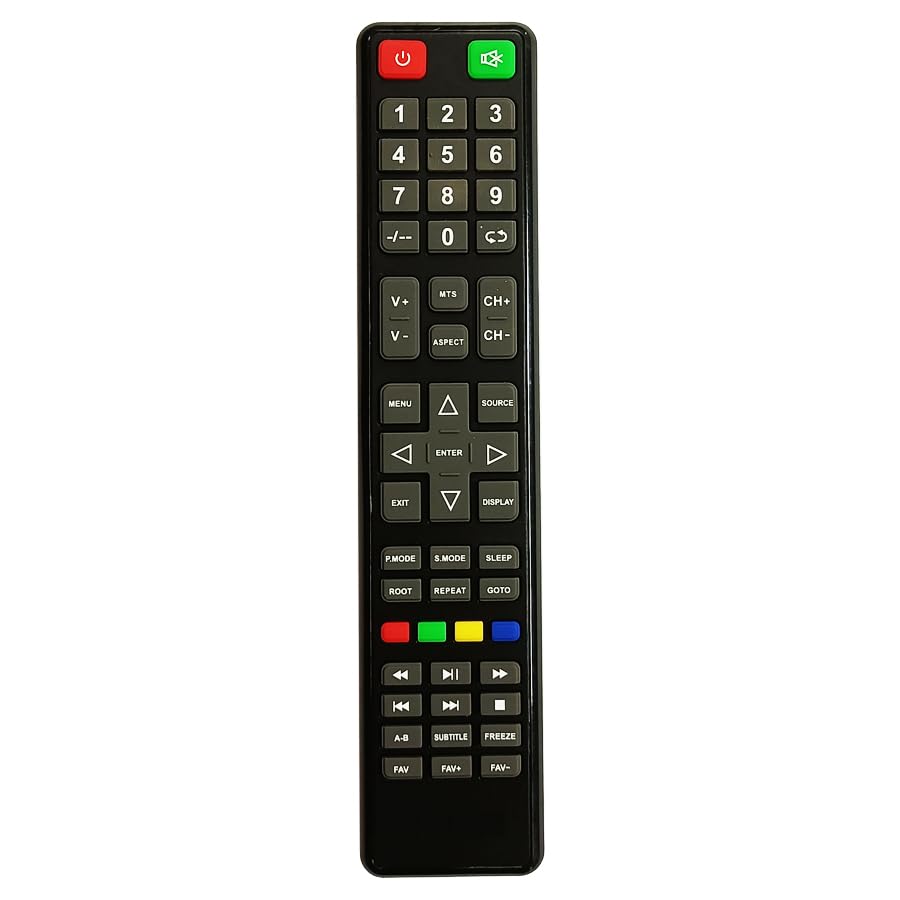
Figure 1: Manta Smart TV Remote Control. A black remote control with various buttons for TV operation, including a numeric keypad, navigation buttons, and dedicated smart TV function buttons.
3. באַטאַרייע ייַנמאָנטירונג
The remote control requires Lithium Ion batteries (not typically included). Follow these steps to install the batteries:
- געפֿינען די דעקן פון די באַטאַרייע אָפּטייל אויף די צוריק פון די ווייַט קאָנטראָל.
- שלעפּט דעם דעקל אַראָפּ אָדער דריק דעם לאַטש צו עפֿענען דעם אָפּטייל.
- Insert the Lithium Ion batteries, ensuring the positive (+) and negative (-) terminals align correctly with the markings inside the compartment.
- פֿאַרמאַכט דעם דעקל פֿון דער באַטעריע־אָפּטיילונג דורך עס צוריקצורוקן אין פּלאַץ ביז עס קליקט זיכער.
באַמערקונג: Always replace all batteries at the same time. Do not mix old and new batteries, or different types of batteries.
4. אויפשטעלן און ערשטע באנוץ
This remote control uses infrared (IR) technology and typically does not require complex pairing. Once batteries are installed, it should be ready for use with compatible Manta Smart TVs.
- Ensure your Manta Smart TV is powered on or in standby mode.
- Point the remote control directly at the IR receiver on your Manta Smart TV.
- דרוק די מאַכט button to turn on or off the TV. If the TV responds, the remote is successfully set up.
If the TV does not respond, refer to the Troubleshooting section.
5. אַפּערייטינג ינסטרוקטיאָנס
Familiarize yourself with the main functions of the remote control:
- מאַכט קנעפּל: טורנס די טעלעוויזיע אויף אָדער אַוועק.
- נומעריק קיפּאַד (0-9): Used for direct channel input.
- באַנד אַרויף / אַראָפּ: אַדדזשוסץ די געזונט מדרגה.
- קאַנאַל אַרויף / אַראָפּ: טוישט טעלעוויזיע קאַנאַלן סיקווענשעל.
- שטיל קנעפּל: שטומט אדער אנשטומט דעם טעלעוויזיע קלאַנג.
- נאַוויגאַציע קנעפּלעך (אַרויף, אַראָפּ, לינקס, רעכטס, גוט): Used to navigate menus and select options on the screen.
- צוריק/אויסגאַנג קנעפּל: גייט צוריק צום פריערדיקן מעניו אדער גייט ארויס פונעם איצטיקן מעניו.
- סמאַרט טעלעוויזיע/היים קנעפּל: Accesses the Smart TV interface or home screen.
- Fav Button: Accesses your favorite channels list (if supported by your TV model).
- קאָליר קנעפּלעך (רויט, גרין, געל, בלוי): Perform specific functions within menus or applications, as indicated on screen.
6. טראָובלעשאָאָטינג
אויב איר טרעפט פּראָבלעמען מיט אייער ווײַטקאָנטראָל, זעט די פֿאָלגנדיקע געוויינטלעכע פּראָבלעמען און לייזונגען:
| פּראָבלעם | לייזונג |
|---|---|
| Remote is not responding to the TV. |
|
| Some buttons are not working. |
|
| די ווײַטקאָנטראָל אַרבעט צווישנצײַטיק. |
|
7. וישאַלט
To ensure the longevity of your remote control:
- האַלט די ווײַטקאָנטראָל ריין דורך עס אָפּווישן מיט אַ ווייכן, טרוקענעם שטאָף.
- פֿאַרמײַדט אויסשטעלן דעם ווײַטקאָנטראָל צו עקסטרעמע טעמפּעראַטורן, דירעקטע זונשײַן, אָדער פֿײַכטקייט.
- לאָזט נישט אַראָפּ דעם ווײַטקאָנטראָל און שטעלט עס נישט אויס צו שטאַרקע קלאַפּן.
- אויב דער ווײַטקאָנטראָל וועט נישט ווערן גענוצט פֿאַר אַ לענגערע צײַט, נעמט אַרויס די באַטעריעס כּדי צו פֿאַרמײַדן ליקאַדזש.
8. ספּעסאַפאַקיישאַנז
| שטריך | דעטאַל |
|---|---|
| סאָרט | גענעריק |
| פאַבריקאַנט | cheops |
| לאַנד פון אָריגין | כינע |
| קאַנעקטיוויטי טעכנאָלאָגיע | ינפרערעד |
| קאָנטראָללער טיפּ | קנעפּל קאָנטראָל |
| באַטערי באַשרייַבונג | ליטהיום יאָן |
| ASIN | B0CC31JXM4 |
9. וואָראַנטי און שטיצן
For warranty information and customer support, please refer to the documentation provided with your purchase or contact the seller directly. Specific warranty terms and support channels may vary depending on your region and point of purchase.


