
1. הקדמה
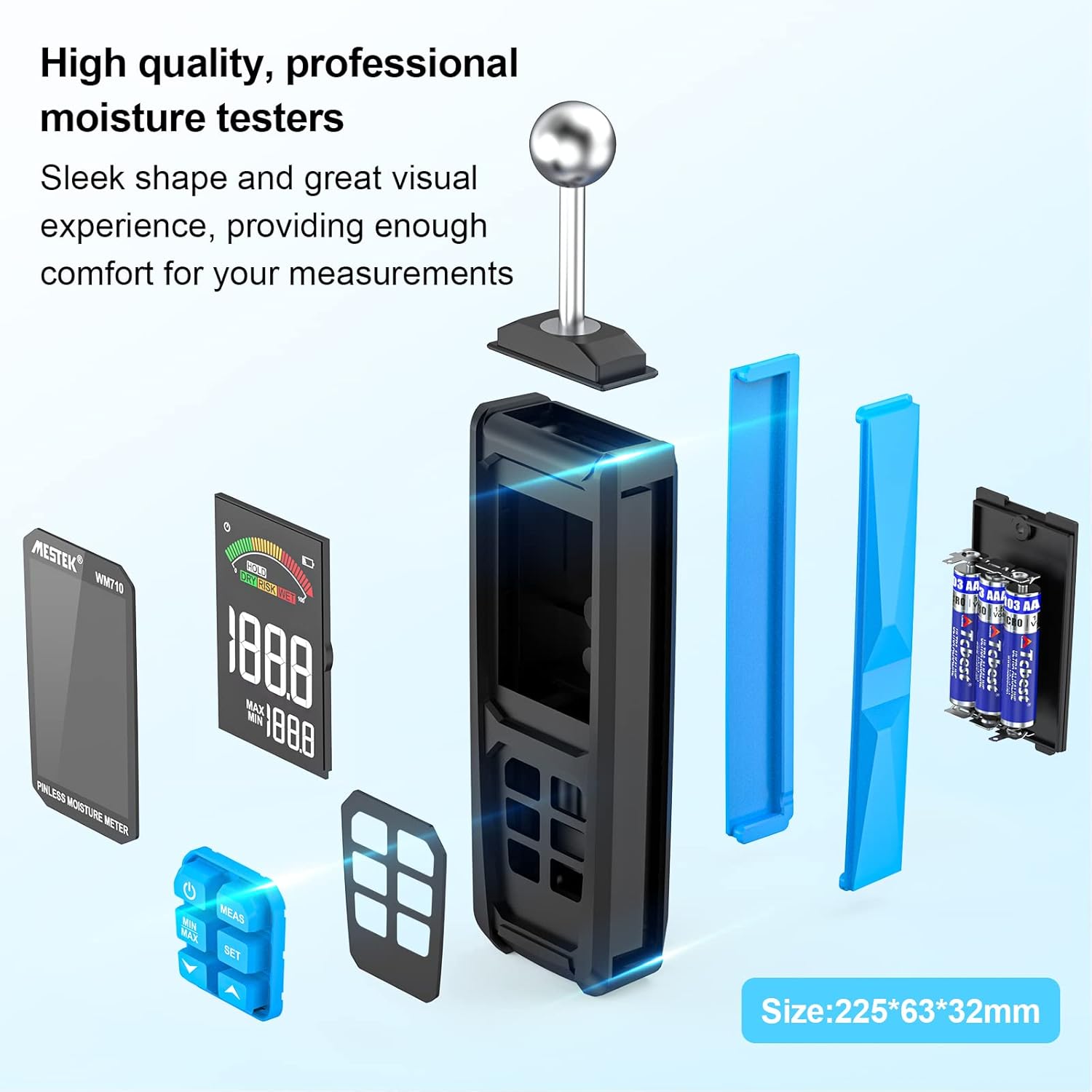
The MESTEK WM710A is a professional, non-destructive pinless moisture meter designed for detecting moisture content in various building materials. This device utilizes a spherical probe to send and receive high-frequency signals, allowing for damage-free moisture assessment. It is an essential tool for homeowners, builders, carpenters, and gardeners to identify leaks and moisture-related issues in wood, walls, concrete, and other construction materials.
This manual provides detailed instructions on how to set up, operate, and maintain your MESTEK WM710A moisture meter to ensure accurate and reliable measurements.
2. פּראָדוקט פֿעיִקייטן
- Non-Destructive Measurement: Detects moisture without damaging the material. The spherical probe allows for easy measurement in corners and narrow areas.
- ברייט מעזשערמאַנט קייט: Measures moisture from 0.0% to 100.0% with a resolution of 0.1%. Maximum measurement depth is 40mm.
- אָטאַמאַטיק קאַלאַבריישאַן: Simple three-second press of the 'MEAS' button initiates automatic calibration for consistent accuracy.
- Large HD Color Display: Features a 3-inch high-definition color LCD screen with an analog bar for intuitive and clear readings.
- אַודיבאַל אַלאַרם פונקציע: Provides audible alerts based on user-settable thresholds for 'Wet', 'Risk', and 'Dry' conditions.
- Data Retention & Max/Min Record: Allows for data hold and displays maximum/minimum measured values simultaneously.
- אָטאַמאַטיק שאַטדאַון: The device automatically powers off after 30 minutes of inactivity to conserve battery life.
- דוראַבאַל פּלאַן: Robust construction with a soft rubber exterior for enhanced durability.
3. פּעקל אינהאַלט
ווען איר עפנט דעם פעקל, ביטע זיכער מאכן אז אלע פאלגנדע זאכן זענען אריינגערעכנט:
- 1 x MESTEK WM710A Pinless Moisture Meter
- 3 X AAA באַטעריז
- 1 x באַניצער מאַנואַל
- 1 x שרויפנ - ציער
- 1 x סטאָרידזש באַג
4. סעטאַפּ
4.1 באַטאַרייע ייַנמאָנטירונג
To power on your MESTEK WM710A, you need to install the included AAA batteries:
- געפֿינען די באַטאַרייע אָפּטייל אויף די צוריק פון די מיטל.
- ניצט דעם צוגעשטעלטן שרויפנציהער צו עפענען דעם דעקל פון דעם באַטעריע אָפּטייל.
- אַרײַנשטעלן 3 AAA באַטעריעס, און זיכער מאַכן אַז די פּאָלאַריטעט איז ריכטיק (+/-).
- פאַרבייַטן די דעקן פון די באַטאַרייע אָפּטייל און באַוואָרענען עס מיט די שרויף.
באַשרייַבונג: This image shows the back of the MESTEK WM710A moisture meter with the battery compartment open. A hand is inserting AAA batteries into the compartment, and a small screwdriver is visible, indicating the tools needed for installation.
5. אַפּערייטינג ינסטרוקטיאָנס
5.1 Power On and Calibration
Follow these steps to power on the device and perform initial calibration:
- דרוק די מאַכט קנעפּל (
 ) to turn on the moisture meter.
 - Hold the spherical probe in the air, away from any materials, to ensure a dry environment for calibration.
- דריקן און האַלטן די MEAS button for approximately three seconds until 'CAL' appears on the screen, indicating automatic calibration is in progress.
- Once calibration is complete, the display will show '0.0' or a very low value, ready for measurement.
באַשרייַבונג: This image provides a visual four-step guide for operating the MESTEK WM710A. It shows pressing the power button, holding the probe in a dry area for calibration, pressing the MEAS button, and the display showing 'CAL' during calibration.
5.2 גענומען מעזשערמאַנץ
צו מעסטן די נעץ אינהאַלט:
- Place the spherical probe directly onto the surface of the material you wish to measure. Ensure full contact between the probe and the material.
- The device will instantly display the moisture reading on the LCD screen. The measurement depth is between 20-40mm.
- The color analog bar on the display will indicate the moisture level: גרין for Dry, געל for Risk, and רויט for Wet.

באַשרייַבונג: A close-up of the MESTEK WM710A's large backlit LCD display, showing the current measured value, maximum and minimum recorded values, and a color-coded analog bar indicating moisture levels (Dry, Risk, Wet).

באַשרייַבונג: This image shows the MESTEK WM710A moisture meter being used to measure moisture on a wall surface, demonstrating the non-destructive nature of the spherical probe.
5.3 Data Hold and Max/Min Record
- To hold the current measurement on the screen, press the האַלטן קנעפּל. דריק עס נאכאמאל צו באפרייען.
- The device automatically records the maximum (MAX) and minimum (MIN) moisture values during a measurement session. These values are displayed below the current reading.
- צו view only the MAX or MIN value, press the MIN / MAX קנעפּל.

באַשרייַבונג: A close-up of the MESTEK WM710A display showing the 'HOLD' indicator, signifying that the current measurement is frozen on the screen.

באַשרייַבונג: The MESTEK WM710A held against a wall, demonstrating its ability to automatically detect and display the maximum and minimum moisture values within a test range to help locate wet and dry areas.
5.4 Setting Alarm Thresholds
The MESTEK WM710A allows you to set custom alarm thresholds for 'Risk' and 'Wet' conditions:
- דרוק די שטעלן קנעפּל צו אַרייַן די אַלאַרם סעטטינג מאָדע.
- ניצן די Up (
 ) און אַראָפּ () arrow buttons to adjust the desired 'Risk' or 'Wet' value.
 - דרוק שטעלן again to switch between 'Risk' and 'Wet' thresholds.
- Once the desired values are set, press the מאַכט קנעפּל צו אַרויסגאַנג די באַשטעטיקן מאָדע.

באַשרייַבונג: The moisture meter in use on a wooden surface, illustrating the 'Dry', 'Risk', and 'Wet' indicators on the display, which change based on the measured moisture content. An exclamation mark indicates an alarm condition.
5.5 ווידעא דעמאַנסטראַציע
באַשרייַבונג: An official product video demonstrating the features and usage of the MESTEK WM710A Pinless Moisture Meter, including battery installation, calibration, measurement on different materials, and alarm functions.
6. מעאַסורעמענט אַפּפּליקאַטיאָנס
The MESTEK WM710A is versatile and can be used on a wide range of materials:
- Wood Materials: Ideal for checking moisture levels in various types of wood before cutting or for assessing existing wooden structures.
- ווענט: Suitable for detecting moisture in plaster, stucco, and brick walls.
- Concrete & Cement: Effective for measuring moisture in concrete slabs and cement surfaces.
- Ceilings: Can be used to check for moisture in ceiling materials.
Note: This device is not designed for use on metallic materials.

באַשרייַבונג: Four images demonstrating the MESTEK WM710A being used to measure moisture in different materials: wood, a powder/brick wall, concrete, and a ceiling, showcasinג זיין ווערסאַטילאַטי.
7. ספּעסאַפאַקיישאַנז
| שטריך | באַשרייַבונג |
|---|---|
| מאָדעל נומער | WM710A |
| סאָרט | MESTEK |
| Measurement Depth | 20-40מם |
| מעאַסורעמענט ראַנגע | 0.0 - 100.0 |
| האַכלאָטע | 0.1% |
| ווייַז | Large HD Color LCD (3 inches) |
| מאַכט מקור | 3 רענטגענ אַאַאַ אַלקאַלינע באַטעריז |
| פּראָדוקט דימענסיעס (ברייט x הויך) | 32 מם X 225 מם |
| פּראָדוקט וואָג | 360 גראַמז |
| אַפּערייטינג טעמפּעראַטור | אַרויף צו 50 °C |
| אָטאַמאַטיק שאַטדאַון | נאָך 30 מינוט פון ינאַקטיוויטי |
| אַרייַנגערעכנט קאַמפּאָונאַנץ | WM710A Hygrometer, 3 AAA Batteries, User Manual, Screwdriver, Storage Bag |
8. וישאַלט
- רייניקונג: ווישט אָפּ דאָס אַפּאַראַט מיט אַ ווייכן, טרוקענעם שטאָף. ניצט נישט קיין שרײַבנדיקע רייניגערס אָדער סאָלווענטן.
- סטאָרידזש: Store the moisture meter in a cool, dry place when not in use. If storing for an extended period, remove the batteries to prevent leakage.
- באַטערי פאַרבייַט: Replace batteries when the low power reminder appears on the display to ensure accurate readings.
- פּראָבע באַהאַנדלונג: Keep the spherical probe clean and free from debris to maintain optimal performance.
9. טראָובלעשאָאָטינג
If you encounter issues with your MESTEK WM710A, please refer to the following common problems and solutions:
- אַפּאַראַט אַרבעט נישט אָן:
- קאָנטראָלירט צי די באַטעריעס זענען ריכטיק אינסטאַלירט מיט דער ריכטיקער פּאָלאַריטעט.
- פאַרבייַטן מיט נייַ אַאַאַ באַטעריז.
- נישט פּינקטלעכע לייענונגען:
- Ensure the device is calibrated in a dry environment before use.
- Make sure the spherical probe has full contact with the material surface.
- Avoid measuring near metallic objects, as this can interfere with readings.
- דער שרעק קלינגט נישט:
- Verify that the alarm thresholds are set correctly in the settings menu.
- Check if the measured moisture level exceeds the set threshold.
10. וואָראַנטי און שטיצן
The MESTEK WM710A Pinless Moisture Meter comes with a 2 יאָר וואָראַנטי from the date of purchase. This warranty covers manufacturing defects and ensures the product's quality and performance under normal use.
For any questions, technical support, or warranty claims, please contact MESTEK customer service. We aim to respond to all inquiries within 24 hours.
קאָנטאַקט אינפֿאָרמאַציע: Please refer to the contact details provided in your product packaging or visit the official MESTEK webפּלאַץ פֿאַר שטיצן.