
הקדמה
This document serves as an instruction manual for the Generic Easytry20679 infrared replacement remote control. This remote is designed for use with Costzon FWAM-01989 and Sykik SP2091BT Bluetooth Portable PA Systems. Please note that as a replacement unit, its functionality may vary slightly from the original remote control.
פּראָדוקט איבערview
The Easytry20679 is an infrared (IR) remote control featuring a standard button layout for audio system operation. It allows for convenient control of compatible PA systems from a distance.
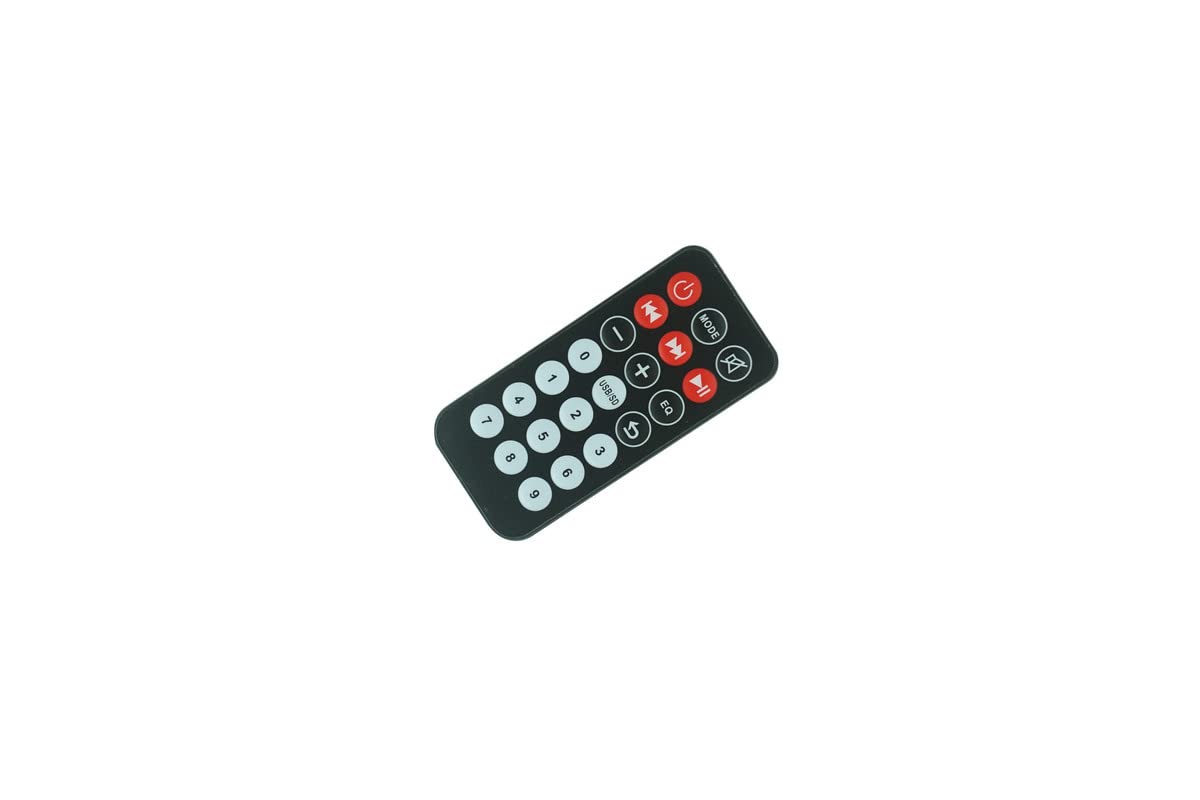
פיגורע 1: פראָנט view of the remote control, displaying all operational buttons.

פיגורע 2: צוריק view פון דער ווײַטקאָנטראָל, אַרויסהייבנדיק דעם באַטעריע־אָפּטייל.
סעטאַפּ
ייַנמאָנטירונג פון באַטאַרייע
The remote control requires two (2) CR2 batteries for operation. Batteries are not included with the remote control and must be purchased separately.
- געפינט די באַטעריע אָפּטייל אויף דער צוריקזייט פון דער ווײַטקאָנטראָל (זעט בילד 2).
- רוקט דעם דעקל פונעם באַטעריע־אָפּטייל אַראָפּ אָדער אין דער ריכטונג וואָס ווערט אָנגעוויזן דורך אַ פײַל צו עס עפֿענען.
- Insert two CR2 batteries, ensuring the positive (+) and negative (-) terminals align correctly with the markings inside the compartment.
- פאַרמאַכן די באַטאַרייע אָפּטייל דעקן סיקיורלי.
After installing the batteries, the remote control is ready for use.
אַפּערייטינג ינסטראַקשאַנז
This remote control operates via infrared signals. Ensure there is a clear line of sight between the remote control and the IR receiver on your PA system for proper functionality.
יקערדיק פאַנגקשאַנז
- מאַכט קנעפּל (⏻): Press to turn the PA system on or off.
- מאָדע קנעפּל: Cycles through input modes (e.g., Bluetooth, USB, SD, AUX, FM).
- שטום קנעפּל (🔇): מיוטעס אָדער אַנמיוט די אַודיאָ רעזולטאַט.
- באַנד קאָנטראָל (- / +): אַדזשאַסטירט דעם אַודיאָ באַנד לעוועל.
- Track Control (⏮ / ⏭): שפּרינגט צום פריערדיקן אָדער נעקסטן ליד/סטאַנציע.
- שפּיל / פּויזע קנעפּל (⏯): שפּילט אָדער פּויזירט מעדיע ווידערשפּיל.
- עק קנעפּל: גייט דורך ציקלען דורך יקוואַלייזער פּרעסעטס.
- USB/SD Button: Selects USB or SD card input directly.
- נומעריק קיפּאַד (0-9): Used for direct track selection or frequency input in FM mode.
וויכטיק באַמערקונג: As a replacement remote, some functions or buttons may not operate identically to your original remote or may not be supported by your specific PA system model. Full compatibility with all original functions cannot be guaranteed.
וישאַלט
באַטערי פאַרבייַט
Replace batteries when the remote control's range decreases or it stops responding. Always replace both batteries simultaneously with new CR2 batteries. Do not mix old and new batteries or different battery types.
רייניקונג
צו רייניקן די ווײַטקאָנטראָל, ניצט אַ ווייכע, טרוקענע שטאָף. פֿאַר שווערע שמוץ, לייכט ווישטampen the cloth with water. Do not use abrasive cleaners, solvents, or chemical sprays, as these can damage the remote's surface or internal components.
סטאָרידזש
האַלט די ווײַטקאָנטראָל אין אַ קיל, טרוקן אָרט אַוועק פון דירעקט זונשייַן און עקסטרעמע טעמפּעראַטורן. אויב די ווײַטקאָנטראָל וועט נישט ווערן גענוצט פֿאַר אַ לענגערע צײַט, איז ראַטזאַם צו אַרויסנעמען די באַטעריעס צו פאַרמייַדן ליקאַדזש.
טראָובלעשאָאָטינג
- ווייַט ניט ריספּאַנדינג:
- קאָנטראָלירט צי די באַטעריעס זענען ריכטיק אַרײַנגעשטעלט מיט דער ריכטיקער פּאָלאַריטעט.
- Replace the batteries with fresh CR2 batteries.
- Ensure there is a clear line of sight between the remote's IR emitter and the PA system's IR receiver. Obstructions can block the signal.
- זייט זיכער אז איר זענט אין דער עפעקטיווער ארבעטס-ראַנג פון דער ווײַטקאָנטראָל.
- עטלעכע פונקציעס אַרבעטן נישט:
- This is a replacement remote. It may not support all functions of your original remote or your specific PA system model. Refer to your PA system's original manual for its remote control capabilities.
ספּעסאַפאַקיישאַנז
| סאָרט | גענעריק |
| מאָדעל נומער | גרינג צו טריי20679 |
| קאַמפּאַטאַבאַל דעוויסעס | Costzon FWAM-01989, Sykik SP2091BT |
| קאַנעקטיוויטי טעכנאָלאָגיע | ינפרערעד (IR) |
| קאָנטראָללער טיפּ | קנעפּל קאָנטראָל |
| באַטערי טיפּ | 2 x CR2 (נישט אַרייַנגערעכנט) |
| ASIN | B0CBQ2GGXV |
וואָראַנטי אינפֿאָרמאַציע
This product comes with a 90-day warranty from the date of purchase. This warranty covers manufacturing defects. Please retain your proof of purchase for any warranty claims.
שטיצן
For further assistance regarding the functionality of this replacement remote control, please refer to the instruction manual provided with your Costzon FWAM-01989 or Sykik SP2091BT Bluetooth Portable PA System. As this is a generic replacement, specific technical support for this remote may be limited.