
1. הקדמה
Thank you for choosing the STRICH SEP-80 88-Key Digital Piano. This portable digital piano is designed for beginners and experienced musicians alike, offering a full-size, touch-sensitive keyboard with a wide range of features. Please read this manual carefully to ensure proper setup, operation, and maintenance of your instrument.

Figure 1: STRICH SEP-80 88-Key Digital Piano with included accessories.
2. וואָס איז אין דער קעסטל
Your STRICH SEP-80 package includes the following items:
- STRICH SEP-80 88-Key Digital Piano
- X-shaped Keyboard Stand
- ונטערהאַלטן פּעדאַל
- בויגן מוזיק שטיין
- וסב מאַכט אַדאַפּטער
- ינסטראַקשאַנז מאַנואַל

Figure 2: All components included in the SEP-80 package.
3. סעטאַפּ
3.1 Assembling the X-Stand
- Unfold the X-shaped keyboard stand.
- Adjust the height to your preferred playing position using the locking mechanism. Ensure the stand is stable before placing the piano.

Figure 3: The X-shaped keyboard stand.
3.2 Placing the Digital Piano on the Stand
Carefully place the SEP-80 digital piano onto the assembled X-stand. Ensure it sits securely on the stand's arms.
3.3 פֿאַרבינדן אַקסעסאָריעס
- סוסטאַין פּעדאַל: Connect the sustain pedal cable to the 'SUS' jack on the rear panel of the piano.
- בלאַט מוזיק שטאַנד: Insert the sheet music stand into the designated slots on the top panel of the piano.
- מאַכט: Connect the USB power adapter to the DC 5V port on the rear panel and plug it into a power outlet. The piano also features a built-in rechargeable battery for portable use.

פיגור 4: הינטערשטע פּאַנעל מיט פֿאַרשידענע קאָנעקטיוויטי אָפּציעס.

פיגור 5: דער אריינגערעכנטער סאַסטיין פּעדאַל.

Figure 6: The sheet music stand.

Figure 7: The USB power adapter.
4. אַפּערייטינג ינסטרוקטיאָנס
4.1 אײַנשטעלן/אויסשטעלן און וואָלומען
- דרוק די מאַכט button to turn the piano on or off.
- ניצן די - און + buttons next to the LED display to adjust the master volume.
4.2 אויסקלייבן טענער און ריטמען
- The SEP-80 features 128 tones and 128 rhythms.
- דרוק די באַשטעטיקן button twice quickly to enter tone selection mode. Use the - און + buttons to browse.
- דרוק די באַשטעטיקן button once to enter rhythm selection mode. Use the - און + buttons to browse.
4.3 ספּעציעלע פאַנגקשאַנז
- שפּאַלטן מאָדע: Divides the keyboard into two sections, each with its own tone.
- ווייברייט: Adds a vibrato effect to the sound.
- איבערזעצן: פֿאַרשיבט די הויך־טײַט פֿון דער קלאַוויאַטור אַרויף אָדער אַראָפּ.
- טעמפּאָ: Adjusts the speed of rhythms and demo songs.
- מעטראָנאָמע: Provides a steady beat for practice.
- רעקאָרד: Allows you to record and playback your performances.
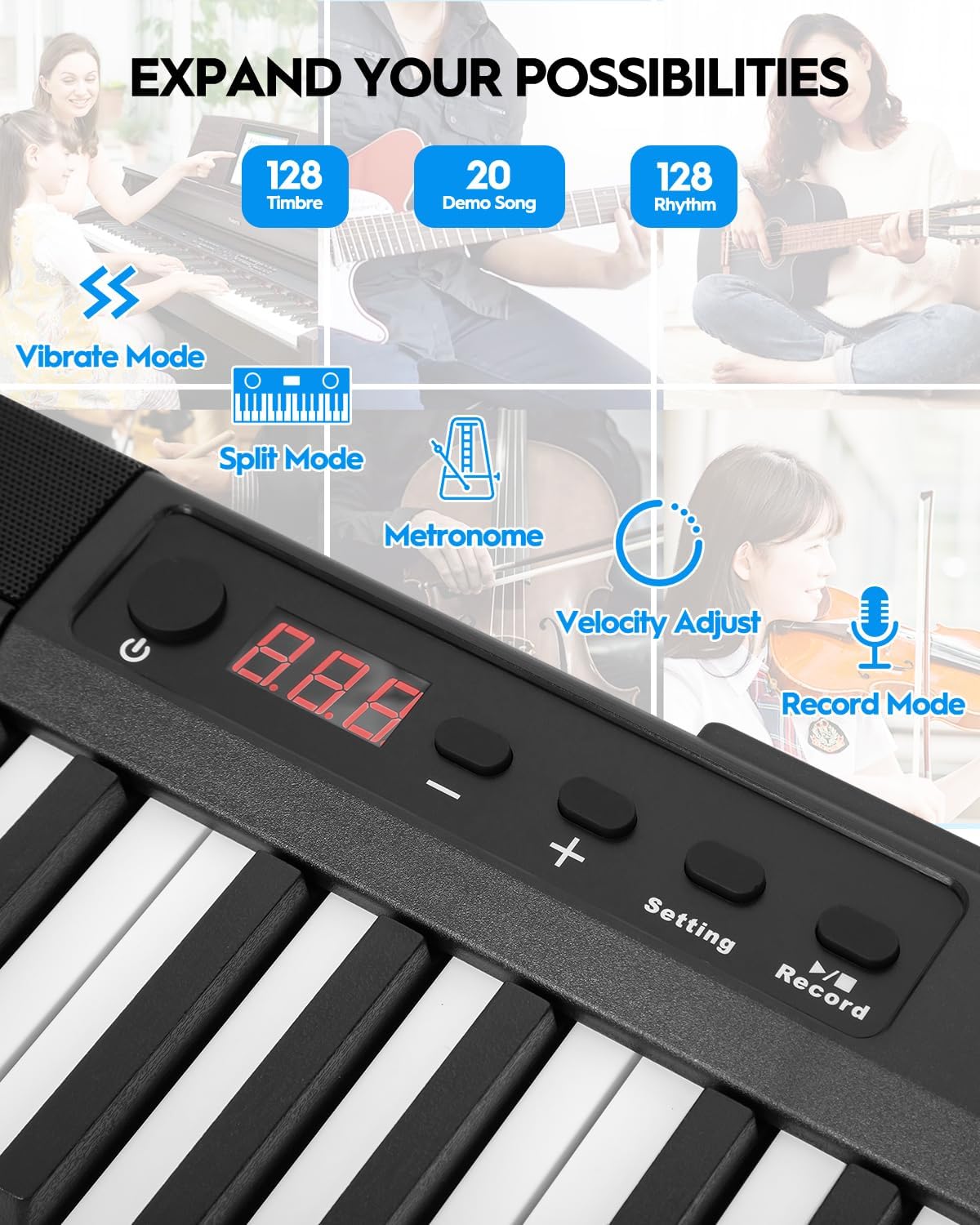
Figure 8: Control panel with various function buttons.
4.4 קאַנעקטיוויטי
- כעדפאָון דזשאַק (3.5 מם): פֿאַר פּריוואַטער פּראַקטיק.
- Audio Input (3.5mm): פֿאַרבינדן עקסטערנע אַודיאָ קוועלער.
- MIDI Interface (via USB port): Connect to external software for learning and practice.
- Wireless Connect (GZUT-MUSIC): For wireless connectivity options.

פיגורע 9: דעטאַילעד view of the control panel and connectivity ports.
4.5 פּראָדוקט ווידעאָס
Video 1: STRICH SEP-80 Velocity-Sensitive Piano Keyboard 88 Keys DEMO. This video demonstrates the velocity-sensitive keys and overall sound of the SEP-80 digital piano.
Video 2: STRICH SEP-80 Rechargeable 88-Keys Portable Electric Piano. This video highlights the portability and rechargeable battery feature of the SEP-80.
Video 3: Sound Sample | SEP-80 Comparison of lively and gentle rhythms. This video provides audio samples demonstrating different rhythms and tones.
Video 4: SEP-80 Keyboard Playing Audition. This video showcases a performance on the SEP-80 keyboard.
5. וישאַלט
- רייניקונג: Use a soft, dry cloth to clean the surface of the piano. Do not use abrasive cleaners or solvents.
- סטאָרידזש: Store the piano in a dry, cool place away from direct sunlight and extreme temperatures.
- באַטערי זאָרגן: פֿאַר אַן אָפּטימאַלן באַטעריע לעבן, פֿאַרמייַדט צו גאָר אויסלאָדן די באַטעריע אָפט. לאָדט עס רעגולער אויף, אפילו אויב עס איז נישט אין באַנוץ פֿאַר לאַנגע פּעריאָדן.
6. טראָובלעשאָאָטינג
- קיין קול: Check if the volume is turned up. Ensure headphones are not plugged in if you intend to use the built-in speakers. Verify power connection or battery charge.
- קנעפּלעך רעאַגירן נישט: זיכער מאַכן אַז די פּיאַנע איז אָנגעצונדן. אויב ספּעציפֿישע קלאַוויאַטורן רעאַגירן נישט, קאָנטאַקטירט קונה שטיצע.
- קאַנעקטיוויטי ישוז: For MIDI via USB, ensure the correct drivers are installed on your computer. For wireless connection, ensure Bluetooth is enabled on your device and select "GZUT-MUSIC".
7. ספּעסאַפאַקיישאַנז
| שטריך | דעטאַל |
|---|---|
| סאָרט | שטריקן |
| מאָדעל נאָמען | SEP-80 |
| נומער פון קיז | 88 |
| שליסל טיפּ | Touch-Sensitive, Reduced-Weighted |
| קלאַנגען/טאָנען | 128 |
| רהיטמס | 128 |
| דעמאָ סאָנגס | 20 |
| קאַנעקטיוויטי | 3.5mm Headphone Jack, 3.5mm Audio Input, USB (MIDI), Wireless Connect (GZUT-MUSIC) |
| מאַכט מקור | Corded Electric (USB Adapter), Built-in Rechargeable Battery |
| באַטערי לעבן | Up to 5 hours (built-in battery) |
| פּראָדוקט דימענשאַנז | 14.76"ד רענטגענ 53.74"וו רענטגענ 5.31"ה |
| פּונקט וואָג | 19.56 פונט |
| ספּעציעלע פֿעיִקייטן | Built-In Speaker, Portable, Recording, Touch-Sensitive Keys |

Figure 10: Dimensions of the STRICH SEP-80 Digital Piano.
8. וואָראַנטי און שטיצן
The STRICH SEP-80 Digital Piano comes with a standard manufacturer's warranty. For detailed warranty information, product support, or service inquiries, please refer to the contact information provided in your product packaging or visit the official STRICH webפּלאַץ.