
1. הקדמה
This manual provides essential information for the installation, operation, and maintenance of your Phillips MX7053 Digital Deadbolt PCD-360. Please read these instructions carefully before installation and use to ensure proper function and longevity of the product.
The Phillips MX7053 Digital Deadbolt is designed for interior wood or metal doors, offering secure keyless entry via a numeric keypad or traditional key access. It features a light indicator for status updates and supports up to 50 unique user codes.
2. פּראָדוקט פֿעיִקייטן
- גרינג ינסטאַלירונג: Designed for straightforward installation using basic tools.
- ווערסאַטאַל מאַונטינג: Features an interior mounting plate that can be screwed or welded.
- נומעריק קיפּאַד: Exterior keypad supports 4 to 10-digit codes for up to 50 users.
- סטאַטוס ינדיקאַטאָר: Integrated light indicator shows lock/unlock status and alerts for incorrect code entries.
- Dual Access: Keyless entry via keypad or traditional high-security key access.
- באַטערי אַפּערייטאַד: Requires 4 AA batteries (not included), eliminating the need for electrical wiring.
3. פּעקל אינהאַלט
באַשטעטיקן אַז אַלע קאָמפּאָנענטן זענען פאַראַן איידער איר הייבט אָן די אינסטאַלאַציע:
- Phillips MX7053 Digital Deadbolt (Exterior Keypad Unit)
- Interior Thumb Turn Unit
- מאַונטינג פּלאַטע
- High-Security Keys (Quantity may vary)
- אינסטאַלאַציע שרויפן און האַרדווער
- אינסטרוקציע מאַנואַל (דעם דאָקומענט)

בילד 3.1: Packaging of the Phillips MX7053 Digital Deadbolt, illustrating the included components and highlighting the 1-year warranty.
4. ספּעסאַפאַקיישאַנז
| פאַבריקאַנט | פיליפּס |
| מאָדעל נומער | MX7053 |
| קאָליר | שוואַרץ |
| ענדיקן | בראַשט |
| מאַטעריאַל | מעטאַל, פּלאַסטיק |
| לאַק טיפּ | דעאַדבאָלט |
| ספּעציעלע פֿעיִקייטן | Touch keypad, Keyless entry |
| מאַכט מקור | 4 אַאַ באַטעריז (ניט אַרייַנגערעכנט) |
| וואָג | 1.12 קילאָגראַמס |
| דימענסיעס (L X W X H) | 21.01 X 11 X 23.01 סענטימעטער |
5. זיכערקייַט אינפֿאָרמאַציע
- Do not expose the lock to extreme temperatures or direct moisture.
- ניצט נאָר ספּעציפֿישע AA אַלקאַליין באַטעריעס. מישט נישט אַלטע און נייע באַטעריעס אָדער פֿאַרשידענע טיפּן באַטעריעס.
- האַלט די שליסלען אין אַ זיכער אָרט אַוועק פון די שלאָס.
- Regularly check battery levels and replace batteries when indicated to prevent lock-out.
- פֿאַרמײַדן די נוצן פֿון אַברייסיוו רייניגער אָדער סאָלווענטן אויף דער ייבערפֿלאַך פֿונעם שלאָס.
6. ינסטאַלירונג
The Phillips MX7053 Digital Deadbolt is designed for surface-mount installation on interior wood or metal doors. It is compatible with both left and right-opening doors.
6.1 מכשירים פארלאנגט
- שרויפנציהער (פיליפּס קאָפּ רעקאָמענדירט)
- Drill (if new holes are required)
- מעסטן טייפּ אָדער ווירע
- בלייַער
6.2 ינסטאַללאַטיאָן סטעפּס
- צוגרייטן די טיר: Ensure the door is clean and free of obstructions. If replacing an existing lock, remove it.
- אינסטאַלירן די דעדבאָלט לאַטש: Insert the deadbolt latch into the door edge. Ensure the latch is oriented correctly for your door's handing (left or right).
- Mount the Exterior Keypad: Position the exterior keypad unit on the outside of the door, aligning it with the deadbolt latch.
- אינסטאַלירן די אינעווייניקסטע מאַונטינג פּלאַטע: On the inside of the door, attach the interior mounting plate. Secure it with the provided screws. This plate can be screwed directly or welded for added security.
- Connect the Interior Unit: Connect the cable from the exterior keypad to the interior thumb turn unit. Carefully tuck any excess cable into the door cavity.
- Secure the Interior Unit: Attach the interior thumb turn unit to the mounting plate using the remaining screws. Ensure it is flush against the door.
- טעסט אָפּעראַציע: Before closing the door, test the deadbolt's operation using both the thumb turn and the key. Ensure the deadbolt extends and retracts smoothly.
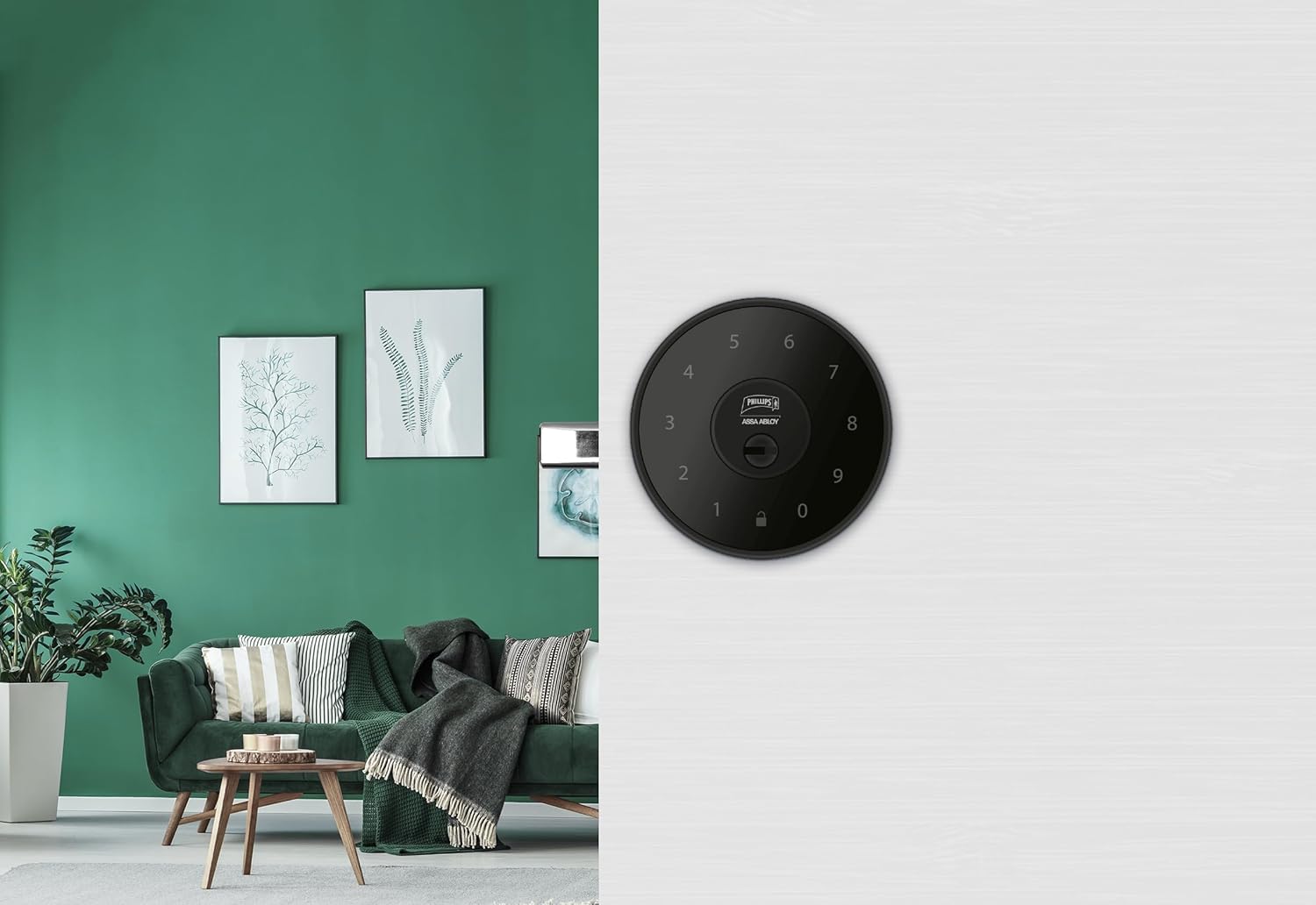
בילד 6.1: An installed Phillips MX7053 Digital Deadbolt, showcasing its exterior keypad on a door.

בילד 6.2: נאָענט־אַרויף פֿראָנט view of the exterior keypad, highlighting the numeric interface and keyhole.
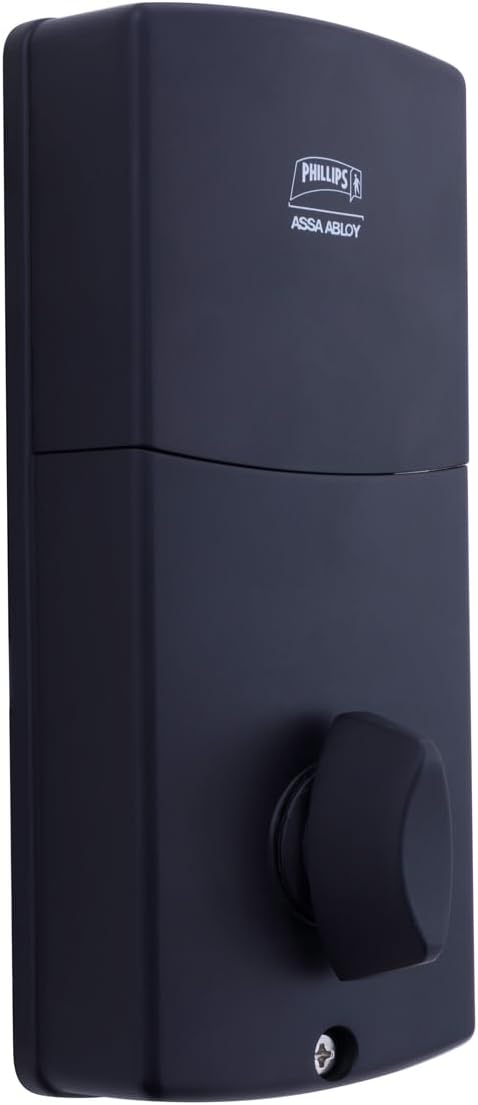
בילד 6.3: דערציען view of the interior unit, which houses the battery compartment and the thumb turn for manual locking/unlocking.
7. באַטערי ייַנמאָנטירונג און פאַרבייַט
The Phillips MX7053 Digital Deadbolt requires 4 AA alkaline batteries for operation. Batteries are not included.
- צוטריט באַטעריע אָפּטייל: Locate the battery cover on the interior thumb turn unit. Slide or unclip the cover to open the compartment.
- אַרייַנלייגן באַטעריז: אַרײַנשטעלן 4 נײַע AA אַלקאַליין באַטעריעס, און זיכער מאַכן אַז די פּאָלאַריטעט (+/-) איז ריכטיק ווי אָנגעוויזן אין דעם אָפּטייל.
- פֿאַרמאַכן אָפּטייל: Replace the battery cover, ensuring it is securely closed.
- טעסט: After installing batteries, the lock should emit a beep and the keypad lights may illuminate briefly, indicating power.
באַמערקונג: Replace all four batteries simultaneously. Do not mix old and new batteries or different battery types. Low battery indication will typically be a series of beeps or a specific light pattern when operating the lock.
8. אָפּעראַציע
8.1 אַנלאַקינג די טיר
- ניצן אַ קאָד: Enter your 4 to 10-digit user code on the exterior keypad. The light indicator will confirm successful entry, and the deadbolt will retract.
- ניצן דעם שליסל: Insert the high-security key into the keyhole on the exterior keypad and turn it to unlock the deadbolt.
- פֿון אינעווייניק: Turn the thumb turn on the interior unit to retract the deadbolt.
8.2 לאַקינג די טיר
- פֿון אַרויס: Press any key on the keypad or simply wait for the auto-lock feature (if enabled) to engage the deadbolt.
- ניצן דעם שליסל: Insert the high-security key into the keyhole on the exterior keypad and turn it to extend the deadbolt.
- פֿון אינעווייניק: Turn the thumb turn on the interior unit to extend the deadbolt.
9. פּראָגראַמירן באַניצער קאָודז
The lock supports up to 50 unique user codes, each 4 to 10 digits long. Refer to the specific programming instructions included with your lock for detailed steps on adding, deleting, or modifying user codes. Generally, this involves entering a master code followed by a sequence of commands and the desired user code.
וויכטיק: Keep your master code confidential and do not share it. It is essential for managing all other user codes.
10. וישאַלט
- רייניקונג: Wipe the lock's surface with a soft, damp שטאָף. דו זאלסט נישט נוצן האַרב קעמיקאַלז אָדער אַברייסיוו קלינערז.
- באַטערי טשעק: טוישט באַלד די באַטעריעס ווען דער אינדיקאַטאָר פֿאַר נידעריקע באַטעריע דערשיינט.
- מעכאנישע קאָנטראָל: Periodically check that all screws are tight and the lock operates smoothly. Lubricate the deadbolt mechanism with a silicone-based lubricant if necessary.
11. טראָובלעשאָאָטינג
- שלאָס ענטפֿערט נישט: Check battery installation and replace batteries if necessary. Ensure the keypad is clean and free of debris.
- Deadbolt Not Extending/Retracting: Verify that the door frame strike plate is properly aligned with the deadbolt. Check for any obstructions in the door jamb.
- אומרעכטע קאָד איינגאַבע: If the light indicator flashes or beeps after entering a code, re-enter the code carefully. Ensure you are using a valid, programmed user code.
- קלאַוויאַטור צינדט זיך נישט אָן: This may indicate very low batteries or a power issue. Replace batteries.
12. וואָראַנטי און שטיצן
The Phillips MX7053 Digital Deadbolt PCD-360 comes with a 1 יאָר וואָראַנטי פֿון דעם קויפֿדאַטום, וואָס באַדעקט פֿאַבריקאַציע־דעפֿעקטן. ביטע באַהאַלטן אייער קויפֿבאַווײַז פֿאַר וואָראַנטי־קליימז.
For technical assistance, troubleshooting beyond this manual, or warranty inquiries, please contact Phillips customer support. Refer to the contact information provided on the product packaging or Phillips' official webפּלאַץ.
Additional protection plans may be available from third-party providers for extended coverage.