
הקדמה
Thank you for choosing the Diyeeni Portable Vintage Radio Speaker. This device combines a classic retro design with modern functionality, offering AM/FM/SW radio reception, Bluetooth connectivity, and multiple playback modes. Its portable and lightweight design makes it ideal for both indoor and outdoor use. Please read this manual carefully to ensure proper operation and to maximize your enjoyment of this product.
זיכערקייַט אינפֿאָרמאַציע
- שטעלט נישט אויס דעם אפאראט צו רעגן, פייכטקייט, אדער עקסטרעמע טעמפעראטורן.
- ויסמיידן דראַפּינג אָדער אונטערטעניק די מיטל צו שטאַרק ימפּאַקץ.
- נעמט נישט אויס דעם אפאראט אדער פרובירט נישט צו פאררעכטן אליין. לאָזט איבער אלע סערוויסעס צו קוואַליפֿיצירטע פּערסאָנעל.
- האַלטן די מיטל אַוועק פון שטאַרק מאַגנעטיק פעלדער.
- Use only the provided charging cable and battery, or compatible replacements.
- זיכער מאַכן אַז די ווענטילאַציע איז געהעריק ווען איר אַרבעט מיט דעם אַפּאַראַט.
פּעקל אינהאַלט
ביטע טשעק די פּאַקעט פֿאַר די פאלגענדע זאכן:
- 1 x Portable Vintage Radio Speaker (Model RXBT628)
- 1 x Matching Rechargeable Battery
- 1 x וסב טשאַרדזשינג קאַבלע
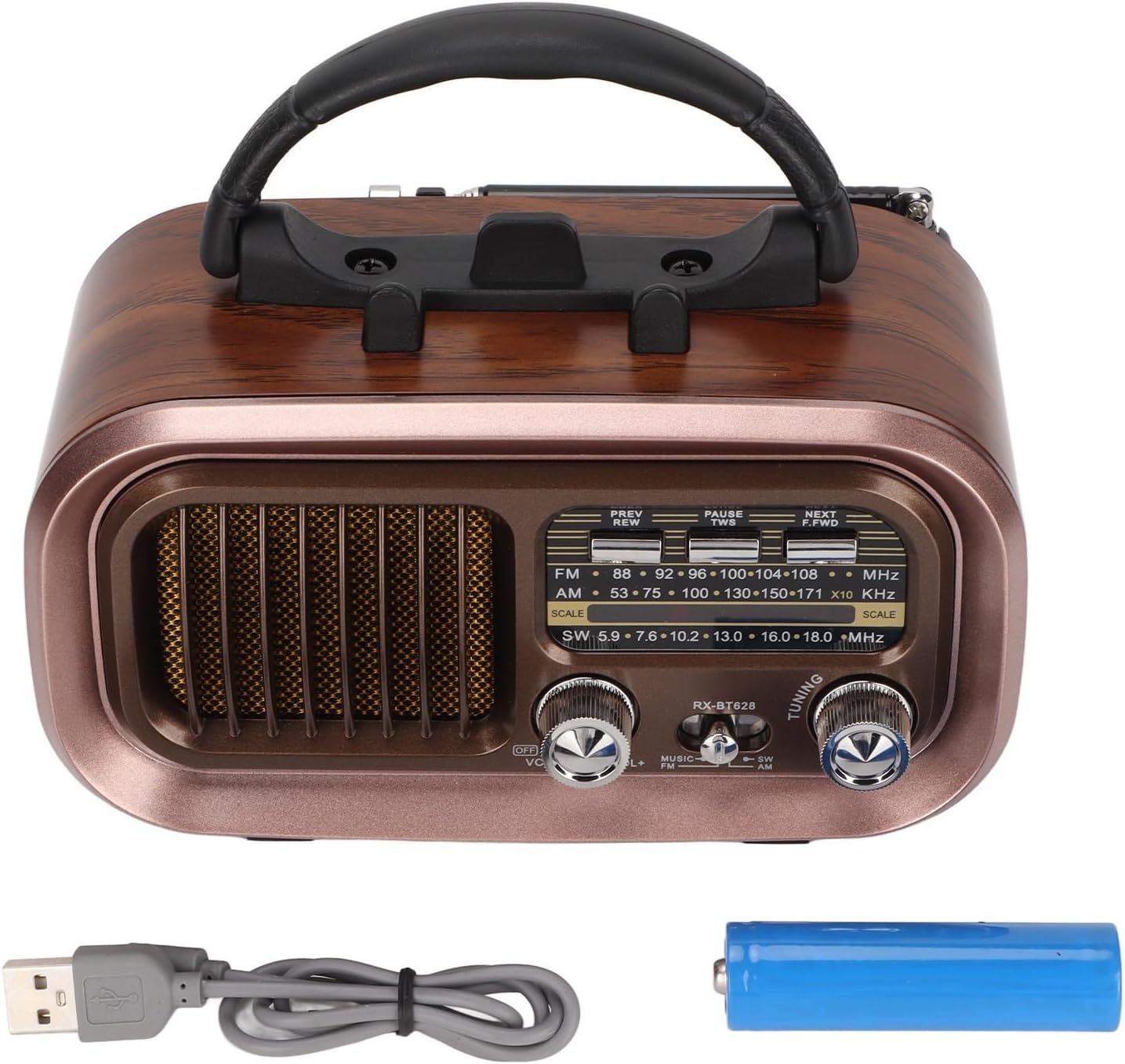
Image: The Diyeeni Portable Vintage Radio Speaker shown with its included rechargeable battery and USB charging cable.
Product Layout and Controls

בילד: פראָנט view of the radio speaker, highlighting the main controls and display area.
- אַנטענע: Extendable telescopic antenna for improved radio reception.
- שעפּן: אינטעגרירטע הענטל פֿאַר גרינג פּאָרטאַביליטי.
- PREV/REW Button: Short press for previous track (Bluetooth/USB/TF), long press for rewind.
- PAUSE/TWS Button: Play/Pause (Bluetooth/USB/TF). Long press for TWS pairing (Bluetooth mode).
- NEXT/F.FWD Button: Short press for next track (Bluetooth/USB/TF), long press for fast forward.
- אָפטקייַט ווייַז: Analog display for radio frequencies.
- OFF/VOL Knob: Power On/Off and Volume control. Rotate to adjust volume.
- MUSIC/SW/AM/FM Switch: Selects between Bluetooth/USB/TF (MUSIC) mode and radio bands (SW, AM, FM).
- טונינג קנעפּל: Rotate to tune into radio stations.

Image: Side panel of the radio speaker, showing the USB port, TF card slot, power indicator, charge indicator, and DC 5V input port.
- וסב פּאָרט: פֿאַר USB פלאַש דרייוו ווידערשפּיל.
- טף קאַרד שפּעלטל: For TF (Micro SD) card playback.
- POWER ינדיקאַטאָר: לייץ אַרויף ווען די מיטל איז פּאַוערד אויף.
- CHARGE Indicator: לייכט זיך אָן בעתן אויפלאָדן.
- DC 5V IN Port: מיקראָ USB פּאָרט פֿאַר טשאַרדזשינג די אינעווייניקסטע באַטאַרייע.
סעטאַפּ
1. באַטאַרייע ייַנמאָנטירונג
The radio speaker uses a rechargeable battery. Before first use, ensure the battery is correctly installed.
- געפינען די באַטאַרייע אָפּטייל אויף די צוריק פון די אַפּאַראַט.
- רוק די באַטאַרייע אָפּטייל דעקן עפענען.
- Insert the provided rechargeable battery, ensuring the polarity (+/-) matches the diagram inside the compartment.
- פאַרמאַכן די באַטאַרייע אָפּטייל דעקן סיקיורלי.

בילד: הינטערשטע view of the radio speaker, showing the battery compartment cover and specifications label.
2. טשאַרדזשינג די באַטערי
Before initial use, fully charge the battery for optimal performance.
- Connect the small end of the USB charging cable to the DC 5V IN port on the side of the radio.
- פֿאַרבינדט דעם גרעסערן עק פֿונעם USB טשאַרדזשינג קאַבל צו אַ נאָרמאַלן USB מאַכט אַדאַפּטער (נישט אַרייַנגערעכנט) אָדער אַ קאָמפּיוטער USB פּאָרט.
- The CHARGE indicator light will illuminate, indicating that the battery is charging.
- Once fully charged, the CHARGE indicator light may change color or turn off (refer to specific model behavior). Disconnect the charging cable.
אַפּערייטינג ינסטראַקשאַנז
1. מאַכט אויף/אויס און באַנד קאָנטראָל
- To power on the device, rotate the OFF/VOL knob clockwise until you hear a click and the POWER indicator lights up.
- פאָרזעצן דרייען די OFF/VOL knob clockwise to increase the volume, and counter-clockwise to decrease it.
- צו אויסלעשן, דריי די OFF/VOL knob counter-clockwise until you hear a click and the POWER indicator turns off.
2. מאָדע סעלעקציע
ניצן די MUSIC/SW/AM/FM switch to select the desired operating mode:
- עפעם: פֿאַר FM ראַדיאָ אָפּנאַם.
- AM: For AM radio reception.
- SW: For Shortwave radio reception.
- מוזיק: For Bluetooth, USB, or TF card playback. The device will automatically detect and switch to the available source (Bluetooth, then USB, then TF).
3. Radio Operation (AM/FM/SW)
- Extend the telescopic antenna for better reception, especially for FM and SW bands.
- שטעלן די MUSIC/SW/AM/FM switch to the desired radio band (FM, AM, or SW).
- סלאָולי דרייען די טונינג knob to scan for radio stations. The frequency display will indicate the approximate frequency.
- Adjust the antenna position for optimal signal clarity.
4. בלועטאָאָטה פּערינג
- שטעלן די MUSIC/SW/AM/FM באַשטימען צו מוזיק mode. The device will enter Bluetooth pairing mode, indicated by an audible prompt.
- אויף אייער מאָבילער מיטל (סמאַרטפאָן, טאַבלעט, אאז"וו), אַקטיווירט בלועטוט און זוכט פֿאַר פֿאַראַן דעוויסעס.
- Select "RXBT628" (or similar name) from the list of found devices to pair.
- Once paired, you will hear a confirmation sound, and you can now play audio from your device through the speaker.
- ניצן די PREV/REW, PAUSE / TWS, און NEXT/F.FWD קנעפּלעך צו קאָנטראָלירן פּלייבאַק.
5. USB/TF קאַרטל פּלייבאַק
- Ensure your USB flash drive or TF (Micro SD) card contains audio fileאין MP3, WMA אָדער WAV פֿאָרמאַט.
- שטעלן די MUSIC/SW/AM/FM באַשטימען צו מוזיק מאָדע.
- Insert the USB flash drive into the USB port or the TF card into the TF card slot. The device will automatically detect and begin playing audio.
- ניצן די PREV/REW, PAUSE / TWS, און NEXT/F.FWD קנעפּלעך צו קאָנטראָלירן פּלייבאַק.
וישאַלט
- רייניקונג: ווישט אָפּ די אויסערלעכע זייט פון דעם אַפּאַראַט מיט אַ ווייכן, טרוקענעם שטאָף. ניצט נישט קיין שרײַבנדיקע רייניגערס אדער סאָלווענטן.
- סטאָרידזש: ווען נישט אין באַנוץ פֿאַר לענגערע פּעריאָדן, זאָל מען דאָס אַפּאַראַט אויפֿהיטן אין אַ קילן, טרוקענעם אָרט, אַוועק פֿון דירעקטער זון און עקסטרעמע טעמפּעראַטורן.
- באַטערי זאָרגן: If the device will not be used for a long time, it is recommended to charge the battery periodically to maintain its lifespan.
טראָובלעשאָאָטינג
| פּראָבלעם | מעגלעך סיבה | לייזונג |
|---|---|---|
| קיין מאַכט | די באַטעריע איז אויסגעשעפּט אָדער נישט ריכטיק אינסטאַלירט. | לאָדט די באַטעריע אויף. מאַכט זיכער אַז די באַטעריע איז אַרײַנגעשטעלט מיט דער ריכטיקער פּאָלאַריטעט. |
| נעבעך ראַדיאָ אָפּטראָג | אַנטענע נישט אויסגעשטרעקט, שוואַך סיגנאַל, אָדער שטערונג. | Fully extend the telescopic antenna. Adjust the antenna position. Try moving to a different location. |
| בלועטאָאָטה איז נישט פּערינג | Device not in pairing mode, or too far from the speaker. | Ensure the speaker is in MUSIC mode. Make sure Bluetooth is enabled on your mobile device. Keep devices within 10 meters (33 feet). |
| USB/TF קאַרטל שפּילט נישט | אומרעכט file format, card not inserted properly, or damaged card. | פאַרזיכערן אַודיאָ files are MP3, WMA, or WAV. Reinsert the USB drive/TF card. Try a different USB drive/TF card. |
| קיין געזונט | Volume too low, or device muted. | Increase the volume using the OFF/VOL knob. Check if the connected Bluetooth device's volume is also up. |
ספּעסאַפאַקיישאַנז
| שטריך | באַשרייַבונג |
|---|---|
| מאָדעל נומער | RXBT628 |
| סאָרט | דייעני |
| קאָליר | Black (Retro Style) |
| קאַנעקטיוויטי טעכנאָלאָגיע | בלועטאָאָטה |
| טונער טעכנאָלאָגיע | AM, FM, SW (3-Band) |
| מאַכט מקור | באַטאַרייע פּאַוערד (קריקאָנלאָדלעך) |
| מאַטעריאַל | פּלאַסטיק |
| ייַזנוואַרג צובינד | וסב |
| קאַמפּאַטאַבאַל דעוויסעס | סמאַרטפאָון, טאַבלעט, לאַפּטאָפּ |
| פּלייַבאַקק מאָדעס | Bluetooth, USB, TF Card (MP3, WMA, WAV formats) |
| ספּעציעלע פֿעיִקייטן | Lightweight, Portable, External Antenna |
וואָראַנטי און שטיצן
This product comes with a standard manufacturer's warranty. For specific warranty details, please refer to the documentation provided with your purchase or contact Diyeeni customer support. If you encounter any issues not covered in this manual, please reach out to the retailer or manufacturer for assistance.
For further support, please visit the official Diyeeni store or contact their customer service channels.