
הקדמה
This manual provides detailed instructions for the installation, operation, and maintenance of your DB Drive WDX200.4 4-Channel Speaker Ampליפיער. ביטע ליינט דעם מאַנואַל גרינטלעך איידער איר פּרוּווט צו ינסטאַלירן אָדער אַפּערירן דעם amplifier to ensure proper function and safety. The WDX200.4 is a versatile 4-channel amplifier designed to deliver high-quality audio performance for various applications.
סעטאַפּ און ינסטאַלירונג
געהעריקע אינסטאַלאַציע איז קריטיש פֿאַר אָפּטימאַלער פאָרשטעלונג און לאַנגלעבעדיקייט פון אייער ampעס איז רעקאָמענדירט אַז די אינסטאַלאַציע זאָל דורכגעפירט ווערן דורך אַ קוואַליפֿיצירטן פאַכמאַן.
מאַונטינג
די amplifier features a surface mount design. Ensure the mounting location provides adequate ventilation to prevent overheating. Avoid mounting in direct sunlight or near heat sources.
מאַכט קאַנעקשאַנז
The WDX200.4 operates within a voltage range of 9V to 16V DC. Connect the power and ground cables securely to the robust power and output connectors. Ensure proper gauge wiring is used for power and ground connections to handle the amplifier's current draw.
אַרייַנשרייַב קאַנעקשאַנז
די amplifier supports both RCA (low-level) and high-level inputs. This allows for compatibility with both aftermarket and factory head units without the need for additional adapters.
- RCA אַרייַנשרייַב: Use RCA cables to connect your head unit's pre-amp אַוטפּוץ צו די ampליפיער ס RCA ינפּוץ.
- הויך-מדרגה אַרייַנשרייַב: If your head unit does not have RCA outputs, use the high-level input. This input typically connects directly to your head unit's speaker outputs.
רעדנער קאַנעקשאַנז
The WDX200.4 is a 4-channel amplifier, providing 200 Watts RMS per channel at 2 ohms. It also supports bridging, allowing for 2 channels of 400 Watts RMS at 4 ohms. Connect your speakers to the appropriate output terminals, ensuring correct polarity.

בילד: אויבן און אונטן view of the DB Drive WDX200.4 4-Channel Speaker Amplifier, illustrating the various input and output terminals for connection.
קראָססאָווער אַדדזשוסטמענץ
די amplifier features integrated crossovers with High-Pass Filter (HPF), Low-Pass Filter (LPF), and Full-Range adjustments. These allow you to tailor the frequency response for your specific speaker setup (subwoofers, woofers, midranges, tweeters).
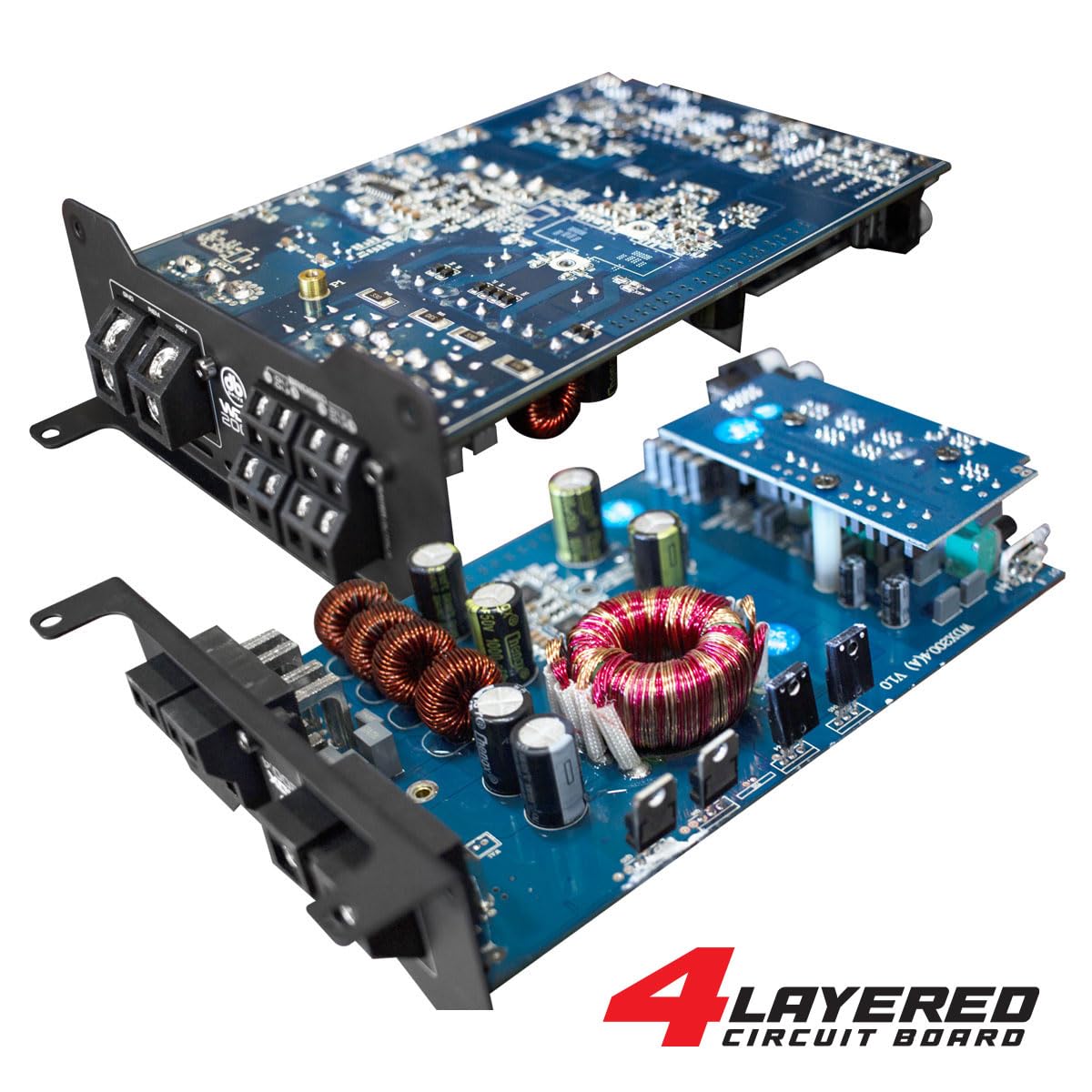
בילד: אן אינערליכע view of the DB Drive WDX200.4 amplifier, highlighting its 4-layered circuit board design for enhanced performance and durability.
אַפּערייטינג ינסטראַקשאַנז
אַמאָל אינסטאַלירן, די amplifier requires minimal user interaction for daily operation. The primary adjustments are for input level and crossover settings.
מדרגה אַדזשאַסטמאַנט
Adjust the input level controls to match the output voltage of your head unit. Start with the amplifier's level control at minimum and slowly increase it until the desired volume is achieved without distortion.
קראָסאָוווער סעטטינגס
- HPF (הויך-פּאַס פילטער): Use this setting for speakers that should only reproduce high frequencies (e.g., tweeters, mid-range speakers). This filters out low bass frequencies.
- LPF (נידעריק-פּאַס פילטער): Use this setting for speakers that should only reproduce low frequencies (e.g., subwoofers). This filters out high frequencies.
- FULL (Full-Range): Use this setting for speakers that should reproduce the entire frequency spectrum.
Adjust these settings according to the specifications of your speakers and your desired audio output.
וישאַלט
To ensure the longevity and optimal performance of your DB Drive WDX200.4 ampליפיער, פאָלגט די וישאַלט גיידליינז:
- רייניקונג: רייניקן פּעריִאָדיש די אויסערלעכע זייט פון די amplifier with a soft, dry cloth. Do not use harsh chemicals or abrasive cleaners. Ensure all ventilation openings are free from dust and debris.
- פֿאַרבינדונגען: Regularly check all power, ground, and speaker connections to ensure they are secure and free from corrosion. Loose connections can lead to poor performance or damage.
- ווענטילאַטיאָן: פאַרזיכערן די amplifier always has adequate airflow around it. Blocked vents can lead to overheating and thermal shutdown.
טראָובלעשאָאָטינג
אויב איר דערפאַרונג ישוז מיט דיין ampליפיער, זעט די פאלגענדע אלגעמיינע פראבלעמען און לייזונגען:
- קיין מאַכט: Check the main fuse, power and ground connections, and the remote turn-on wire. Ensure the vehicle's battery has sufficient charge.
- קיין קול: Verify all input and output connections. Check speaker wires for shorts or open circuits. Ensure the head unit is functioning correctly and sending an audio signal. Check crossover settings.
- פאַרקרימט סאָונד: Reduce the input level (gain) on the amplifier. Check for proper crossover settings. Ensure speakers are not overdriven or damaged.
- Ampאיבערהיצונג פון ליפיער: ענשור טויגן ווענאַליישאַן אַרום די amplifier. Check speaker impedance to ensure it matches the amplifier's capabilities. Reduce the volume or gain settings.
- שוץ מאָדע: אויב די amplifier enters protection mode (indicated by a specific LED), it usually signifies an issue such as overheating, a short circuit in the speaker wiring, or an impedance mismatch. Disconnect power, inspect all connections and speaker wiring, and allow the amplifier to cool before reconnecting.
If problems persist after attempting these solutions, consult a qualified car audio technician.
ספּעסאַפאַקיישאַנז
| שטריך | באַשרייַבונג |
|---|---|
| מאָדעל נומער | WDX200.4 |
| סאָרט | די בי דרייוו |
| נומער פון טשאַנאַלז | 4 |
| רעזולטאַט מאַכט (סטערעאָ) | 200 Watts RMS per channel at 2 Ohms |
| Output Power (Bridged) | 400 Watts RMS per channel at 4 Ohms (2 channels) |
| Voltage | 9 - 16 Volts (DC) |
| מאַונטינג טיפּ | ייבערפלאַך בארג |
| קראָסאָוווער | Integrated HPF, LPF, Full-Range |
| ינפּוץ | RCA (Low-Level), High-Level with Automatic Turn-On |
| Certification | פקק |
וואָראַנטי און שטיצן
For warranty information and technical support, please refer to the documentation included with your purchase or visit the official DB Drive webזייטל. האַלט דיין קויפן באַווייַז פֿאַר קיין וואָראַנטי קליימז.