
1. הקדמה
Thank you for choosing the SILENTWARE Air 1000 Black ATX Midi Tower PC Case. This manual provides essential information for the proper installation, operation, and maintenance of your new PC case. Please read this manual thoroughly before beginning the assembly process to ensure a smooth and successful build.
2. זיכערקייַט אינפֿאָרמאַציע
- Always disconnect the power supply from the wall outlet before installing or removing any components inside the PC case.
- Handle components with care to avoid damage from electrostatic discharge (ESD). Consider using an anti-static wrist strap.
- Be cautious of sharp edges inside the case.
- פרובירט נישט צו מאדיפיצירן דעם קעיס אדער זיינע קאמפאנענטן, ווייל דאס קען בטל מאכן אייער גאראנטיע און שאפן זיכערהייט ריזיקעס.
- Keep the case away from water, moisture, and extreme temperatures.
3. פּעקל אינהאַלט
ביטע באַשטעטיקן אַז אַלע זאכן זענען פאַראַן אין דיין פּעקל:
- SILENTWARE Air 1000 Black ATX Midi Tower PC Case
- Pre-installed 4x 120mm ARGB Fans
- Accessory box (screws, cable ties, standoffs, etc.)
- באַניצער מאַנואַל (דעם דאָקומענט)
4. פּראָדוקט איבערview
The SILENTWARE Air 1000 is an ATX Midi Tower PC case designed for optimal airflow and component compatibility. It features a mesh front panel for maximum ventilation and a tempered glass side panel to showcase your build.


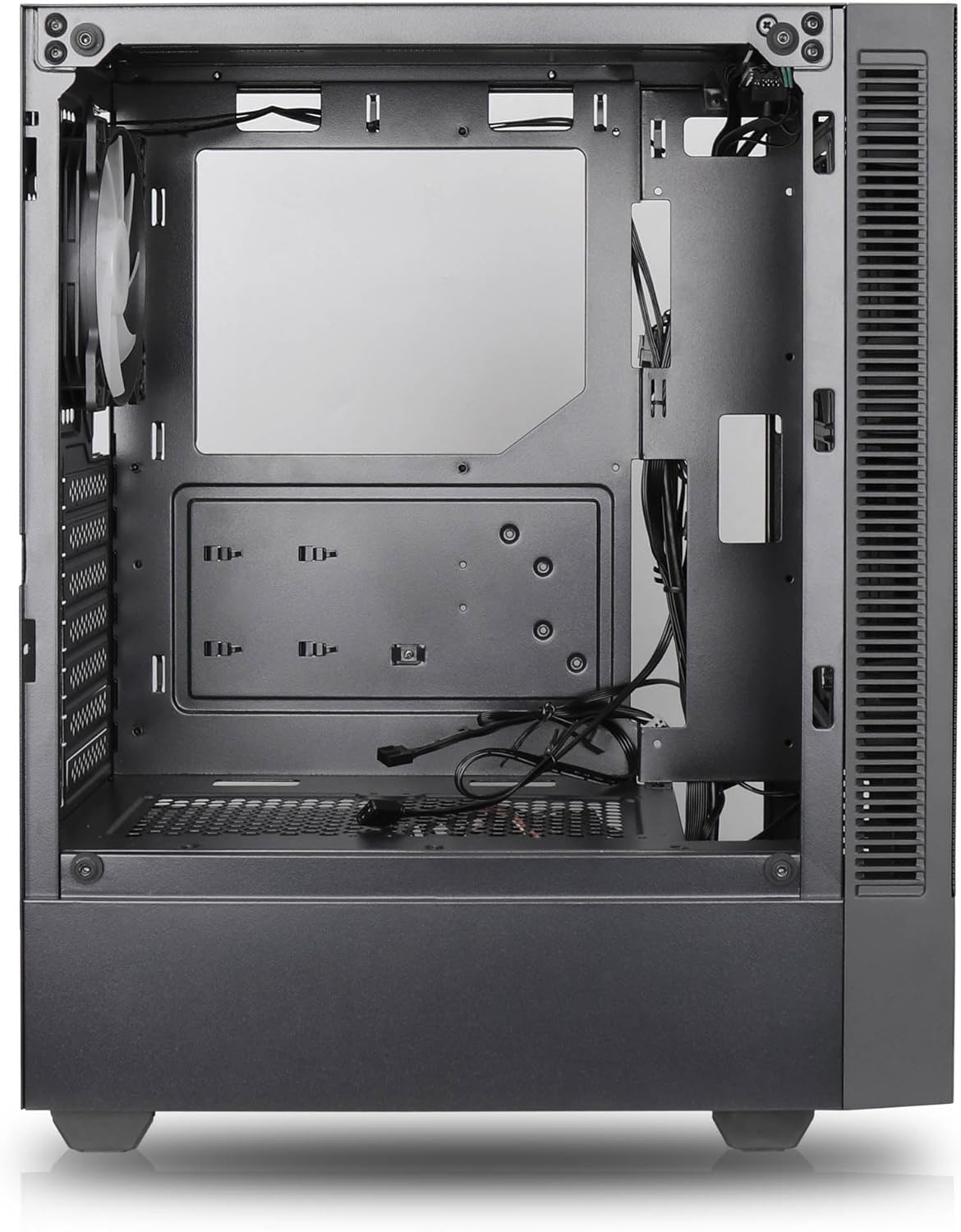

שליסל פֿעיִקייטן:
- מאַקסימום לופט לויפן: Large mesh front panel and four pre-installed 140mm A-RGB fans with hydraulic bearings ensure excellent ventilation.
- Easy PC Building: Thoughtful design with daisy-chain connections simplifies installation, eliminating the need for additional adapters or controllers.
- הויך-קוואַליטעט פּלאַן: Genuine tempered glass side panel showcases installed components and provides a minimalist, premium aesthetic.
- Flexible Lighting and Control: 3-pin A-RGB fans and 4-pin fan control allow for impressive lighting effects and easy adjustment of fan speed and curves directly from the motherboard.
- Powerful Component Compatibility: Supports GPUs up to 400mm long, radiators up to 360mm (front and top) and 140mm (rear), and space for up to 4 fans.
- Compact Case with Ampדי פּלאַץ: Midi tower format accommodates E-ATX, ATX, mATX, and ITX motherboards, up to two 2.5" SSDs, two 3.5" HDDs, and ATX power supplies.
5. ינסטאַללאַטיאָן גייד
Follow these steps for component installation. Refer to your individual component manuals for specific instructions.
5.1. צוגרייטן דעם פאַל
- שטעלט דעם קעסטל אויף א פלאַכער, סטאַבילער ייבערפלאַך.
- Carefully remove the tempered glass side panel by unscrewing the thumb screws and gently pulling it away. Set it aside on a soft, non-abrasive surface.
- Remove the solid right side panel by unscrewing the thumb screws and sliding it backward.
5.2. מאָטהערבאָאַרד ינסטאַללאַטיאָן
- אינסטאלירט דעם I/O שילד אין דער הינטערשטער עפענונג פונעם קעיס.
- Ensure the correct standoffs are installed for your motherboard form factor (E-ATX, ATX, mATX, ITX). Adjust or add standoffs as needed.
- לייגט פֿאָרזיכטיק אייער מאַדערבאָרד אויף די סטאַנדאָפס, און גלייכט אויס די שרויף לעכער.
- באַפעסטיקט דאָס מאַדערבאָרד מיט די צוגעשטעלטע שרויפן. נישט צו שטאַרק אָנציִען.
5.3. מאַכט צושטעלן אַפּאַראַט (PSU) ינסטאַלירונג
- שטעלט די PSU אין דעם באַזונדערן אָפּטייל אין דער אונטערשטער הינטערשטער טייל פון דעם קעסטל.
- זייט זיכער אז דער PSU פען קוקט אראפ (אויב דער קעיס האט א אונטערשטע ווענטילאציע) אדער ארויף, לויט אייער קיל-פארלאנג.
- Secure the PSU to the case with the provided screws from the rear.
5.4. סטאָרידזש דרייוו אינסטאַלאַציע
2.5" SSDs:
- Locate the 2.5" drive mounts (typically behind the motherboard tray).
- Secure the SSDs using the provided screws.
3.5" האַרט דיסקס:
- Locate the 3.5" drive cages (usually near the PSU shroud).
- Slide the HDDs into the drive trays and secure them with screws or tool-less mechanisms if available.
5.5. גראַפיקס קאַרטל (GPU) ינסטאַלירונג
- אַראָפּנעמען די נייטיקע PCIe סלאָט דעקל פון די הינטערשטע טייל פון די קעסטל.
- Align your GPU with the PCIe slot on the motherboard and press firmly until it clicks into place.
- Secure the GPU to the case with screws.
5.6. קאַבלע מאַנאַגעמענט
ניצט די קאַבל רוטינג אויסשניטן און טיי-דאַון פונקטן הינטער די מאַדערבאָרד טאַץ צו פאַרוואַלטן קייבאַלז. דאָס פֿאַרבעסערט לופטפלוס און עסטעטיק.
6. אָפּעראַציע
6.1. פּאַוערינג אויף
After all components are installed and cables are connected, reattach the side panels. Connect the power cable to the PSU and a wall outlet, then press the power button on the top I/O panel of the case.
6.2. ARGB פען קאנטראל
The pre-installed ARGB fans feature 3-pin ARGB connectors for lighting control and 4-pin connectors for fan speed control. These can be connected directly to compatible headers on your motherboard. Use your motherboard's software or BIOS settings to customize lighting effects and fan curves.
7. וישאַלט
7.1. רייניקונג
- Regularly clean dust filters (if present) to maintain optimal airflow.
- Use a can of compressed air to remove dust from inside the case and components.
- ווישן יקסטיריער סערפאַסיז מיט אַ ווייך, דamp שטאָף. ויסמייַדן האַרב קעמיקאַלז.
- For the tempered glass panel, use a glass cleaner and a microfiber cloth.
8. טראָובלעשאָאָטינג
- PC not powering on: Check all power connections, including the 24-pin motherboard power, 8-pin CPU power, and GPU power cables. Ensure the PSU switch is in the 'ON' position.
- Fans not spinning/RGB not working: Verify that fan and ARGB headers are correctly connected to the motherboard. Check motherboard software for fan speed and lighting control settings.
- איבערהייצונג: Ensure proper airflow by checking fan orientation and cleaning dust filters. Verify CPU cooler and GPU cooler are properly seated.
- קיין ווייַז: Confirm the monitor cable is connected to the graphics card (not the motherboard integrated graphics, unless you are using integrated graphics). Reseat the graphics card and RAM modules.
9. ספּעסאַפאַקיישאַנז
| שטריך | באַשרייַבונג |
|---|---|
| סאָרט | SILENTWARE |
| מאָדעל נאָמען | Silentware Flow 100 ARGB |
| נומער מאָדעל נומער | FLOW100 |
| ASIN | B0CB8CZ5GF |
| קאָליר | שוואַרץ |
| טיפּ פון קאַסטן | מיד טאַוער |
| מאַטעריאַל | טעמפּערד גלאז |
| מאָטהערבאָאַרד קאַמפּאַטאַבילאַטי | ATX, מיקראָ ATX, מיני ITX |
| קאַמפּאַטאַבאַל דעוויסעס | ATX, mATX, ITX motherboards, GPUs up to 325mm, radiators up to 360mm, 2.5" and 3.5" storage drives |
| רעקאָממענדעד ניצט | גיימינג |
| קאָאָלינג אופֿן | לופט |
| פאַר-אינסטאַלירן פאַנס | 4x 120 מ״מ ARGB פאַנס |
| פאָכער גרייס | 140 Millimeters (Note: Product description mentions 140mm fans, while pre-installed are 120mm. Please verify with product packaging.) |
| מאַכט צושטעלן מאַונטינג טיפּ | דנאָ בארג |
| מאַקסימום גפּו לענג | 400 מם |
| Radiator Support (Front/Top) | אַרויף צו 360 מם |
| ראַדיאַטאָר שטיצע (הינטן) | אַרויף צו 140 מם |
| 2.5" דרייוו בייס | אַרויף צו 2 |
| 3.5" דרייוו בייס | אַרויף צו 2 |
10. וואָראַנטי און שטיצן
For warranty information and technical support, please refer to the official SILENTWARE website or contact your retailer. Specific details regarding spare parts availability and software updates are not available in the provided product information.