
SEMAITU 9" Autoradio(DAB)
SEMAITU TH0029DAB Car Radio User Manual
Model: TH0029DAB
הקדמה
Welcome to the user manual for your SEMAITU TH0029DAB Car Radio. This advanced multimedia system is designed to enhance your driving experience with features such as DAB digital radio, Android 12 operating system, Wireless Apple CarPlay, Android Auto, GPS navigation, Bluetooth connectivity, and a reverse camera. This manual provides detailed instructions for installation, operation, maintenance, and troubleshooting to ensure optimal performance and longevity of your device.
Please read this manual thoroughly before using the product and keep it for future reference.
פּראָדוקט איבערview
The SEMAITU TH0029DAB Car Radio is a state-of-the-art in-car entertainment and navigation system. Key features include:
- אַפּערייטינג סיסטעם: אַנדרויד 12.0
- ווייַז: 9-inch QLED Quantum Touchscreen (1280x720 resolution)
- זכּרון: 2GB RAM + 32GB Internal Storage
- ראַדיאָ: DAB Digital Radio, FM/RDS Radio (NXP6856 chip)
- קאַנעקטיוויטי: Wireless Apple CarPlay, Wireless Android Auto, GPS Navigation (Europe maps), WiFi, Bluetooth (with dual microphone), Dual USB ports
- אַודיאָ: DSP EQ for Hi-Fi sound
- אַפּאַראַט שטיצן: AHD Reverse Camera (170° wide angle, night vision, waterproof)
- קאַמפּאַטאַבילאַטי: Designed for VW, Seat, and Skoda models (specific models listed in compatibility section)
- נאָך פֿעיִקייטן: Steering Wheel Control (SWC) function, Mirror Link for iOS and Android

Figure 1: SEMAITU TH0029DAB Car Radio main unit with included accessories (DAB antenna, USB cable, reverse camera).
קאַמפּאַטאַבילאַטי
This car radio is specifically designed for certain VW, Seat, and Skoda models. Please verify your vehicle's compatibility before installation.
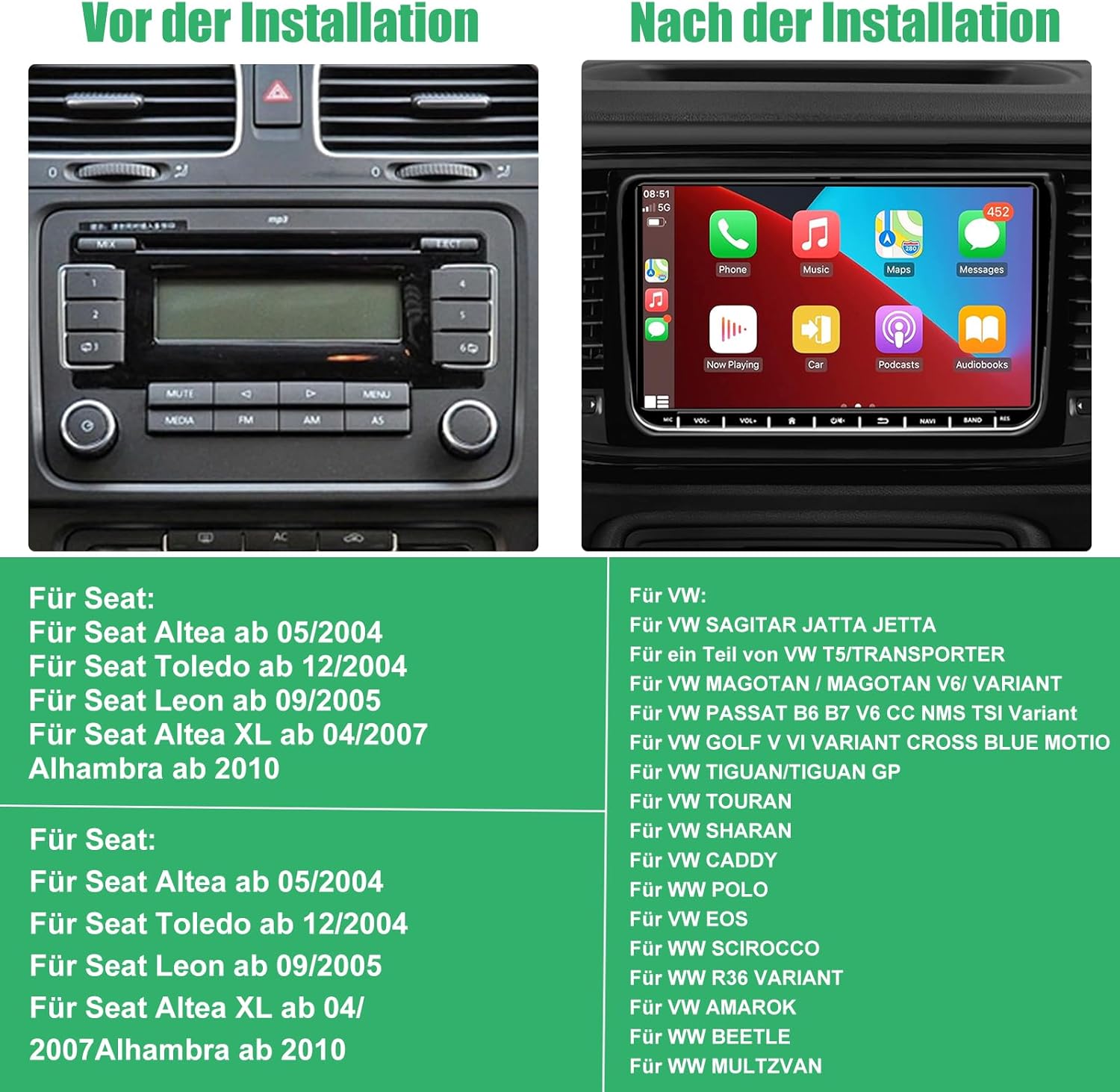
Figure 2: Visual comparison of a car dashboard before and after installation, alongside a list of compatible Seat and VW vehicle models.
קאַמפּאַטאַבאַל מאָדעלס:
פֿאַר זיץ:
- Seat Altea from 05/2004
- Seat Toledo from 12/2004
- Seat Leon from 09/2005
- Seat Altea XL from 04/2007
- Alhambra from 2010
פֿאַר VW:
- VW SAGITAR JETTA
- VW T5/TRANSPORTER (partial models)
- VW MAGOTAN / MAGOTAN V6 / VARIANT
- VW PASSAT B6 B7 V6 CC NMS TSI VARIANT
- VW GOLF V VI VARIANT CROSS BLUE MOTIO
- VW TIGUAN/TIGUAN GP
- VW טוראַן
- VW שאַרן
- פֿאָלקסווגן קאַדי
- פֿאָלקסווגן פּאָלאָ
- VW EOS
- פֿאָלקסווגן סקירוקאָ
- VW R36 וואַריאַנט
- VW AMAROK
- VW ביטל
- VW מולצוואן
פּעקל אינהאַלט
Before installation, please check that all components are present in the package:
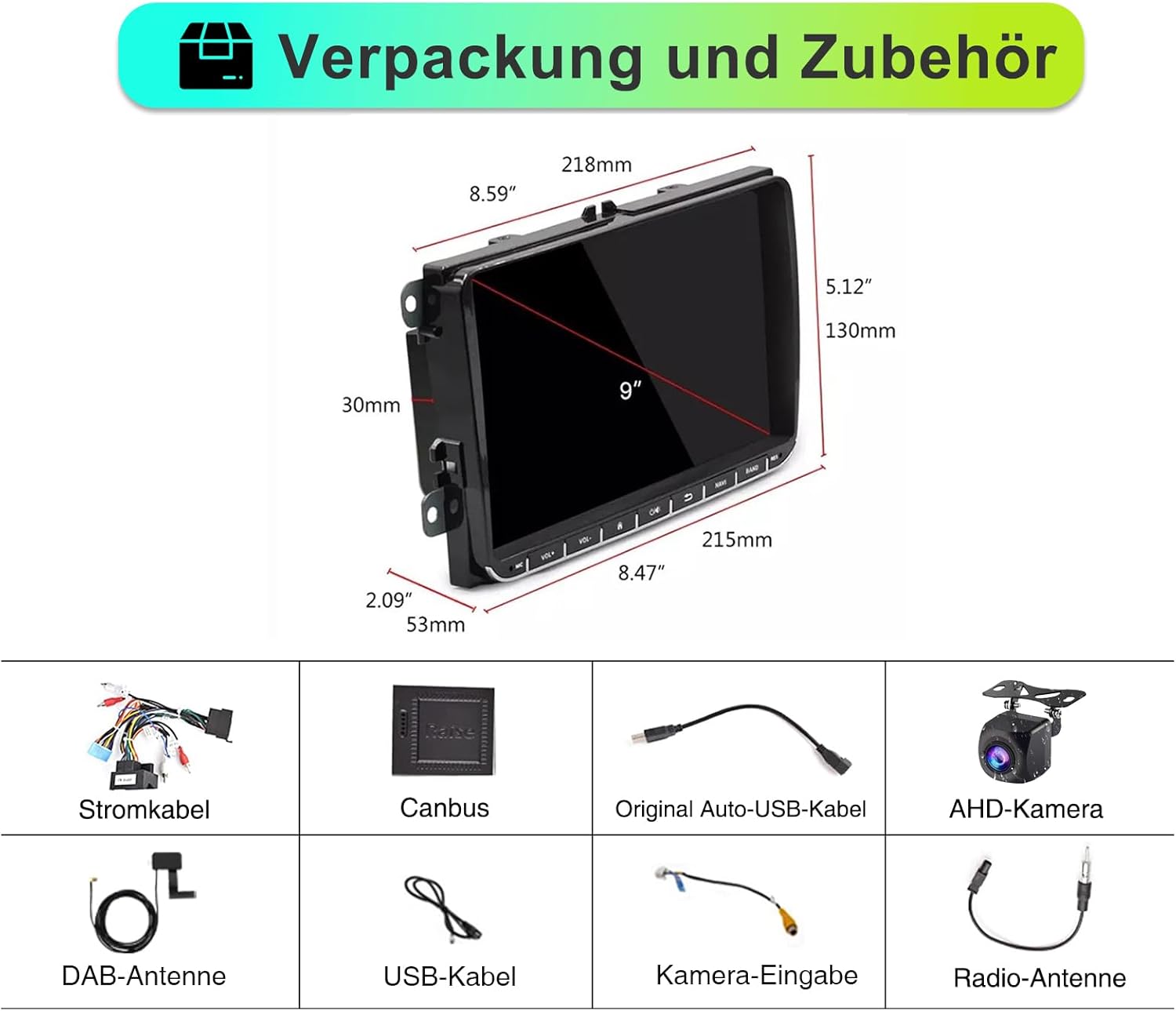
פיגורע 3: איבערview of the car radio dimensions and all included accessories.
- SEMAITU TH0029DAB Car Radio Unit
- מאַכט קאַבלע
- Canbus Decoder
- Original Auto USB Cable
- AHD Camera (Reverse Camera)
- DAB אַנטענע
- וסב קאַבלע
- אַפּאַראַט אַרייַנשרייַב קאַבלע
- ראַדיאָ אַנטענע
סעטאַפּ און ינסטאַלירונג
Professional installation is recommended. Ensure the vehicle's battery is disconnected before beginning installation to prevent electrical damage.
אַלגעמיינע ינסטאַללאַטיאָן סטעפּס:
- צוגרייטונג: Disconnect the negative terminal of the car battery. Remove the original car radio unit from the dashboard.
- וויירינג קאַנעקשאַנז:
- Connect the main power cable harness from the new radio to the vehicle's wiring harness.
- Connect the Canbus decoder to ensure proper communication with the vehicle's systems (e.g., steering wheel controls, door status).
- Connect the radio antenna and DAB antenna.
- פֿאַרבינדט די USB קייבלען פֿאַר עקסטערנע דעוויסעס.
- If installing the reverse camera, route the camera cable from the rear of the vehicle to the radio unit and connect it to the camera input. Ensure the camera's power is connected to the reverse light circuit.
- מאָונטינג: Secure the new SEMAITU car radio into the dashboard opening. Ensure all cables are neatly tucked away and not pinched.
- טעסט: Reconnect the car battery. Turn on the ignition and test the radio's basic functions: power on/off, radio reception, touchscreen responsiveness, and sound output.
- לעצט פֿאַרזאַמלונג: Reassemble the dashboard trim panels.
For detailed wiring diagrams and specific vehicle instructions, please refer to the included installation guide or consult a professional installer.
אַפּערייטינג ינסטראַקשאַנז
יקערדיק אָפּעראַציע:
- מאַכט אויף / אַוועק: Press the power button (usually located on the front panel or integrated with volume knob) to turn the unit on or off.
- באַנד קאָנטראָל: ניצט דעם באַנד קנעפּל אָדער טאָוטשסקרין קאָנטראָלס צו סטרויערן די אַודיאָ לעוועלס.
- היים פאַרשטעלן: Tap the home icon on the touchscreen to return to the main menu.
- נאַוויגאַציע: Swipe left/right on the touchscreen to access different application pages.
Radio Functions (DAB/FM/RDS):

Figure 4: DAB Digital Radio interface showing station selection and signal strength.
- באַשטימען מאָדעס: Select "Radio" from the main menu. Choose between FM or DAB mode.
- סקענירן סטאַנציעס: In FM mode, use the "Scan" or "Seek" function to find available stations. In DAB mode, the unit will automatically scan for digital stations upon first use or when entering a new area.
- היט פּרעסעץ: Tune to your desired station, then press and hold a preset button (P1-P6) on the screen to save it.
- RDS (ראַדיאָ דאַטאַ סיסטעם): When available, RDS will display station information, song titles, and traffic announcements on FM.
וויירלעס עפל קארפליי און אנדרויד אויטא:
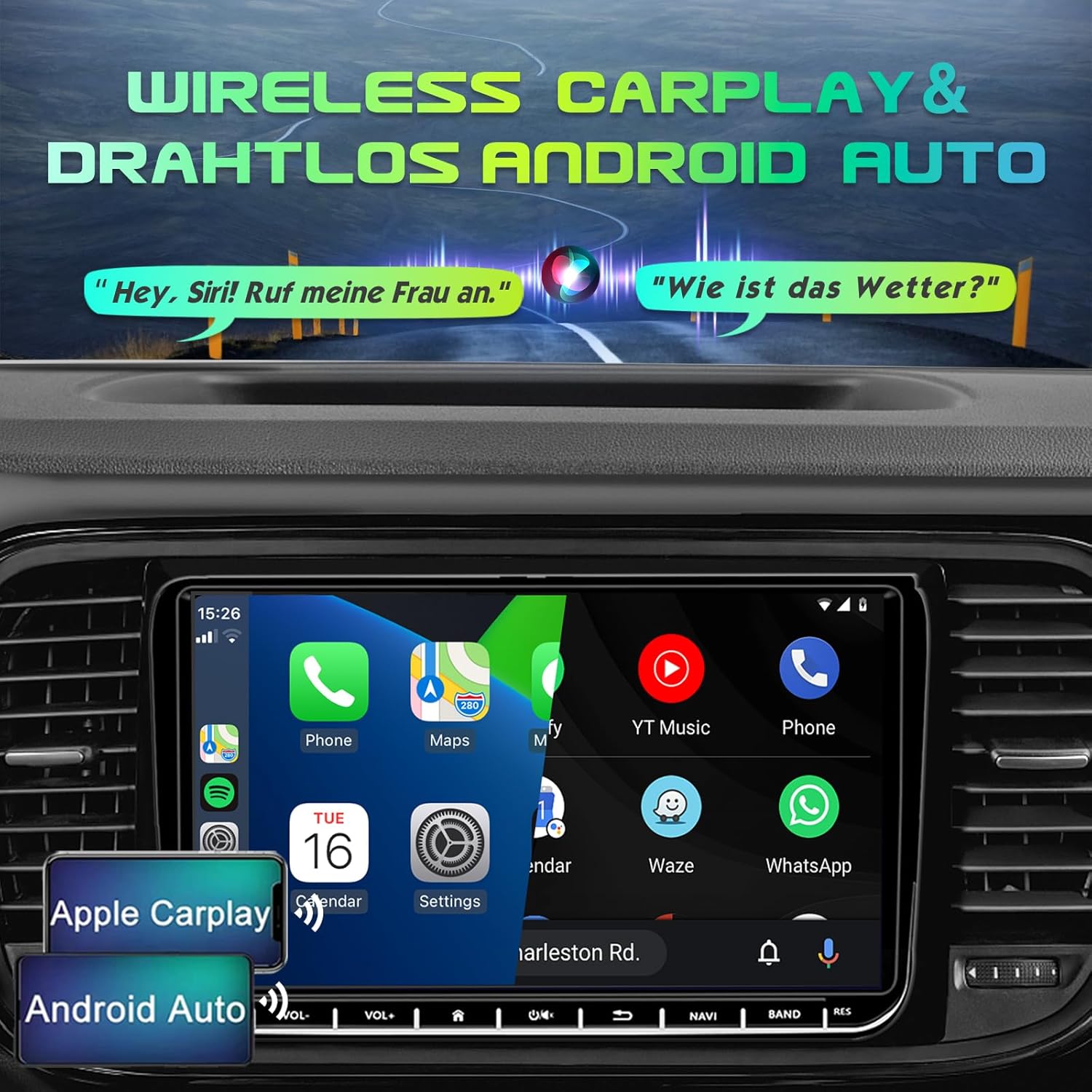
Figure 5: Display demonstrating Wireless Apple CarPlay and Android Auto functionality.
Connect your smartphone wirelessly to access navigation, music, calls, and messages directly on the car radio screen.
- Enable Bluetooth & Wi-Fi: מאַכן זיכער אַז בלועטאָאָטה און Wi-Fi זענען ענייבאַלד אויף דיין סמאַרטפאָנע.
- פּאָרינג: On the car radio, go to the Bluetooth settings and search for your phone. Pair the devices.
- Launch CarPlay/Android Auto: Once paired, the system should prompt you to launch Apple CarPlay or Android Auto. Follow the on-screen instructions.
- קול קאָנטראָל: Use voice commands (e.g., "Hey Siri" for CarPlay, "Hey Google" for Android Auto) for hands-free operation.
גפּס נאַוויגאַציע:

Figure 6: GPS Navigation interface displaying map, current location, and route details.
The unit comes with pre-installed Europe maps and supports online and offline navigation.
- Starting Navigation: Tap the "Navigation" icon on the main screen.
- Entering Destination: Use the on-screen keyboard to enter your destination address or select from recent destinations/points of interest.
- מאַפּע דערהייַנטיקונגען: Connect to Wi-Fi to download map updates or use online navigation services.
בלועטאָאָטה קאַנעקטיוויטי:

Figure 7: Bluetooth interface for hands-free calling and audio streaming.
- פּאָרינג: Go to "Bluetooth" settings, enable Bluetooth on your phone, and select the car radio from the list of available devices.
- הענט-פריי רופן: Make and receive calls directly through the car radio. Your phonebook can be synchronized.
- אַודיאָ סטרימינג: Play music from your phone via Bluetooth audio streaming (A2DP).
Reverse Camera (AHD Camera):
When the vehicle is shifted into reverse gear, the display will automatically switch to the rear view camera feed, providing a wide 170° view with night vision capabilities.
Figure 8: AHD Reverse Camera display showing day and night vision modes.
DSP EQ (Digital Sound Processor Equalizer):
Customize your audio experience with the built-in DSP EQ. Adjust frequency bands to match your preferences and vehicle acoustics.
Figure 9: DSP EQ interface for advanced audio customization.
- צוטריט צו EQ: Navigate to the "Sound Settings" or "DSP" menu.
- אַדזשאַסטינג סעטטינגס: Use the sliders to adjust individual frequency bands. Select from preset sound modes (e.g., Pop, Rock, Jazz) or create custom profiles.
שטיר-ראד קאנטראל (SWC):
If your vehicle supports it and the Canbus is correctly connected, you can program the steering wheel buttons to control the car radio functions (e.g., volume, track skip, mode change).
Figure 10: Steering Wheel Control (SWC) setup interface.
- סעטאַפּ: Go to "Settings" > "Steering Wheel Control" and follow the on-screen instructions to map your vehicle's steering wheel buttons to the radio functions.
שפּיגל לינק:
Mirror Link allows you to display your smartphone's screen directly on the car radio, supporting both iOS and Android devices. This enables you to view content like navigation, videos, and messages from your phone on the larger display.
Figure 11: Mirror Link feature displaying a mirrored smartphone screen.
- קשר: Connect your smartphone via USB or Wi-Fi (depending on the specific Mirror Link app/protocol).
- אַקטאַוויישאַן: Launch the Mirror Link application on the car radio and follow the pairing instructions on both devices.
וישאַלט
- סקרין רייניקונג: ניצט אַ ווייכע, לינט-פֿרייע שטאָף צו פֿאָרזיכטיק ווישן דעם טאָוטשסקרין. פֿאַר שווערע פֿלעקן, אַ ביסל ווישןampווישט דעם שטאָף מיט וואַסער אָדער אַ פאַרשטעלן-זיכער רייניגער. פֿאַרמייַדט אַברייסיוו מאַטעריאַלן אָדער שטרענגע כעמיקאַלן.
- אַלגעמיינע רייניקונג: האַלט דעם אַפּאַראַט פריי פון שטויב און שמוץ. ניצט אַ ווייכע באַרשט אָדער קאָמפּרעסירטע לופט צו רייניקן אַרום קנעפּלעך און פּאָרטן.
- ווייכווארג דערהייַנטיקונגען: Periodically check for software updates from the manufacturer (if available) to ensure optimal performance and access to new features. Updates can usually be performed via Wi-Fi.
- ויסמיידן עקסטרעם טעמפּעראַטורעס: שטעלט נישט אויס דעם אַפּאַראַט צו עקסטרעמע היץ אָדער קעלט, ווײַל דאָס קען אַפעקטירן זײַן פאָרשטעלונג און לעבנסדויער.
- מאַכט פאַרוואַלטונג: זיכער מאַכן אַז די עלעקטרישע סיסטעם פון דעם אויטאָ איז סטאַביל. פֿאַרמייַדן אָפטע מאַכט פלוקטואַציעס.
טראָובלעשאָאָטינג
If you encounter issues with your SEMAITU TH0029DAB Car Radio, please refer to the following common problems and solutions:
| פּראָבלעם | מעגלעך סיבה | לייזונג |
|---|---|---|
| דער אַפּאַראַט טוט נישט מאַכט אויף. | קיין שטראָם צושטעל; צעבראכענע פיוז; אומרעכטע וויירינג. | Check vehicle's fuse box and radio fuse. Verify power cable connections. Ensure battery is connected. |
| קיין געזונט רעזולטאַט. | Volume too low; Mute activated; Speaker wiring issue; Incorrect audio source. | Increase volume. Check if mute is on. Verify speaker connections. Select correct audio source (e.g., FM, Bluetooth). |
| Poor radio reception (FM/DAB). | Antenna not connected; Damaged antenna; Weak signal area. | Ensure radio and DAB antennas are securely connected. Check antenna for damage. Try scanning for stations in a different location. |
| קאַרפּליי/אַנדרויד אויטאָ פֿאַרבינדט זיך נישט. | Bluetooth/Wi-Fi off on phone; Incorrect pairing; Software glitch. | Ensure Bluetooth and Wi-Fi are enabled on your phone. Re-pair the devices. Restart both phone and car radio. Update phone OS. |
| Reverse camera not displaying. | Camera not powered; Incorrect camera input connection; Reverse trigger wire not connected. | Check camera power supply (usually from reverse light). Verify camera input cable is connected to the correct port. Ensure reverse trigger wire is connected. |
| טאָוטשסקרעען ניט ריספּאַנדאַבאַל. | סיסטעם איינפרירט; שמוץ אויפן עקראַן. | Restart the unit (press and hold power button). Clean the screen. If issue persists, a factory reset might be needed (consult support). |
| Steering Wheel Controls not working. | Canbus not connected; Incorrect SWC programming. | Ensure Canbus decoder is correctly installed. Re-program the steering wheel controls in the settings menu. |
אויב די פראבלעם בלייבט נאך פרובירן די לייזונגען, ביטע קאנטאקטירט קאסטומער סופארט.
ספּעסאַפאַקיישאַנז
| שטריך | דעטאַל |
|---|---|
| מאָדעל נאָמען | Autoradio Android 12.0 9" (DAB) |
| פאַבריקאַנט | SEMAITU |
| אָפּערייטינג סיסטעם | אַנדרויד 12.0 |
| פאַרשטעלן גרייס | 9 אינטשעס |
| ווייַז טיפּ | QLED Quantum Touchscreen |
| האַכלאָטע | 1280 X 720 בילדצעלן |
| Memory (RAM + Storage) | 2 גיגאבייט באַראַן + 32 גיגאבייט ראַם |
| ראַדיאָ טונער | DAB, FM, RDS (NXP6856) |
| קאַנעקטיוויטי | Bluetooth, Wi-Fi, USB (Dual ports) |
| נאַוויגאַציע | GPS (Europe maps included) |
| סמאַרטפאָנע ינטעגראַטיאָן | Wireless Apple CarPlay, Wireless Android Auto, Mirror Link |
| אַודיאָ רעזולטאַט מאָדע | Stereo with DSP EQ |
| ספּעציעלע פֿעיִקייטן | Touchscreen, AHD Reverse Camera Support, Steering Wheel Control (SWC) |
| פאָרמיטל סערוויס טיפּ | מאַשין |
| מאַונטינג טיפּ | דאַשבאָרד בארג |
| פּעקל דימענשאַנז | 28 X 25.3 X 9 סענטימעטער |
| פּונקט וואָג | 1.4 קילאָגראַמס |
וואָראַנטי און שטיצן
For warranty information and customer support, please refer to the documentation provided with your purchase or contact SEMAITU customer service directly. Keep your proof of purchase for warranty claims.
For technical assistance or further inquiries, please visit the official SEMAITU webפּלאַץ אָדער קאָנטאַקט זייער שטיצן מאַנשאַפֿט.
Ask a question about this manual
Ask about setup, troubleshooting, compatibility, parts, safety, or missing instructions. Manuals+ will review the question and use this page’s manual context to help answer it.