
הקדמה
This manual provides instructions for the proper setup, operation, and maintenance of your MXR Phase 90 50th-Anniversary Pedal. Please read this manual thoroughly before use to ensure optimal performance and longevity of the product.
זיכערקייַט אינפֿאָרמאַציע
- Use only the specified power adapter (9 Volts DC, 2.1mm barrel connector, center-negative).
- Do not expose the pedal to moisture or extreme temperatures.
- Do not attempt to open or modify the pedal casing.
- האַלטן אויס פון דערגרייכן פון קינדער.
פּראָדוקט איבערview
The MXR Phase 90 is a classic phaser guitar effects pedal known for its distinctive modulation sound. This 50th-anniversary edition features a special gold finish and simple, single-knob operation.
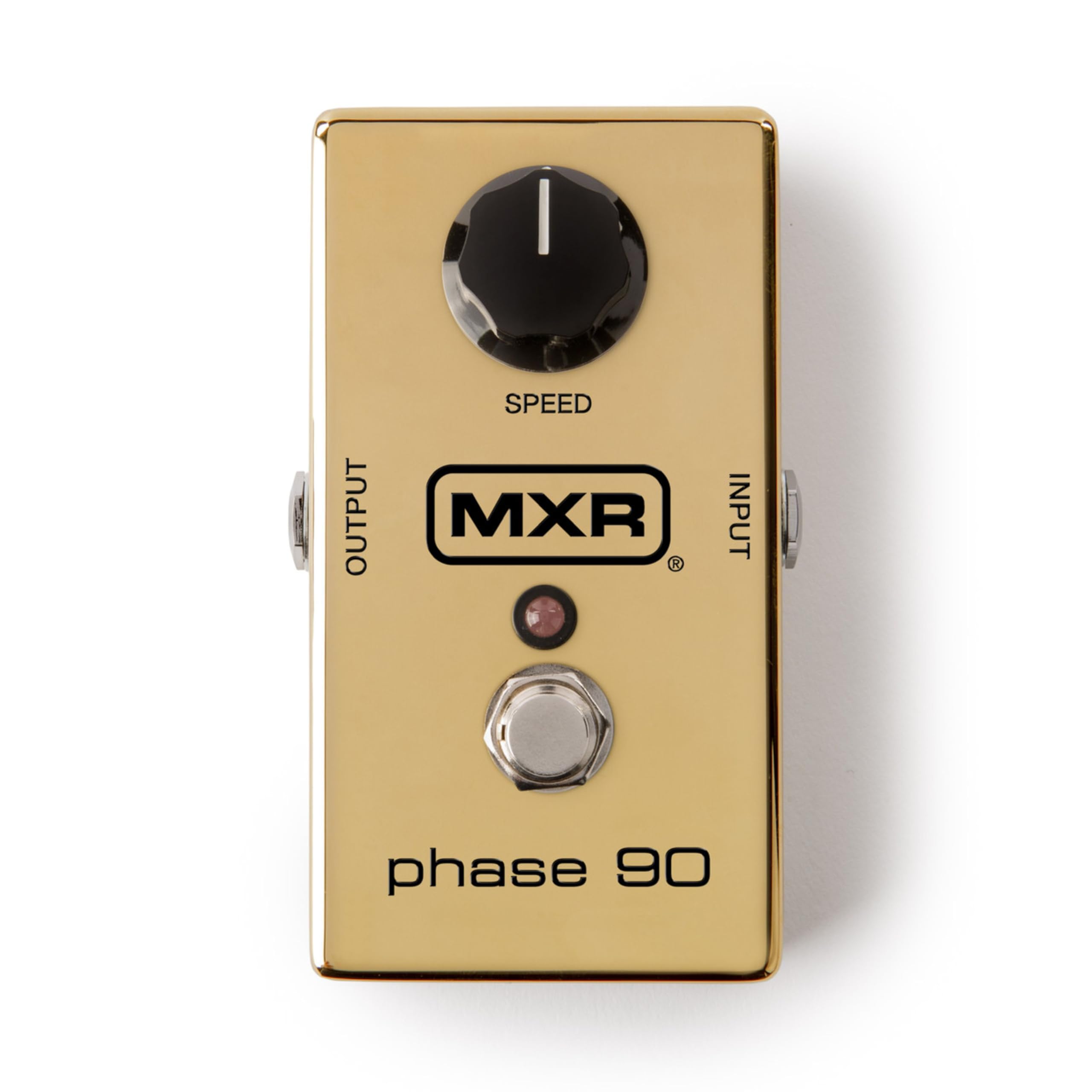
בילד: פון אויבן אַראָפּ view of the MXR Phase 90 50th-Anniversary Pedal. The pedal is gold-colored with a single black 'SPEED' knob on the top left, an input jack on the right side, an output jack on the left side, and a footswitch with an LED indicator in the center. The MXR logo and 'phase 90' are visible on the top surface.
סעטאַפּ
- מאַכט קשר: Connect a 9-volt DC AC adapter (not included) to the power input jack on the side of the pedal. Ensure the adapter has a 2.1mm barrel connector and center-negative polarity.
- אינסטרומענט איינגאַבע: Connect your instrument (e.g., guitar) to the INPUT jack on the right side of the pedal using a standard 1/4-inch instrument cable.
- Ampלייפייער רעזולטאַט: פאַרבינדן די OUTPUT דזשאַק אויף די לינקס זייַט פון די טרעטלען צו דיין ampליפיער אדער דעם נעקסטן פּעדאַל אין אייער סיגנאַל קייט ניצנדיק אַ סטאַנדאַרט 1/4-אינטש אינסטרומענט קאַבל.
- אָרט: שטעלט דעם פּעדאַל אויף אַ סטאַבילער ייבערפלאַך אָדער אינטעגרירט עס אין אייער פּעדאַלבאָרד.

בילד: זייט view of the MXR Phase 90 50th-Anniversary Pedal showing the power input jack (left) and the instrument input jack (right). The pedal is gold with a black 'SPEED' knob visible on the top surface.
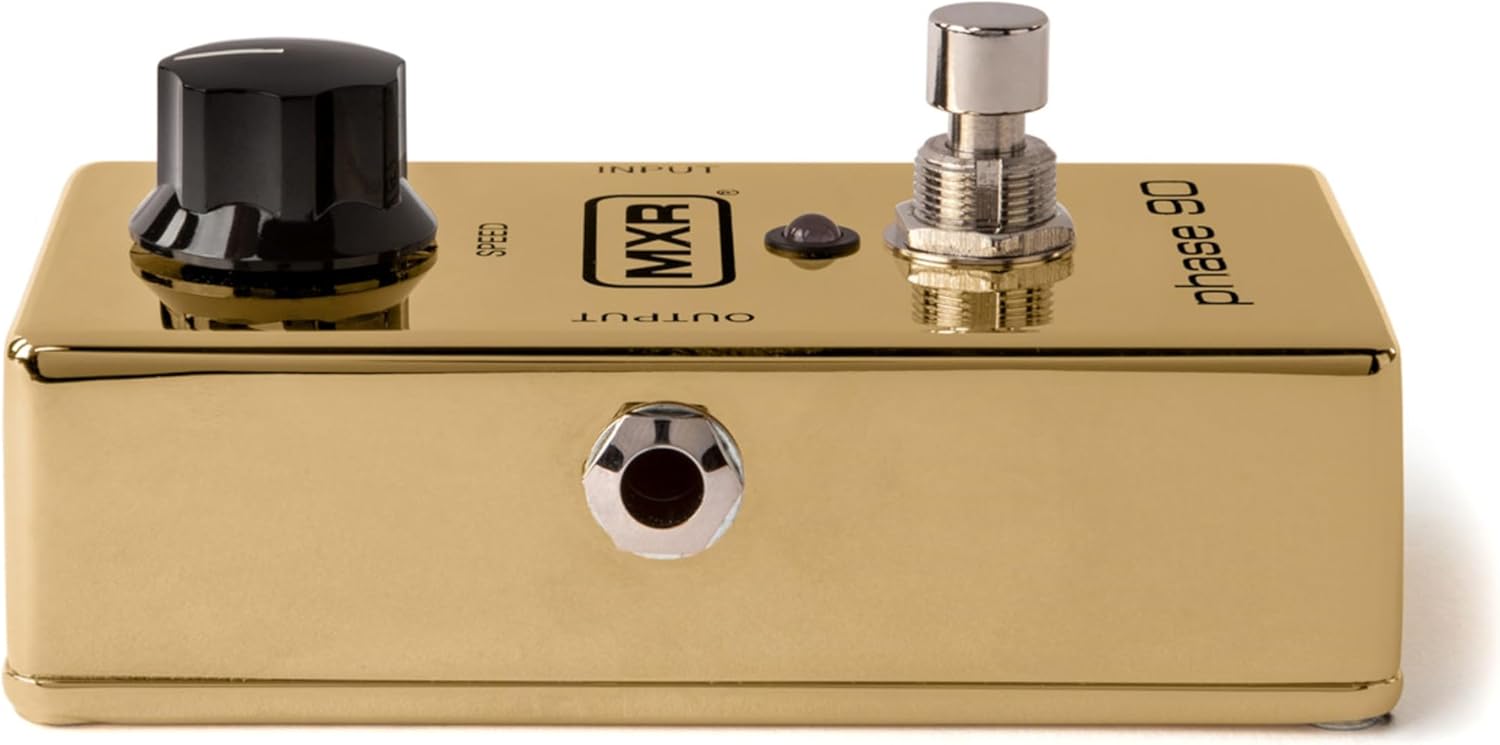
בילד: אויבן view of the MXR Phase 90 50th-Anniversary Pedal, highlighting the 'INPUT' and 'OUTPUT' labels near the respective jacks. The gold finish and black 'SPEED' knob are prominent.
אַפּערייטינג ינסטראַקשאַנז
קאָנטראָלס
- SPEED קנופּ: This is the only control on the Phase 90. Turning the knob clockwise increases the speed of the phasing effect, while turning it counter-clockwise decreases the speed. Experiment with different settings to achieve various modulation sounds, from subtle sweeps to fast, watery warbles.
- פאָאָטסוויטש: Press the footswitch to engage or bypass the phasing effect. The LED indicator will illuminate when the effect is active.

בילד: נאָענט-אַרויף view of the black 'SPEED' knob on the MXR Phase 90 pedal. The knob has a white indicator line for setting the phase speed.

בילד: נאָענט-אַרויף view of the chrome footswitch and the small red LED indicator on the MXR Phase 90 pedal. The footswitch is used to activate or deactivate the effect.
יקערדיק אָפּעראַציע
- Ensure all connections (power, input, output) are secure.
- קער אויף דיין ampליפער.
- Press the footswitch to activate the Phase 90. The LED will light up.
- Adjust the SPEED knob to achieve your desired phasinג עפֿעקט.
- To bypass the effect, press the footswitch again. The LED will turn off.
וישאַלט
- רייניקונג: ווישט אָפּ דעם פּעדאַל מיט אַ ווייכן, טרוקענעם שטאָף. ניצט נישט קיין שרײַבנדיקע רייניגער אָדער סאָלווענטן.
- סטאָרידזש: Store the pedal in a dry environment, away from direct sunlight and extreme temperatures, when not in use.
- באַטערי פאַרבייַט: This pedal is designed for AC adapter use. There is no internal battery compartment.
טראָובלעשאָאָטינג
קיין געזונט
- קאָנטראָליר אַלע קאַבל קאַנעקשאַנז (אינסטרומענט, ampלעפיערער, מאַכט).
- Ensure the power adapter is correctly connected and providing power (LED should light up when engaged).
- Test with different cables and a different power supply if available.
- Bypass the pedal to confirm your instrument and ampליפיער אַרבעט ריכטיק.
ווירקונג ניט ענגיידזשינג
- Ensure the power adapter is connected and functional.
- Press the footswitch firmly. The LED should illuminate when the effect is active.
אַנוואָנטיד ראַש
- זיכער מאַכן אַז אַלע קייבלס זענען באַשיצט און אין גוטן צושטאַנד.
- Check for ground loops in your setup. Try isolating the power supply.
- Ensure the power adapter is rated correctly for the pedal (9V DC, center-negative).
ספּעסאַפאַקיישאַנז
| שטריך | דעטאַל |
|---|---|
| מאָדעל | M101GLD |
| ווירקונג טיפּ | פאַסער |
| קאָנטראָלס | 1x SPEED knob |
| אַרייַנשרייַב | 1/4-inch Instrument Jack |
| רעזולטאַט | 1/4-inch Instrument Jack |
| מאַכט | 9V DC, 2.1mm barrel connector, center-negative (AC adapter not included) |
| דימענשאַנז | 5.5 X 4.5 X 2.5 אינטשעס (בעערעך) |
| וואָג | 1.16 פונט (אומגעפער) |
| קאָליר | גאָלד |
וואָראַנטי אינפֿאָרמאַציע
This MXR product is covered by a 2-year warranty from the date of purchase. The warranty covers defects in materials and workmanship under normal use. It does not cover damage caused by misuse, accident, modification, or unauthorized repair. Please retain your proof of purchase for warranty claims.
שטיצן
For technical assistance, troubleshooting beyond this manual, or warranty service, please contact MXR customer support through their official website or authorized service centers. Refer to the MXR webזייטל פֿאַר די מערסט אַקטועלע קאָנטאַקט אינפֿאָרמאַציע.