
Supermicro MBD-X10DRG-O+-CPU
Supermicro X10DRG-O+-CPU Motherboard User Manual
Model: MBD-X10DRG-O+-CPU
1. הקדמה
This user manual provides comprehensive instructions for the installation, configuration, and maintenance of the Supermicro X10DRG-O+-CPU Motherboard. This motherboard is designed for high-performance computing environments, supporting dual Intel Xeon E5-2600 v3/v4 processors and extensive memory configurations.
Please read this manual thoroughly before beginning the installation process to ensure proper setup and operation.
2. זיכערקייַט אינפֿאָרמאַציע
שטענדיק אָבסערווירן די פאלגענדע זיכערהייט מיטלען ווען איר האַנדלט מיט די מוטערבאָרד און אַנדערע קאָמפּיוטער קאָמפּאָנענטן:
- זיכער מאַכן אַז די מאַכט צושטעל איז אָפּגעטיילט פֿון דער וואַנט אַוטלעט איידער איר אינסטאַלירן אָדער אַראָפּנעמען קיין קאָמפּאָנענטן.
- טראָגט אַן אַנטי-סטאַטישן האַנטגעלענק-רימען אָדער רירט אָפט אָן אַן געערדטן מעטאַלן אָביעקט צו אָפּלאָדן סטאַטישע עלעקטריע.
- האַלט אָן דאָס מוטערבאָרד ביי די ברעגן כּדי נישט צו אָנרירן סענסיטיווע קאָמפּאָנענטן.
- Keep the motherboard away from liquids and extreme temperatures.
- Refer to the safety guidelines provided with other components (CPU, RAM, etc.) for additional precautions.
3. פּעקל אינהאַלט
Verify that all items are present in the package. If any item is missing or damaged, contact your vendor immediately.
- Supermicro X10DRG-O+-CPU Motherboard
- איך / אָ שילד
- SATA קייבלס (די קוואַנטיטעט קען זיין אַנדערש)
- שנעל רעפערענץ גייד
- דרייווער סי-די/די-ווי-די (אדער לינק צו דאונלאודן דרייווערס)
4. מאָטהערבאָאַרד אויסלייג
אונטן איז אַן איבערview of the Supermicro X10DRG-O+-CPU Motherboard, highlighting key components and connectors.
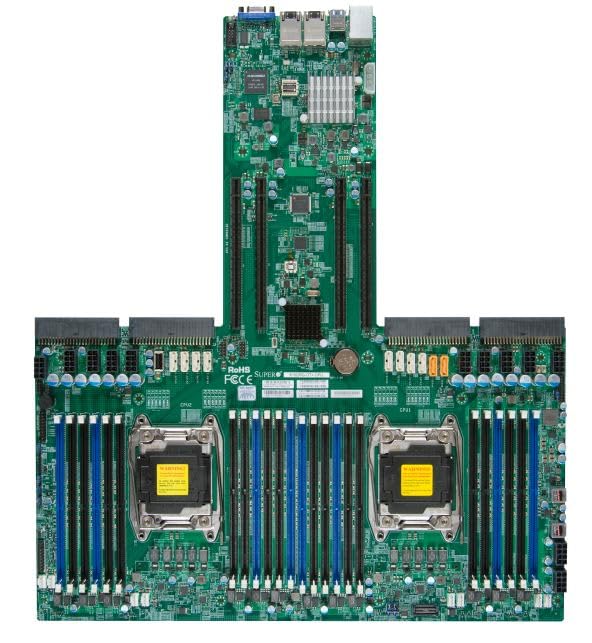
Figure 4.1: Supermicro X10DRG-O+-CPU Motherboard. This image displays the full motherboard, showing the dual CPU sockets, numerous DDR4 DIMM slots, PCIe expansion slots, and various I/O ports and connectors.
שליסל קאַמפּאָונאַנץ:
- CPU Sockets (LGA 2011-3): Two sockets for Intel Xeon E5-2600 v3/v4 processors.
- DDR4 DIMM Slots: Multiple slots supporting up to 3072 GB of ECC DDR4 memory.
- PCIe יקספּאַנשאַן סלאָץ: Various PCIe 3.0 slots for graphics cards, network cards, and other expansion devices.
- SATA פּאָרץ: Connectors for SATA 3.0 storage devices.
- וסב פּאָרץ: USB 2.0 and USB 3.0 headers and rear panel ports.
- לאַן פּאָרץ: Ethernet ports for network connectivity.
- מאַכט קאַנעקטערז: ATX 24-pin, 8-pin EPS, and 4-pin power connectors.
5. סעטאַפּ
Follow these steps for proper installation of the motherboard and its components.
5.1 קפּו ינסטאַלירונג
- Open the CPU socket retention levers.
- פֿאָרזיכטיק גלייכט אויס די CPU מיטן סאָקעט, און מאַכט זיכער אַז די דרייעקיקע צייכן אויפן CPU פּאַסט צום צייכן אויפן סאָקעט.
- לייגט פֿאָרזיכטיק אַרײַן די סי־פּי־יו אין דער סאָקעט אָן עס צווינגען.
- Close the retention levers to secure the CPU.
- Apply thermal paste and install the CPU cooler according to the cooler manufacturer's instructions.
5.2 זכּרון (RAM) אינסטאַלאַציע
- עפֿנט די קליפּס ביי ביידע עקן פֿון דעם DIMM סלאָט.
- גלייכט אויס דעם קערב אויפן DDR4 זכּרון מאָדול מיטן שליסל אין דעם DIMM סלאָט.
- שטעקט אריין דעם מאָדול פעסט אין דעם שפּאַלט ביז די קליפס קלאַפּן זיך איין אין פּלאַץ.
- Repeat for all desired memory modules, following the motherboard's memory population guidelines for optimal performance.
5.3 סטאָרידזש מיטל ינסטאַלירונג
- פֿאַרבינדט איין עק פֿון די SATA דאַטן קאַבל צו אַ SATA פּאָרט אויף דער מוטערבאָרד.
- פֿאַרבינדט דעם אַנדערן עק פֿונעם SATA דאַטן קאַבל צו אייער SATA האַרט דרייוו אָדער SSD.
- פֿאַרבינדט אַ SATA מאַכט קאַבל פֿון אייער מאַכט צושטעלן צום סטאָרידזש מיטל.
5.4 אינסטאַלאַציע פון עקספּאַנסיע קאַרטל
- Select an appropriate PCIe slot for your expansion card (e.g., GPU, network card).
- אַראָפּנעמען די קאָראַספּאַנדינג סלאָט דעקל פֿון דיין פּיסי קעסטל.
- Align the expansion card with the slot and press down firmly until it is fully seated.
- Secure the card with a screw or retention clip to the PC case.
5.5 מאַכט קאַנעקשאַנז
- פֿאַרבינדט דעם 24-פּין ATX מאַכט קאַנעקטאָר פֿון אייער מאַכט צושטעל צום הויפּט מאַכט כעדער אויף דער מוטערבאָרד.
- Connect the 8-pin EPS (CPU) power connector(s) to the corresponding headers near the CPU sockets.
- זיכער מאַכן אַז אַלע מאַכט קייבאַלז זענען זיכער פארבונדן.
5.6 פראָנט פּאַנעל קאַנעקשאַנז
Connect the front panel cables (Power LED, HDD LED, Power Switch, Reset Switch, USB, Audio) from your PC case to the corresponding headers on the motherboard. Refer to the motherboard's silkscreen labels for correct pin assignments.
6. אָפּערייטינג
6.1 בייאָס/UEFI סעטאַפּ
Upon first boot, you may need to enter the BIOS/UEFI setup utility to configure system settings. Typically, you can access this by pressing DEL or F2 during the POST (Power-On Self-Test) sequence. Common settings to configure include boot order, date/time, and enabling/disabling specific features.
6.2 דרייווער ינסטאַלירונג
After installing your operating system, install the necessary drivers for the motherboard's chipsets, LAN, audio, and other integrated components. Drivers can be found on the included driver CD/DVD or downloaded from the Supermicro official webפּלאַץ.
6.3 אַפּערייטינג סיסטעם ינסטאַלירונג
Insert your operating system installation media (USB drive or DVD) and follow the on-screen prompts to install the OS. Ensure the boot order in BIOS/UEFI is set to prioritize your installation media.
7. וישאַלט
7.1 רייניקונג
Regularly clean dust from the motherboard and components using compressed air. Ensure the system is powered off and unplugged before cleaning. Avoid using liquids or abrasive materials.
7.2 פירמוואַרע דערהייַנטיקונגען
טשעקט פּעריִאָדיש די סופּערמיקראָ website for updated BIOS/UEFI firmware. Firmware updates can improve stability, performance, and add support for new hardware. Follow the provided instructions carefully when performing a firmware update to avoid system damage.
8. טראָובלעשאָאָטינג
די סעקציע גיט לייזונגען צו געוויינטלעכע פראבלעמען וואָס איר קענט באַגעגענען.
| פּראָבלעם | מעגלעך סיבה | לייזונג |
|---|---|---|
| סיסטעם טוט נישט מאַכט אויף. | לויזע מאַכט קאַבלען, דעפעקטיווע מאַכט צושטעל, פאַלשע פראָנט פּאַנעל קאַנעקשאַנז. | Check all power connections (24-pin, 8-pin EPS). Verify front panel power switch connection. Test power supply. |
| ניט קיין אַרויסווייַזן רעזולטאַט. | Incorrectly seated GPU, faulty monitor cable, no integrated graphics. | Reseat the graphics card. Check monitor cable connections. Ensure monitor is on correct input. |
| System beeps repeatedly. | Memory (RAM) issue. | Reseat RAM modules. Try one module at a time. Refer to BIOS beep codes for specific diagnosis. |
| אָפּערירן סיסטעם נישט געפֿונען. | Incorrect boot order, loose SATA cable, unformatted drive. | Check BIOS/UEFI boot order. Reseat SATA cables. Ensure drive is properly formatted and OS installed. |
9. ספּעסאַפאַקיישאַנז
Detailed technical specifications for the Supermicro X10DRG-O+-CPU Motherboard.
- מאָדעל נומער: MBD-X10DRG-O+-CPU
- סאָרט: Supermicro
- קפּו סופּפּאָרט: Dual Intel Xeon E5-2600 v3/v4 Processors (LGA 2011-3)
- ראַם זכּרון מאַקסימום גרייס: 3072 GB DDR4 ECC
- סיסטעם באַס סטאַנדאַרט געשטיצט: SATA 3
- S/PDIF Connector Type: אָפּטיש
- פּעקל דימענשאַנזגרייס: 25 X 25 X 4 אינטשעס
- UPC: 672042176427
- ערשטער דאַטע בנימצא: 21 יוני 2023
10. וואָראַנטי און שטיצן
פֿאַר וואָראַנטי אינפֿאָרמאַציע און טעכנישע שטיצע, ביטע זען די באַאַמטער סופּערמיקראָ webזייטל אדער קאָנטאַקט אייער קויפן-פונקט. האַלט אייער קויפן-באַווייַז פֿאַר וואָראַנטי-קליימז.
סופּערמיקראָ אפיציעל Webפּלאַץ: www.supermicro.com
Ask a question about this manual
Ask about setup, troubleshooting, compatibility, parts, safety, or missing instructions. Manuals+ will review the question and use this page’s manual context to help answer it.