
1. הקדמה
This manual provides comprehensive instructions for the installation, operation, and maintenance of your Turing TP-MED4M28-1Y 4MP Turret IP Camera. Please read this manual thoroughly before using the product to ensure proper setup and functionality. Keep this manual for future reference.
2. זיכערקייַט אינפֿאָרמאַציע
אָבסערווירן די פאלגענדע זיכערהייט מיטלען צו פאַרמייַדן שאָדן אָדער שעדיקן צו דעם פּראָדוקט:
- Ensure the power supply meets the camera's specifications (DC 12V+/-25% or PoE IEEE 802.3af).
- שטעלט נישט אויס די קאַמעראַ צו עקסטרעמע טעמפּעראַטורן, הומידיטי, אדער קאָראָזיווע סביבות.
- Avoid direct exposure of the lens to strong light sources, as this may damage the image sensor.
- פרובירט נישט צו צענעמען אדער מאדיפיצירן די קאמערא. לאָזט איבער אלע סערוויסעס צו קוואַליפֿיצירטע פּערסאָנעל.
- Handle the camera with care to prevent physical shock or vibration.
- פאַרזיכערן געהעריק גראַונדינג צו פאַרמייַדן עלעקטריקאַל כאַזערדז.
3. פּעקל אינהאַלט
באַשטעטיקט אַז אַלע זאכן זענען פאַראַן אין אייער פּעקל. אויב עפּעס פעלן אָדער זענען געשעדיגט, קאָנטאַקטירט אייער הענדלער.
- Turing TP-MED4M28-1Y 4MP Turret IP Camera
- מאָנטירונג שרויפן און וואַנט פּלאַגז
- Waterproof Connector for Ethernet Cable
- בויער מוסטער
- שנעל אָנהייב גייד
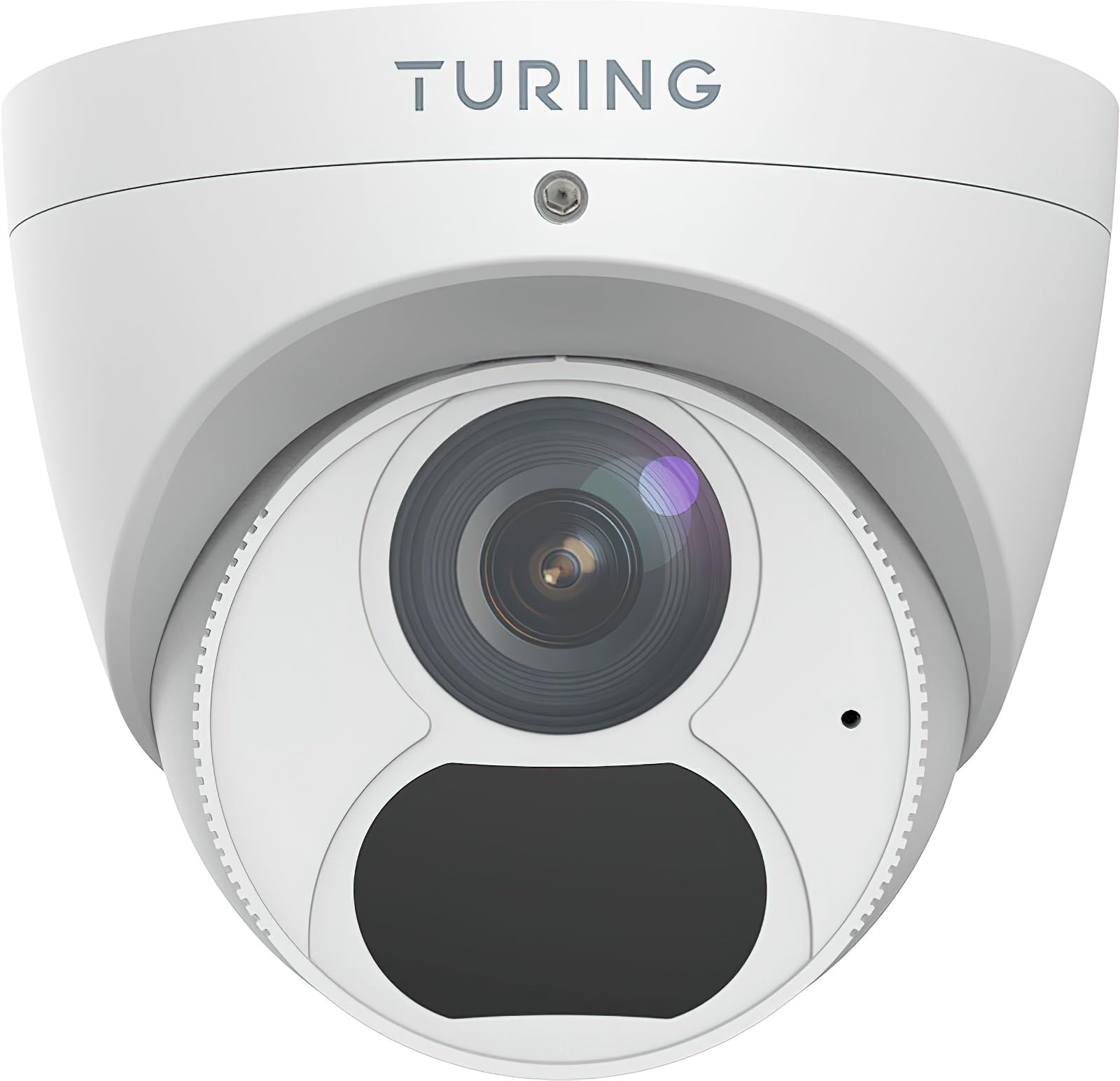
Figure 1: Turing TP-MED4M28-1Y 4MP Turret IP Camera and included accessories. The image shows the camera unit, mounting hardware, and a waterproof connector.
4. פּראָדוקט איבערview
The Turing TP-MED4M28-1Y is a 4MP low-light turret IP camera designed for surveillance applications. It features a 2.8mm fixed lens, TwilightVision for enhanced low-light performance, and Smart IR up to 30m (98ft). The camera supports a 256GB microSD card for local storage and integrates with the Turing Vision Core AI platform.
שליסל פֿעיִקייטן:
- Max. 4MP (2688x1520) at 30fps resolution
- 2.8mm fixed lens with 101.1° horizontal view
- TwilightVision for optimal image clarity in low light (0.002 Lux)
- Smart IR illumination up to 30m (98ft)
- IP67 weather protection, WDR (Wide Dynamic Range), PoE (Power over Ethernet)
- Built-in microphone for audio monitoring
- שטיצט ביז 256 גיגאבייט מיקראָסד קאַרטל (נישט אַרייַנגערעכנט)
- Integrated with Turing Vision Core AI for advanced analytics (1st year license included)
- NDAA געהאָרכיק
5. סעטאַפּ און ייַנמאָנטירונג
Follow these steps for proper installation of your IP camera.
5.1 מאָונטינג די אַפּאַראַט
- קלייַבן אַ אָרט: Select a suitable mounting location, typically a ceiling or wall, ensuring a clear field of view and within range of your network connection. The camera is IP67 rated for outdoor use.
- צוגרייטן די ייבערפלאַך: Use the provided drill template to mark the screw holes on the mounting surface. Drill pilot holes as needed.
- באַוואָרענען די באַזע: Attach the camera's mounting base to the surface using the supplied screws and wall plugs. Ensure it is firmly secured.
- קאַבלע פאַרוואַלטונג: Route the Ethernet cable through the designated cable entry point. Use the waterproof connector for outdoor installations to protect the Ethernet connection.
5.2 נעץ פֿאַרבינדונג און מאַכט
- פאַרבינדן עטערנעט: Connect an Ethernet cable from your network switch or router to the camera's RJ45 port.
- מאַכט צושטעלן:
- PoE (מאַכט איבער עטהערנעט): If your network switch supports PoE (IEEE 802.3af), the camera will receive power directly through the Ethernet cable. No separate power adapter is needed.
- DC 12V: If PoE is not available, connect a DC 12V power adapter (not included) to the camera's power input port.
- ערשטע אויפשטעל: The camera will power on and initiate its boot sequence. This may take a few minutes.
5.3 ערשט קאַנפיגיעריישאַן
Refer to the Turing Vision Quick Start Guide or the Turing Vision platform documentation for detailed instructions on adding and configuring your camera within the Turing Vision ecosystem.
- Access the camera via the Turing Vision platform or a web בלעטערער ניצן זייַן IP אַדרעס.
- טוישן די פעליקייַט פּאַראָל פֿאַר זיכערהייט.
- Configure network settings, video resolution, and recording schedules.
- Adjust image settings such as WDR, 2D/3D DNR, and defog for optimal video quality.
6. אַפּערייטינג די קאַמעראַ
The Turing TP-MED4M28-1Y camera is primarily operated and managed through the Turing Vision cloud platform or a compatible NVR/VMS system.
6.1 לעבן View און רעקאָרדינג
- Access the live video feed through the Turing Vision application or web צובינד.
- Configure continuous recording, motion-triggered recording, or scheduled recording via the platform settings.
- Review רעקאָרדעד פוtage by navigating to the playback section within the Turing Vision platform.
6.2 AI Features (Turing Vision Core AI)
With the included Turing CORE AI License, the camera leverages advanced analytics:
- People and Vehicle Search: Utilize the Turing Vision platform to quickly search for specific events involving people or vehicles.
- ינטעליגענט אַלערץ: Receive real-time notifications for detected events based on configured rules.
- Pattern Detection: Analyze patterns across multiple locations for improved operational efficiency and safety.
6.3 Image Enhancement Features
- TwilightVision: Automatically enhances image clarity in extremely low-light conditions, providing color images where traditional cameras would switch to black and white.
- סמאַרט IR: Adjusts the intensity of the infrared LEDs to prevent overexposure of objects close to the camera, ensuring balanced night vision.
- WDR (ברייט דינאַמיק ראַנגע): Balances areas of high contrast in the image, ensuring details are visible in both bright and dark regions simultaneously.
7. וישאַלט
רעגולערע אויפהאלטונג גאראנטירט אפטימאלע פאָרשטעלונג און לאַנגלעבעדיקייט פון אייער קאַמעראַ.
- לענס רייניקונג: Gently clean the camera lens with a soft, dry cloth. For stubborn dirt, use a lens cleaning solution and a microfiber cloth. Avoid abrasive materials.
- Firmware דערהייַנטיקונגען: Periodically check for and install firmware updates through the Turing Vision platform or the camera's web interface. Firmware updates often include performance improvements and security enhancements.
- גשמיות דורכקוק: Regularly inspect the camera housing and mounting for any signs of damage, loose connections, or corrosion, especially for outdoor installations.
- סטאָרידזש פאַרוואַלטונג: If using a microSD card, periodically check its status and manage recorded data to prevent it from filling up. Format the card if necessary (this will erase all data).
8. טראָובלעשאָאָטינג
אויב איר טרעפט פּראָבלעמען מיט אייער קאַמעראַ, זעט די פאלגענדע געוויינטלעכע פּראָבלעמען און לייזונגען:
| פּראָבלעם | מעגלעך סיבה | לייזונג |
|---|---|---|
| קיין בילד/ווידעא פיד | No power; Network connection issue; Incorrect IP address | Check power supply (PoE or DC 12V). Verify Ethernet cable connection. Ensure camera is on the same network subnet as your viewing device or NVR. |
| נעבעך בילד קוואַליטעט | Dirty lens; Incorrect focus (fixed lens, but check for obstructions); Insufficient lighting; Incorrect image settings | Clean the lens. Ensure adequate lighting or verify Smart IR/TwilightVision settings. Adjust WDR, brightness, contrast in camera settings. |
| Cannot connect to Turing Vision | Network issues; Incorrect camera registration; Firewall blocking connection | Verify internet connectivity. Ensure the camera is correctly added to your Turing Vision account. Check firewall settings on your network. |
| מיקראָסד קאַרטל רעקאָרדירט נישט | Card full; Card not formatted; Faulty card; Recording schedule not set | Check card capacity. Format the microSD card via camera settings. Replace faulty card. Configure recording schedule. |
If the problem persists, contact Turing technical support for assistance.
9. ספּעסאַפאַקיישאַנז
Detailed technical specifications for the Turing TP-MED4M28-1Y camera:
| שטריך | באַשרייַבונג |
|---|---|
| מאָדעל | TP-MED4M28-1Y |
| בילד סענסאָר | 1/3-inch 4MP 16:9 Progressive Scan CMOS |
| האַכלאָטע | Max. 4MP (2688x1520) at 30fps |
| לענס | 2.8 מם פאַרפעסטיקט אָביעקטיוו |
| ווינקל פון View (H/V/D) | 101.1 ° / 55.3 ° / 111.1 ° |
| מינימום יללומינאַטיאָן | Color: 0.002 Lux (F1.6, AGC on); 0 Lux with IR on |
| יר ראַנגע | Up to 30m (98ft) Smart IR |
| ווידעא קאַמפּרעשאַן | הינטער 265, ה.265, ה.264, מדזשפּעג |
| דיגיטאַל פּראַסעסינג | 120 dB WDR, 2D/3D DNR, Defog |
| אַודיאָ | Built-in microphone, G.711, Noise suppression |
| אַנבאָרד סטאָרידזש | מיקראָסד קאַרטל שפּעלטל, ביז 256 גיגאבייט (קאַרטל נישט אַרייַנגערעכנט) |
| מאַכט צושטעלן | DC 12V+/-25%, PoE (IEEE 802.3af) |
| מאַכט קאַנסאַמשאַן | Max. 4.0W |
| שוץ | IP67, 4KV Surge Protection |
| דימענסיעס (Ø X H) | 4.4 X 3.7 אינטשעס (111.8 X 94 מם) |
| וואָג | 0.93 לבס (0.42 קג) |
| אַפּערייטינג טעמפּעראַטור | -30°C צו 60°C (-22°F צו 140°F) |
10. וואָראַנטי און שטיצן
Turing provides a limited warranty for its products. Please refer to the official Turing website or your purchase documentation for detailed warranty terms and conditions. The first year of Turing CORE AI License is included with this product.
For technical support, product inquiries, or warranty claims, please contact Turing customer service through their official webפּלאַץ אָדער די קאָנטאַקט אינפֿאָרמאַציע צוגעשטעלט מיט דיין קויפן.
אָנליין רעסורסן: Visit the Turing support portal for FAQs, software downloads, and additional documentation.