
Turing TP-MFD4A28
Turing TP-MFD4A28 Smart Series 4MP IR Dome IP Camera User Manual
Model: TP-MFD4A28
1. הקדמה
This manual provides detailed instructions for the installation, operation, and maintenance of the Turing TP-MFD4A28 Smart Series 4MP IR Dome IP Camera. This camera features 4-megapixel resolution, TwilightVision technology for optimal low-light performance, Smart IR up to 30 meters (98 feet), and robust IP67 and IK10 ratings for outdoor and vandal-resistant use. It supports Power over Ethernet (PoE) and a 256GB MicroSD card for local storage.
שליסל פֿעיִקייטן אַרייַננעמען:
- Max. 4MP (2688x1520) resolution at 30/25fps
- 2.8 מם פאַרפעסטיקט אָביעקטיוו
- TwilightVision for optimal image clarity in low light
- Smart IR up to 30m (98ft) night vision
- IP67 weather resistance and IK10 vandal resistance
- ברייט דינאַמיק ראַנגע (WDR)
- מאַכט איבער עטהערנעט (PoE) שטיצן
- Support for 256GB MicroSD card
- People and Vehicle Search capabilities when used with Turing Smart Series NVR and Turing Vision Cloud
2. זיכערקייַט אינפֿאָרמאַציע
Please read these safety instructions carefully before using the product to prevent damage or injury.
- מאַכט צושטעלן: Use only the specified power adapter (12V DC) or a compliant Power over Ethernet (PoE) switch/injector. Incorrect voltagעס קען שעדיקן די קאַמעראַ.
- ייַנמאָנטירונג: Ensure the camera is securely mounted to prevent it from falling. Professional installation is recommended for outdoor or high-altitude mounting.
- סוויווע: Do not expose the camera to extreme temperatures, humidity, or corrosive environments beyond its IP67 rating. Avoid direct sunlight for prolonged periods.
- רייניקונג: Disconnect power before cleaning. Use a soft, dry cloth. Do not use strong detergents or solvents.
- דיסאַססעמבלי: פרובירט נישט צו צענעמען אדער מאדיפיצירן די קאמערא. דאס וועט בטל מאכן די גאראנטיע און קען שאפן שאדן.
- קאַבלעס: Protect network and power cables from being walked on or pinched, especially at plugs and the point where they exit the camera.
3. פּעקל אינהאַלט
באַשטעטיקן אַז אַלע זאכן זענען פאַראַן און אין גוטן צושטאַנד ביים אויספּאַקן:
- Turing TP-MFD4A28 IP Dome Camera
- מאָנטירונג שרויפן און וואַנט פּלאַגז
- Waterproof Connector for Ethernet Cable
- Quick Start Guide / Instruction Manual (this document)
- Drill Template (may be included)
Note: A power adapter (12V DC) is not always included as the camera supports PoE. A PoE switch or injector is required for PoE power.
4. פּראָדוקט איבערview
The Turing TP-MFD4A28 is a compact dome-style IP camera designed for discreet surveillance. Its robust housing provides protection against weather and vandalism.
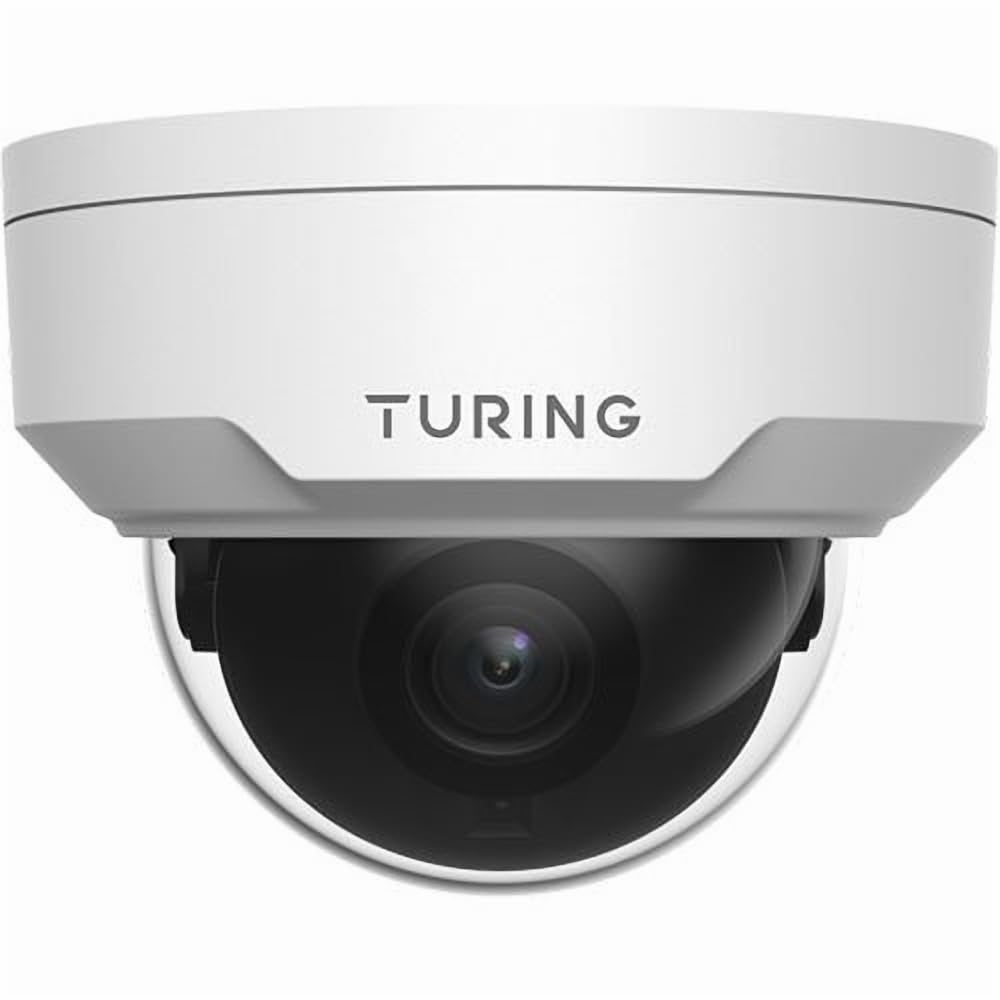
פיגורע 4.1: פראָנט view of the Turing TP-MFD4A28 4MP IR Dome IP Camera, showing its white dome design and lens.
שליסל קאַמפּאָונאַנץ:
- קופּאָל דעקל: Protective cover for the lens and IR LEDs.
- לענס: 2.8mm fixed lens for a wide field of view.
- יר לעדס: Infrared illuminators for night vision.
- מיקראָסד קאָרט שפּעלטל: Located internally, accessible by removing the dome cover.
- באַשטעטיק קנעפּל: Located internally, used for factory reset.
- עטהערנעט פּאָרט (RJ45): פֿאַר נעץ פֿאַרבינדונג און פּאַוער איבער עטהערנעט (PoE).
- Power Input (DC 12V): Optional power input if PoE is not used.
5. סעטאַפּ
5.1 Physical Installation (Wall Mount)
- קלייַבן אַ אָרט: Select a suitable wall-mount location that provides the desired viewing angle and is within range of your network cable.
- צוגרייטן די ייבערפלאַך: Use the provided drill template (if available) to mark the screw holes on the wall. Drill pilot holes.
- Mount the Camera Base: Secure the camera's mounting base to the wall using the provided screws and wall plugs.
- רוט קאַבלעס: Pass the Ethernet cable through the cable entry point on the mounting base.
5.2 מאַכט און נעץ פֿאַרבינדונג
- עטהערנעט קשר: Connect an Ethernet cable from your PoE switch/injector or network router to the camera's RJ45 port. Use the waterproof connector for outdoor installations.
- מאַכט (אָפּטיאָנאַל): If not using PoE, connect a 12V DC power adapter (not included) to the camera's power input.
- באַשטעטיקן מאַכט: The camera's indicator light (if present) should illuminate, indicating power.
5.3 מיקראָסד קאַרטל אינסטאַלאַציע
The camera supports up to a 256GB MicroSD card for local storage.
- דיסקאַנעקט מאַכט: Ensure the camera is powered off before installing or removing the MicroSD card.
- אַראָפּנעמען דעם קופּאָל דעקל: Carefully twist or unclip the outer dome cover to access the internal components.
- אַרייַנלייגן מיקראָסד קאָרט: Locate the MicroSD card slot and insert the card with the contacts facing down until it clicks into place.
- Replace Dome Cover: Securely reattach the dome cover, ensuring a watertight seal for IP67 protection.
- פֿאָרמאַטירונג קאָרט: After powering on, format the MicroSD card via the camera's web interface or connected NVR for proper operation.
5.4 ערשט קאַנפיגיעריישאַן
For initial setup and advanced configuration, access the camera via its web interface or connect it to a Turing Smart Series NVR or Turing Vision Cloud.
- Find IP Address: Use a network scanner tool or your NVR to discover the camera's IP address on your local network.
- אַקסעס Web צובינד: עפענען א web browser and enter the camera's IP address. Log in using the default credentials (refer to the Quick Start Guide for default username/password).
- טוישן דיפאָלט פּאַראָל: For security, immediately change the default password upon first login.
- נעץ סעטטינגס: Configure network settings (e.g., static IP, DNS) if required by your network environment.
- צייט סעטטינגס: Set the correct date and time for accurate recording timestamps.
6. אָפּערייטינג
6.1 לעבן View און רעקאָרדינג
Access the live video feed through your NVR, Turing Vision Cloud, or the camera's web interface. You can initiate manual recordings or configure scheduled/motion-triggered recordings.
- רעזאלוציע: The camera supports up to 4MP (2688x1520) resolution. Adjust settings as needed for bandwidth and storage.
- ראַם קורס: Records at 30/25 frames per second for smooth video.
6.2 Night Vision (Smart IR)
The camera automatically switches to night vision mode in low-light conditions, utilizing its Smart IR LEDs to provide clear black-and-white video up to 30 meters (98 feet). TwilightVision technology enhances low-light performance before IR activation.
6.3 ברייט דינאַמיש קייט (WDR)
WDR technology helps balance areas of high contrast in the image, ensuring details are visible in both bright and dark regions simultaneously. This is particularly useful in scenes with strong backlighting.
6.4 Motion Detection and Analytics
Configure motion detection zones and sensitivity via the camera's web interface or NVR. When integrated with a Turing Smart Series NVR or Turing Vision Cloud, the camera supports advanced analytics like People and Vehicle Search.
- Alert Type: Motion Only alerts are supported.
- קאַנפיגיעריישאַן: Set up email notifications or NVR alarms for detected events.
7. וישאַלט
7.1 רייניקן די קאַמעראַ
רעגולערע רייניקונג העלפט אויפהאלטן די אָפּטימאַלע בילד קוואַליטעט.
- Gently wipe the dome cover and lens with a soft, lint-free cloth.
- פֿאַר שווערן שמוץ, ניצט אַ טוך לײַכטampשווענקט מיט וואַסער. פֿאַרמייַדט אַברייסיוו רייניגער.
- Ensure no moisture enters the camera housing.
7.2 פירמוואַרע דערהייַנטיקונגען
Periodically check the Turing website or your NVR system for available firmware updates. Firmware updates can improve performance, add new features, and enhance security. Follow the provided instructions carefully when performing updates.
7.3 מיקראָSD קאַרטל פאַרוואַלטונג
If using a MicroSD card for recording, it is recommended to format it periodically (e.g., monthly) to maintain performance and prevent data corruption. Back up any important recordings before formatting.
8. טראָובלעשאָאָטינג
| פּראָבלעם | מעגלעך סיבה | לייזונג |
|---|---|---|
| קיין מאַכט / קאַמעראַ טוט זיך נישט אָן |
|
|
| קיין ווידעא פיטער |
|
|
| נעבעך בילד קוואַליטי |
|
|
| מיקראָסד קאַרטל רעקאָרדירט נישט |
|
|
9. ספּעסאַפאַקיישאַנז
| מאָדעל נומער | TP-MFD4A28 |
| עפעקטיוו נאָך האַכלאָטע | 4 מעגאַפּיקסעל (2688x1520) |
| לענס | 2.8 מם פאַרפעסטיקט אָביעקטיוו |
| ראַם קורס | 30 fps |
| נאַכט וויזשאַן ראַנגע | Up to 30m (98.43 Feet) with Smart IR |
| נידעריק ליכט טעכנאָלאָגיע | TwilightVision |
| אינטערנאַציאָנאַלע פּראַטעקשאַן שאַץ | IP67 (וועטערפּרוף) |
| וואַנדאַל קעגנשטעל | IK10 |
| ברייט דינאַמיק ראַנגע (WDR) | יא |
| מאַכט מקור | פּאָע (מאַכט איבער עטהערנעט) אָדער 12 וו דק |
| קאַנעקטיוויטי טעכנאָלאָגיע | ווייערד (עטהערנעט) |
| מיקראָסד קאַרטל שטיצע | אַרויף צו 256 גיגאבייט |
| מאַונטינג טיפּ | וואנט בארג |
| פאָרם פאַקטאָר | קופּאָל |
| דימענסיעס (L X W X H) | 4.3 X 4.3 X 3.2 אינטשעס |
| פּונקט וואָג | 14.9 אונס (0.93 פונט) |
| קאָליר | ווייַס |
| פלינק טיפּ | בלויז באַוועגונג |
| פאָטאָ סענסאָר טעכנאָלאָגיע | קמאָס |
10. וואָראַנטי און שטיצן
Turing products are covered by a manufacturer's warranty. Please refer to the official Turing webוועבזייטל אדער אייער קויפן דאקומענטאציע פאר ספעציפישע גאראנטיע טערמינען און באדינגונגען.
For technical support, troubleshooting assistance, or warranty claims, please contact Turing customer service through their official webפּלאַץ אָדער די קאָנטאַקט אינפֿאָרמאַציע צוגעשטעלט מיט דיין קויפן.
אָנליין רעסורסן:
- Official Turing Webפּלאַץ: www.turing.com
- Support Portal: (Check Turing website for specific support links)
Ask a question about this manual
Ask about setup, troubleshooting, compatibility, parts, safety, or missing instructions. Manuals+ will review the question and use this page’s manual context to help answer it.