
דעלאַ 048-OPAC-6H
Della 10000 BTU Portable Air Conditioner User Manual
מאָדעל: 048-OPAC-6H | סאָרט: Della
1. וויכטיק סאַפעטי אינפֿאָרמאַציע
Please read this manual carefully before operating your portable air conditioner. Keep this manual for future reference. Always follow basic safety precautions to reduce the risk of fire, electric shock, or injury.
- זיכער מאַכן אַז די אַפּאַראַט איז געשטעלט אויף אַ פלאַך, סטאַביל ייבערפלאַך צו פאַרמייַדן קיפּינג.
- דו זאלסט נישט אַרבעטן די אַפּאַראַט מיט אַ דאַמידזשד שנור אָדער צאַפּן.
- שטעקט נישט אריין פינגער אדער אביעקטן אין די לופט אריינגאנג אדער ארויסגאנג.
- האַלט דעם אַפּאַראַט אַוועק פון ברענענדיקע מאַטעריאַלן און אָפֿענע פֿלאַמען.
- שטענדיק אויסשטעקן דעם אַפּאַראַט איידער איר רייניקט אָדער דורכפירט קיין וישאַלט.
- דער אַפּפּליאַנסע איז נישט בדעה פֿאַר נוצן דורך מענטשן (אַרייַנגערעכנט קינדער) מיט רידוסט גשמיות, סענסערי אָדער גייַסטיק קייפּאַבילאַטיז, אָדער פעלן פון דערפאַרונג און וויסן, סייַדן זיי האָבן באקומען השגחה אָדער לימעד וועגן די נוצן פון דעם אַפּפּליאַנסע דורך אַ מענטש פאַראַנטוואָרטלעך פֿאַר זייער זיכערקייַט.
2. פּראָדוקט איבערview
The Della 10000 BTU Portable Air Conditioner is a versatile unit designed to provide cooling, heating, dehumidification, and fan functions for spaces up to 450 sq. ft. It features smart WiFi connectivity for convenient control via a mobile app, a remote control, and an intuitive soft-touch control panel.

Image: Della Portable Air Conditioner unit, remote control, and smartphone displaying the control app.
Key components include the main unit with integrated handle, exhaust hose, window installation kit, and remote control.

Image: Diagram showing the dimensions of the portable air conditioner: 12.2 inches (width) x 12.2 inches (depth) x 27.6 inches (height).
3. סעטאַפּ
3.1 אַנפּאַקינג
Carefully remove the unit and all accessories from the packaging. Retain the original packaging for future storage or transport. Allow the unit to stand upright for at least 24 hours before initial use to allow the refrigerant to settle.
3.2 פּלייסמאַנט
Place the air conditioner on a firm, level surface in a location that allows for proper air circulation. Ensure there is at least 20 inches (50 cm) of space from walls or other objects to allow for adequate airflow around the unit.
3.3 פֿענצטער קיט אינסטאַלאַציע
The included window kit is designed for easy installation in both horizontal and vertical sliding windows. No drilling is required.

Image: Diagrams illustrating the installation of the window kit in both horizontal and vertical sliding windows, showing compatibility with window openings from 25.5 to 64.1 inches.
- Assemble the window slider kit by sliding the adjustable panels together to fit your window opening. The kit is compatible with window sizes from 25.5 to 64.1 inches.
- Secure the panels with the provided screws.
- Open the window and place the assembled window kit into the window frame. Extend the panels to fit snugly and close the window against the kit to secure it.
- Ensure the window kit is sealed properly to prevent air leakage. Use foam seals if necessary.
3.4 ויסמאַטערן קישקע קאַנעקשאַן
- Attach the exhaust hose connector to one end of the exhaust hose.
- צוטשעפּן דעם פֿענצטער קיט אַדאַפּטער צו די אנדערע עק פון די אויספּוף שלאַנג.
- Insert the exhaust hose connector into the exhaust outlet on the back of the air conditioner unit.
- Insert the window kit adapter into the opening on the window slider kit.
- Ensure all connections are secure to prevent hot air from re-entering the room.
3.5 מאַכט קאַנעקשאַן
Plug the power cord into a grounded 115V/60Hz electrical outlet. Do not use extension cords or power strips.
4. אַפּערייטינג ינסטרוקטיאָנס
4.1 קאָנטראָל פּאַנעל
The unit features an intuitive soft-touch control panel on the top of the unit.
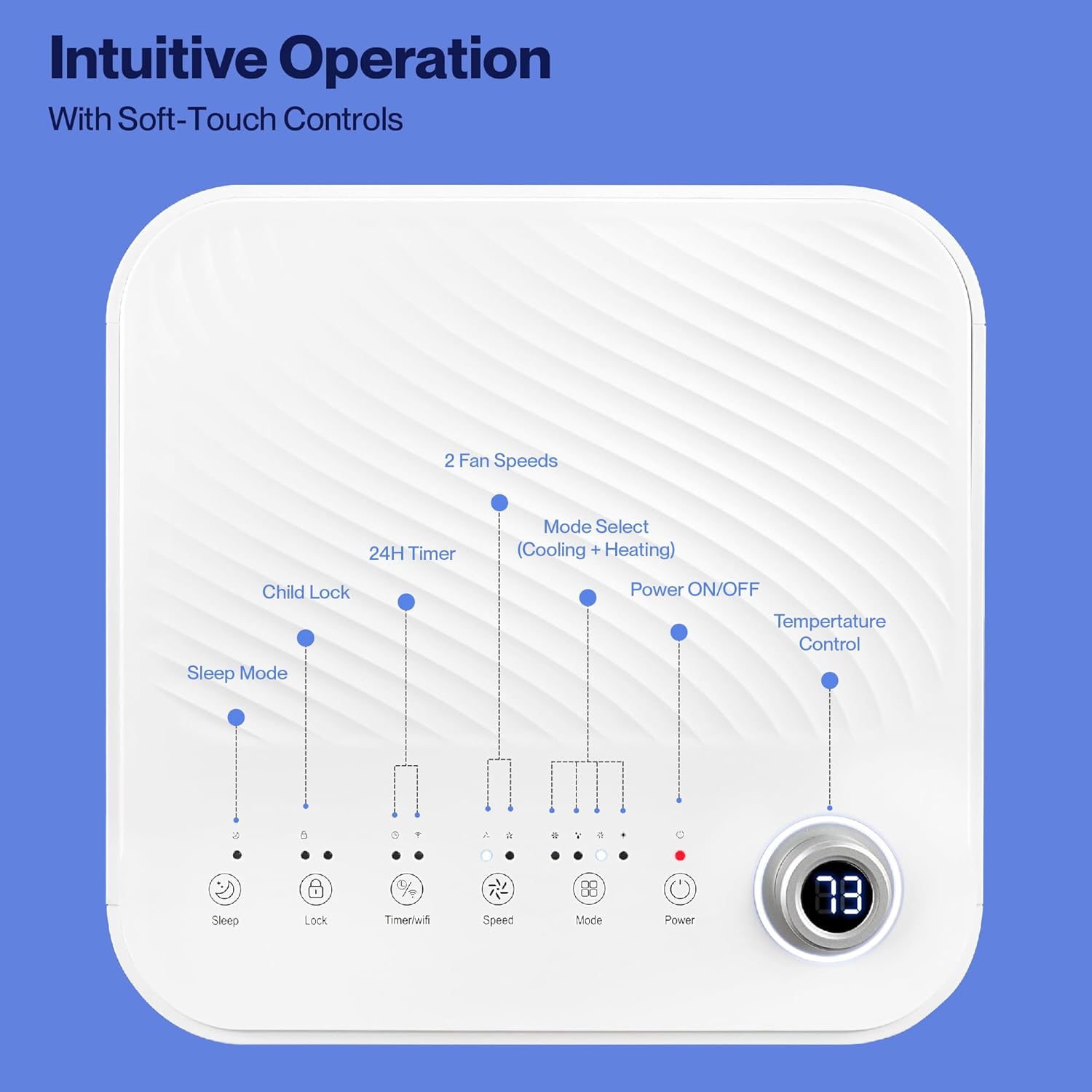
Image: Detailed diagram of the control panel with labels for each button: Sleep, Child Lock, Timer/WiFi, Fan Speed, Mode Select (Cooling + Heating), Power ON/OFF, and Temperature Control with digital display.
- מאַכט אויף / אַוועק: דרוק צו קער די אַפּאַראַט אויף אָדער אַוועק.
- מאָדע אויסקלייַבן: Cycle through Cooling, Heating, Dehumidification, Ventilation (Fan), and Sleep modes.
- טעמפּעראַטור קאָנטראָל: Use the up/down arrows to adjust the desired temperature.
- פאַן גיכקייַט: Select between 2 fan speeds (Low, High).
- טיימער: שטעלט א 24-שעה טייַמער פֿאַר אויטאָמאַטישע אָן/אויס אָפּעראַציע.
- קינד שלאָס: Activates or deactivates the child lock function.
- שלאָפן מאָדע: אַקטיוויזירט שלאָף מאָדע פֿאַר שטילער אָפּעראַציע און גראַדועל טעמפּעראַטור אַדזשאַסטמאַנט.
4.2 רימאָוט קאָנטראָל
The unit comes with a remote control for convenient operation from a distance. All functions available on the control panel can be accessed via the remote.
4.3 WiFi/Smart App Control
Control your Della Portable Air Conditioner from anywhere using the free DELLA+ app on your smartphone. The unit is compatible with Google Assistant and Amazon Alexa for voice control.

Image: A person relaxing on a couch, using a smartphone to control the air conditioner, with text indicating compatibility with Google Assistant and Amazon Alexa.
- Download the DELLA+ app from your smartphone's app store.
- פֿאָלגט די אינסטרוקציעס אין דער אַפּ צו פֿאַרבינדן אייער לופטקילונג צו אייער היים WiFi נעץ.
- Once connected, you can control modes, temperature, fan speed, and set schedules remotely.
The app also supports Smart Geo Location, allowing the unit to automatically turn on or off based on your proximity to home.

Image: A smartphone screen showing a map with a car icon and a notification indicating the AC unit automatically turned on due to Smart Geo Location.
5. וישאַלט
רעגולערע אויפהאלטונג זיכערט אָפּטימאַלע פאָרשטעלונג און פאַרלענגערט די לעבנסדויער פון אייער אַפּאַראַט. שטענדיק אַרויסציען דעם עלעקטרישן טייל פון דער אַפּאַראַט איידער איר רייניגט עס.
5.1 רייניקונג די לופט פילטער
דער לופט פילטער זאָל ווערן ריין געמאַכט יעדע צוויי וואָכן אָדער אָפטער, דיפּענדינג אויף באַניץ און לופט קוואַליטעט.
- געפינט דעם לופט פילטער פאנעל (געווענליך אויף דער הינטערשטער אדער זייט פון דעם איינהייט).
- אַראָפּנעמען די פילטער.
- וואַשט דעם פילטער מיט וואַרעם, זייפֿיקן וואַסער. שווענקט גוט אויס און לאָזט עס גאָר טרוקן ווערן אין דער לופֿט איידער איר לייגט עס צוריק אַרײַן.
5.2 אויסלאָזן וואַסער
The unit has a self-evaporating system, but in high humidity conditions, water may accumulate. The "Water-full indicator" will illuminate when the water tank needs draining.
- שטעלט א פלאַכע פאַן אָדער טאַץ אונטער דעם דריינאַדזש פּאָרט (וואָס געפינט זיך אין דער אונטערשטער הינטערשטער טייל פון דער אַפּאַראַט).
- אַראָפּנעמען די פליסן צאַפּן.
- Allow all accumulated water to drain out.
- לייגט צוריק דעם אפפלוס-פלאג זיכער.
5.3 סטאָרידזש
אויב איר לייגט דאָס אַפּאַראַט אַוועק פֿאַר אַ לענגערע צײַט:
- אַרויסגיסן אַלע אָנגעזאַמלטע וואַסער.
- ריין די לופט פילטער.
- לאָזט דעם אַפּאַראַט לויפן אין נאָר-ווענטילאַטאָר מאָדע פֿאַר אַ פּאָר שעה צו טרוקענען דעם אינעווייניק.
- אַרויסנעמען דעם עלעקטרישן שנור פֿון דער עלעקטרישער פּלאַטע און עס אָפּדרייען אויף אַ אָרדנטלעכן אופֿן.
- סטאָר די אַפּאַראַט אין אַ קיל, טרוקן אָרט, פּרעפעראַבלי אין זייַן אָריגינעל פּאַקקאַגינג.
6. טראָובלעשאָאָטינג
זעט דעם אָפּטייל פֿאַר געוויינטלעכע פּראָבלעמען און זייערע לייזונגען.
| פּראָבלעם | מעגלעך סיבה | לייזונג |
|---|---|---|
| אַפּאַראַט טוט נישט קער אויף | קיין שטראָם; שטראָם שנור אַרויסגעצויגן; קרייַז ברעאַקער אויסגעלאָשן; וואַסער טאַנק פול | Check power outlet; Plug in power cord; Reset circuit breaker; Drain water tank |
| אַפּאַראַט קילט נישט עפֿעקטיוו | Air filter dirty; Exhaust hose not properly installed; Room too large; Doors/windows open; Temperature setting too high | Clean air filter; Ensure exhaust hose is sealed; Close doors/windows; Lower temperature setting |
| אַפּאַראַט איז טומלדיק | Unit not on level surface; Air filter dirty; Obstruction in fan | Place unit on level surface; Clean air filter; Check for obstructions |
| וואַסער ליקאַדזש | Drain plug loose or missing; Unit tilted | זיכער מאַכן אַז די אַראָפּגאַנג פּלאָג איז גלייך; זיכער מאַכן אַז די אַפּאַראַט איז גלייך |
| WiFi פֿאַרבינדונג פּראָבלעמען | Incorrect WiFi password; Unit too far from router; Router issues | Verify password; Move unit closer to router; Restart router |
אויב די פראבלעם בלייבט נאך פרובירן די לייזונגען, ביטע קאנטאקטירט קאסטומער סופארט.
7. ספּעסאַפאַקיישאַנז
| שטריך | באַשרייַבונג |
|---|---|
| מאָדעל נומער | 048-OPAC-6H |
| קאָאָלינג קאַפּאַציטעט | 10000 BTU |
| קאַווערידזש שטח | אַרויף צו 450 סק. פט. |
| פאַנגקשאַנז | Cooling, Heating, Dehumidifier, Fan, Sleep Mode |
| Voltage | 115 וואלטס |
| ראַש מדרגה | 54 דב |
| ריפרידזשעראַנט | ר 410 א |
| דימענסיעס (L X W X H) | 12.2 X 12.2 X 27.6 אינטשעס |
| מאַטעריאַל | אַבס פּלאַסטיק |
| ספּעציעלע פֿעיִקייטן | Portable, Dehumidifier, WiFi Enabled, Remote Control, Built-in Handle, 24-hour timer, Child Lock |
8. גאַראַנטיע און קונה שטיצע
For warranty information or technical assistance, please refer to the warranty card included with your product or visit the official Della website. You may also contact Della customer support directly for further assistance with troubleshooting or parts replacement.
Ask a question about this manual
Ask about setup, troubleshooting, compatibility, parts, safety, or missing instructions. Manuals+ will review the question and use this page’s manual context to help answer it.