
1. הקדמה
This manual provides detailed instructions for setting up, operating, and maintaining your Bmax B7 Power Mini PC. Please read this manual thoroughly before using the device to ensure proper functionality and longevity. The Bmax B7 Power is a compact and powerful mini PC designed for various computing tasks, from everyday productivity to multimedia consumption and light gaming.
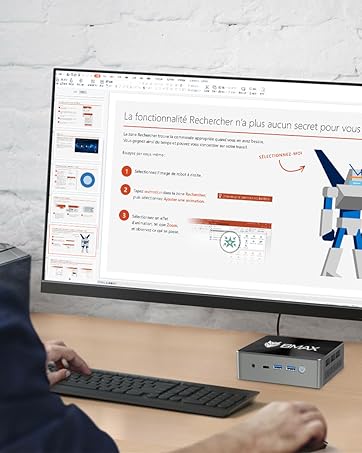
The Bmax B7 Power Mini PC in a typical desktop setup.
2. פּעקל אינהאַלט
Upon opening the package, verify that all items listed below are present and in good condition. If any items are missing or damaged, please contact customer support.
- Bmax B7 Power Mini PC
- מאַכט אַדאַפּטער
- HDMI קאַבלע
- VESA Mount Bracket and Screws
- באַניצער מאַנואַל (דעם דאָקומענט)
Video: An unboxing demonstration of the Bmax B7 Power Mini PC, showing the contents of the retail package.
3. פּראָדוקט איבערview
The Bmax B7 Power Mini PC features a compact design with essential ports for connectivity and expansion. Familiarize yourself with the port layout before connecting peripherals.
ווידעא: אן הקדמה איבערview of the Bmax B7 Power Mini PC, highlighting its design, features, and port configuration.
פראָנט פּאַנעל
- מאַכט קנעפּל: Press to turn the PC on or off.
- וסב 3.0 פּאָרץ (x2): פֿאַר פֿאַרבינדן הויך-גיכקייט USB דעוויסעס.
- טיפּ-C פּאָרט: פֿאַר דאַטן אַריבערפירן און אַרויסווייַזן רעזולטאַט.
- 3.5 מם כעדסעט דזשאַק: For audio output and microphone input.
- קלאָר CMOS קנעפּל: Used to reset BIOS settings (use with caution).
דערציען פּאַנעל
- HDMI פּאָרטן (x2): פֿאַר פֿאַרבינדן צו דיספּלייז.
- וסב 2.0 פּאָרץ (x2): פֿאַר פֿאַרבינדן נאָרמאַלע USB דעוויסעס.
- עטהערנעט פּאָרט: פֿאַר אַ דראָטיקער נעץ פֿאַרבינדונג.
- מאַכט אין: פֿאַרבינדט דאָ דעם צוגעשטעלטן מאַכט אַדאַפּטער.
4. סעטאַפּ אינסטרוקציעס
Follow these steps to set up your Bmax B7 Power Mini PC:
- פאַרבינדן צו אַ דיספּליי: Use the provided HDMI cable to connect the Mini PC to your monitor or TV. The B7 Power supports up to three displays simultaneously.
- פאַרבינדן פּעריפעראַלס: שטעקט אריין אייער USB קלאַוויאַטור און מויז אין די פאַראַן USB פּאָרץ.
- פאַרבינדן צו נעץ (אפציאָנעל): For a wired connection, plug an Ethernet cable into the Ethernet port. For wireless, ensure your Wi-Fi network is available during initial setup.
- פאַרבינדן מאַכט: Connect the power adapter to the "Power In" port on the Mini PC, then plug the adapter into a power outlet.
- מאַכט אויף: Press the power button on the front panel. The Mini PC will boot up.
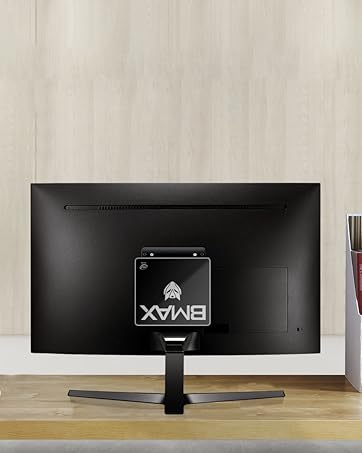
The Bmax B7 Power can be mounted behind a monitor for a clean setup.
5. אַפּערייטינג ינסטרוקטיאָנס
Initial Windows Setup
Upon first boot, you will be guided through the Windows operating system setup process. Follow the on-screen prompts to configure language, region, network settings, and user accounts. Ensure you have your Wi-Fi password ready if you choose a wireless connection.
קאַנעקטינג צו Wi-Fi
The Bmax B7 Power supports Wi-Fi 6 (802.11ax) for high-speed wireless networking. To connect:
- דריקט דעם Wi-Fi אייקאן אין דער סיסטעם טאַץ (געווענליך אונטן-רעכטס פון דעם עקראַן).
- אויסקלייבן אייער געוואונטשענע Wi-Fi נעץ פון דער ליסטע.
- Enter the network security key (password) and click "Connect".
מאַכט מאַנאַגעמענט
- שאַט אַראָפּ: דריקט דעם אָנהייב קנעפּל, דערנאָך מאַכט > שאַט דאַון.
- ריסטאַרט: דריקט דעם אָנהייב קנעפּל, דערנאָך מאַכט > ריסטאַרט.
- שלאָף: דריקט דעם אָנהייב קנעפּל, דערנאָך מאַכט > שלאָף.
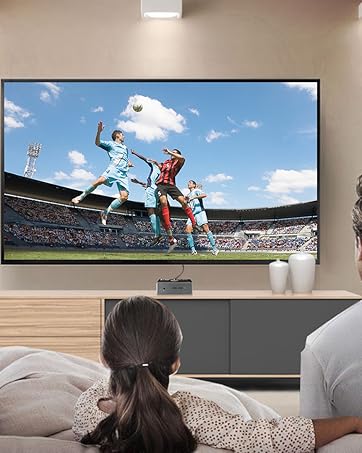
The Bmax B7 Power is suitable for home entertainment, including playing 4K UHD videos.
6. ספּעסאַפאַקיישאַנז
| שטריך | דעטאַל |
|---|---|
| מאָדעל נומער | ב7 מאַכט |
| פּראַסעסער | Intel Core i7-11390H (up to 5.0GHz) |
| באַראַן | 16GB DDR4 (Supports up to 64GB) |
| סטאָרידזש | 1TB NVMe SSD |
| ווירעלעסס קאַנעקטיוויטי | 802.11a/b/g/n/ac/ax WiFi 6 |
| דימענשאַנז | 10.51 X 6.14 X 2.91 אינטשעס |
| וואָג | 1.87 פונט |
| פאַבריקאַנט | BMAX |
| ערשטער בנימצא | 14 יוני 2023 |
7. וישאַלט
Regular maintenance helps ensure the optimal performance and lifespan of your Mini PC.
- רייניקונג: Use a soft, dry cloth to clean the exterior of the device. For dust accumulation in vents, use compressed air. Ensure the device is powered off and unplugged before cleaning.
- ווייכווארג דערהייַנטיקונגען: Regularly check for and install operating system updates (e.g., Windows Updates) and driver updates to maintain security and performance.
- ווענטילאַטיאָן: Ensure the Mini PC is placed in a well-ventilated area and that its vents are not obstructed to prevent overheating.
8. טראָובלעשאָאָטינג
If you encounter issues with your Bmax B7 Power Mini PC, refer to the following common problems and solutions:
קיין מאַכט
- זיכער מאַכן אַז דער מאַכט אַדאַפּטער איז זיכער פארבונדן צו ביידע די מיני פּיסי און אַ אַרבעטנדיק מאַכט ווענטיל.
- פּרובירט די עלעקטרישע אַוטלעט מיט אַן אַנדער מיטל צו באַשטעטיקן אַז עס פֿונקציאָנירט.
- If using a power strip, ensure it is switched on.
קיין ווייַז רעזולטאַט
- Verify that the HDMI cable is securely connected to both the Mini PC and the monitor.
- זייט זיכער אז דער מאָניטאָר איז אנגעצונדן און איינגעשטעלט צו דער ריכטיקער אינפוט מקור (למשל, HDMI 1, HDMI 2).
- פרובירט אן אנדערן HDMI קאבל אדער מאָניטאָר אויב מעגלעך.
Wi-Fi קאָנעקטיוויטי פּראָבלעמען
- Check if other devices can connect to your Wi-Fi network.
- Restart your Wi-Fi router and the Mini PC.
- Ensure Wi-Fi drivers are up to date in Device Manager.
- If the issue persists, consider using a wired Ethernet connection as an alternative.
9. וואָראַנטי און שטיצן
Your Bmax B7 Power Mini PC comes with a manufacturer's warranty. Please refer to the warranty card included in your package for specific terms and conditions. For technical support, product inquiries, or warranty claims, please contact Bmax customer service through their official webפּלאַץ אָדער די קאָנטאַקט אינפֿאָרמאַציע צוגעשטעלט מיט דיין קויפן.
For additional resources and FAQs, visit the official Bmax webפּלאַץ: Bmax Official Store