
1. הקדמה
Welcome to your WOOXGEHM 4-in-1 Wired Arcade Fight Stick Joystick. This manual provides essential information for setting up, operating, and maintaining your new arcade controller. Designed for compatibility with Nintendo Switch, PC, PlayStation 3, and Android devices, this joystick enhances your gaming experience with precise control and turbo functions.
2. זיכערקייַט אינפֿאָרמאַציע
זיכערקייַט גיידליינז
- האַלטן די מיטל אַוועק פון וואַסער און נעץ.
- ויסמיידן יקספּאָוזינג די מיטל צו עקסטרעם טעמפּעראַטורעס.
- דו זאלסט נישט פּרווון צו דיסאַסעמבאַל אָדער פאַרריכטן די מיטל זיך.
- ניצט נאָר די צוגעשטעלטע קייבלען און אַקסעסאָריעס.
- האַלטן אויס פון דערגרייכן פון קליין קינדער.
3. פּעקל אינהאַלט
וואָס איז אַרייַנגערעכנט
- 1 x Universal Arcade Fight Stick
- 1 x Remote Lever Handle (Joystick)
- 1 x Fixed Small Parts (e.g., suction cups)
- 1 x ינסטרוקטיאָן מאַנואַל
4. פּראָדוקט איבערview
The WOOXGEHM Arcade Fight Stick is designed for comfort and precision, featuring a spherical metal joystick and six round control buttons. It also includes additional buttons for various functions and platform compatibility.

פיגורע 1: WOOXGEHM 4-in-1 Wired Arcade Fight Stick Joystick, top view. A black arcade fight stick with a red spherical joystick on the left and six red circular action buttons on the right. Smaller function buttons are located above the main action buttons. The surface features a racing car graphic.
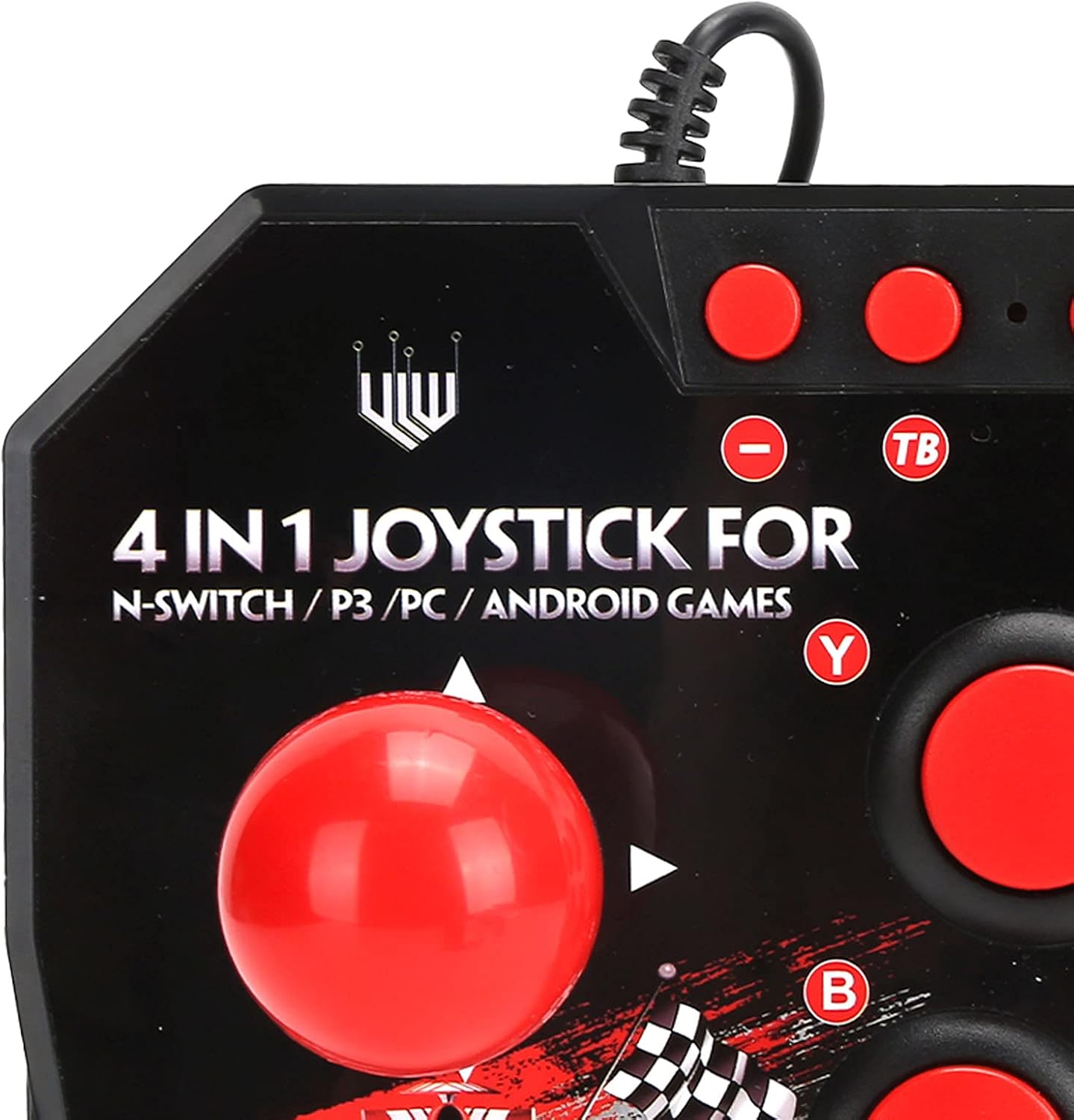
פיגורע 2: Close-up of WOOXGEHM 4-in-1 Wired Arcade Fight Stick Joystick buttons. A detailed view of the joystick's top panel, showing the "4 IN 1 JOYSTICK FOR N-SWITCH / P3 / PC / ANDROID GAMES" text, along with the red spherical joystick and several red action buttons labeled Y, B, X, A, L, R, and smaller buttons for Turbo functions.

פיגורע 3: דנאָ view of WOOXGEHM 4-in-1 Wired Arcade Fight Stick Joystick with suction cups. The underside of the arcade fight stick, showing four clear suction cups designed to secure the device to a flat surface during use. The label indicates "Input: DC5V / 500mA", "Working current: 20mA", and "MADE IN CHINA".
5. סעטאַפּ און קאַנעקשאַן
The arcade fight stick connects via a wired USB cable. Ensure your console or device is powered on before connecting.
5.1 נינטענדאָ סוויטש פֿאַרבינדונג
- Connect the USB cable from the arcade fight stick to an available USB port on your Nintendo Switch dock.
- Ensure "Pro Controller Wired Communication" is enabled in your Switch System Settings.
- The controller should be automatically recognized.
5.2 פּיסי קאַנעקשאַן
- Connect the USB cable from the arcade fight stick to an available USB port on your PC.
- The system should automatically install the necessary drivers. If not, manual driver installation may be required (refer to your PC's operating system documentation).
- The controller will be recognized as a standard USB gamepad.
5.3 PlayStation 3 (PS3) Connection
- Connect the USB cable from the arcade fight stick to an available USB port on your PS3 console.
- דער קאָנטראָללער זאָל ווערן אויטאָמאַטיש דערקענט און גרייט פֿאַר באַנוץ.
5.4 אַנדרויד דעווייס פֿאַרבינדונג
- Connect the USB cable from the arcade fight stick to your Android device using an OTG (On-The-Go) adapter (not included).
- Ensure your Android device supports OTG functionality.
- The controller should be recognized as an external gamepad.

פיגורע 4: Multi-platform compatibility. This image illustrates the multi-platform compatibility of the arcade fight stick, showing it connected to a Nintendo Switch console, a PlayStation 3, a PC monitor, and an Android device, highlighting its versatility.

פיגורע 5: Plug-and-Play functionality. This image highlights the plug-and-play nature of the arcade fight stick, showing it connected to a PlayStation console, a Nintendo Switch, and a monitor displaying game content, emphasizing ease of use across platforms.
6. אַפּערייטינג ינסטרוקטיאָנס
6.1 יקערדיק קאָנטראָלס
- דזשויסטיק: Use the spherical metal joystick for directional movement.
- קאַמף קנעפּלעך: The six large round buttons (A, B, X, Y, L, R) are for primary game actions.
- פונקציע קנעפּלעך: Smaller buttons above the main action buttons provide additional controls (e.g., Home, Select, Start).
6.2 Turbo Functions
The controller features turbo functions for rapid button presses.
- To activate Turbo for a button, press and hold the desired action button, then press the "TB" (Turbo) button. The button will now rapidly repeat its input when held down.
- To deactivate Turbo, press and hold the same action button, then press the "TB" button again.
6.3 מאָדע סוויטשינג
The joystick may have a mode switch to toggle between different input modes (e.g., D-Pad, Left Analog Stick, Right Analog Stick) for specific games or platforms. Refer to the small buttons near the top left of the controller for these options.
7. וישאַלט און קער
פּראָדוקט קער
- רייניקונג: Wipe the surface of the joystick with a soft, dry cloth. Do not use abrasive cleaners or solvents.
- סטאָרידזש: סטאָר די מיטל אין אַ קיל, טרוקן אָרט אַוועק פון דירעקט זונשייַן ווען ניט אין נוצן.
- קאַבלע פאַרוואַלטונג: פֿאַרמײַדט שאַרפֿע בייגן אָדער איבערגעטריבענעם ציען דעם USB קאַבל כּדי צו פֿאַרמײַדן שאָדן.
8. טראָובלעשאָאָטינג
פּראָסט ישוז און סאַלושאַנז
- Controller not recognized:
לייזונג: Ensure the USB cable is securely connected to both the joystick and the device/console.
לייזונג: For Nintendo Switch, verify "Pro Controller Wired Communication" is enabled in system settings.
לייזונג: פּרוּווט קאַנעקטינג צו אַ אַנדערש וסב פּאָרט.
לייזונג: Restart your console/PC/Android device. - Buttons or joystick unresponsive:
לייזונג: אָפּשטעקן און ווידער פֿאַרבינדן דעם דזשויסטיק.
לייזונג: Test the joystick on another compatible device to determine if the issue is with the controller or the device. - Turbo function not working:
לייזונג: Ensure you are correctly activating/deactivating the turbo mode as described in the Operating Instructions.
9. ספּעסאַפאַקיישאַנז
טעכניש ספּעסאַפאַקיישאַנז
| שטריך | דעטאַל |
|---|---|
| מאָדעל | B0C7GYXMLZ |
| סאָרט | WOOXGEHM |
| קאָנטראָללער טיפּ | Button Control, Joystick |
| ייַזנוואַרג צובינד | וסב |
| מאַטעריאַל | אַקרילאָניטרילע בוטאַדיענע סטירענע (אַבס) |
| פּונקט וואָג | 0.52 קילאָגראַמס (1.14 פונט) |
| גרייס (בעערעך.) | 21 X 15 X 6 סענטימעטער (8.3 X 5.9 X 2.4 אינטשעס) |
| ארבעטן חלקtagE/קראַנט | DC5V/20mA |
| וסב קאַבלע לענג | 3 עם / 9.8 פט |
| קאַמפּאַטאַבילאַטי | Nintendo Switch, PC, PS3, Android Games |

פיגורע 6: Technical specifications overview. An image displaying the technical specifications of the arcade fight stick, including item type, material (ABS), size (21 x 15 x 6 cm), working voltage/current (DC5V/20mA), and USB cable length (3m/9.8ft), along with a list of package contents.
10. וואָראַנטי און שטיצן
וואָראַנטי אינפֿאָרמאַציע
This WOOXGEHM product comes with a standard manufacturer's warranty. For specific warranty terms and conditions, please refer to the warranty card included in your package or contact WOOXGEHM customer support.
קונה שטיצן
If you encounter any issues or have questions regarding your Arcade Fight Stick, please visit the official WOOXGEHM webפּלאַץ אָדער קאָנטאַקט זייער קונה דינסט פֿאַר הילף.