
1. זיכערקייַט אינפֿאָרמאַציע
Please read these safety instructions carefully before using your Ledwood XTREM140 speaker. Keep this manual for future reference.
- שטעלט נישט אויס דעם רעדנער צו עקסטרעמע טעמפּעראַטורן, דירעקטע זונשייַן, אדער אפענע פלאַמען.
- ויסמיידן דראַפּינג אָדער ונטערטעניק די רעדנער צו שטאַרק ימפּאַקץ.
- The speaker is IPX5 waterproof, meaning it is protected against low-pressure water jets from any direction. Do not immerse it in water.
- פּרוּווט נישט צו צענעמען, פאַרריכטן אָדער מאָדיפֿיצירן דעם רעדנער אַליין. קאָנטאַקט קוואַליפֿיצירטע סערוויס פּערסאָנעל.
- ניצט נאָר דעם צוגעשטעלטן USB-C טשאַרדזשינג קאַבל אָדער אַ סערטיפיצירטן עקוויוואַלענט.
- האַלטן אויס פון דערגרייכן פון קינדער.
2. פּראָדוקט איבערview
Familiarize yourself with the components and controls of your Ledwood XTREM140 speaker.
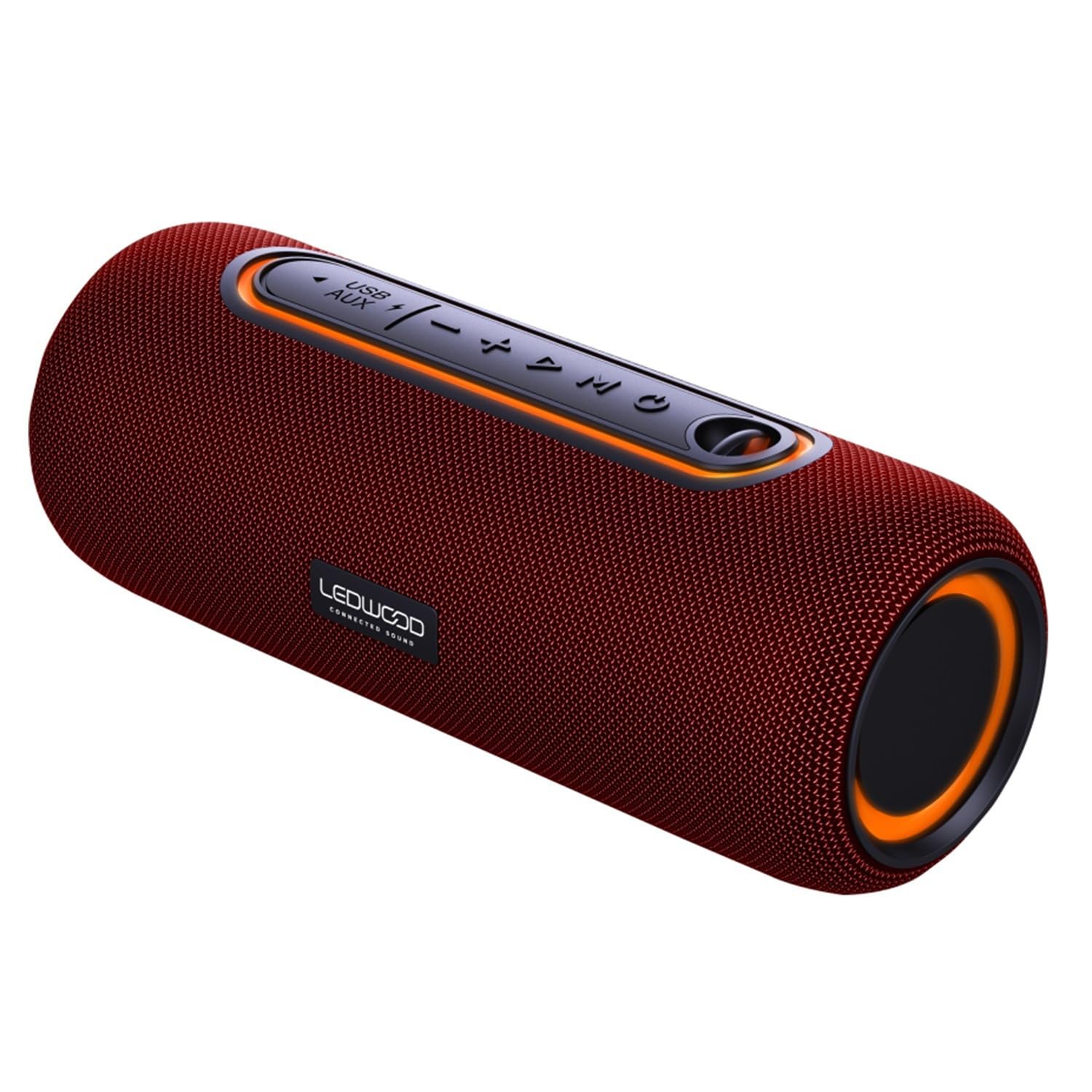
Image 1: Ledwood XTREM140 speaker, angled view showing the control panel and carrying strap.
קאָנטראָל פּאַנעל אויסלייג

בילד 2: דעטאַלירט view of the speaker's control buttons, including power, volume, play/pause, and mode selection.
- מאַכט קנעפּל: דריקן און האַלטן צו קער אויף / אַוועק.
- שפּיל / פּויזע קנעפּל: דרוק צו שפּילן אָדער פּויזע אַודיאָ.
- באַנד אַראָפּ / פרייַערדיק שפּור: דריקן צו פֿאַרמינערן די באַנד. דריקן און האַלטן צו גיין צום פֿריִערדיקן ליד.
- באַנד אַרויף / ווייַטער שפּור: דריק צו פארגרעסערן די קול. דריק און האלט צו גיין צום נעקסטן ליד.
- מאָדע קנעפּל (M): דריקן צו באַשטימען צווישן בלועטוט, AUX, און USB מאָדעס.
- TWS קנעפּל: Press to activate True Wireless Stereo pairing.
- וסב פּאָרט: For USB playback or charging.
- AUX אַרייַנשרייַב: פֿאַר דראָטיקער אַודיאָ פֿאַרבינדונג.
- USB-C טשאַרדזשינג פּאָרט: פֿאַר טשאַרדזשינג די רעדנער.
3. וואָס איז אין דער קעסטל
באַשטעטיקן אַז אַלע זאכן זענען פאַראַן אין דער פּאַקאַדזשינג:
- Ledwood XTREM140 Portable Bluetooth Speaker
- וסב-C טשאַרדזשינג קאַבלע
- 3.5 מם AUX אַודיאָ קאַבלע
- באַניצער מאַנואַל (דעם דאָקומענט)
4. סעטאַפּ
4.1 אויפלאָדן דעם רעדנער
- Connect the provided USB-C cable to the speaker's USB-C charging port.
- פֿאַרבינדט דעם אַנדערן עק פֿונעם USB-C קאַבל צו אַ USB מאַכט אַדאַפּטער (נישט אַרייַנגערעכנט) אָדער אַ קאָמפּיוטער'ס USB פּאָרט.
- די טשאַרדזשינג אינדיקאַטאָר ליכט וועט זיך אָנצינדן. עס וועט זיך אויסלעשן אָדער טוישן קאָליר אַמאָל עס איז גאָר אָנגעלאָדן.
- A full charge takes approximately 3-4 hours and provides up to 6 hours of playback.
4.2 פּאַוערינג אויף / אַוועק
- צו מאַכט אויף: דריק און האלט דעם פּאַוער קנעפּל פֿאַר 2-3 סעקונדעס. איר וועט הערן אַן אָדבאַרן פּראָמפּט.
- צו מאַכט אַוועק: דריק און האלט דעם פּאַוער קנעפּל פֿאַר 2-3 סעקונדעס. איר וועט הערן אַן אָדבאַרן פּראָמפּט.
4.3 בלועטאָאָטה פּערינג
- Ensure the speaker is powered on and in Bluetooth mode (indicated by a flashing blue LED). If not, press the 'M' (Mode) button to switch to Bluetooth mode.
- אַקטיווירן בלועטוט אויף אייער סמאַרטפאָון, טאַבלעט, אָדער אַנדערע בלועטוט-ענייבאַלד מיטל.
- זוכן פֿאַר "XTREM140" in your device's Bluetooth list.
- Select "XTREM140" to connect. Once paired, the LED indicator will stop flashing and remain solid blue, and you will hear a confirmation sound.
- דער רעדנער וועט זיך אויטאָמאַטיש ווידער פֿאַרבינדן צום לעצטן פֿאַרבונדענעם מיטל ווען עס ווערט אָנגעצונדן, אויב דער מיטל'ס בלועטוט איז אַקטיוו און אין דער געגנט.
4.4 אמתע ווירעלעס סטערעאָ (TWS) פּאָרינג
TWS allows you to connect two XTREM140 speakers for a stereo sound experience.
- Ensure both XTREM140 speakers are powered on and in Bluetooth mode, but נישט פארבונדן צו יעדן מיטל.
- On one of the speakers (this will be the primary speaker), press the 'TWS' button. You will hear a prompt indicating TWS pairing mode.
- The two speakers will automatically search for and connect to each other. Once connected, you will hear a confirmation sound, and the TWS indicator light will be solid on both speakers.
- Now, connect your Bluetooth device to the primary speaker (the one you pressed the TWS button on) as described in section 4.3.
- To disconnect TWS, press the TWS button on either speaker.
4.5 AUX קאַנעקשאַן
- Connect one end of the 3.5mm AUX audio cable to the AUX input port on the speaker.
- Connect the other end of the cable to the audio output jack of your device (e.g., MP3 player, computer).
- Press the 'M' (Mode) button on the speaker to switch to AUX mode.
- אַודיאָ וועט איצט שפּילן דורך דעם רעדנער פֿון אייער פֿאַרבונדענעם מיטל.
4.6 יו-עס-בי פּלייבּעק
- Insert a USB flash drive (formatted to FAT32) containing MP3 audio fileאַרײַן אין דעם USB פּאָרט אויף דעם רעדנער.
- Press the 'M' (Mode) button to switch to USB mode.
- The speaker will automatically begin playing audio fileס פון די USB דרייוו.
5. אַפּערייטינג ינסטרוקטיאָנס
5.1 גרונטלעכע שפּיל קאָנטראָלן
- שפּיל / פּויזע: דרוק די שפּיל / פּויזע קנעפּל.
- באַנד אַרויף: דרוק די באַנד אַרויף (+) קנעפּל.
- באַנד אַראָפּ: דרוק די באַנד אַראָפּ (-) קנעפּל.
- ווייַטער שפּור: דריקן און האַלטן די באַנד אַרויף (+) קנעפּל.
- פֿריִערדיקע שפּור: דריקן און האַלטן די באַנד אַראָפּ (-) קנעפּל.
5.2 ווויס אַססיסטאַנט
The speaker supports voice assistant functionality when connected via Bluetooth to a compatible smartphone.
- To activate your device's voice assistant (e.g., Siri, Google Assistant), press the שפּיל / פּויזע קנעפּל געשווינד.
5.3 Call Handling (via Bluetooth)
ווען פארבונדן צו א סמאַרטפאָון דורך בלועטוט, קען מען ניצן דעם רעדנער פֿאַר הענט-פֿרײַע רופֿן.
- ענטפער רופן: דרוק די שפּיל / פּויזע קנעפּל אַמאָל.
- סוף רופן: דרוק די שפּיל / פּויזע קנעפּל איין מאל בעת א רוף.
- אָפּוואַרפן רופן: דריקן און האַלטן די שפּיל / פּויזע קנעפּל פֿאַר 2 סעקונדעס.
6. וישאַלט
6.1 רייניקונג
- ווישן די רעדנער מיט אַ ווייך, דamp שטאָף. דו זאלסט נישט נוצן אַברייסיוו קלינערז אָדער סאָלוואַנץ.
- זיכער מאַכן אַז אַלע פּאָרטן זענען טרוקן איידער איר טשאַרדזשט אָדער קאַנעקטינג קייבאַלז.
6.2 סטאָרידזש
- האַלט דעם רעדנער אין אַ קיל, טרוקן אָרט אַוועק פון דירעקט זונשייַן און עקסטרעמע טעמפּעראַטורן.
- If storing for an extended period, charge the battery every 3-6 months to maintain battery health.
7. טראָובלעשאָאָטינג
| פּראָבלעם | מעגלעך סיבה | לייזונג |
|---|---|---|
| דער רעדנער לאָזט זיך נישט אָנ | נידעריק באַטאַרייע | לאָדט אויף דעם רעדנער פֿאַר מינדעסטנס 30 מינוט. |
| קען נישט צוזאמענשטעלן דורך בלוטוט | Speaker not in pairing mode; Device Bluetooth off; Speaker already connected to another device; Device too far. | Ensure speaker is in Bluetooth pairing mode (flashing blue LED). Turn on device Bluetooth. Disconnect from other devices. Move device closer to speaker. |
| קיין געזונט | Volume too low; Incorrect mode selected; AUX/USB cable not fully inserted. | Increase speaker and device volume. Press 'M' to select correct mode (Bluetooth, AUX, USB). Ensure cables are securely connected. |
| TWS פּערינג פיילז | Speakers already connected to a device; Speakers too far apart. | Ensure both speakers are disconnected from any Bluetooth device before TWS pairing. Place speakers within 5 meters of each other. |
8. ספּעסאַפאַקיישאַנז
| שטריך | באַשרייַבונג |
|---|---|
| מאָדעל נאָמען | XTREM140 |
| מאָדעל נומער | LD-XT140BT |
| בלועטאָאָטה ווערסיע | 5.0 |
| וואָטערפּרוף רייטינג | IPX5 |
| RMS מאַכט רעזולטאַט | 10 וו |
| Total Admissible Power | 100 וו |
| רעדנער דריווערס | 2 x 3.5 inch (9cm) |
| אָפטקייַט ענטפער | 80 הערץ - 16 כ"ץ |
| באַטאַרייע קאַפּאַציטעט | 5 וו, 2000 מאַה |
| פּלייַבאַקק צייט | אַרויף צו 6 שעה |
| טשאַרדזשינג צייט | בעערעך. 3-4 שעה |
| קאַנעקטיוויטי | בלועטוט, יו-עס-בי, 3.5 מ"מ אוקס |
| דימענסיעס (L X W X H) | 24.2cm X 9.2cm X 9.2cm |
| מאַטעריאַל | High-quality fabric |
| ספּעציעלע פֿעיִקייטן | TWS Function, Voice Assistance |
9. וואָראַנטי און שטיצן
Ledwood products are designed and manufactured to the highest quality standards. For detailed warranty information and customer support, please refer to the warranty card included with your purchase or visit the official Ledwood webפּלאַץ.
If you encounter any issues not covered in this manual, please contact Ledwood customer service for assistance.