
Deiss DT-116A
Deiss PRO Bluetooth Meat Thermometer Wireless - Instruction Manual
סאָרט: Deiss | מאָדעל: דט -116 אַ
1. פּראָדוקט איבערview
The Deiss PRO Bluetooth Meat Thermometer is designed to provide precise, instant-read temperatures for various meats, ensuring perfect cooking results. It features dual probes for multi-zone cooking and connects wirelessly to your smartphone via a dedicated app, allowing remote monitoring and alerts.

Figure 1: Deiss PRO Bluetooth Meat Thermometer and App Interface.
שליסל פֿעיִקייטן:
- פּינטלעך טעמפּעראַטור רידינגז: Provides precise, instant-read temperatures for various food types.
- צווייענדיק פּראָבע פּלאַן: Allows simultaneous monitoring of two different temperatures, such as two cuts of meat or meat and ambient oven/smoker temperature.
- בלועטאָאָטה קאַנעקטיוויטי: Connects to iOS/Android devices for remote monitoring and alerts.
- USDA-Recommended Presets: Includes pre-programmed temperature settings for common meats, with options to create custom settings.
- ברייט טעמפּעראַטור קייט: Operates from 32°F to 572°F (0°C to 300°C) with probes built to withstand up to 716°F (380°C).
- עטלעכע מאַונטינג אָפּציעס: Features anti-slip pads, a hanging hole, and an internal magnet for versatile placement.
2. וואָס איז אין דער קעסטל
ביים עפענען דעם פּעקל, זיכער מאַכן אַז אַלע קאָמפּאָנענטן זענען פאַראַן:
- Deiss PRO Bluetooth Meat Thermometer Unit
- 2 x Stainless Steel Probes with Waterproof Probe Cables
- 2 x AAA באַטעריעס (פאַר-אינסטאַלירט אָדער אַרייַנגערעכנט באַזונדער)
- ינסטרוקטיאָן מאַנואַל (דעם דאָקומענט)

פיגור 2: פּאַקעט אינהאַלט.
3. סעטאַפּ גייד
3.1. ערשט סעטאַפּ
- אַרייַנלייגן באַטעריז: If not already installed, open the battery compartment on the back of the thermometer unit and insert 2 AAA batteries, observing polarity.
- מאַכט אויף: Press the power button on the thermometer unit to turn it on.
- אראפקאפיע די אַפּ: Scan the QR code provided in the product packaging or search for "Deiss Thermo" in your device's app store (iOS or Android). Download and install the application.

Download the Deiss Thermo App.
- פֿאַרבינדן פּראָבעס: Insert the probe cables into the corresponding ports (Probe 1 and Probe 2) on the side of the thermometer unit. Ensure they are securely connected.

Connect the probes.
3.2. בלועטאָאָטה פּערינג
- געבן בלועטאָאָטה: מאַכן זיכער אַז בלועטאָאָטה איז ענייבאַלד אויף דיין סמאַרטפאָנע.
- עפענען אַפּ: Launch the "Deiss Thermo" app. The app will automatically scan for and connect to your thermometer unit.
- באַשטעטיקן קשר: Once connected, the app will display the current temperatures from the probes.

Figure 3: Connecting the thermometer to the app.
3.3. פּראָדוקט דעמאָנסטראַציע ווידעאָ
ווידעא 1: אן איבערview and demonstration of the Deiss PRO Bluetooth Meat Thermometer, showing unboxing, setup, and usage.
4. אַפּערייטינג ינסטרוקטיאָנס
4.1. Using the Probes
- אַרייַנלייגן פּראָבע: Carefully insert the stainless steel probe into the thickest part of the meat, avoiding bones. For dual probe use, insert the second probe into another piece of meat or position it to measure ambient oven/smoker temperature.

אַרייַנלייגן די זאָנד אין דיין עסנוואַרג.
- מאָניטאָר טעמפּעראַטורעס: The thermometer unit and the app will display real-time temperatures from both probes.

Figure 4: Proper probe insertion for accurate readings.
4.2. Using the Deiss Thermo App
- Select Food Type: In the app, tap on the probe you wish to configure (P1 or P2). Select a food type from the USDA-recommended presets (e.g., Beef, Chicken, Pork, Fish, Turkey, Lamb, Hamburger, BBQ Smoke, Hot Smoke, Cold Smoke, Bread).

Select food type in the app.
- קאַסטאַמייז טעמפּעראַטור (אַפּשאַנאַל): For certain food types like beef, you can select desired doneness (Rare, Medium Rare, Medium, Medium Well, Well Done). You can also create custom temperature alerts by setting a specific target temperature.
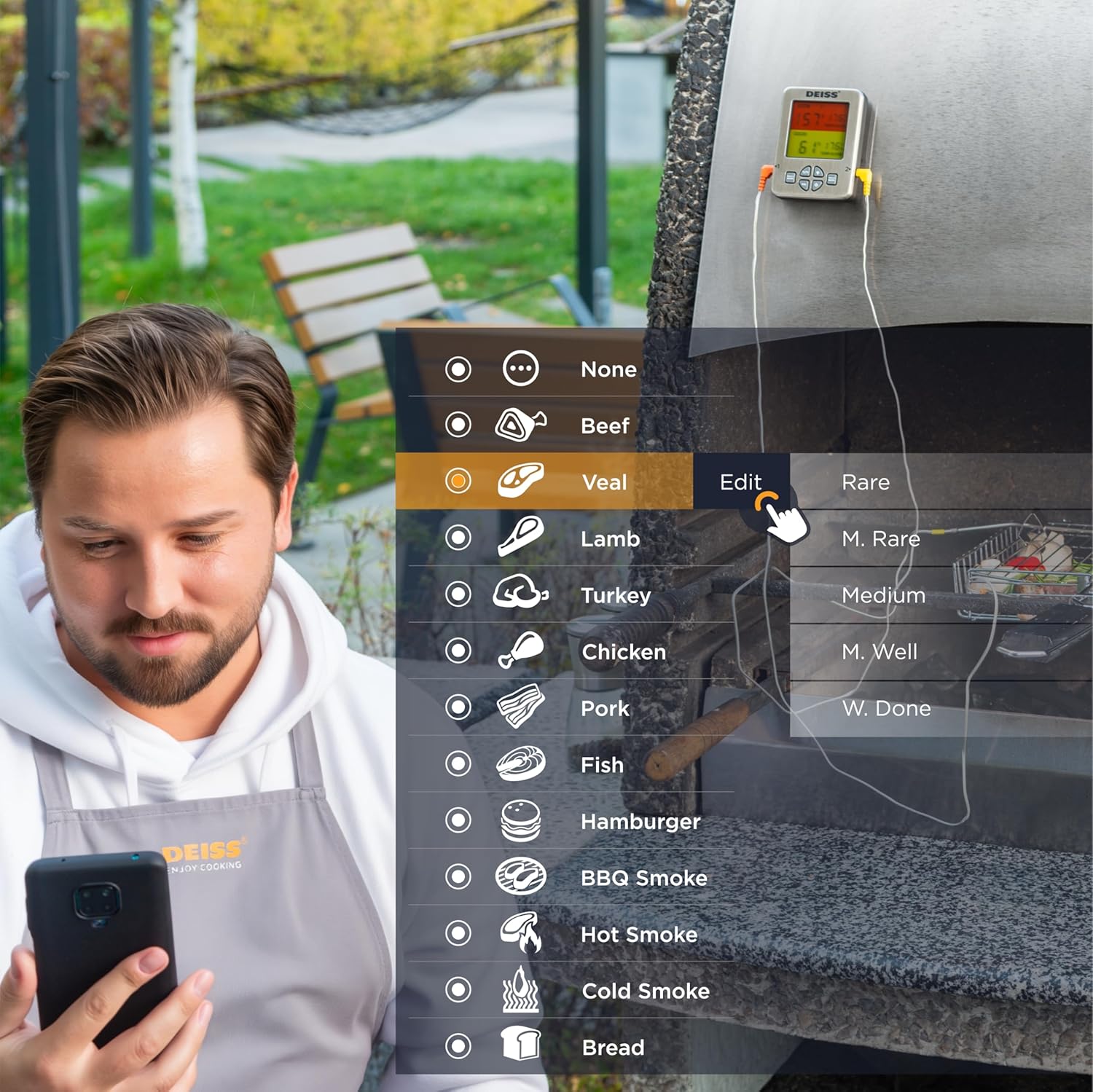
Figure 5: Customizing temperature settings in the app.
- שטעלן טימער: The app allows you to set a countdown timer for your cooking.

Utilize the timer function.
- טעמפּעראַטור גראף: View a historical graph of the temperature readings for better cooking insights.

View temperature trends.
- באַקומען אַלערץ: The app will send real-time alerts to your phone when the target temperature is reached, or if the temperature deviates significantly. The thermometer unit also has an audible alarm.

Receive alerts for perfect doneness.
4.3. Unit Controls
- °C/°F באַשטימען: Press the "C/F" button on the unit to toggle between Celsius and Fahrenheit temperature display.

באַשטימען צווישן סעלסיוס און פאַהרענהעיט.
- באַנד קאָנטראָל: Use the "VOL" button to adjust the alarm volume.
- באַקלייט: The unit features a backlight for easy reading in low light conditions.

Figure 6: Thermometer unit controls and features.
5. קער און וישאַלט
- רייניקונג פּראָבעס: The stainless steel probes are food-safe and designed to withstand high temperatures. After each use, wipe the probes clean with a damp cloth and mild detergent. Rinse thoroughly and dry completely before storage. Do not immerse the entire probe cable or the main unit in water.
- Cleaning Unit: Wipe the thermometer unit with a soft, damp טוך. ניצט נישט קיין שרײַבנדיקע רייניגער און טונקט נישט אײַן דעם אַפּאַראַט אין וואַסער.
- סטאָרידזש: Store the thermometer and probes in a clean, dry place when not in use. The unit has a hanging hole and internal magnets for convenient storage.

Figure 7: Multiple mounting and storage options.
- באַטערי פאַרבייַט: Replace AAA batteries when the display indicates low power or the unit does not turn on.
6. טראָובלעשאָאָטינג
| פּראָבלעם | מעגלעך סיבה | לייזונג |
|---|---|---|
| Thermometer not turning on. | טויטע אדער נישט ריכטיק אריינגעשטעלטע באַטעריעס. | פאַרבייטן די באַטעריעס מיט נייע AAA באַטעריעס, און זאָרגט אַז די פּאָלאַריטעט איז ריכטיק. |
| קיין בלועטאָאָטה פֿאַרבינדונג. | Bluetooth is off on phone; app not open; device out of range; interference. | Ensure Bluetooth is enabled on your phone. Open the "Deiss Thermo" app. Move closer to the thermometer unit. Avoid strong electromagnetic interference. Restart both the thermometer and the app. |
| ומפּינקטלעך טעמפּעראַטור רידינגז. | Probe not inserted correctly; probe damaged; temperature range exceeded. | Ensure the probe is inserted into the thickest part of the meat, away from bones. Check probes for visible damage. Ensure temperatures are within the specified range (32-572°F / 0-300°C). |
| App alarms are not working or are too frequent. | App notification settings; incorrect temperature set points. | Check your phone's notification settings for the "Deiss Thermo" app. Verify the target temperature settings in the app are correct for your desired doneness. Adjust alarm interval settings in the app if available. |
| דער עקראַן איז טונקל אָדער פליקערט. | נידעריק באַטאַרייע. | פאַרבייַטן באַטעריז. |
7. פּראָדוקט ספּעסאַפאַקיישאַנז
| שטריך | דעטאַל |
|---|---|
| מאָדעל נומער | דט -116 אַ |
| פּראָדוקט דימענשאַנז | 3.86 X 2.93 X 1 אינטשעס; 8.15 אונסעס |
| טעמפּעראַטור ראַנגע | 32°F צו 572°F (0°C צו 300°C) |
| Probe Withstand Temperature | אַרויף צו 716 ° F (380 ° C) |
| אַקיעראַסי | ±1.8°F (±1°C) resolution |
| קאַנעקטיוויטי | בלועטאָאָטה |
| מאַכט מקור | 2 AAA באַטעריז (אַרייַנגערעכנט) |
| ווייַז טיפּ | דיגיטאַלע LCD מיט באַקלייט |
| זאָנד מאַטעריאַל | ומבאַפלעקט שטאָל |
| ויסווייניקסט מאַטעריאַל | פּלאַסטיק |
| זאָרגן אינסטרוקציעס | Oven Safe (probes), Wipe Clean (unit) |
| פאַבריקאַנט | Deiss Kitchenware |
| לאַנד פון אָריגין | כינע |

פיגור 8: פּראָדוקט דימענסיעס.
8. וואָראַנטי און שטיצן
For warranty information, technical support, or any inquiries regarding your Deiss PRO Bluetooth Meat Thermometer, please contact Deiss Kitchenware customer service or visit their official website. Refer to the product packaging or the Deiss Thermo app for specific contact details.
You can also visit the Deiss Store on Amazon for more information: Deiss Kitchenware Store.
Ask a question about this manual
Ask about setup, troubleshooting, compatibility, parts, safety, or missing instructions. Manuals+ will review the question and use this page’s manual context to help answer it.