
הקדמה
This manual provides essential information for the safe and efficient operation of your Sharp 40FH6EA 40-inch Full HD Android TV. Please read these instructions thoroughly before using your television and retain them for future reference.
זיכערקייַט אינפֿאָרמאַציע
שטענדיק פֿאָלגן די גרונטלעכע זיכערהייט מיטלען ווען איר ניצט דעם טעלעוויזיע צו רעדוצירן דעם ריזיקאָ פֿון פֿײַער, עלעקטרישן קלאַפּ און שאָדן.
- דו זאלסט נישט ויסשטעלן די טעלעוויזיע צו רעגן אָדער נעץ.
- דו זאלסט נישט פאַרשפּאַרן ווענטאַליישאַן אָופּאַנינגז.
- זיכער מאַכן אַז מען טרעט נישט אויף אָדער צוקוועטשט דעם עלעקטרישן שנור.
- נעמט ארויס דעם טעלעוויזאר בעת בליץ-שטורעמס אדער ווען מען ניצט עס נישט פאר לאנגע צייטן.
- אָפּשיקן אַלע סערוויסעס צו קוואַלאַפייד סערוויס פּערסאַנעל.
פּעקל אינהאַלט
באַשטעטיקט אַז אַלע זאכן וואָס זענען אויסגערעכנט אונטן זענען אַרייַנגערעכנט אין אייער טעלעוויזיע פּעקל:
- Sharp 40FH6EA 40-inch Full HD Android TV
- ווייַט קאָנטראָל
- 2 x AAA באַטעריעס (פֿאַר ווײַטקאָנטראָל)
- שנעל אָנהייב גייד
- TV Stands (if not pre-attached)
סעטאַפּ
1. אַנפּאַקינג און פּלייסמאַנט
Carefully remove the TV from its packaging. Place the TV on a stable, flat surface or mount it on a wall using a compatible VESA mount (200 x 200 mm). Ensure adequate ventilation around the TV.
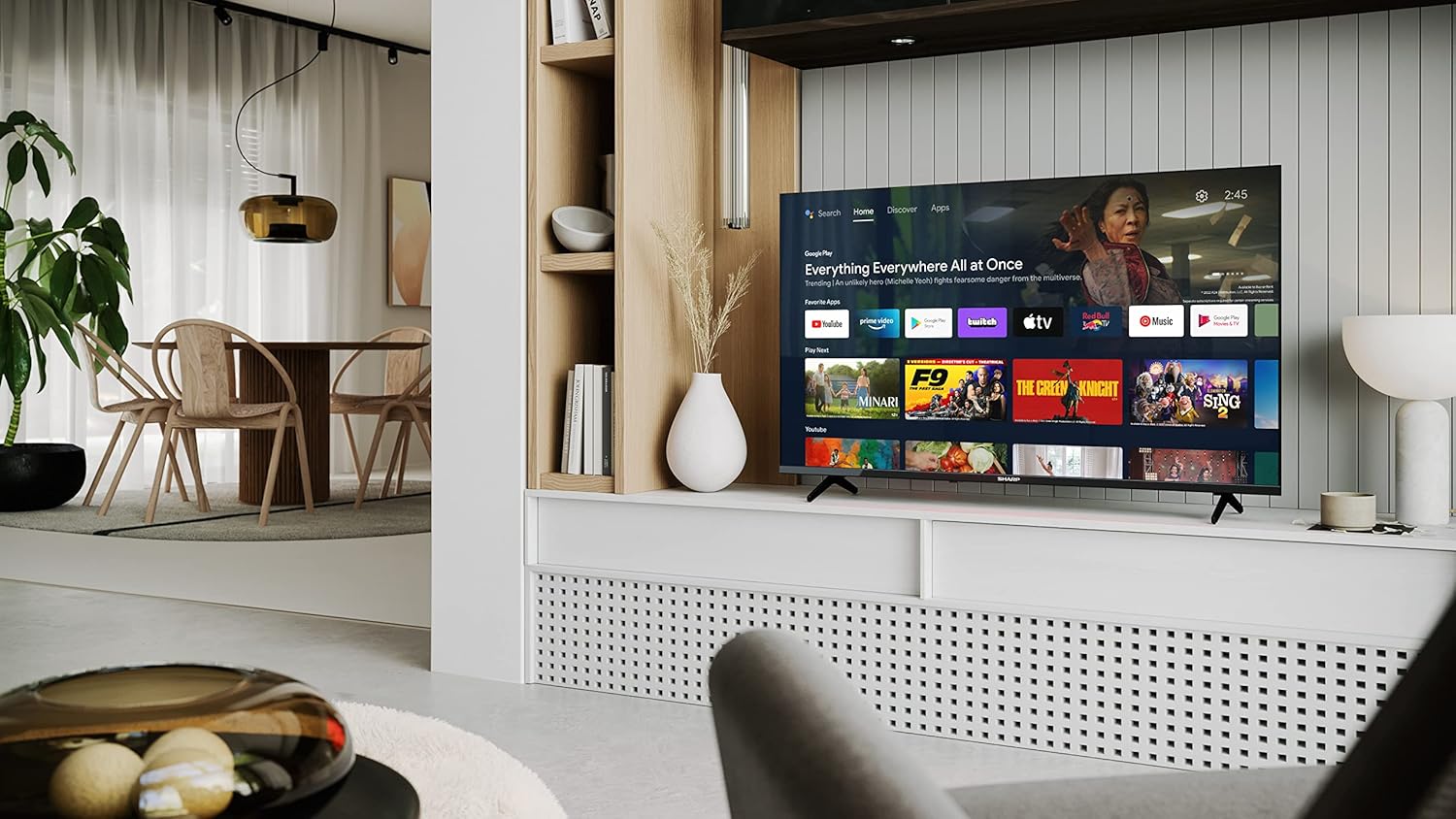
Image: Sharp 40FH6EA TV integrated into a living room environment, showcasing its frameless design.
2. אנשטעלן דעם שטאנד
If you are not wall-mounting, attach the included stands to the bottom of the TV. Follow the instructions in the Quick Start Guide for proper assembly.

בילד: נאָענט-אַרויף view of the TV stand attached to the bottom of the Sharp 40FH6EA television.
3. קאַנעקטינג פונדרויסנדיק דעוויסעס
Connect your devices such as Blu-ray players, game consoles, or sound systems to the TV's input ports.
- הדמי: Use HDMI cables for high-definition video and audio. This TV has 3 HDMI ports.
- וסב: Connect USB devices for media playback. This TV has 2 USB ports.
- אַנטענע / קאַבלע: Connect your antenna or cable TV feed for broadcast channels.
- עטהערנעט: פֿאַר אַ דראָטיקער אינטערנעט פֿאַרבינדונג.
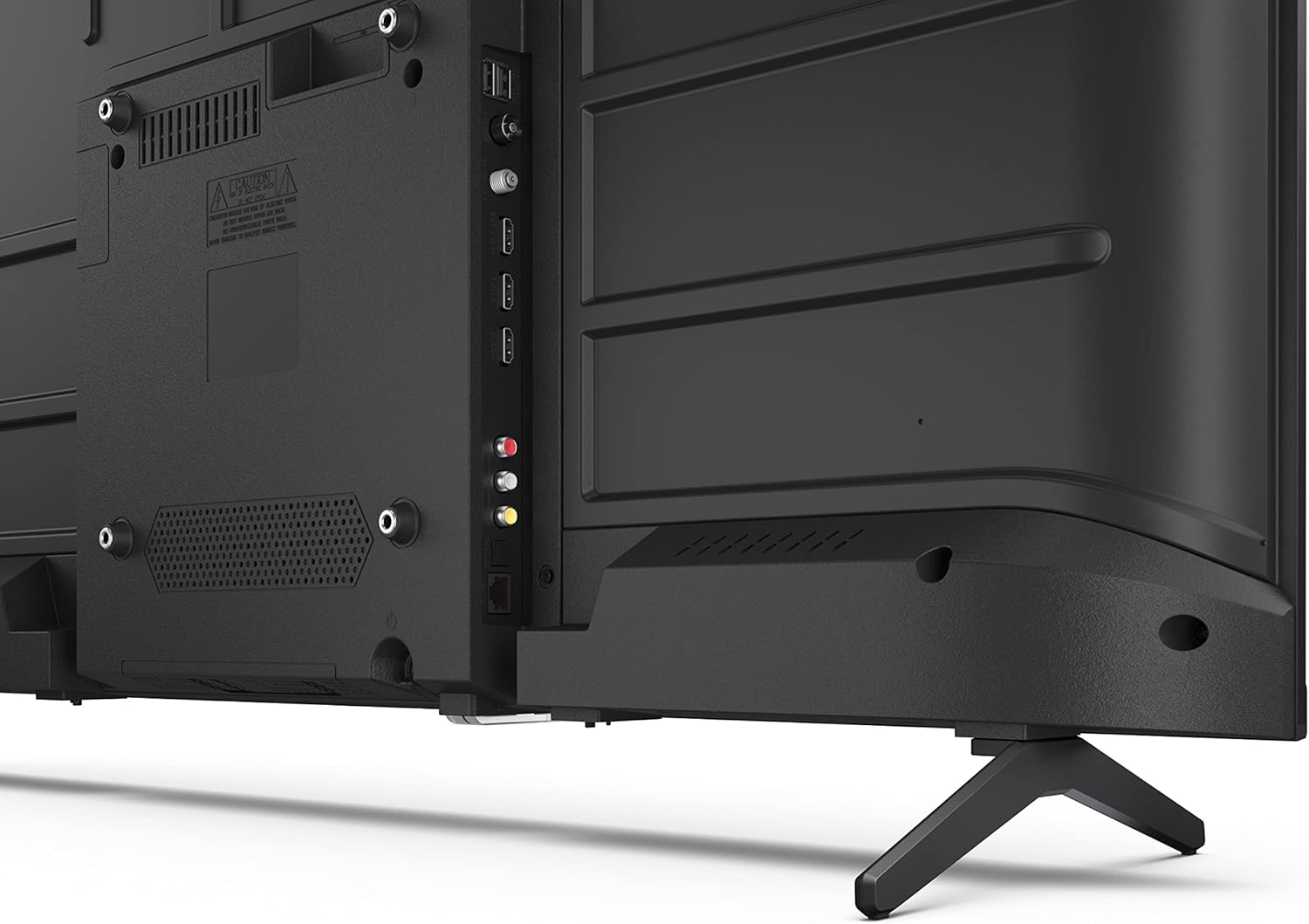
בילד: הינטערשטע view of the Sharp 40FH6EA TV, highlighting the various input ports including HDMI, USB, and antenna connections.

בילד: זייט view of the Sharp 40FH6EA TV, showing additional connectivity ports for easy access.
4. מאַכט קאַנעקשאַן
שטעקט אריין דעם עלעקטרישן שנור אין דעם טעלעוויזאר'ס עלעקטרישן אריינגאנג, דערנאך אין א וואנט אווענט.
5. ערשט סעטאַפּ
ביים ערשטן מאָל אנצינדן, וועט דער טעלעוויזאָר אייך פירן דורך דעם ערשטן סעטאַפּ פּראָצעס. דאָס נעמט אַרײַן אויסקלייבן אייער שפּראַך, זיך פֿאַרבינדן צו אַ Wi-Fi נעץ, און זיך אַרײַנלאָגירן מיט אייער Google חשבון צו צוקומען צו אַנדרויד טיווי פֿונקציעס.
אַפּערייטינג ינסטראַקשאַנז
1. רימאָוט קאָנטראָל איבערview
The included remote control allows you to navigate the TV's interface and control various functions. Insert the 2 AAA batteries as indicated.
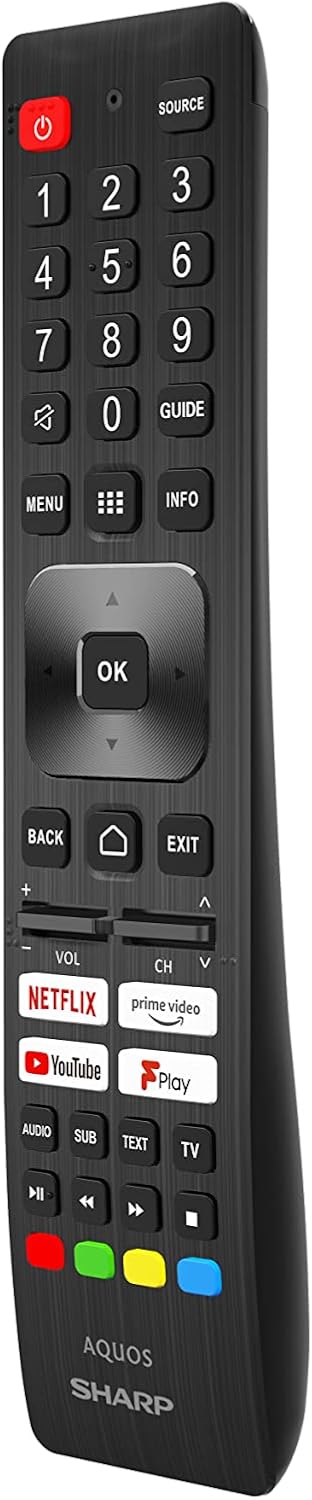
Image: The Sharp 40FH6EA TV remote control, featuring dedicated buttons for popular streaming services and Google Assistant.
- מאַכט קנעפּל: טורנס די טעלעוויזיע אויף אָדער אַוועק.
- נאַוויגאַציע פּאַד (OK קנעפּל): פֿאַר מעניו נאַוויגאַציע און סעלעקציע.
- באנד +/-: אַדזשאַסץ די באַנד מדרגה.
- קאַנאַל +/-: טוישט טעלעוויזיע קאַנאַלן.
- היים קנעפּל: קערט צוריק צום אַנדרויד טיווי היים עקראַן.
- גוגל אַסיסטאַנט קנעפּל: אַקטיוויזירט שטימע קאָנטראָל.
- אַפּ קורץ-וועג קנעפּלעך: Direct access to Netflix, Prime Video, YouTube, etc.
2. אַנדרויד טעלעוויזיע צובינד
Your Sharp 40FH6EA runs on Android TV 11, providing access to a wide range of apps, streaming services, and smart features.

Image: The Sharp 40FH6EA Android TV displaying its home screen with various streaming applications and content recommendations.
- היים פאַרשטעלן: Provides quick access to installed apps, recommended content, and settings.
- גוגל אַססיסטאַנט: ניצט שטימע קאמאנדעס דורך די ווײַטקאָנטראָל צו זוכן אינהאַלט, קאָנטראָלירן קלוגע היים דעוויסעס און באַקומען אינפֿאָרמאַציע.
- Chromecast Built-in: Cast content from your smartphone, tablet, or computer directly to the TV.
- Google פּלייַ סטאָר: Download additional apps and games.
3. ינפּוט סעלעקציע
Press the "Source" button on your remote control to switch between different input sources (HDMI 1, HDMI 2, HDMI 3, TV, USB, etc.).
וישאַלט
1. רייניקן דעם טעלעוויזאר
- שטענדיק אויסשטעקן דעם טעלעוויזאר איידער איר רייניגט.
- ניצט אַ ווייכן, טרוקענעם שטאָף צו ווישן דעם עקראַן און קאַבינעט.
- פֿאַר שווערע פֿלעקן, לײַכט דריקןampווישט דעם שטאָף מיט וואַסער אָדער אַ מילדן, נישט-אַבראַוויזיוון עקראַן רייניגער. שפּריצט נישט רייניגער גלייך אויף דעם עקראַן.
2. ווייכווארג דערהייַנטיקונגען
Your Android TV may receive automatic software updates. Ensure your TV is connected to the internet to receive these updates, which can improve performance and add new features. You can also manually check for updates in the TV's settings menu.
טראָובלעשאָאָטינג
אויב איר טרעפט פּראָבלעמען מיט אייער טעלעוויזיע, זעט די פאלגענדע געוויינטלעכע פּראָבלעמען און לייזונגען:
| פּראָבלעם | מעגלעך לייזונג |
|---|---|
| קיין מאַכט | קאָנטראָלירט צי דער עלעקטרישער שנור איז גוט איינגעשלאָסן אין דער טעלעוויזיע און אין דער וואַנט־אַויטלעט. מאַכט זיכער אַז די אַויטלעט האָט עלעקטרישקייט. |
| קיין בילד נישט, אבער סאונד איז דא | באַשטעטיקן אַז די ריכטיקע אַרייַנגאַנג מקור איז אויסגעקליבן. קאָנטראָלירט קאַבל קאַנעקשאַנז צו פונדרויסנדיק דעוויסעס. |
| קיין קלאַנג, אָבער בילד איז דאָ | Check the volume level and mute settings. Ensure external audio devices are properly connected and configured. |
| ווייַט קאָנטראָל נישט ארבעטן | טוישט די באַטעריעס. מאַכט זיכער אַז עס זענען נישטאָ קיין שטערונגען צווישן דעם ווײַטקאָנטראָל און דעם טעלעוויזאָר. |
| קענען ניט פאַרבינדן צו ווי-פי | Check your router and modem. Restart the TV and your network equipment. Re-enter the Wi-Fi password. |
| אַפּפּס זענען פּאַמעלעך אָדער קראַשן | Close unused apps. Clear app cache or data in settings. Restart the TV. |
ספּעסאַפאַקיישאַנז
Detailed technical specifications for the Sharp 40FH6EA Android TV:
| שטריך | דעטאַל |
|---|---|
| מאָדעל נומער | 40FH6EA |
| פאַרשטעלן גרייס | 40 אינטשעס (101 ס״מ דיאַגאָנאַל) |
| ווייַז טעכנאָלאָגיע | געפירט |
| האַכלאָטע | גאַנץ הד (1920 רענטגענ 1080 פּ) |
| דערפרישן קורס | 50 Hz (Native), 60 Hz (Display) |
| אַספּעקט פאַרהעלטעניש | 16:9 |
| קאַנטראַסט פאַרהעלטעניש | 1000:1 |
| Viewינג אַנגלע | 178 דיגריז |
| HDR שטיצן | HDR10 |
| בילד ענכאַנסמאַנט | אקטיווע באוועגונג 400 |
| אָפּערייטינג סיסטעם | Android TV (Version 11) |
| ספּעציעלע פֿעיִקייטן | גוגל אַססיסטאַנט, Chromecast געבויט-אין |
| אַודיאָ רעזולטאַט | 2 x 8W RMS Stereo Speakers |
| אַודיאָ טעכנאָלאָגיעס | Dolby Audio, Dolby Digital, Dolby Digital Plus, Dolby AC-4 |
| קאַנעקטיוויטי | ווי-פי, בלועטאָאָטה, עטהערנעט |
| HDMI פּאָרץ | 3 (HDMI 2.1 קאָמפּאַטיבל) |
| וסב פּאָרץ | 2 |
| טונער טיפּ | דווב-ט / ט 2 / C / ד / ס 2 |
| VESA מאָונטינג סטאַנדאַרד | 200 רענטגענ 200 מם |
| מאַכט קאַנסאַמשאַן | 36 Watts (Operational) |
| דימענשאַנז (ב x ה x ד) | 89.2 x 55.5 x 21.3 ס״מ (מיט שטאַנד) |
| קאָליר | שוואַרץ |

Image: Diagram illustrating the physical dimensions of the Sharp 40FH6EA TV, including width, height, and depth.

Image: The energy efficiency label for the Sharp 40FH6EA TV, showing its energy class and consumption.
View EPREL פּראָדוקט אינפֿאָרמאַציע
וואָראַנטי און שטיצן
Your Sharp 40FH6EA television comes with a standard manufacturer's warranty. Please refer to the warranty card included in your package for specific terms and conditions.
For technical support, service inquiries, or to obtain replacement parts, please contact Sharp customer service. Contact information can typically be found on the Sharp official webוועבזייטל אדער אין דער דאקומענטאציע וואס איז צוגעשטעלט געווארן מיט אייער טעלעוויזיע.
- פאַבריקאַנט: שאַרף
- מאָדעל יאָר: 2023
- ווייכווארג דערהייַנטיקונגען געראַנטיד ביז: Information not available (as per product data)
- ספּער פּאַרץ אַוויילאַביליטי: Information not available (as per product data)