
הקדמה
This manual provides detailed instructions for the safe and effective use of your Dylanto Kids Instant Print Camera, Model BLL2. Please read this manual thoroughly before operating the device and retain it for future reference.
פּראָדוקט איבערview
The Dylanto Kids Instant Print Camera is designed for children aged 3-12, offering both digital photography and instant black-and-white printing capabilities. It features a 2.4-inch screen, 1080P video recording, 16x digital zoom, and various creative functions.

Figure 1: Dylanto Kids Instant Print Camera and included accessories.
פּעקל אינהאַלט:
- Dylanto Kids Instant Print Camera (Model BLL2)
- 3 ראָלן פון טערמאַל דרוק פּאַפּיר
- 32 גיגאבייט זכּרון קאָרט
- לאַניאַרד
- וסב טיפּע- C קאַבלע
- באַניצער מאַנואַל (דעם דאָקומענט)
זיכערקייַט אינפֿאָרמאַציע
- Ensure the camera is fully charged before first use and after each use to prolong battery life.
- The thermal printing paper is BPA-free.
- Do not expose the camera to extreme temperatures or moisture.
- Supervise young children during use to prevent accidental damage or misuse.
- Keep small parts, such as the memory card, out of reach of very young children to prevent choking hazards.
סעטאַפּ
1. טשאַרדזשינג די קאַמעראַ
Before initial use, fully charge the camera. Connect the provided USB Type-C cable to the camera's charging port and the other end to a compatible USB power adapter (not included) or computer USB port. The charging indicator will show the charging status.
The camera has a 2000 mAh battery capacity, providing approximately 3-4 hours of continuous use after a full charge.
2. Installing the Memory Card
Locate the memory card slot on the camera. Insert the provided 32GB memory card into the slot until it clicks into place. Ensure the card is inserted in the correct orientation.
3. Loading Printing Paper
The camera uses thermal printing paper. Follow these steps to load a new roll:
- Gently push up the part with the lens to open the paper slot.
- Insert a roll of thermal printing paper into the slot. Ensure the paper feeds from the bottom of the roll and the end of the paper is facing upwards, ready to be pulled out.
- Close the two parts of the camera until they click securely.
- To avoid blank prints, pull the paper out by approximately 1 inch before the first print.

Figure 2: Steps for loading thermal printing paper.

Figure 3: Detailed instructions for paper installation, including a tip for blank prints.
אַפּערייטינג ינסטראַקשאַנז
מאַכט אויף / אַוועק
Press and hold the power button to turn the camera on or off.
נאַוויגאַציע און מעניו
Use the directional buttons and the OK/Shutter button to navigate through the camera's menu and select options on the 2.4-inch IPS screen.

Figure 4: Camera interface showing main functions.
גענומען פאָטאָס
In photo mode, frame your shot using the screen. Press the shutter button to capture a photo. The camera supports 16x digital zoom.
The camera can capture color photos digitally and simultaneously print black-and-white thermal photos.
דרוק מאָדעס:
The camera offers three printing modes for thermal prints: Low, Middle, and High, which likely refer to print density or quality.

Figure 5: Available printing modes.
רעקאָרדינג ווידיאס
Switch to video mode. Press the shutter button to start recording 1080P video. Press it again to stop recording.

Figure 6: Video recording capabilities and storage.
Video 1: Demonstration of the camera's instant print and video recording features. This video highlights the camera's ability to capture moments and print them instantly.
ספּעציעלע פֿעיִקייטן
- צייט-לאַפּס פאָטאָגראַפיע: Set intervals for automatic photo capture (e.g., 2s, 5s, 10s).
- קעסיידערדיק שאָס: Capture multiple photos in quick succession.
- שפּילערייַ: The camera includes built-in puzzle games for entertainment.
- Filter Frames & Stickers: Apply various frames and stickers to photos before printing or saving.
- Mp3 שפּילער: The camera supports MP3 playback.
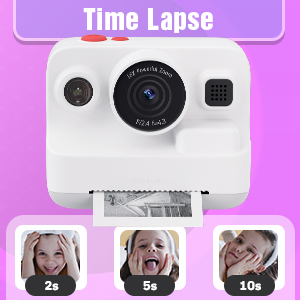
Figure 7: Time-lapse settings.

Figure 8: Built-in games and DIY photo features.

Figure 9: Creative frame and sticker options.
וישאַלט
- רייניקונג: ניצט אַ ווייכע, טרוקענע שטאָף צו רייניקן די קאַמעראַ און דעם עקראַן. ניצט נישט קיין פליסיקע רייניגער אָדער שרײַבנדיקע מאַטעריאַלן.
- סטאָרידזש: האַלט די קאַמעראַ אין אַ קיל, טרוקן אָרט אַוועק פון דירעקט זונשייַן ווען נישט אין באַנוץ.
- באַטערי זאָרגן: Fully charge the camera regularly, even if not in frequent use, to maintain battery health.
- פּאַפּיר סטאָרידזש: Store thermal paper rolls in a cool, dark place to prevent premature fading or damage.
טראָובלעשאָאָטינג
| פּראָבלעם | מעגלעך סיבה | לייזונג |
|---|---|---|
| די קאַמעראַ צינדט זיך נישט אָן. | נידעריק באַטאַרייע. | Charge the camera fully using the provided USB Type-C cable. |
| Printed photos are blank. | Thermal paper installed incorrectly (wrong side up). | Open the paper slot, rotate the paper roll 180 degrees, and re-install it correctly. Ensure the paper feeds from the bottom of the roll and the end is facing upwards. |
| נעבעך דרוק קוואַליטעט. | Low battery; paper quality; print mode setting. | Ensure camera is fully charged. Use recommended thermal paper. Check print mode settings (Low, Middle, High) and adjust to High for better quality. |
| קען נישט ראַטעווען בילדער/ווידעאָס. | זכּרון קאַרטל פול אָדער נישט ריכטיק אַרײַנגעשטעלט. | Check if the 32GB memory card is properly inserted. Delete unnecessary files to free up space or replace the card if full. |
| די קאַמעראַ פרירט זיך אָדער רעאַגירט נישט. | ווייכווארג פראבלעם. | Press and hold the power button for 10-15 seconds to force a restart. If the issue persists, contact customer support. |
ספּעסאַפאַקיישאַנז
| שטריך | דעטאַל |
|---|---|
| מאָדעל נאָמען | BLL2 |
| ווייַז סקרין | 2.4-אינטש IPS קאָליר פאַרשטעלן |
| פאָטאָ האַכלאָטע | Up to 12 MP Effective Still Resolution |
| ווידעא האַכלאָטע | 1080P (AVI format) |
| אָפּטיש פארגרעסער | 16x דיגיטאַל פארגרעסער |
| בילד סטאַביליזאַטיאָן | דיגיטאַל |
| פאָטאָ סענסאָר טעכנאָלאָגיע | CMOS (1/4-inch sensor size) |
| געשטיצט File פֿאָרמאַט | JPEG (photos) |
| באַטאַרייע קאַפּאַציטעט | 2000 מאַה ליטהיום יאָן |
| באַטערי לעבן | Approx. 3-4 hours continuous use |
| טשאַרדזשינג צובינד | וסב טיפּ-C |
| זכּרון סטאָרידזש | 32GB (included) |
| קאַנעקטיוויטי | וסב, ווי-פי |
| פלאַש | Built-In, Automatic |
| קעסיידערדיק שיסערייַ | 30 fps |
| עלטער ראַנגע | Kid (3-12 years old recommended) |
| דימענסיעס (בעערעך) | 3.9 אינטשעס (ברייט) X 3.1 אינטשעס (הייך) |

Figure 10: Camera dimensions and included accessories.
וואָראַנטי אינפֿאָרמאַציע
The Dylanto Kids Instant Print Camera comes with a 6-חודש וואָראַנטי פֿון דעם קויפֿדאַטום. די וואָראַנטי דעקט פֿאַבריקאַציע חסרונות און מאַלפאַנגקשאַנז אונטער נאָרמאַל נוצן. עס דעקט נישט שעדיקן געפֿירט דורך מיסברויך, אַקסאַדאַנץ, נישט-אָטעריזירטע ריפּערז, אָדער נאָרמאַל טראָגן און טרער.
ביטע האַלטן דיין דערווייַז פון קויפן פֿאַר וואָראַנטי קליימז.
קונה שטיצן
For any questions, technical assistance, or warranty claims, please contact Dylanto customer support through the retailer where you purchased the product or visit the official Dylanto brand store on Amazon: