
1. הקדמה
This manual provides detailed instructions for the installation, configuration, and maintenance of the Essentielb MS-7848 VER 1.0 Desktop Motherboard. This motherboard supports LGA1150 processors and DDR3 memory, designed for personal computer systems. Please read this manual thoroughly before proceeding with any installation or operation to ensure proper functionality and safety.
2. זיכערקייַט אינפֿאָרמאַציע
- שטענדיק אָפּשטעקן די מאַכט צושטעל פון די וואַנט אַוטלעט איידער איר ינסטאַלירן אָדער אַראָפּנעמען קיין קאָמפּאָנענטן.
- Wear an anti-static wrist strap or frequently touch a grounded metal object to discharge static electricity before handling the motherboard or other components. Static electricity can damage electronic components.
- האַלט אָן דאָס מוטערבאָרד ביי די ברעגן כּדי נישט צו אָנרירן סענסיטיווע קאָמפּאָנענטן.
- זאָרגט פֿאַר געהעריקע ווענטילאַציע אינעווייניק פֿון קאָמפּיוטער קעסטל כּדי צו פֿאַרמייַדן איבערהיצונג.
- האַלט די מאַדערבאָרד אַוועק פון נאַס און עקסטרעמע טעמפּעראַטורן.
3. פּעקל אינהאַלט
באַשטעטיקט אַז אַלע זאכן זענען פאַראַן אין אייער פּעקל. אויב עפּעס פעלט אָדער איז געשעדיגט, קאָנטאַקטירט אייער הענדלער.
- Essentielb MS-7848 VER 1.0 Motherboard
- איך / אָ שילד
- SATA Data Cable(s) (quantity may vary)
- באַניצער מאַנואַל (דעם דאָקומענט)
- דרייווער סי-די/די-ווי-די (אדער לינק צו דאונלאודן דרייווערס)
4. סעטאַפּ און ייַנמאָנטירונג
4.1 מאָטהערבאָאַרד אויסלייג
מאַכט זיך באַקאַנט מיט די פֿאַרשידענע קאָמפּאָנענטן און קאַנעקטאָרס אויף דער מוטערבאָרד איידער איר אינסטאַלירט עס.
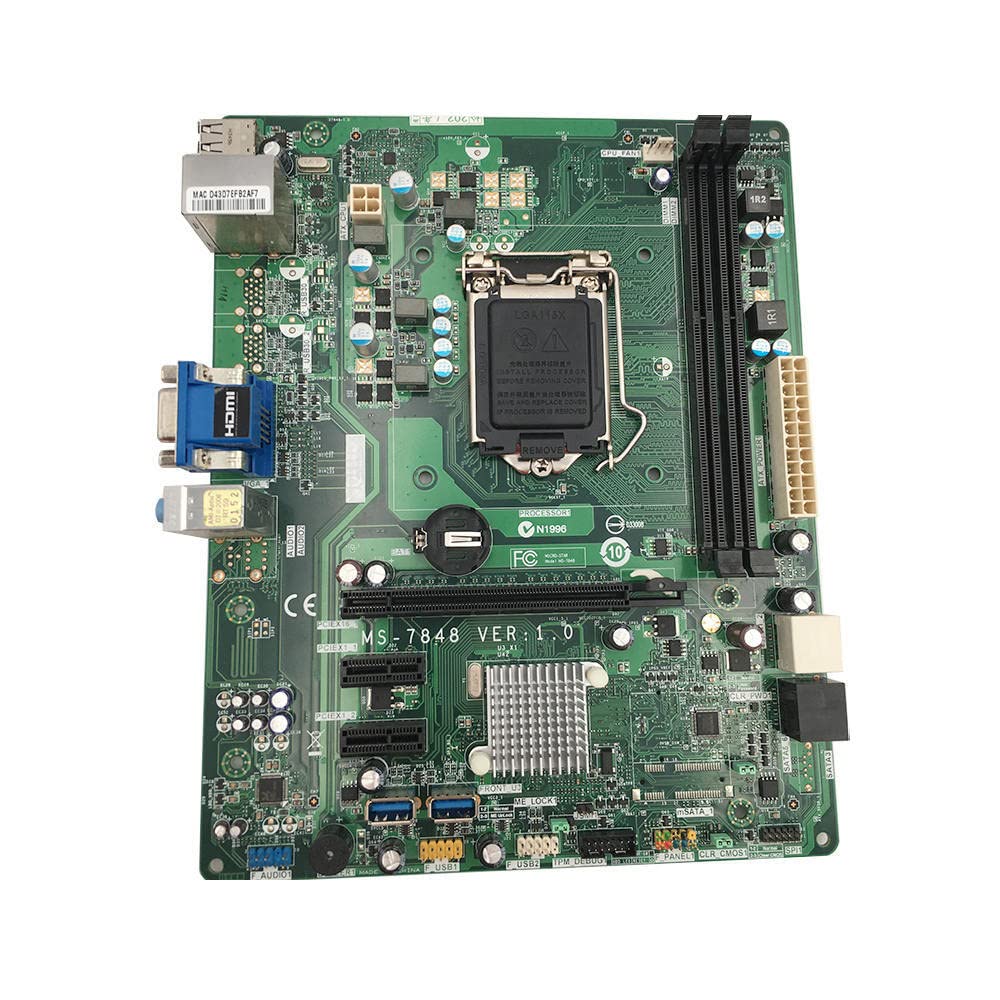
פיגורע 1: Top-down view of the Essentielb MS-7848 motherboard. This image displays the central LGA1150 CPU socket, two DDR3 RAM slots to its right, multiple PCIe expansion slots below, and various power and data connectors around the board's perimeter. The rear I/O panel is visible on the left side.

פיגורע 2: Close-up of the LGA1150 CPU socket. This image provides a detailed view of the CPU socket with its retention mechanism, surrounded by power delivery components and the CMOS battery. The model number 'MS-7848 VER 1.0' is clearly visible on the PCB.
4.2 קפּו ינסטאַלירונג
- געפינט די LGA1150 CPU סאָקעט אויף די מאָטהערבאָאַרד.
- Gently push down the load lever and pull it away from the socket to open the CPU socket cover.
- Carefully align the notches on your LGA1150 CPU with the alignment keys on the socket. The golden triangle on the CPU should match the triangle on the socket.
- Place the CPU gently into the socket. Do not force it. If it does not sit correctly, re-check alignment.
- Close the load plate and push the load lever back into place until it clicks. This will secure the CPU.
- טראָגט אויף טערמישע פּאַסטע אויף דער סי-פּי-יו ייבערפלאַך און אינסטאַלירן דעם סי-פּי-יו קולער לויט די אינסטרוקציעס פון זײַן פאַבריקאַנט.
4.3 ראַם אינסטאַלאַציע
The Essentielb MS-7848 supports DDR3 memory modules. Refer to the specifications for supported speeds and capacities.
- עפֿנט די קליפּס ביי ביידע עקן פֿון דעם DIMM סלאָט.
- גלייכט אויס דעם קערב אויפן DDR3 זכּרון מאָדול מיטן שליסל אין דעם DIMM סלאָט.
- Insert the memory module firmly into the slot until the clips snap into place, securing the module.
4.4 Storage Device (SATA) Connection
Connect your SATA hard drives or SSDs to the SATA ports on the motherboard using SATA data cables. Connect the power cables from your power supply to the drives.
4.5 Expansion Card (PCIe) Installation
This motherboard features PCIe slots for graphics cards and other expansion cards.
- גלייכט אויס די עקספּאַנשאַן קאַרטל מיטן געוואונטשענעם PCIe סלאָט.
- Press down firmly until the card is fully seated in the slot.
- Secure the card with a screw to the computer case.
4.6 פראָנט פּאַנעל קאַנעקשאַנז
Connect the front panel cables (power button, reset button, HDD LED, power LED, USB ports, audio jacks) from your computer case to the corresponding headers on the motherboard. Refer to the motherboard diagram for exact pin locations.
4.7 מאַכט סופּפּלי קאַנעקשאַן
Connect the 24-pin ATX main power connector and the 4-pin or 8-pin ATX 12V CPU power connector from your power supply to the respective ports on the motherboard.
5. אַפּערייטינג ינסטרוקטיאָנס
5.1 ערשטער שטיוול
After completing all hardware installations, connect your monitor, keyboard, and mouse. Power on the system. The system should display the BIOS/UEFI splash screen.
5.2 בייאָס/UEFI קאָנפיגוראַציע
During startup, press the designated key (usually DEL or F2) to enter the BIOS/UEFI setup utility. Here you can configure boot order, system time, and other hardware settings. Save changes before exiting.
5.3 דרייווער ינסטאַלירונג
After installing your operating system, install the necessary drivers for the motherboard's chipset, audio, network, and any other integrated components. These drivers are typically provided on a CD/DVD or can be downloaded from the manufacturer's webפּלאַץ.
6. וישאַלט
6.1 רייניקונג
Regularly clean the interior of your computer case to prevent dust buildup, which can lead to overheating. Use compressed air to remove dust from fans, heatsinks, and other components. Ensure the system is powered off and unplugged before cleaning.
6.2 בייאָוס דערהייַנטיקונגען
קאָנטראָלירט פּעריִאָדיש דעם פאַבריקאַנט'ס website for BIOS/UEFI updates. Updates can improve system stability, add support for new hardware, or fix bugs. Follow the update instructions carefully to avoid damaging the motherboard.
7. טראָובלעשאָאָטינג
- קיין מאַכט: Ensure all power cables (24-pin ATX, 4/8-pin CPU) are securely connected. Check the power supply unit (PSU) and wall outlet.
- קיין ווייַז: Verify that the monitor is connected and powered on. Ensure the graphics card (if dedicated) is properly seated and powered. Try reseating RAM modules.
- סיסטעם אינסטאביליטעט/קראכן: Check RAM modules for proper seating. Ensure CPU cooler is correctly installed and making good contact. Verify power supply is sufficient for all components.
- אפערירן סיסטעם בוט נישט: קאָנטראָלירט די בוט סדר אין בייאָס/UEFI. זיכערט זיך אַז די סטאָרידזש דרייווס זענען ריכטיק פארבונדן און דעטעקטירט.
- פּעריפערישע פּראָבלעמען: Ensure USB devices are connected to functional ports. Install correct drivers for all peripherals.
8. ספּעסאַפאַקיישאַנז
| שטריך | באַשרייַבונג |
|---|---|
| סאָרט | גענעריק |
| מאָדעל נאָמען | MS 7848 |
| קפּו סאָקקעט | LGA 1150 |
| קאָמפּאַטיבלע פּראַסעסאָרן | Intel Core i5-4xxx, Intel Core i7-4xxx, Intel Core i5-5xxx, Intel Core i7-5xxx |
| ראַם טעכנאָלאָגיע | דדר3 |
| Available Memory Slots | 1 |
| קאַמפּאַטאַבאַל דעוויסעס | פערזענלעכע קאָמפּיוטער |
| פּלאַטפאָרמע | Windows |
| הויפּט מאַכט קאַנעקטער | 24-שפּילקע |
| graphics קאָרט צובינד | PCI Express |
| Supported System Bus Standard | PCIe 2.0 |
| גאַנץ SATA פּאָרץ | 6 |
| גאַנץ וסב פּאָרץ | 2 |
| Total PCIe Ports | 1 |
| טייל נומער | VCDi_Sei_101665 |
| ASIN | B0C64XFTV1 |
9. וואָראַנטי און שטיצן
For warranty information and technical support, please refer to the documentation provided by your retailer or contact the product manufacturer directly. Keep your proof of purchase for warranty claims.