
1. הקדמה
א דאנק פארן קויפןasing the Audiocrazy AC-BM101 Portable AM/FM Bluetooth Radio. This device is designed to provide high-quality audio reception and playback, offering both traditional AM/FM radio functionality and modern Bluetooth connectivity. Its portable design allows for versatile use in various environments, powered by either AC or batteries. Please read this manual thoroughly before using the product to ensure proper operation and to maximize its lifespan.
2. וויכטיק סאַפעטי אינפֿאָרמאַציע
- שטעלט נישט אויס דעם ראַדיאָ צו רעגן, פייכטקייט, אדער עקסטרעמע טעמפּעראַטורן.
- פֿאַרמײַדט צו שטעלן דעם ראַדיאָ לעבן היץ־קוואַלן ווי ראַדיאַטאָרן, היץ־רעגיסטערס, אויוון, צי אַנדערע אַפּאַראַטן (אַרײַנגערעכנט ampליפיערס) וואָס פּראָדוצירן היץ.
- ניצן בלויז אַטאַטשמאַנץ / אַקסעסעריז ספּעסיפיעד דורך דער פאַבריקאַנט.
- אָפּשטויסן דעם אַפּאַראַט בעשאַס בליץ סטאָרמז אָדער ווען אַניוזד פֿאַר לאַנג פּיריאַדז.
- אָפּשיקן אַלע סערוויסעס צו קוואַלאַפייד סערוויס פּערסאַנעל. סערוויס איז פארלאנגט ווען דער אַפּאַראַט איז דאַמידזשד אין קיין וועג, אַזאַ ווי מאַכט צושטעלן שנור אָדער צאַפּן איז דאַמידזשד, פליסיק איז ספּילד אָדער אַבדזשעקץ זענען געפאלן אין די אַפּאַראַט, דער אַפּאַראַט איז יקספּאָוזד צו רעגן אָדער נעץ, אַרבעט נישט נאָרמאַלי , אָדער האט שוין דראַפּט.
- אַוועקוואַרפן באַטעריז רעכט לויט די היגע רעגיאַליישאַנז.
3. פּעקל אינהאַלט
ביטע קאָנטראָלירט דעם פּעקל קערפֿול צו זיכער מאַכן אַז אַלע זאַכן זענען דאָ און אין גוטן צושטאַנד:
- Audiocrazy AC-BM101 Portable AM/FM Bluetooth Radio
- מאַכט שנור
- מאַכט אַדאַפּטער
- באַניצער מאַנואַל (דעם דאָקומענט)
4. פּראָדוקט איבערview
Familiarize yourself with the components and controls of your Audiocrazy AC-BM101 radio.
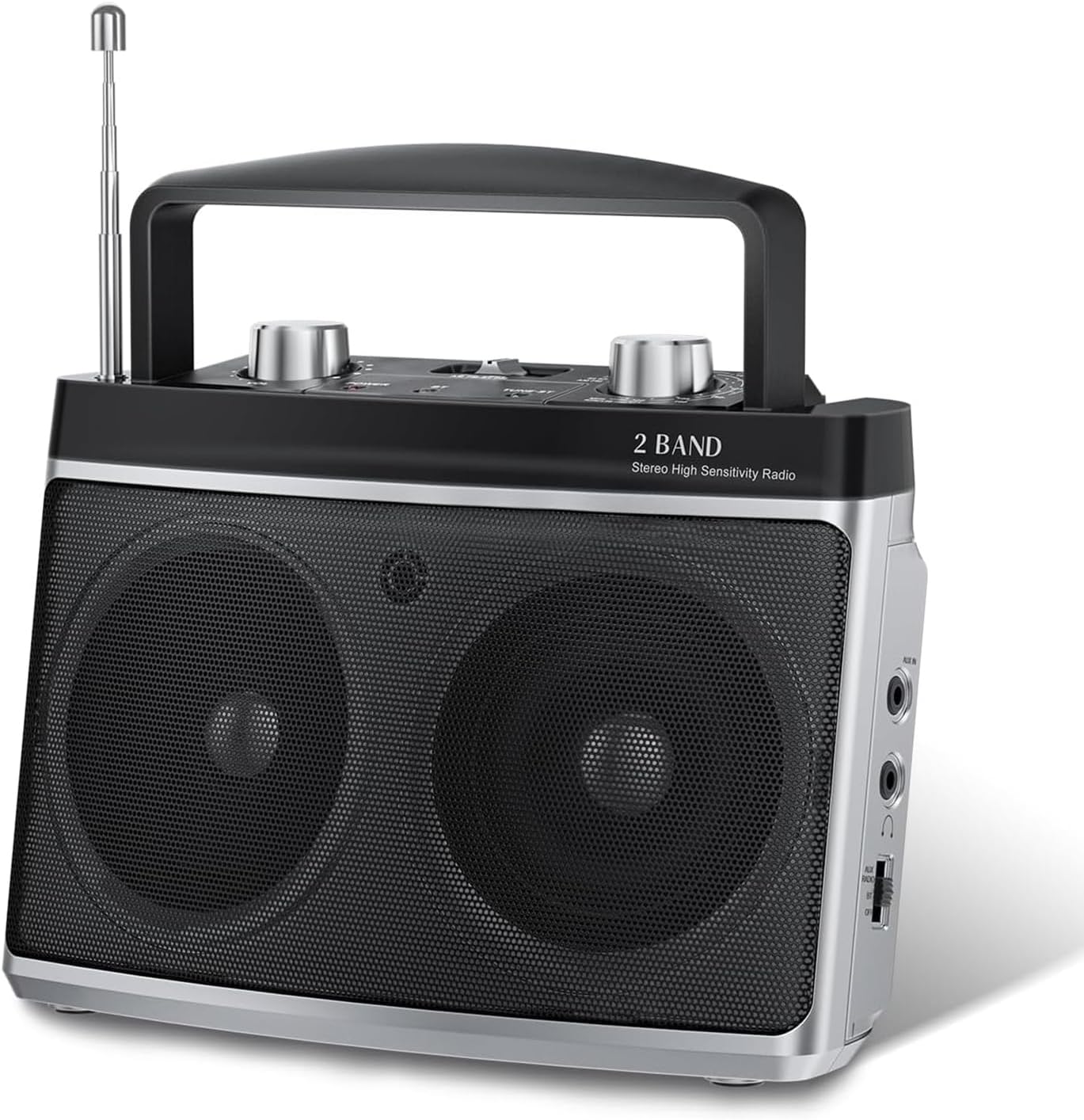
פיגורע 4.1: פראָנט view of the Audiocrazy AC-BM101 radio, showing the dual speakers, tuning knob, volume knob, and extended telescopic antenna.
4.1 Front and Top Panel Controls
- טעלאַסקאָפּיק אַנטענע: For FM reception. Extend fully for best signal.
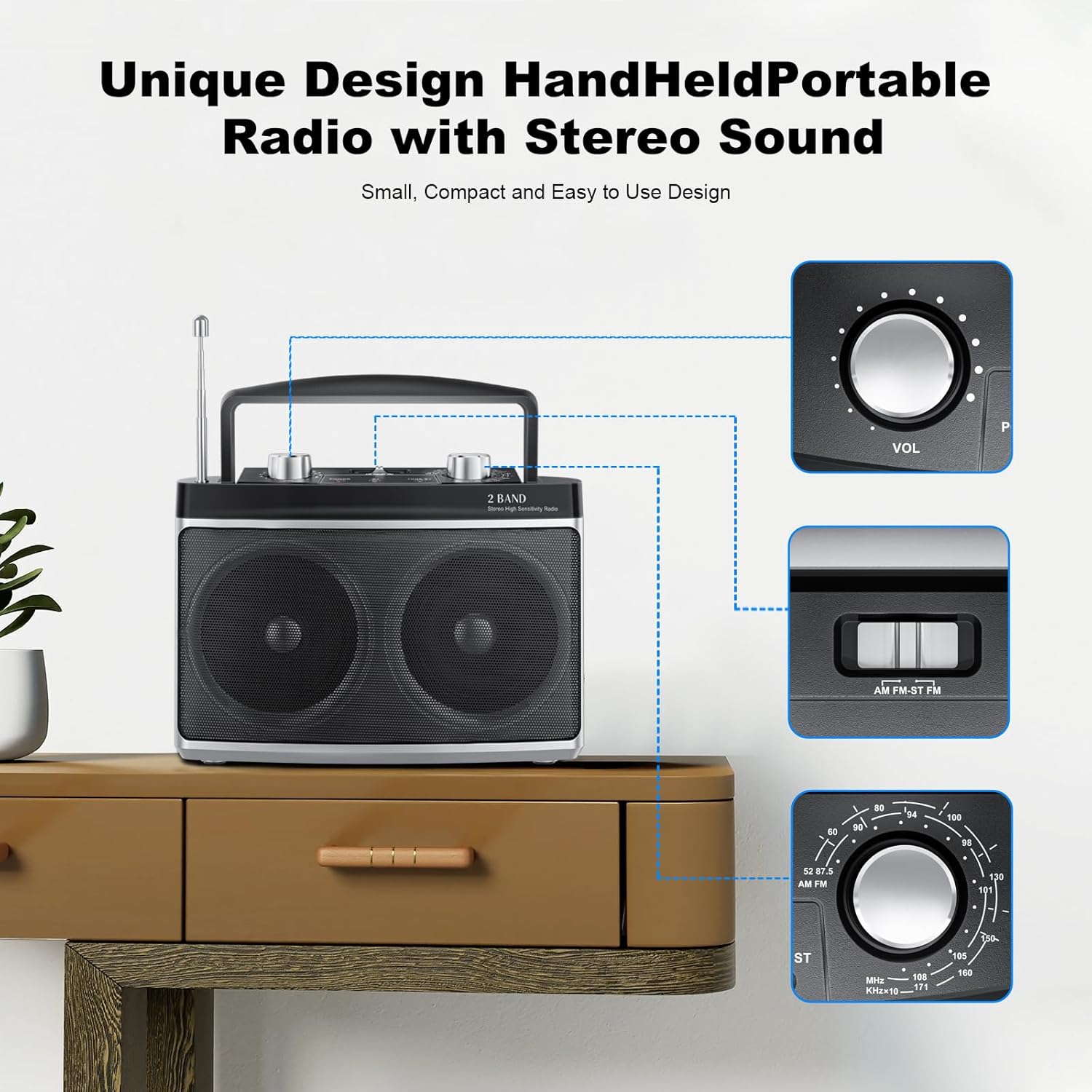
- באַנד קנעפּל (VOL): אַדזשאַסץ די אַודיאָ רעזולטאַט מדרגה.
- טונינג קנעפּל: Used to select AM or FM radio frequencies.
- AM/FM/BT Switch: Selects between AM radio, FM radio, or Bluetooth mode.
- אָפטקייַט ווייַז: Shows the current radio frequency.
- רעדנער: Dual speakers for stereo sound output.

פיגורע 4.2: דעטאַילעד view of the main control knobs and switches on the top panel.
4.2 Side and Rear Panel Ports
- AUX אין פּאָרט: 3.5 מ״מ אַרײַנגאַנג פֿאַר פֿאַרבינדן עקסטערנע אַודיאָ דעוויסעס.
- כעדפאָון דזשאַק: 3.5 מ״מ אויסגאַנג פֿאַר פּריוואַט צוהערן.
- אַק מאַכט אַרייַנשרייַב: פֿאַר קאַנעקטינג די מאַכט אַדאַפּטער.
- באַטערי אָפּטייל: Holds 2 x D-size batteries (not included) for portable use.
5. סעטאַפּ
5.1 אנשטעלן דעם ראַדיאָ
Your Audiocrazy AC-BM101 radio can be powered by either AC (wall outlet) or DC (batteries).
פיגורע 5.1: Powering options: AC plug-in and DC battery operation.
AC Power (Wall Outlet):
- Insert the power cord into the AC Power Input port on the back of the radio.
- Plug the other end of the power cord into a standard AC wall outlet (120V/60Hz).
- The radio is now ready for use with AC power.
DC Power (Batteries):
- עפֿנט דעם דעקל פֿון דער באַטעריע־אָפּטיילונג אויף דער הינטערשטער זײַט פֿון ראַדיאָ.
- Insert 2 x D-size batteries (not included), ensuring correct polarity (+/-) as indicated inside the compartment.
- פאַרמאַכן די באַטאַרייע אָפּטייל דעקן סיקיורלי.
- The radio is now ready for portable use with battery power.
באַמערקונג: When both AC power and batteries are connected, the radio will prioritize AC power. Remove batteries if the radio will not be used for an extended period to prevent leakage.
5.2 אַנטענע סעטאַפּ
- For FM reception, fully extend the telescopic antenna. Adjust its direction for optimal signal reception.
- For AM reception, the radio uses a built-in ferrite bar antenna. Rotate the entire radio for best AM signal reception.
6. אַפּערייטינג ינסטרוקטיאָנס
6.1 מאַכט אויף/אויס און באַנד קאָנטראָל
- To turn on the radio, rotate the Volume Knob (VOL) clockwise until you hear a click.
- Adjust the volume by rotating the Volume Knob (VOL) clockwise to increase or counter-clockwise to decrease.
- To turn off the radio, rotate the Volume Knob (VOL) counter-clockwise until you hear a click.
6.2 AM/FM ראַדיאָ אָפּעראַציע
- Slide the AM/FM/BT switch to the "AM" or "FM" position.
- For FM, extend the telescopic antenna. For AM, position the radio for best reception.
- Rotate the Tuning Knob to scan for radio stations. The frequency display will show the selected frequency.
- Fine-tune the knob for clear reception.
6.3 בלועטאָאָטה אָפּעראַציע
Connect your Bluetooth-enabled device to the radio for wireless audio streaming.

פיגורע 6.1: The radio supports Bluetooth connectivity and features a 3.5mm headphone jack for private listening.
- Slide the AM/FM/BT switch to the "BT" (Bluetooth) position. The radio will enter pairing mode, indicated by an audible prompt or indicator light (if present).
- אויף אייער בלוטוט-פארשטארקטע דעווייס (למשל, סמאַרטפאָון, טאַבלעט), אַקטיווירט בלוטוט און זוכט פֿאַר פאַראַן דעווייסעס.
- Select "AC-BM101" (or similar name) from the list of found devices to pair.
- Once paired, you can play audio from your device through the radio's speakers.
6.4 AUX אַרייַנגאַנג אָפּעראַציע
Use the AUX input to connect non-Bluetooth audio devices.
- Connect one end of a 3.5mm audio cable (not included) to the AUX In port on the radio.
- Connect the other end of the audio cable to the headphone jack or audio output of your external device (e.g., MP3 player, CD player).
- Ensure the AM/FM/BT switch is not in the "BT" position. The radio will automatically switch to AUX mode when a cable is inserted.
- Play audio from your external device. Adjust volume on both the radio and the external device as needed.
6.5 נוצן פון כעדפאָונז
For private listening, connect standard 3.5mm headphones (not included) to the Headphone Jack on the radio. The internal speakers will automatically mute when headphones are connected.
7. וישאַלט
- רייניקונג: ווישט אָפּ דעם ראַדיאָ מיט אַ ווייכן, טרוקענעם שטאָף. ניצט נישט קיין שרײַבנדיקע רייניגער, וואַקסן אָדער סאָלווענטן.
- סטאָרידזש: If storing the radio for an extended period, remove the batteries to prevent leakage and store in a cool, dry place.
- אַנטענע זאָרגן: האַנדלט מיט דער טעלעסקאָפּישער אַנטענע מיט לײַכטקייט כּדי זי זאָל זיך נישט בייגן אָדער צעברעכן.
8. טראָובלעשאָאָטינג
| פּראָבלעם | מעגלעך סיבה | לייזונג |
|---|---|---|
| קיין מאַכט | Power cord not connected; Batteries dead or incorrectly inserted; Volume knob off. | Ensure power cord is securely plugged in. Replace batteries or check polarity. Rotate volume knob clockwise to turn on. |
| נעבעך ראַדיאָ אָפּטראָג | Antenna not extended/positioned correctly; Weak signal area; Interference. | Fully extend FM antenna and adjust direction. For AM, rotate the radio. Move radio to a different location away from electronic devices. |
| בלועטאָאָטה איז נישט קאַנעקטינג | Radio not in BT mode; Device Bluetooth off; Device too far; Already paired to another device. | Slide switch to BT. Ensure Bluetooth is enabled on your device. Move device closer to radio. Disconnect from other Bluetooth devices. |
| קיין קלאַנג פֿון AUX אַרייַנגאַנג | AUX cable not fully inserted; External device volume too low; Radio not in AUX mode. | Ensure AUX cable is fully inserted into both devices. Increase volume on external device. Ensure BT mode is off. |
9. ספּעסאַפאַקיישאַנז
| שטריך | דעטאַל |
|---|---|
| מאָדעל נומער | AC-BM101 |
| סאָרט | אַודיאָקרייזי |
| פּראָדוקט דימענשאַנז | 7.32 X 3.38 X 5.35 אינטשעס (18.59 X 8.59 X 13.59 סענטימעטער) |
| פּונקט וואָג | 1.83 פונט (0.83 קג) |
| קאָליר | זילבער |
| טונער טעכנאָלאָגיע | AM/FM |
| אָפטקייַט ראַנגע | FM: 87-108 MHz, AM: 520-1710 KHz |
| קאַנעקטיוויטי טעכנאָלאָגיע | בלועטוט 5.0, הילפס-פארבינדונג (3.5 מ"מ) |
| ספּעציעלע פֿעיִקייטן | Portable, Stereo Sound with Dual Speakers, Headphone Jack |
| מאַכט מקור | AC Power Supply / DC Battery (2 x D-size batteries, not included) |
| אַרייַנגערעכנט קאַמפּאָונאַנץ | Radio unit, Power Cord, Power Adapter |
10. וואָראַנטי און שטיצן
Audiocrazy products are designed for reliability and performance. For specific warranty details, please refer to the warranty card included with your purchase or contact Audiocrazy customer support.
If you encounter any issues or have questions regarding your AC-BM101 radio, please contact our customer support team for assistance. Contact information can typically be found on the product packaging or on the official Audiocrazy webפּלאַץ.