
FAO Schwarz Thunderbolt Jet X2
FAO Schwarz Thunderbolt Jet X2 דראָון באַניצער מאַנואַל
Model: Thunderbolt Jet X2 | Brand: FAO Schwarz
הקדמה
Welcome to the user manual for your new FAO Schwarz Thunderbolt Jet X2 Drone. This manual provides essential information for safe operation, setup, maintenance, and troubleshooting. Please read it thoroughly before operating your drone to ensure a safe and enjoyable experience.
זיכערקייַט אינפֿאָרמאַציע
- שטענדיק אָפּערירן דעם דראָון אין אָפֿענע, קלאָרע געביטן, ווײַט פֿון מענטשן, חיות און שטערונגען.
- Do not fly near airports, power lines, or restricted airspace.
- Ensure the drone's battery and remote control batteries are fully charged before each flight.
- האַלט פינגער, האָר און לויזע קליידער אַוועק פון ראָטירנדיקע פּראָפּעלערס.
- אַרבעט נישט אין שטאַרקע ווינטן אָדער שלעכטע וועטער באַדינגונגען.
- דערוואַקסענע השגחה איז רעקאָמענדירט פֿאַר ייִנגערע באַניצער.
וואָס איז אין די קעסטל
באַשטעטיקן אַז אַלע קאָמפּאָנענטן זענען פאַראַן:
- FAO Schwarz Thunderbolt Jet X2 Drone
- ווייַט קאָנטראָל
- ריטשאַרדזשאַבאַל דראָון באַטאַרייע
- וסב טשאַרדזשינג קאַבלע
- רעזערוו פּראָפּעלערס (אויב אַרייַנגערעכנט)
- באַניצער מאַנואַל (דעם דאָקומענט)
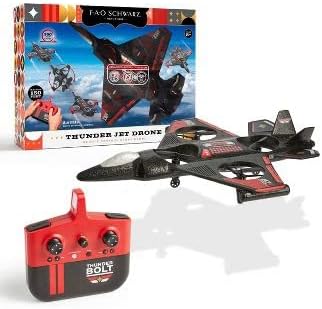
Image: The Thunderbolt Jet X2 Drone, its remote control, and the product packaging, showing the main components included.
סעטאַפּ
1. אויפלאָדן די דראָון באַטאַרייע
- Locate the rechargeable drone battery.
- פֿאַרבינדט די באַטאַרייע צום צוגעשטעלטן USB טשאַרדזשינג קאַבל.
- Plug the USB cable into a standard USB power source (e.g., computer USB port, USB wall adapter).
- די אינדיקאַטאָר ליכט אויף די USB קאַבל וועט ווייַזן די טשאַרדזשינג סטאַטוס (למשל, רויט פֿאַר טשאַרדזשינג, אויסגעלאָדן פֿאַר גאָר אויפגעלאָדן).
- אויפלאָדן נעמט געוויינטלעך אַרום 60-90 מינוט. איבערלאָדן נישט.
2. ינסטאָלינג רימאָוט קאָנטראָל באַטעריז
- עפענען די באַטאַרייע אָפּטייל אויף די צוריק פון די ווייַט קאָנטראָל.
- Insert 3x AAA batteries (not included) into the compartment, ensuring correct polarity (+/-).
- פאַרמאַכן די באַטאַרייע אָפּטייל סיקיורלי.

בילד: א דעטאַלירטע view of the remote control for the Thunderbolt Jet X2 Drone, highlighting its buttons and joysticks.
3. Pairing the Drone and Remote
- שטעלן די דראָון אויף אַ פלאַך, גלייַך ייבערפלאַך.
- צינדט אן דעם דראָון דורך דריקן דעם מאַכט קנעפּל. די דראָון'ס ליכטער וועלן בלינקען.
- קער אויף די ווייַט קאָנטראָל.
- דריק דעם לינקן דזשויסטיק (טראטל) אינגאנצן ארויף, דערנאך אינגאנצן אראפ.
- The drone's lights will become solid, indicating successful pairing.
אפערירן דעם דראָון
יקערדיק קאָנטראָלס
- לינקער דזשויסטיק (גאז-הענטל): Up to ascend, down to descend.
- Right Joystick (Directional): Forward to move forward, backward to move backward, left to move left, right to move right.
- טרים קנעפּלעך: Used to fine-tune the drone's stability if it drifts in any direction.
- איין-קנעפל אויפהייבן/לאנדן קנעפל: דריקן צו אויטאָמאַטיש אויפהייבן אָדער לאַנדן.
- 360° Flip Button: Press this button, then push the right joystick in any direction to perform a flip.

Image: The Thunderbolt Jet X2 Drone flying in the air, with a hand holding the remote control in the foreground, illustrating active operation.
ערשטער פלי
- Ensure you are in a safe, open area.
- שטעלן די דראָון אויף אַ פלאַך ייבערפלאַך.
- Press the One-Key Take-off button, or slowly push the left joystick up to ascend.
- Practice hovering at a low altitude first.
- Use the right joystick for directional control.
- To land, press the One-Key Landing button or slowly pull the left joystick down until the drone lands.

Image: Three Thunderbolt Jet X2 Drones shown in different aerial maneuvers, demonstrating its agility and flight capabilities.
וישאַלט
- רייניקונג: Use a soft, dry cloth to clean the drone and remote control. Do not use water or harsh chemicals.
- פּראָפּעלער דורכקוק: Regularly check propellers for damage (bends, cracks). Replace damaged propellers immediately using the provided spares.
- באַטערי זאָרגן: האַלט די באַטעריעס אין אַ קיל, טרוקן אָרט. לאָזט נישט די באַטעריעס גאָר אויסגעלאָדן פֿאַר לענגערע צייטן.
- סטאָרידזש: When not in use, store the drone and remote in a safe place, away from direct sunlight and extreme temperatures.
טראָובלעשאָאָטינג
| פּראָבלעם | מעגלעך סיבה | לייזונג |
|---|---|---|
| דראָון רעאַגירט נישט אויף ווייַטקאָנטראָל. | Not paired; low battery; out of range. | Re-pair drone and remote; charge drone battery; replace remote batteries; ensure within 300 feet range. |
| דראָון דריפט בעת פלי. | Needs trimming; uneven take-off surface. | Use trim buttons to adjust; ensure drone is on a flat surface before take-off. |
| פּראָפּעלערן דרייען זיך נישט. | Obstruction; damaged propeller; motor issue. | Check for obstructions; replace damaged propellers; contact support if motor issue suspected. |
ספּעסאַפאַקיישאַנז
| שטריך | דעטאַל |
|---|---|
| סאָרט | FAO שוואַרץ |
| מאָדעל נאָמען | Thunderbolt Jet X2 |
| קאָליר | שוואַרץ |
| ווידעא קאַפּטורע רעסאָלוטיאָן | 480 פּ |
| קאַנעקטיוויטי טעכנאָלאָגיע | וסב |
| בקיעס מדרגה | אָנהייבער |
| באַטאַרייע קאַפּאַציטעט | 850 מיליamp שעהן |
| ווידעא קאַפּטורע פֿאָרמאַט | mp4 |
| מאַקסימום קייט | 300 פֿיס |
| מאַטעריאַל | פּלאַסטיק |
| פּונקט וואָג | 1.61 פונט |
| פּעקל דימענשאַנז | 17.48 X 12.68 X 4.37 אינטשעס |
וואָראַנטי און שטיצן
For warranty information or technical support, please refer to the contact details provided on the product packaging or visit the official FAO Schwarz webזייטל. האַלט אייער קויף קוויטל ווי אַ באַווייַז פון קויפן.
Ask a question about this manual
Ask about setup, troubleshooting, compatibility, parts, safety, or missing instructions. Manuals+ will review the question and use this page’s manual context to help answer it.