
הקדמה
This manual provides essential instructions for the installation, operation, maintenance, and troubleshooting of your HIKSEMI Hikvision Wave SATA 3.0 512GB Solid State Drive. Please read this manual thoroughly before using the product to ensure proper functionality and longevity.
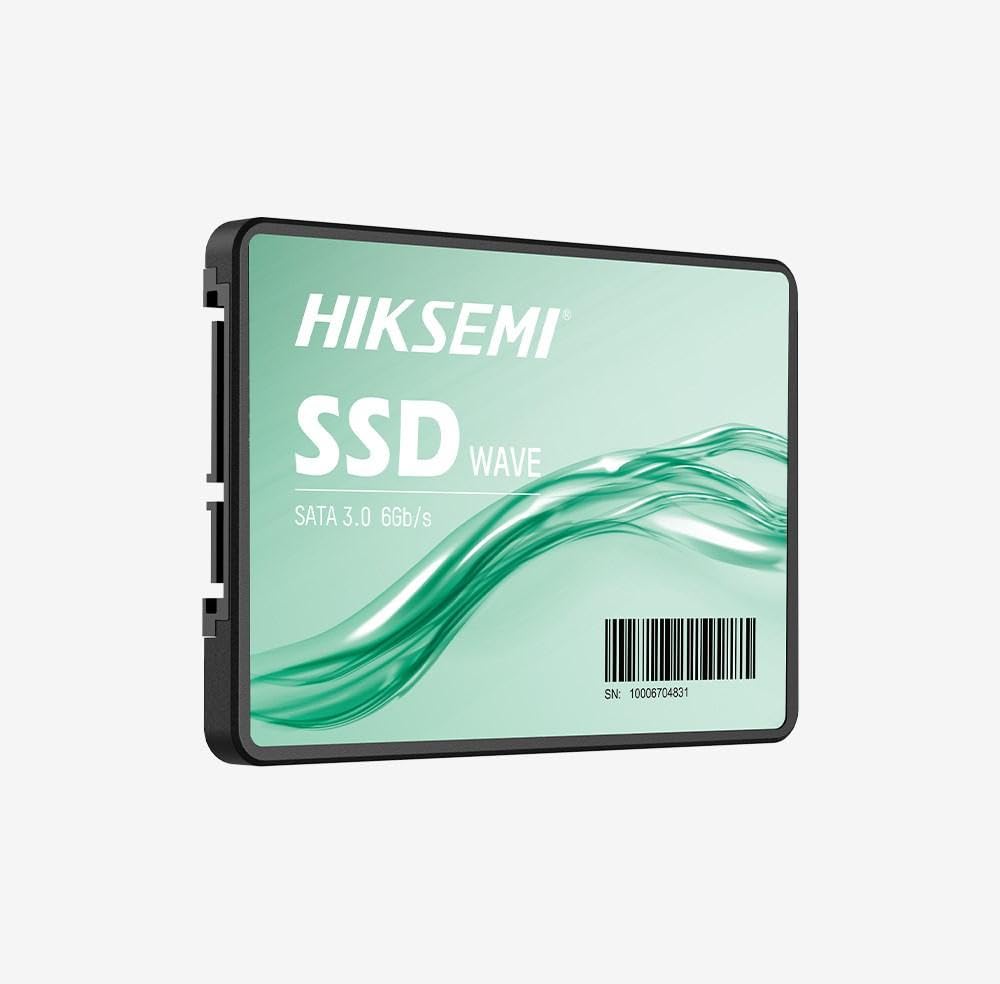
Image: HIKSEMI Hikvision Wave SATA 3.0 512GB Solid State Drive. This image displays the compact 2.5-inch form factor of the SSD, highlighting its sleek design and standard SATA interface connectors.
זיכערקייַט אינפֿאָרמאַציע
Observe the following safety precautions to prevent damage to the drive or injury to yourself:
- Always handle the SSD by its edges to avoid touching the circuit board or connectors.
- Ensure your computer is powered off and unplugged before installation.
- Discharge static electricity by touching a grounded metal object before handling the SSD.
- שטעלט נישט אויס דעם SSD צו פייכטקייט, עקסטרעמע טעמפּעראַטורן, אדער שטאַרקע מאַגנעטישע פעלדער.
- פרובירט נישט צו צענעמען אדער מאדיפיצירן דעם SSD. דאס וועט בטל מאכן די גאראנטיע.
פּעקל אינהאַלט
באַשטעטיקן אַז אַלע זאכן זענען פאַראַן אין פּעקל:
- HIKSEMI Hikvision Wave SATA 3.0 512GB Solid State Drive (HS-SSD-WAVE-S-512G)
- שנעלע אָנהייב גייד (אויב אַרייַנגערעכנט)
Note: SATA data and power cables are typically not included and must be purchased separately if not already present in your system.
סעטאַפּ און ינסטאַלירונג
1. פיזישע אינסטאַלאַציע (דעסקטאַפּ פּיסי)
- צוגרייטן אייער סיסטעם: אויסלעשן דעם קאָמפּיוטער און אַרויסציען דעם עלעקטרישן שנור. עפֿענען דעם קאָמפּיוטער קעסטל.
- געפינען אַ דרייוו ביי: Find an available 2.5-inch drive bay. If only 3.5-inch bays are available, you may need a 2.5-inch to 3.5-inch adapter bracket (not included).
- מאָנטירן די SSD: באַפֿעסטיקן דעם SSD אין דער דרייוו־באַי מיט שרויפֿן.
- פאַרבינדן קייבאַלז:
- Connect one end of a SATA data cable to the SSD and the other end to an available SATA port on your motherboard.
- פֿאַרבינדט אַ SATA מאַכט קאַבל פֿון אייער מאַכט צושטעל יוניט (PSU) צום SSD.
- פאַרמאַכן דעם פאַל: Reassemble your computer case and reconnect the power cord.
2. פיזישע אינסטאַלאַציע (לאַפּטאַפּ)
- Prepare your laptop: Power off your laptop, unplug the power adapter, and remove the battery (if removable). Consult your laptop's manual for specific instructions on accessing the drive bay.
- Remove old drive (if applicable): Carefully remove the existing hard drive or SSD.
- אינסטאַלירן די SSD: Insert the HIKSEMI Wave SSD into the drive bay. Secure it with any screws or brackets that held the previous drive.
- ריאַסעמבאַל: Close the drive bay cover, reinsert the battery, and reconnect the power adapter.
3. Initializing and Formatting the SSD (Windows)
- שטאַרט דיין קאָמפּיוטער: מאַכט אויף דיין קאָמפּיוטער.
- עפֿענען דיסק פאַרוואַלטונג: Right-click on the Start button (Windows 10/11) or search for "Disk Management" (Windows 7/8). Select "Disk Management".
- איניציאליזירן דעם דיסק: A "Initialize Disk" window should appear automatically for new drives. Select GPT (GUID פּאַרטישאַן טאַבעלע) for drives larger than 2TB or for UEFI-based systems, or MBR (Master Boot Record) for older systems or drives 2TB or smaller. Click "OK".
- שאַפֿן אַ נײַעם פּשוטן באַנד: Locate your new SSD (it will likely show as "Unallocated Space"). Right-click on the unallocated space and select "New Simple Volume...".
- Follow the wizard: Follow the on-screen prompts to assign a drive letter, choose a file סיסטעם (NTFS איז רעקאמענדירט פאר ווינדאָוס), און דורכפירן א שנעלן פֿאָרמאַט.
- Your SSD is now ready for use.
אפערירן דעם SSD
Once installed and formatted, your HIKSEMI Wave SSD functions like any other storage drive. You can use it for:
- אַפּערייטינג סיסטעם ינסטאַלירונג: Install your operating system (Windows, macOS, Linux) for faster boot times and overall system responsiveness.
- אַפּליקאַציע סטאָרידזש: Install frequently used applications and games to benefit from quicker loading times.
- דאַטן סטאָרידזש: אויפֿהיטן דאָקומענטן, פֿאָטאָס, ווידעאָס און אַנדערע files.
The SSD utilizes the SATA 3.0 interface, providing theoretical transfer speeds up to 6 Gbps. Actual performance may vary based on your system hardware, software, and workload.
וישאַלט
SSDs require less maintenance than traditional hard drives, but a few practices can help ensure optimal performance and longevity:
- אַקטיווירן TRIM: Ensure your operating system has TRIM enabled. TRIM helps the SSD manage deleted data blocks efficiently, maintaining performance over time. Modern operating systems (Windows 7+, macOS 10.6.8+, most Linux distributions) typically enable TRIM by default.
- פֿאַרמייַדן דעפֿראַגמענטאַציע: Do not defragment an SSD. Defragmentation is unnecessary for SSDs and can reduce their lifespan by increasing write cycles.
- Firmware דערהייַנטיקונגען: Periodically check the HIKSEMI official website for firmware updates for your specific SSD model. Firmware updates can improve performance, stability, and compatibility. Follow the manufacturer's instructions carefully when performing updates.
- האַלטן פרייען פּלאַץ: While not strictly necessary, keeping some free space (e.g., 10-15%) on your SSD can help maintain performance, especially for drives with smaller capacities.
- דאַטאַ באַקקופּ: מאַכט רעגולער באַקאַפּס פון וויכטיקע דאַטן צו אַן אַנדער סטאָרידזש מיטל. כאָטש SSDs זענען פאַרלעסלעך, קיין סטאָרידזש מיטל איז נישט ימיון צו דורכפאַל.
טראָובלעשאָאָטינג
If you encounter issues with your HIKSEMI Wave SSD, refer to the following common troubleshooting steps:
- SSD ניט דיטעקטאַד:
- Check all SATA data and power cable connections. Ensure they are securely seated.
- Try a different SATA port on your motherboard and a different SATA power connector from your PSU.
- Verify that the SATA controller mode in your system's BIOS/UEFI is set to AHCI (Advanced Host Controller Interface).
- Check Disk Management (Windows) or Disk Utility (macOS) to see if the drive is detected but uninitialized/unformatted.
- פּאַמעלעך פאָרשטעלונג:
- זיכער מאַכן אַז TRIM איז ענייבאַלד (ווי באַשריבן אין דער וישאַלט סעקציע).
- Verify that the SSD is connected to a SATA 3.0 (6 Gbps) port on your motherboard, not an older SATA 2.0 (3 Gbps) port.
- קוק פֿאַר הינטערגרונט פּראַסעסאַז קאַנסומינג סיסטעם רעסורסן.
- Ensure your system drivers (especially chipset drivers) are up to date.
- Operating System Errors/Crashes:
- Run a disk check utility (e.g.,
chkdskin Windows) to scan for file סיסטעם ערראָרס. - Consider reinstalling the operating system if issues persist after checking hardware connections and drivers.
- Run a disk check utility (e.g.,
ספּעסאַפאַקיישאַנז
| שטריך | באַשרייַבונג |
|---|---|
| מאָדעל נומער | HS-SSD-WAVE-S-512G |
| דיגיטאַל סטאָרידזש קאַפּאַציטעט | 512 גיגאבייט |
| שווער דיסק צובינד | Serial ATA (SATA 3.0) |
| פאָרם פאַקטאָר | 2.5 אינטשעס |
| לייענען גיכקייט (מאַקס) | 560 מעגאבייט פּער סעקונדע |
| שרייב גיכקייט (מאַקס) | 490 מעגאבייט פּער סעקונדע |
| קאַמפּאַטאַבאַל דעוויסעס | דעסקטאָפּ, לאַפּטאָפּ |
| ספּעציעלע שטריך | לייטווייט |
| פּונקט וואָג | 0.02 קילאָגראַמס |
| פאַבריקאַנט | Hangzhou Hikvision Digital Technology Co., Ltd. |
וואָראַנטי אינפֿאָרמאַציע
The HIKSEMI Hikvision Wave SATA 3.0 512GB Solid State Drive comes with a 3-יאָר לימיטעד וואָראַנטי from the date of purchase. This warranty covers defects in materials and workmanship under normal use. It does not cover damage caused by misuse, accident, modification, unauthorized repair, or improper installation.
ביטע האַלטן דיין דערווייַז פון קויפן פֿאַר וואָראַנטי קליימז.
קונה שטיצן
For technical assistance, warranty claims, or further inquiries, please visit the official HIKSEMI support webזייטל אדער קאנטאקט זייער קאסטומער סערוויס דעפארטמענט. זעהט די פראדוקט פאקאדזש אדער די אפיציעלע webזייטל פֿאַר די מערסט אַקטועלע קאָנטאַקט אינפֿאָרמאַציע.
Online resources may include FAQs, driver downloads, and firmware updates.
באַזייַטיקונג אינפֿאָרמאַציע
This product contains electronic components and should not be disposed of with household waste. Please follow local regulations for the proper disposal of electronic waste. Recycling helps protect the environment and human health.