
הקדמה
Thank you for choosing the BONTEC Dual Monitor Stand Riser. This product is designed to enhance your workspace ergonomics and organization. By elevating your monitors to an optimal viewing height, it helps reduce neck, back, and shoulder strain. Its adjustable design and integrated features provide a tidy and efficient desktop environment.
פּראָדוקט איבערview
The BONTEC Dual Monitor Stand Riser features a modular design, allowing for adjustable length and angle to suit various desk sizes and user preferences. It includes dedicated storage compartments, a smartphone holder, and cable management solutions to keep your workspace clutter-free.

Figure 1: BONTEC Dual Monitor Stand Riser in White, demonstrating its adjustable design and organizational features.
אַסעמבלי אינסטרוקציעס
- אָפּלייגן קאַמפּאָונאַנץ: Carefully remove all parts from the packaging. Verify that all components listed in the parts checklist are present.
- צוזאַמענשטעלן באַזע איינהייטן: Attach the side panels to the main top panels using the provided screws and tools. Ensure all connections are secure.
- פֿאַרבינדן מאָדולאַרע סעקשאַנז: The stand consists of three modular sections. These sections can be connected in a straight line or angled to form a V-shape, depending on your desk configuration and preference. The connecting pins allow for flexible arrangement.
- Install Non-Slip Pads: Apply the included non-slip pads to the bottom of each stand leg to ensure stability and protect your desk surface.
- Place Monitors: Position your monitors on the elevated surfaces.

Figure 2: Visual representation of desktop organization before and after using the monitor stand.

Figure 3: Detailed diagram illustrating the simple assembly process.
Video 1: Official product video demonstrating the features and assembly of the BONTEC Dual Monitor Stand Riser with Smartphone Holder.
אָפּעראַציע און אַדזשאַסטמאַנץ
- Adjustable Length & Angle: The stand's length can be adjusted from 31.5 inches to 42.5 inches. The side sections can swivel to create a straight, angled, or V-shaped configuration to best fit your workspace and viewינג באדערפענישן.
- ערגאָנאָמיק פּאַזישאַנינג: Place your monitors at eye level to promote a healthy posture and reduce strain on your neck, back, and shoulders during extended use.
- סמאַרטפאָנע האָלדער: Utilize the integrated slot to hold your smartphone upright, keeping it visible and accessible while you work.
- סטאָרידזש קאַמפּאַרטמאַנץ: The three spacious compartments underneath the stand provide convenient storage for items such as keyboards, mice, files, laptops, or other office essentials.
- קאַבלע פאַרוואַלטונג: Use the cable management openings to route and organize your device cables, maintaining a neat and clutter-free desktop.
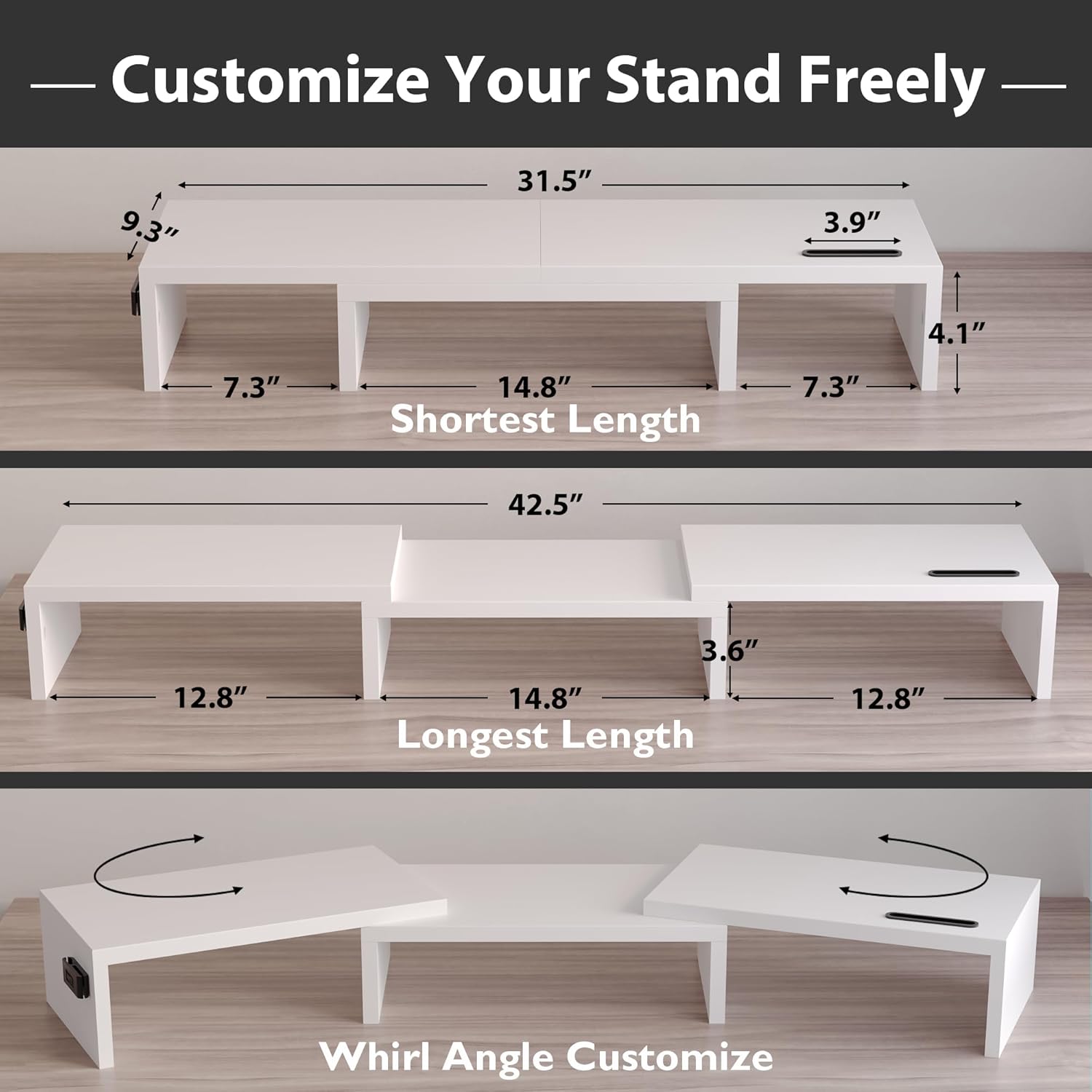
Figure 4: Illustration of the stand's adjustable length and swivel angle for customized setups.

Figure 5: Ergonomic benefits demonstrated by improved user posture with the monitor stand.

Figure 6: Key features including the smartphone holder and cable management slots.
Video 2: Official product video highlighting the adjustable and organizational aspects of the BONTEC Dual Monitor Stand.
זאָרגן און וישאַלט
- רייניקונג: The stand is made from a waterproof material, making it easy to clean. Wipe surfaces with a damp טוך און מילדן וואַשפּולווער אויב נייטיק. פֿאַרמייַדן אַברייסיוו רייניגער.
- פעסטקייַט: Regularly check that all screws are tightened to maintain the stand's stability.
- ייבערפלאַך שוץ: The non-slip pads not only provide stability but also protect your desk from scratches. Ensure they remain securely attached.

Figure 7: Details on non-slip pads and the waterproof, easy-to-clean surface.
ספּעסאַפאַקיישאַנז
| שטריך | דעטאַל |
|---|---|
| סאָרט | BONTEC |
| מאָדעל | MTR-S3 |
| מאַטעריאַל | האָלץ (MDF) |
| קאָליר | ווייַס |
| אַדזשאַסטאַבאַל לענג | 31.5 אינטשעס צו 42.5 אינטשעס |
| מאַסע קאַפּאַציטעט | ביז 44 פונט (20 ק"ג) |
| ספּעציעלע פֿעיִקייטן | Ergonomic Design, Smartphone Holder, Cable Management, Large Storage, Non-Slip Base |
| אַסעמבלי פארלאנגט | יא (אומגעפער 3 מינוט) |
וואָראַנטי און שטיצן
BONTEC products are manufactured to high-quality standards. For any questions, concerns, or warranty claims, please contact BONTEC customer support through the retailer's platform or the official BONTEC webזייטל. ביטע באַהאַלטן אייער קויפן באַווייַז פֿאַר וואָראַנטי צוועקן.