
1. הקדמה
Thank you for choosing the SPLITSKY NZFS Kids Alarm Clock. This device combines an alarm clock, white noise sleep aid, and an 8-mode RGB night light, designed to assist with sleep and wake-up routines for children and adults. Please read this manual thoroughly to understand its features and ensure proper operation.
זיכערקייַט אינפֿאָרמאַציע:
- האַלט דעם אַפּאַראַט אַוועק פון וואַסער און הויך-פייכטקייט סביבות.
- דו זאלסט נישט פּרווון צו דיסאַסעמבאַל אָדער פאַרריכטן די מיטל זיך.
- Use only the provided USB-C power cable or a certified equivalent.
- ענשור געהעריק ווענטאַליישאַן אַרום די מיטל.
2. פּעקל אינהאַלט
באַשטעטיקן אַז אַלע זאכן זענען פאַראַן אין דיין פּעקל:
- SPLITSKY NZFS Kids Alarm Clock
- 1.2M (4.7 inch) USB-C Power Cable
- באַניצער מאַנואַל (דעם דאָקומענט)
- 1 x CR2032 Lithium Ion Battery (pre-installed for memory backup)
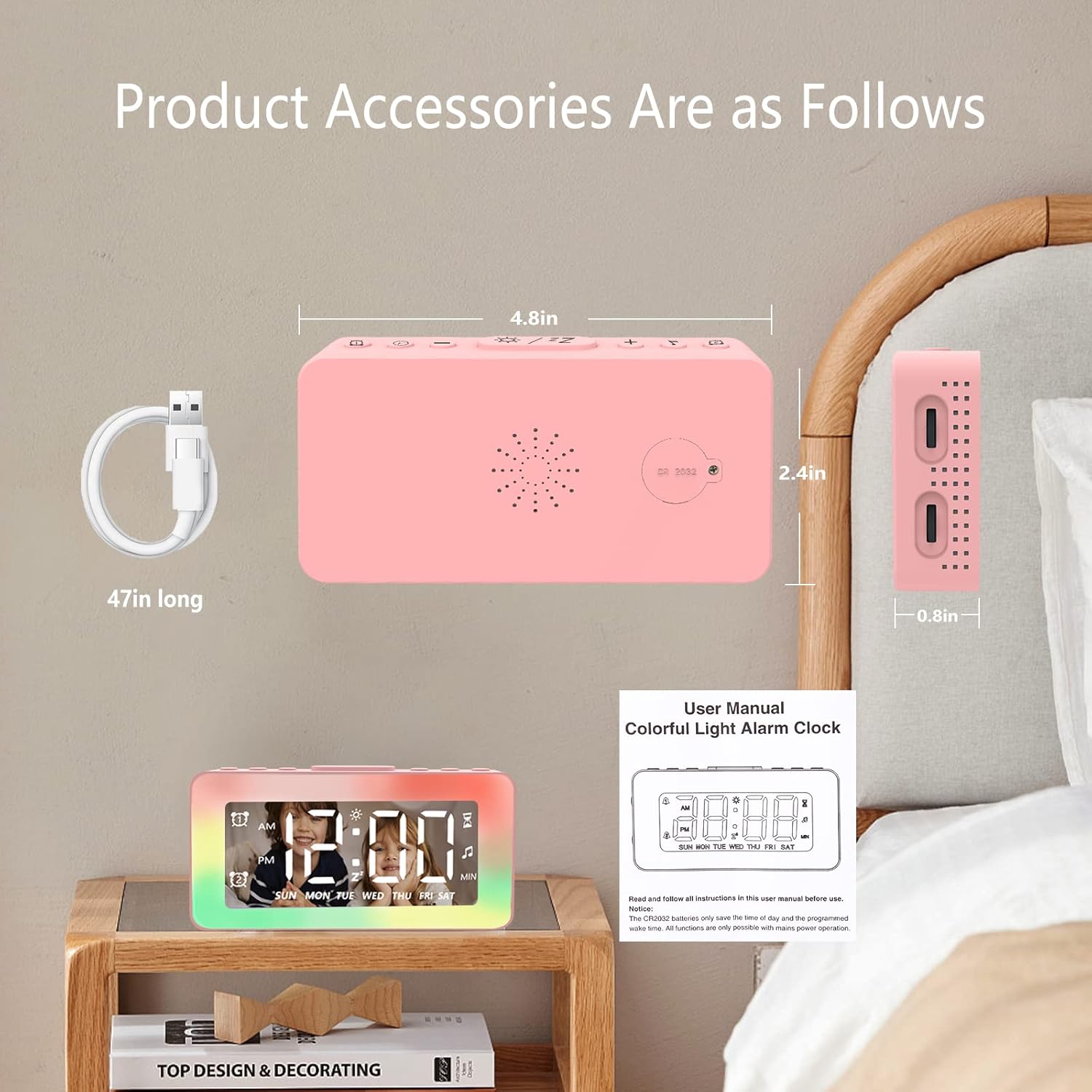
Image: The SPLITSKY NZFS Kids Alarm Clock, a USB-C power cable, and the user manual are included in the package.
3. פּראָדוקט איבערview
מאַכט זיך באַקאַנט מיט די קנעפּלעך און פּאָרטן אויף דיין וועקער זייגער:

בילד: דעטאַלירט view of the alarm clock's top buttons and side ports, including Alarm 1, Time Setting, Light Minus/Settings, Snooze/Light Mode Switch, Light Plus/Setup, Music Switch, Alarm 2, Volume Setting, Time Brightness Setting, USB Output Charging Port, and Type-C Input Interface.
- שרעק 1 קנעפּל: Set and activate Alarm 1.
- צייט באַשטעטיקן קנעפּל: סטרויערן די קראַנט צייט.
- Light Minus / Settings Button: Decrease light brightness or navigate settings.
- Snooze / Light Mode Switch Button: Activate snooze, or cycle through light modes.
- Light Plus / Setup Button: Increase light brightness or confirm settings.
- Music Switch Button: Cycle through white noise sounds.
- שרעק 2 קנעפּל: Set and activate Alarm 2.
- Volume Setting Wheel (Side): Adjust alarm and white noise volume.
- Time Brightness Setting Wheel (Side): סטרויערן די ברייטנאַס פון די אַרויסווייַזן.
- USB Output Charging Port (Side): Charge external devices.
- Type-C Input Interface (Side): Connect power cable to the alarm clock.
4. סעטאַפּ
4.1 מאַכט קאַנעקשאַן
- Connect the provided USB-C power cable to the Type-C Input Interface on the side of the alarm clock.
- שטעקט אריין דעם אנדערן עק פונעם USB-C קאבל אין א קאמפאטיבלן USB פאוער אדאפטער (נישט אריינגערעכנט) אדער א USB פארט.
- דער דיספּלעי וועט זיך באַלויכטן, וואָס ווײַזט אָן אַז די זייגער איז אָן.

Image: The SPLITSKY NZFS Kids Alarm Clock is shown powered on and connected via its USB-C port, also demonstrating its capability to charge a smartphone.
4.2 Battery Installation (Memory Backup)
The alarm clock includes a pre-installed CR2032 battery. This battery serves as a memory backup to retain time and alarm settings during a power outage or when the main power is disconnected. It does not power the clock for regular operation.
- If the battery needs replacement, locate the battery compartment on the back of the unit.
- ניצן אַ קליין שרויפנ - ציער צו עפֿענען דעם אָפּטייל.
- פאַרבייַטן מיט אַ נייַע CR2032 באַטאַרייע, און ינשורינג די ריכטיק פּאָולעראַטי.
- פאַרמאַכן די אָפּטייל סיקיורלי.
5. אַפּערייטינג ינסטרוקטיאָנס
5.1 Setting the Time (12H/24H Format)
- דריקן און האַלטן די צייט באַשטעטיקן קנעפּל until the hour digits begin to flash.
- ניצן די Light Minus / Settings Button (אַראָפּ) אָדער Light Plus / Setup Button (up) to adjust the hour.
- דרוק די צייט באַשטעטיקן קנעפּל again to move to minute adjustment. Adjust minutes using the Light Minus/Plus buttons.
- דרוק די צייט באַשטעטיקן קנעפּל a third time to select 12-hour or 24-hour format. Adjust using the Light Minus/Plus buttons.
- דרוק די צייט באַשטעטיקן קנעפּל once more to confirm and exit time setting mode.
5.2 Setting Alarms (Dual Alarm, Daily/Weekday/Weekend Mode)
די זייגער שטיצט צוויי אומאפהענגיקע אלארמען (אלארם 1 און אלארם 2).
- דריקן און האַלטן די שרעק 1 קנעפּל (פֿאַר אַלאַרם 1) אָדער שרעק 2 קנעפּל (for Alarm 2) until the alarm hour digits flash.
- ניצן די Light Minus / Settings Button or Light Plus / Setup Button צו סטרויערן די שעה.
- Press the respective Alarm Button again to move to minute adjustment. Adjust minutes using the Light Minus/Plus buttons.
- Press the respective Alarm Button again to select the alarm mode:
- טעגלעך מאָדע: דער אַלאַרם קלינגט יעדן טאָג.
- Weekday Mode: דער אלארם קלינגט מאָנטיק ביז פרייטיק.
- וואָכנ-ענד מאָדע: דער אַלאַרם קלינגט שבת און זונטיק.
- Press the respective Alarm Button once more to confirm and exit alarm setting mode.
- צו אַקטיווירן/דעאַקטיווירן אַן אַלאַרם, דריק קורץ די שרעק 1 קנעפּל or שרעק 2 קנעפּלאן אלארם אייקאן וועט דערשיינען/פארשווינדן אויפן דיספלעי.
5.3 סנוז פונקציע
ווען אַן אַלאַרם קלינגט, דריקט אויף די Snooze / Light Mode Switch Button on top to activate snooze. The alarm will pause for 9 minutes and then sound again. This can be repeated multiple times.
5.4 Night Light (8 Modes RGB, 10-level dimming)
The alarm clock features 6 solid color lights and 2 ambient colorful lights.
- קורץ דריקן די Snooze / Light Mode Switch Button to turn on the night light and cycle through the 8 color modes.
- To adjust the brightness (10 levels), use the Light Minus / Settings Button or Light Plus / Setup Button while the night light is active.
- To turn off the night light, continue pressing the Snooze / Light Mode Switch Button ביז די ליכט טורנס אַוועק.

Image: Multiple SPLITSKY NZFS Kids Alarm Clocks are shown, each displaying a different color from the 8 available RGB night light modes.
5.5 White Noise Sleep Aid (8 Sounds)
די זייגער אָפפערט 8 באַרויִגנדיקע קלאַנגען צו העלפֿן מיטן שלאָף.
- קורץ דריקן די מוזיק סוויטש קנעפּל to turn on the white noise and cycle through the available sounds.
- To adjust the volume (16 levels), use the Volume Setting Wheel on the side of the clock.
- To turn off the white noise, continue pressing the מוזיק סוויטש קנעפּל until the sound stops.

Image: The SPLITSKY NZFS Kids Alarm Clock is displayed on a bedside table, with icons illustrating the various white noise options such as rain, cicadas, piano, bonfire, waves, birdsong, and church bells.
5.6 Sleep Timer (10-120 minutes)
The sleep timer allows you to set a duration for the white noise and/or night light to play before automatically turning off.
- While white noise or night light is active, press and hold the מוזיק סוויטש קנעפּל (for white noise timer) or Snooze / Light Mode Switch Button (for light timer).
- ניצן די Light Minus / Settings Button or Light Plus / Setup Button to select the desired timer duration (10, 20, 30, 60, 90, 120 minutes).
- Press the respective button again to confirm the timer setting. The timer icon will appear on the display.
5.7 ווייַז ברייטנאַס אַדזשאַסטמאַנט
Adjust the brightness of the LED time display using the Time Brightness Setting Wheel on the side of the clock.
5.8 וסב טשאַרדזשינג פּאָרט
The USB output charging port on the side of the alarm clock can be used to charge other small electronic devices, such as smartphones. Connect your device's charging cable to this port.
6. וישאַלט
6.1 רייניקונג
- פאַרזיכערן די מיטל איז אַנפּלאַגד איידער רייניקונג.
- ווישן די ייבערפלאַך מיט אַ ווייך, טרוקן שטאָף.
- ניצט נישט קיין שרײַבענדיקע רייניגער, סאָלווענטן אדער כעמישע שפּריץ.
6.2 סטאָרידזש
When not in use for extended periods, store the alarm clock in a cool, dry place, away from direct sunlight and extreme temperatures.
7. טראָובלעשאָאָטינג
If you encounter issues with your SPLITSKY NZFS Kids Alarm Clock, refer to the table below for common problems and solutions.
| פּראָבלעם | מעגלעך סיבה | לייזונג |
|---|---|---|
| Clock display is off or dim. | Not connected to power; Time brightness set too low. | Ensure USB-C cable is securely connected to a power source. Adjust the Time Brightness Setting Wheel. |
| דער אַלאַרם קלינגט נישט. | Alarm not activated; Alarm volume too low. | Check if the alarm icon is displayed. If not, short press the respective Alarm Button to activate. Adjust the Volume Setting Wheel. |
| Time/settings reset after power disconnection. | CR2032 backup battery is depleted or missing. | Replace the CR2032 battery in the battery compartment. |
| Night light or white noise not working. | Function not activated; Sleep timer active. | קורץ דריקן די Snooze / Light Mode Switch Button or מוזיק סוויטש קנעפּל to activate. Check if a sleep timer is set. |
8. ספּעסאַפאַקיישאַנז
| שטריך | דעטאַל |
|---|---|
| סאָרט | ספּליטסקי |
| מאָדעל נומער | NZFS |
| ווייַז טיפּ | דיגיטאַל געפירט |
| פּראָדוקט דימענשאַנז | 3.17" ברייט x 3.17" הויך (אומגעפער 8.05 ס״מ ברייט x 8.05 ס״מ הויך) |
| פּונקט וואָג | 8.1 Ounces (approximately 230 grams) |
| מאַכט מקור | Corded Electric (USB-C), Battery Powered (CR2032 for memory) |
| נאַכט ליכט מאָדעס | 8 (6 solid colors, 2 ambient colorful) with 10-level dimming |
| ווייסע ראַש סאָונדס | 8 סודינג סאָונדס |
| שרעק טאָנעס | 7 wake-up alarm tones with 16-level volume control |
| שרעק פֿעיִקייטן | Dual Alarm, Daily/Weekday/Weekend modes, 9-minute Snooze |
| טייַמער פֿונקציע | 10-120 minute sleep timer for sounds and lights |
| קאַנעקטיוויטי | USB-C Input, USB-A Output (for charging external devices) |
| מאַטעריאַל | אַקרילאָניטרילע בוטאַדיענע סטירענע |
9. וואָראַנטי און שטיצן
9.1 וואָראַנטי אינפֿאָרמאַציע
Please refer to the warranty information provided at the time of purchase or contact your retailer for details regarding the product warranty. Keep your proof of purchase for any warranty claims.
9.2 קונה שטיצן
For technical assistance, troubleshooting beyond this manual, or general inquiries, please contact the seller through the platform where you purchased the product. Provide your order number and a detailed description of the issue for prompt support.