
הקדמה
The TAXNELE THC30A is a digital programmable timer switch designed for automatic control of various electrical equipment. It features daily and weekly programming capabilities with up to 20 ON/OFF settings, a manual override function, and a built-in lithium battery for power-off memory. This manual provides detailed instructions for installation, operation, and maintenance to ensure safe and efficient use of your timer switch.
זיכערקייַט אינפֿאָרמאַציע
- פאַרזיכערן די מאַכט צושטעלן איז דיסקאַנעקטיד איידער ינסטאַלירונג אָדער וישאַלט.
- Installation should be performed by a qualified electrician or knowledgeable individual.
- נישט איבערשטייגן די מאקסימום לאוד קאפאציטעט פון 30A / 5000W.
- האַלטן די מיטל אַוועק פון וואַסער און עקסטרעם טעמפּעראַטורעס.
- Verify correct wiring connections to prevent damage to the device or connected appliances.
פּראָדוקט פֿעיִקייטן
- Programmable Control: Up to 20 ON/OFF settings per day or week.
- מאַכט-אַוועק זכּרון: Built-in 3V lithium battery maintains timing, display, and data storage for up to 3 years during power interruptions.
- הויך פּינטלעכקייַט: Industrial-grade chip for accurate timing.
- מאַנואַל אָווועררייד: Allows temporary or permanent manual control.
- LCD ווייַז: Clear digital display for easy programming and monitoring.
- Din Rail Mount: Designed for easy installation on a standard DIN rail.
- ברייט אַפּלאַקיישאַן: Suitable for street lights, neon lamps, advertising signs, production equipment, and home appliances.

Figure 1: The THC30A timer switch highlighting its power-off memory function, which retains data for up to 3 years using a built-in CR2032 lithium battery.

Figure 2: The THC30A timer switch featuring a 30A big load relay for stable and safe operation with various electrical loads.
Product Components and Display
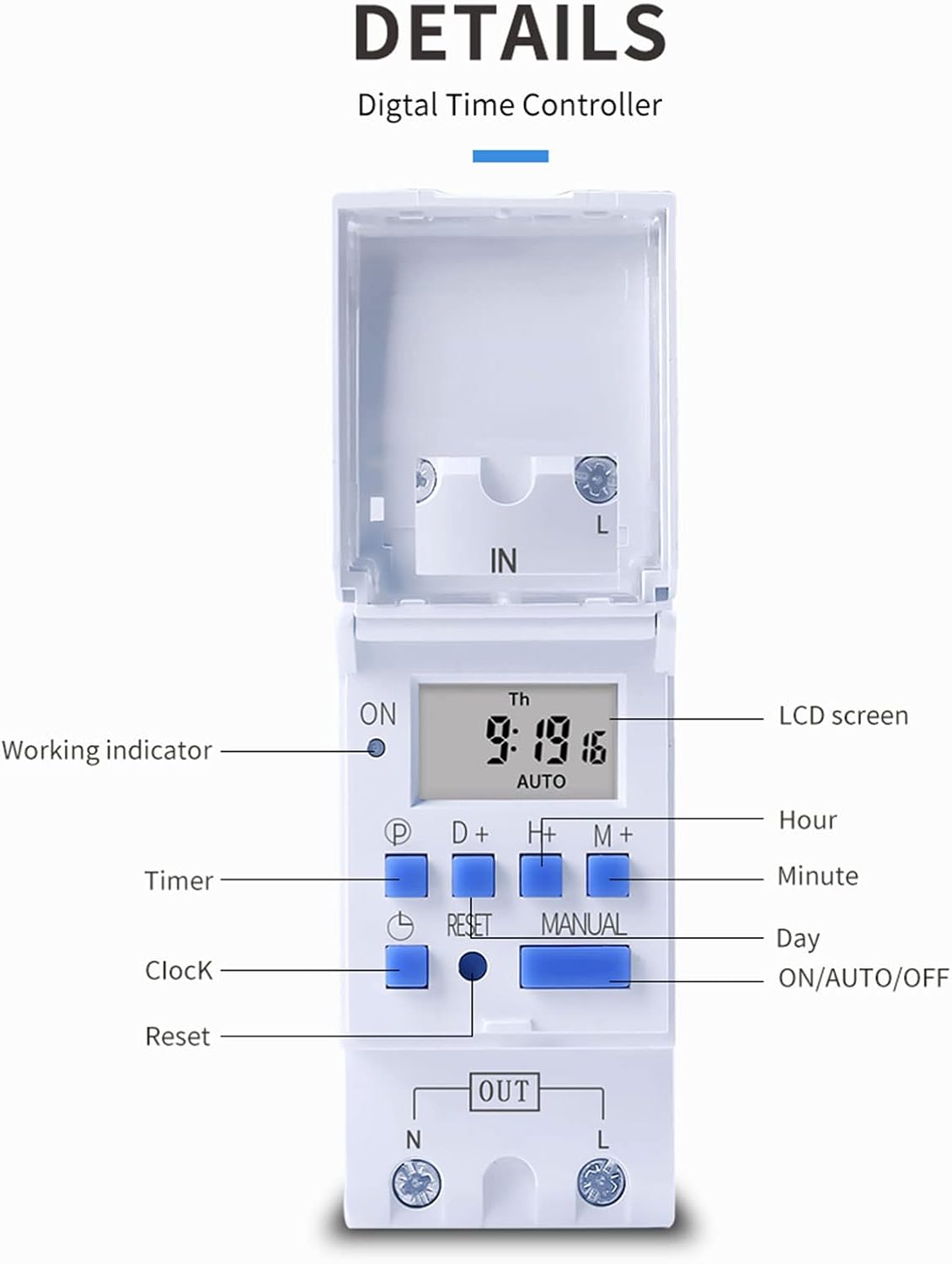
פיגורע 3: דעטאַילעד view of the THC30A timer switch's LCD screen and control buttons. Labels include Working indicator, Timer, Clock, Reset, P (Program), D+ (Day), H+ (Hour), M+ (Minute), Manual, and ON/AUTO/OFF status.
- LCD פאַרשטעלן: Displays current time, day, and ON/OFF status.
- אַרבעט ינדיקאַטאָר: LED light indicating operation status.
- P קנעפּל: גייט אריין אין פּראָגראַממינג מאָדע.
- D+ Button: Adjusts day in clock setting or program.
- H+ Button: Adjusts hour in clock setting or program.
- M+ Button: Adjusts minute in clock setting or program.
- זייגער קנעפּל: Returns to clock display or exits programming mode.
- באַשטעטיק קנעפּל: רימט אויס אַלע סעטטינגס און ריסעט דעם טייַמער.
- מאַנואַל קנעפּל: טוישט צווישן אן, אויטא, און אויס מאָדעס.
ספּעסאַפאַקיישאַנז
| פּאַראַמעטער | ווערט |
|---|---|
| מאָדעל | THC30A |
| קראַנט רייטינג | 30 א |
| מאַכט רייטינג | 5000 וו |
| VoltagE אָפּציעס | 12V DC AC, 24V DC AC, 48V DC AC, 110V AC, 220V AC |
| צייט טעות | ≤2 seconds/day |
| ווייַז | לקד |
| טיימינג קייט | 1 minute to 168 hours (7 days) |
| ON/OFF סעטטינגס | 20 גרופּעס |
| אַפּערייטינג טעמפּעראַטור | -20 ℃ צו 50 ℃ |
| דימענשאַנז | 86 X 36 X 65 מם (3.38 X X X X X X) |
| מאַכט רעסערווע | 3V Lithium battery (CR2032 type) for 3 years data retention |

Figure 4: Dimensions of the THC30A timer switch, showing measurements for height, width, and depth for proper installation planning.
סעטאַפּ און ינסטאַלירונג
1. מאַונטינג
The THC30A timer switch is designed for DIN rail mounting. Securely attach the device to a standard 35mm DIN rail in an appropriate electrical enclosure.
2. וויירינג
ווארענונג: Ensure all power is disconnected before performing any wiring.
Connect the input power supply to the "IN" terminals (N for Neutral, L for Live). Connect the load (e.g., light, appliance) to the "OUT" terminals (N for Neutral, L for Live). The timer acts as a switch for the live wire. Refer to the wiring diagram below for correct connections.

Figure 5: Simplified wiring diagram for the THC30A timer switch. The new version offers direct power output, simplifying connections compared to older models.
- אַרייַנשרייַב (אין): Connect your main power supply (e.g., AC 12V, 24V, 48V, 110V, 220V) to these terminals.
- רעזולטאַט (אויס): Connect your electrical load (e.g., light, motor) to these terminals. The timer controls the power flow to this output.
אַפּערייטינג ינסטראַקשאַנז
1. Initial Setup / Reset
Upon first use or after a prolonged power outage, the display may be blank. Press the באַשטעטיק button (located in a small hole, use a pointed object) to clear all settings and initialize the timer. The LCD will display "0:00" and "AUTO".
2. שטעלן די איצטיקע צייט און טאָג
- דריקן און האַלטן די זייגער קנעפּל.
- בשעת האלטן זייגער, דריקן D+ to set the current day (Monday to Sunday).
- בשעת האלטן זייגער, דריקן H+ צו שטעלן די איצטיקע שעה (0-23).
- בשעת האלטן זייגער, דריקן M+ צו שטעלן די איצטיקע מינוט (0-59).
- מעלדונג די זייגער קנעפּל. די צייט איז איצט איינגעשטעלט.
3. פּראָגראַמירן אָן/אויס ציקלען
The timer supports up to 20 ON/OFF programs. Each program consists of an ON time and an OFF time.
- דרוק די P button once. The display will show "1 ON". This is for the first ON setting.
- דרוק D+ to select the day(s) for this ON event. You can choose a single day, specific days, or blocks of days (e.g., Mon-Fri, Sat-Sun, Mon-Sun).
- דרוק H+ to set the hour for the first ON event.
- דרוק M+ to set the minute for the first ON event.
- דרוק די P button again. The display will show "1 OFF". This is for the first OFF setting.
- Repeat steps 2-4 to set the day(s), hour, and minute for the first OFF event.
- פאָרזעצן דרינגלעך P to cycle through "2 ON", "2 OFF", up to "20 ON", "20 OFF" and set additional programs as needed.
- נאכדעם וואס איר האט איינגעשטעלט אלע געוואונטשענע פראגראמען, דריקט דעם זייגער קנעפּל צו פֿאַרלאָזן פּראָגראַמירן מאָדע און צוריקקומען צו דער איצטיקער צייט אַרויסווייַזונג.
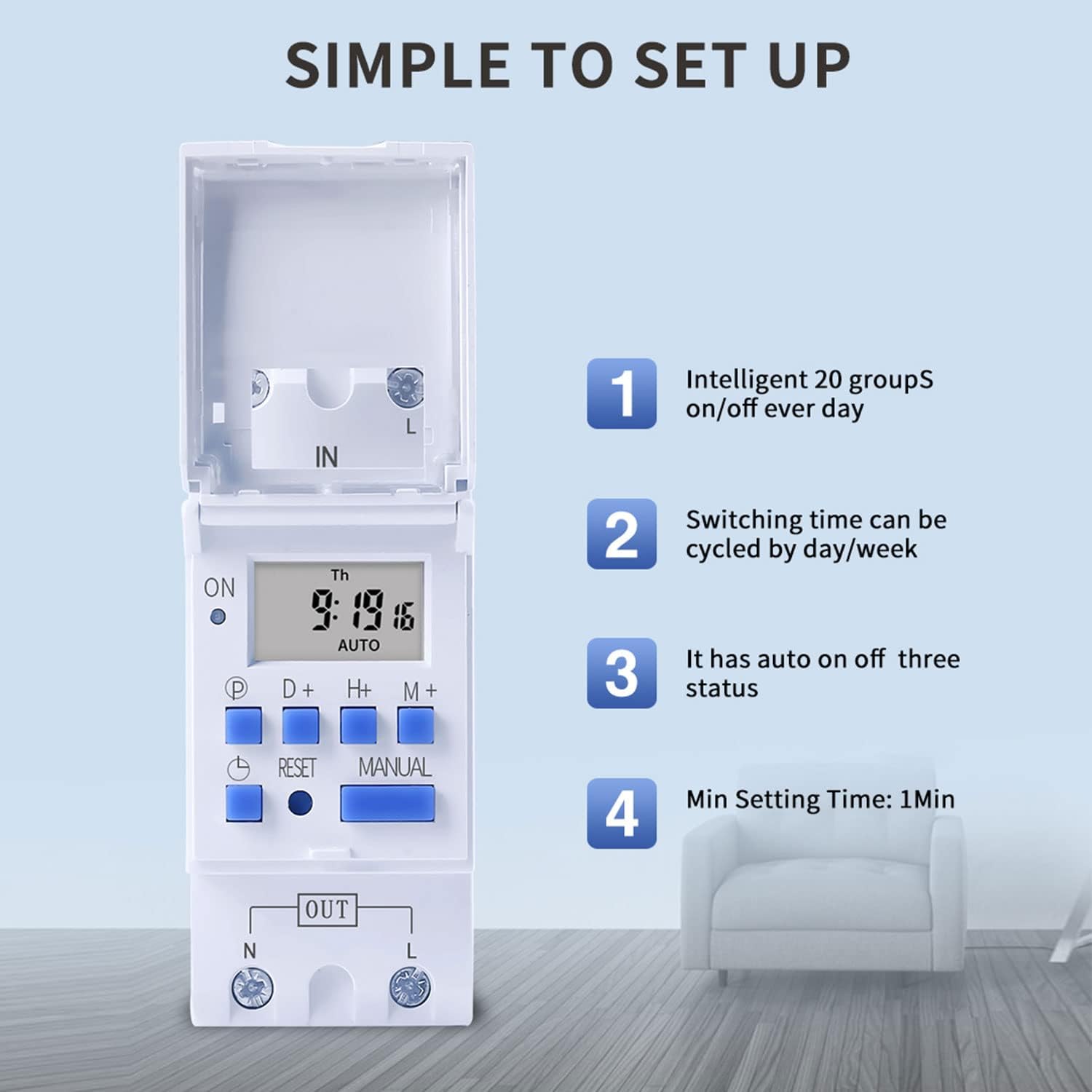
Figure 6: Visual guide to the simple setup of the THC30A timer, highlighting its 20 ON/OFF groups, daily/weekly cycling, auto ON/OFF status, and minimum 1-minute setting time.
4. מאַנואַל אָווועררייד
דרוק די מאַנואַל button to cycle through the output modes:
- אויף: The output is continuously ON, overriding all programs.
- אָטאַמאַטיק: The output operates according to the programmed ON/OFF cycles. This is the standard operating mode.
- OFF: The output is continuously OFF, overriding all programs.
Ensure the timer is in AUTO mode for programmed operations to function.
וישאַלט
- Keep the timer clean and free from dust. Use a dry, soft cloth for cleaning.
- דו זאלסט נישט נוצן אַברייסיוו קלינערז אָדער סאָלוואַנץ.
- The internal lithium battery (CR2032) has a long lifespan (up to 3 years). If the display consistently goes blank after power outagעס, די באַטאַרייע קען דאַרפֿן אַ ריפּלייסמאַנט. דאָס זאָל געטאָן ווערן דורך אַ קוואַליפֿיצירטן טעכניקער.
טראָובלעשאָאָטינג
| פּראָבלעם | מעגלעך סיבה | לייזונג |
|---|---|---|
| די אַרויסווייַזן איז ליידיק. | קיין שטראָם צושטעל; אינערלעכע באַטאַרייע אויסגעשעפט. | Check power connections. Press the Reset button. If problem persists, internal battery may need replacement. |
| Timer does not switch ON/OFF as programmed. | Timer is not in AUTO mode; incorrect program settings; current time/day is wrong. | דרוק מאַנואַל until "AUTO" is displayed. Verify program settings (ON/OFF times, days). Check and correct current time and day. |
| Output is always ON or always OFF. | Timer is in manual ON or OFF mode. | דרוק מאַנואַל until "AUTO" is displayed. |
| פּראָגראַמען גייען פאַרלוירן נאָך דעם ווי מען מאַכט אויסtage. | Internal backup battery is depleted. | The internal CR2032 battery may need replacement. Contact support if necessary. |
אַפּפּליקאַטיאָנס
The TAXNELE THC30A timer switch is versatile and can be used in various applications to automate electrical devices:

פיגורע 7: עקסamples of common applications for the THC30A timer switch, including street light control, home appliance control, battery charging control, and advertising light control.
- Street Light Control: Automate the turning ON/OFF of street lights based on time.
- Home Appliance Control: Schedule operation of water heaters, fans, or other household devices.
- Battery Charging Control: Manage charging cycles for batteries to prevent overcharging.
- Advertising Light Control: Program display times for neon signs and advertising boards.
- Production Equipment: Control machinery operation in industrial settings.
וואָראַנטי און שטיצן
For warranty information or technical support, please refer to the contact details provided with your purchase or visit the official TAXNELE webזייטל. האַלט אייער קויף קוויטל ווי אַ באַווייַז פון קויפן.