
הקדמה
This user manual provides detailed instructions for the operation and maintenance of your Jensen CD-660 Portable Stereo CD Player Boombox. Please read this manual thoroughly before using the device to ensure proper function and to maximize your listening experience. Keep this manual for future reference.
וויכטיק סאַפעטי אינסטרוקציעס
כדי צו רעדוצירן דעם ריזיקע פון עלעקטרישן שאק, פייער, אדער שאדן, פאלגט שטענדיג די גרונטלעכע זיכערהייט מיטלען:
- דו זאלסט נישט ויסשטעלן דעם אַפּפּליאַנסע צו רעגן אָדער נעץ.
- דו זאלסט נישט פאַרשפּאַרן קיין ווענטאַליישאַן אָופּאַנינגז.
- דו זאלסט נישט ינסטאַלירן לעבן קיין היץ קוואלן אַזאַ ווי ראַדיאַטאָרס, היץ רעדזשיסטערז, סטאָוווז אָדער אנדערע אַפּאַראַט (אַרייַנגערעכנט ampליפיערס) וואָס פּראָדוצירן היץ.
- באַשיצן די מאַכט שנור פון גיין אויף אָדער פּינטשעד.
- נאָר נוצן אַטאַטשמאַנץ / אַקסעסעריז ספּעסיפיעד דורך דער פאַבריקאַנט.
- אָפּשטעקן דעם אַפּפּליאַנסע בעשאַס בליץ סטאָרמז אָדער ווען אַניוזד פֿאַר לאַנג פּיריאַדז.
- אָפּשיקן אַלע סערוויסעס צו קוואַלאַפייד סערוויס פּערסאַנעל.
פּעקל אינהאַלט
באַשטעטיקט אַז אַלע זאכן וואָס זענען אויסגערעכנט אונטן זענען אַרייַנגערעכנט אין אייער פּעקל:
- Jensen CD-660 Portable Stereo CD Player Boombox
- AC אַדאַפּטער (120V)
- באַזיצער ס מאַנואַל
פּראָדוקט איבערview
Familiarize yourself with the various parts and controls of your Jensen CD-660 boombox.
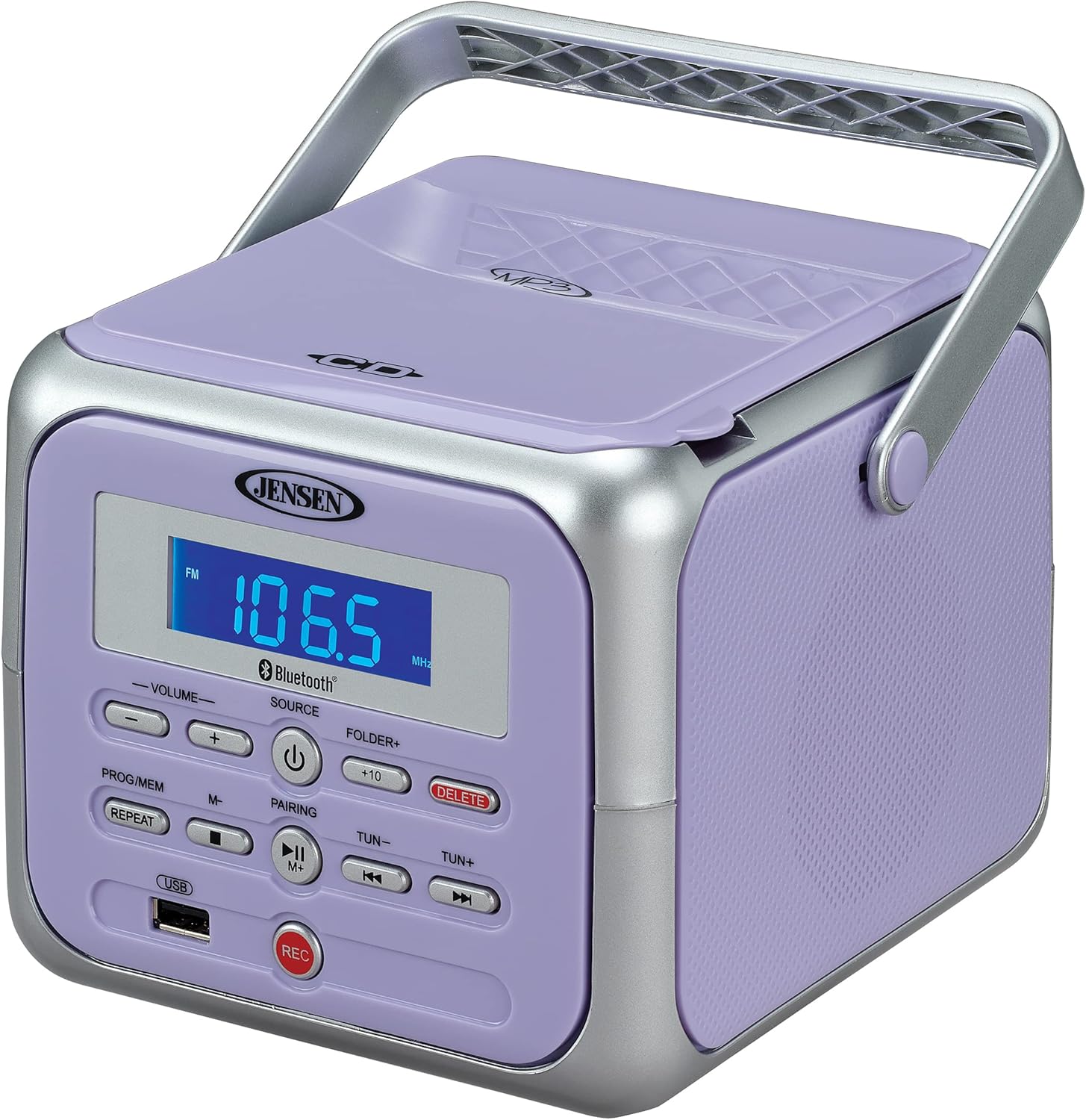
פיגורע 1: פראָנט view of the Jensen CD-660 with the carrying handle extended. This image displays the main control panel, including the display screen, volume controls, source selection, and playback buttons.

פיגורע 2: פראָנט view of the Jensen CD-660 with the carrying handle folded down. This perspective highlights the compact design and the arrangement of buttons and the LCD display.

פיגורע 3: שפּיץ view of the Jensen CD-660 with the CD compartment lid open, revealing the CD tray. This illustrates the top-loading mechanism for disc insertion.
קאָנטראָל פּאַנעל פֿעיִקייטן:
- LCD ווייַז: Shows current mode, track number, frequency, and other information.
- וואָלומע +/- קנעפּלעך: אַדזשאַסטירן דעם אַודיאָ אַרויסגאַנג לעוועל.
- SOURCE קנעפּל: Selects between CD, Bluetooth, FM Radio, and Aux-in modes.
- POWER קנעפּל: טורנס די אַפּאַראַט אויף אָדער אַוועק.
- PROG/MEM Button: Programs CD tracks or stores FM radio presets.
- REPEAT קנעפּל: Repeats current track or all tracks.
- PAIRING Button: הייבט אן בלועטוט פארינג מאָדע.
- שפּיל / פּויזע קנעפּל: סטאַרץ אָדער פּאָזאַז פּלייבאַק.
- STOP קנעפּל: סטאַפּס פּלייבאַק.
- איבערשפרינגען/זוכן קנעפלעך (◀◀ / ▶▶): איבערשפּרינגען לידער אדער זוכן אין אַ ליד.
- TUN +/- Buttons: Tunes FM radio frequency.
- FOLDER+ Button: Navigates to the next folder on a USB device.
- +10 קנעפּל: Skips 10 tracks forward on CD/USB.
- DELETE קנעפּל: Deletes recorded fileס פון וסב.
- רעק קנעפּל: Initiates recording to a USB flash drive.
- וסב פּאָרט: For USB flash drive playback and recording.
- אַוקס-אין דזשאַק: קאַנעקץ פונדרויסנדיק אַודיאָ דעוויסעס.
- כעדפאָון דזשאַק: פֿאַר פּריוואַט צוגעהערט.
סעטאַפּ
מאַכט די אַפּאַראַט
The Jensen CD-660 can be powered by either the included AC adapter or batteries.
AC מאַכט אָפּעראַציע:
- Plug the AC adapter into the AC IN jack located on the back of the unit.
- Plug the other end of the AC adapter into a standard 120V AC wall outlet.
באַטאַרייע מאַכט אָפּעראַציע:
For portable use, the unit requires 6 x 'C' (UM-2) batteries (not included).
- עפֿנט דעם דעקל פֿונעם באַטעריע־אָפּטייל אויף דער אונטערשטער זײַט פֿונעם אַפּאַראַט.
- Insert 6 'C' size batteries, ensuring correct polarity (+/-) as indicated inside the compartment.
- פאַרמאַכן די באַטאַרייע אָפּטייל דעקן סיקיורלי.
באַמערקונג: Disconnect the AC adapter when operating on battery power. Remove batteries if the unit will not be used for an extended period.
אַפּערייטינג ינסטראַקשאַנז
אַלגעמיינע אָפּעראַציע:
- דרוק די מאַכט קנעפּל צו קער די אַפּאַראַט אויף.
- דרוק די מקור button repeatedly to select your desired mode (CD, Bluetooth, FM, USB, AUX).
- סטרויערן די באַנד ניצן די באַנד +/- קנעפּלעך.
קאָמפּאַקטדיסק פּלייבאַק:
The unit supports CD, CD-R/RW, MP3, and WMA disc formats.
- עפֿנט דעם דעקל פֿון סי-די אָפּטייל.
- לייגט אַ סי-די מיט דער עטיקעט זײַט אַרויף אויף דער שפּינדל.
- נאָענט די קאָמפּאַקטדיסק אָפּטייל דעקל.
- דרוק די מקור קנעפּל צו אויסקלייַבן קאָמפּאַקטדיסק מאָדע.
- דרוק די שפּיל / פּויזע קנעפּל צו אָנהייבן פּלייבאַק.
- ניצן די האָפּקען / זוכן buttons (◀◀ / ▶▶) to navigate tracks.
- דרוק די האַלטן קנעפּל צו האַלטן פּלייבאַק.
בלועטאָאָטה אָפּעראַציע:
סטרים אודיאָ אָן דראָטן פֿון אײַער בלוטוט-ענייבאַלד מיטל.
- דרוק די מקור button to select Bluetooth mode. The display will show "BT" and flash, indicating pairing mode.
- אויף דיין בלועטאָאָטה מיטל, געבן בלועטאָאָטה און זוכן פֿאַר בנימצא דעוויסעס.
- Select "JENSEN CD-660" from the list of devices.
- Once paired, the display will stop flashing and show "BT".
- Start playing audio on your connected device.
- ניצן די שפּיל / פּויזע און האָפּקען / זוכן buttons on the boombox or your device to control playback.
עפעם ראַדיאָ:
הערט צו אייערע באַליבסטע FM ראַדיאָ סטאַנציעס.
- דרוק די מקור קנעפּל צו אויסקלייבן FM ראַדיאָ מאָדע.
- Extend the FM wire antenna for optimal reception.
- דרוק די טאָן +/- קנעפּלעך צו מאַנועל צושטעלן צו אַ סטאַנציע.
- דריקן און האַלטן די טאָן +/- buttons for automatic scanning to the next available station.
סטאָרינג און ריקאָלינג פּרעסעץ:
The unit can store up to 30 FM presets.
- ניגן צו דער געוואלט עפעם סטאַנציע.
- דרוק די PROG/MEM button. The display will show a flashing preset number.
- ניצן די האָפּקען / זוכן buttons (◀◀ / ▶▶) to select the desired preset number.
- דרוק די PROG/MEM קנעפּל נאכאמאל צו באשטעטיגן און ראטעווען די סטאנציע.
- צו צוריקרופן א פאָרגעשטעלטן פּונקט, דריק די PROG/MEM קנעפּל איבער און איבער צו דורכגיין די אויפגעהיטע סטאנציעס.
וסב פּלייַבאַקק:
Play MP3, WAV, or FLAC audio files פֿון אַ וסב בליץ פאָר.
- אַרײַנשטעלן אַ USB בליץ דרייוו אין דעם USB פּאָרט.
- דרוק די מקור קנעפּל צו אויסקלייַבן וסב מאָדע.
- The unit will automatically begin playing the first compatible audio file.
- ניצן די האָפּקען / זוכן buttons (◀◀ / ▶▶) to navigate tracks.
- ניצן די FOLDER+ button to navigate between folders on the USB drive.
- די +10 button can be used to skip 10 tracks forward.
USB רעקאָרדינג:
Record audio directly to a USB flash drive from CD, FM Radio, Aux-in, or Bluetooth sources.
- אַרײַנשטעלן אַ USB בליץ דרייוו אין דעם USB פּאָרט.
- Select the desired audio source (CD, FM, AUX, or Bluetooth).
- Start playback of the audio you wish to record.
- דרוק די REC button to begin recording. The display will indicate recording status.
- דרוק די REC קנעפּל ווידער צו האַלטן רעקאָרדינג.
- צו ויסמעקן אַ רעקאָרדעד file, נאַוויגירן צו די file in USB playback mode and press the ויסמעקן קנעפּל.
Aux-in Connection:
Connect external audio devices like smartphones or tablets.
- Connect one end of a 3.5mm audio cable (not included) to the Aux-in jack on the boombox.
- פֿאַרבינדט דעם אַנדערן עק פֿונעם קאַבל צום כעדפֿאָן דזשעק אָדער אַודיאָ אַרויסגאַנג פֿון אייער עקסטערנעם מיטל.
- דרוק די מקור button to select Aux-in mode.
- Start playing audio on your external device.
- שטעל די באַנד אויף ביידע די בומבאַקס און דיין פונדרויסנדיק מיטל פֿאַר אָפּטימאַלן קלאַנג.
וישאַלט
רייניקונג די אַפּאַראַט:
- ווישן די יקסטיריער פון די אַפּאַראַט מיט אַ ווייך, דamp שטאָף. דו זאלסט נישט נוצן אַברייסיוו קלינערז אָדער סאָלוואַנץ.
- פֿאַר די סי-די לענס, ניצט אַ ספּעציעלע סי-די לענס רייניגער דיסק.
באַטערי זאָרגן:
- אַרויסנעמען באַטעריעס אויב די אַפּאַראַט וועט נישט ווערן גענוצט פֿאַר אַ לענגערע צייט צו פאַרמייַדן ליקאַדזש.
- דו זאלסט נישט מישן אַלט און נייַ באַטעריז, אָדער פאַרשידענע טייפּס פון באַטעריז.
טראָובלעשאָאָטינג
If you encounter issues with your Jensen CD-660, refer to the following table for common problems and solutions.
| פּראָבלעם | מעגלעך סיבה | לייזונג |
|---|---|---|
| קיין מאַכט | AC אַדאַפּטער נישט פארבונדן; באַטעריעס אויסגעשעפט אָדער נישט ריכטיק אריינגעשטעלט. | Ensure AC adapter is securely plugged in; Replace batteries or check polarity. |
| קיין געזונט | קול צו נידעריג; אומרעכטע מקור אויסגעקליבן; כעדפאָונז פארבונדן. | Increase volume; Select correct source; Disconnect headphones. |
| סי-די שפּילט נישט | CD inserted incorrectly; Disc is dirty or scratched; CD compartment not closed. | Insert CD with label side up; Clean or replace disc; Close compartment securely. |
| בלועטאָאָטה פּערינג ניט אַנדערש | Device too far; Bluetooth not enabled on external device; Boombox not in pairing mode. | Move device closer; Enable Bluetooth; Ensure boombox is in BT pairing mode. |
| נעבעך עפעם אָפּטראָג | אַנטענע נישט אויסגעשטרעקט; שוואַך סיגנאַל. | פֿולשטענדיק אויסציען די FM דראָט אַנטענע; איבערפּאַזיציאָנירן דעם אַפּאַראַט פֿאַר אַ בעסערן אָפּנאַם. |
| פּראָבלעמען מיט USB ווידערשפּיל | ניט געשטיצט file format; USB drive not properly inserted or corrupted. | פאַרזיכערן files are MP3/WAV/FLAC; Reinsert USB drive; Try a different USB drive. |
ספּעסאַפאַקיישאַנז
| שטריך | דעטאַל |
|---|---|
| מאָדעל נומער | CD-660 |
| מאַכט מקור | AC 120V (included adapter) or 6 x 'C' (UM-2) batteries (not included) |
| קאַנעקטיוויטי | Bluetooth 5.1 (A2DP, AVRCP), USB, Aux-in |
| קאָמפּאַטיביליטי פון קאָמפּאַקטדיסק | סי-די, סי-די-ר/רוו, מפּ3, וומא |
| וסב פּלייַבאַקק | MP3, WAV, FLAC |
| עפעם ראַדיאָ | Stereo Receiver with 30 Presets, PLL Digital Tuning |
| דימענשאַנז (ב x ה x ד) | 6.38" x 5.2" x 6.57" (16.2 ס״מ x 13.2 ס״מ x 16.7 ס״מ) |
| וואָג | בעערעך 2.46 לבס (1.12 קג) |
וואָראַנטי און שטיצן
This Jensen CD-660 Portable Stereo CD Player Boombox comes with a manufacturer's warranty. Please refer to the included Owner's Manual for specific details regarding warranty coverage, terms, and conditions. For technical support or service inquiries, please contact Jensen customer service directly. Contact information can typically be found in the Owner's Manual or on the official Jensen webפּלאַץ.