
1. הקדמה און איבערview
The AFK BT512-009 is a versatile 4-in-1 device designed to enhance your daily routine. It integrates a wireless charging station, a Bluetooth speaker, a digital alarm clock, and hands-free calling capabilities into a single compact unit. This manual provides detailed instructions for setup, operation, and maintenance to ensure optimal performance.

Image: The AFK 4-in-1 Wireless Charging Station showcasing its multiple functions: wireless charging a smartphone, displaying time on the alarm clock, and indicating Bluetooth speaker functionality with musical notes.
2. סעטאַפּ אינסטרוקציעס
- אויספּאַקן: Carefully remove all components from the packaging. Verify that all items are present: the AFK BT512-009 unit, power adapter, and this user manual.
- מאַכט קשר: Connect the provided power adapter to the DC input port on the back of the charging station. Plug the other end of the adapter into a standard electrical outlet (Type A - 2 pin, North American). The digital display should illuminate, indicating the device is powered on.
- ערשטע צייט איינשטעלונג: Upon first power-up, the clock may display a default time. Refer to the 'Alarm Clock Operation' section for instructions on setting the correct time and date.

Image: The AFK Wireless Charging Station on a desk, connected to a power outlet via its USB-A adapter, with a smartphone placed on the charging pad.
3. אַפּערייטינג ינסטרוקטיאָנס
3.1 ווירעלעסס טשאַרדזשינג פֿונקציע
The charging station is compatible with Qi-enabled smartphones. It provides up to 15W wireless charging output.
- אָרט: Place your compatible smartphone directly onto the charging pad. Ensure the phone is centered on the charging area for optimal contact.
- פאַל קאַמפּאַטאַבילאַטי: The charger can accommodate phone cases with a thickness of less than 5mm. Remove any magnetic, metal accessories, or other foreign objects from your phone case as these may interfere with charging.
- אָריענטירונג: Your phone can be charged both horizontally and vertically, allowing for convenient viewing of videos or notifications while charging.
- טשאַרדזשינג ינדיקאַטאָר: A charging indicator light will illuminate on the device when a phone is successfully placed and charging.
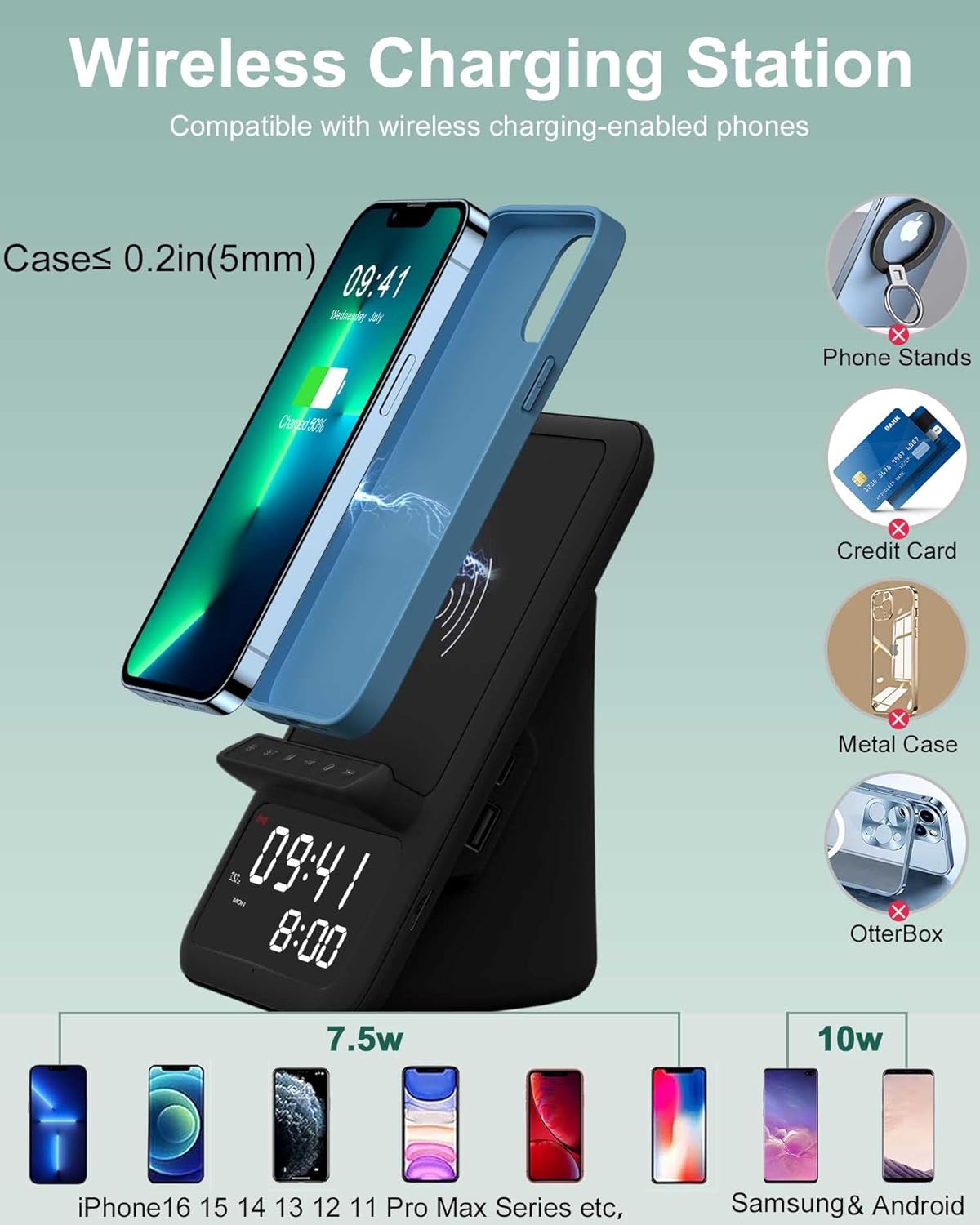
Image: A smartphone being wirelessly charged on the AFK station, illustrating compatibility with cases up to 5mm thick and showing various incompatible items like metal cases or phone stands.
3.2 בלועטוט רעדנער אָפּעראַציע
The integrated Bluetooth speaker allows you to stream audio wirelessly from your devices.
- פּערינג מאָדע: Press and hold the 'M' (Mode) button on the device until the Bluetooth indicator light starts flashing, indicating it is in pairing mode.
- קאָננעקט דיווייס: On your smartphone, tablet, laptop, or computer, navigate to Bluetooth settings and search for available devices. Select "BT512" from the list to connect. A confirmation sound will play upon successful pairing.
- אַודיאָ פּלייבאַק: Once connected, you can play music, audiobooks, or other audio content from your device.
- קאָנטראָלס: Use the physical buttons on the charging station to adjust volume (short press +/-), skip tracks (long press +/-), and play/pause (press 'O' button).

Image: The AFK Wireless Charging Station on a desk, wirelessly connected to a laptop via Bluetooth, with musical notes emanating from the speaker, indicating audio playback.
3.3 וועקער זייגער פונקציע
The device features a digital clock with dual alarm settings.
- באַשטעטיקן צייט: Press and hold the 'SET' button to enter time setting mode. Use the '+' and '-' buttons to adjust hours and minutes. Press 'SET' again to confirm each setting.
- באַשטעטיקן אַלאַרמס: Press the 'SET' button repeatedly to cycle through Alarm 1 and Alarm 2 settings. When an alarm time is displayed, press and hold 'SET' to adjust its hour and minute using '+' and '-'. Press 'SET' to confirm.
- אַקטיווירן/דעאַקטיווירן אַלאַרמס: Short press the 'SET' button to toggle alarms on or off. An alarm icon will appear on the display when active.
- סנוז פונקציע: When an alarm sounds, press any button (except the power button) to activate snooze. The alarm will sound again after a set interval.
- אַלאַרם באַנד: The alarm volume is designed to be loud enough for heavy sleepers.

Image: The AFK Wireless Charging Station on a bedside table, displaying two different alarm times (08:00 and 07:30), highlighting its dual alarm functionality.
3.4 האַנט-פריי קאַללינג
The built-in microphone allows for hands-free communication when connected via Bluetooth.
- ענטפֿערן קאַללס: When a call comes in, press the 'O' (Play/Pause) button to answer.
- ענדיקן קאַללס: Press the 'O' button again to end the call.
- ראַש רעדוקציע: The microphone features intelligent noise reduction for clear call quality.

Image: A person using the AFK Wireless Charging Station for a hands-free video call, with a smartphone placed on the charging pad and a computer screen showing a video conference.
4. וישאַלט
- רייניקונג: Use a soft, dry cloth to clean the surface of the device. Avoid using abrasive cleaners, solvents, or harsh chemicals.
- סטאָרידזש: ווען נישט אין באַנוץ פֿאַר לענגערע פּעריאָדן, זאָל מען דאָס אַפּאַראַט אויפֿהיטן אין אַ קיל, טרוקן אָרט, אַוועק פֿון דירעקטער זון און עקסטרעמע טעמפּעראַטורן.
- האַנדלינג: Handle the device with care. Avoid dropping it or exposing it to excessive force, which could damage internal components.
5. טראָובלעשאָאָטינג
| פּראָבלעם | מעגלעך סיבה | לייזונג |
|---|---|---|
| די מיטל טוט נישט מאַכט אויף | שטראָם אַדאַפּטער נישט פארבונדן אדער אַ דעפעקטיווע אַוטלעט. | זיכער מאַכן אַז דער מאַכט אַדאַפּטער איז זיכער פארבונדן צום מיטל און אַ אַרבעטנדיקן מאַכט אַוטלעט. פּרוּווט אַן אַנדער אַוטלעט. |
| ווירעלעסס טשאַרדזשינג איז נישט ארבעטן | Phone not Qi-compatible, misaligned, or thick/metal case. | Verify your phone supports Qi wireless charging. Reposition the phone on the charging pad. Remove thick or metallic cases. |
| בלועטאָאָטה רעדנער איז נישט קאַנעקטינג | Device not in pairing mode, or already connected to another device. | Ensure the device is in Bluetooth pairing mode (flashing BT indicator). Disconnect from other devices if necessary. Restart both the charging station and your Bluetooth device. |
| דער שרעק קלינגט נישט | אַלאַרם נישט אַקטיוויזירט אָדער פאַלש געשטעלט. | Check if the alarm icon is displayed. Re-set the alarm time and ensure it is enabled. |
6. ספּעסאַפאַקיישאַנז
- סאָרט: AFK
- מאָדעל נומער: BT512-009
- קאַנעקטיוויטי טעכנאָלאָגיע: ווירעלעסס און בלועטאָאָטה
- ספּעציעלע פֿעיִקייטן: Wireless Charger, Bluetooth Speaker, Alarm Clock, Hands-Free Calling
- קאַמפּאַטאַבאַל דעוויסעס: Phones that support wireless charging (e.g., iPhone 8-16 series, Samsung Galaxy S8-S23 series, Note series, Fold/Flip series)
- אַרייַנשרייַב וואָלtage: 12 וואלטס
- רעזולטאַט חלקtage: 5 וואלטס
- Ampאַרויסרופן: 1 Amps
- וואָסtage: 15 וואטס
- גאַנץ וסב פּאָרץ: 1 (for charging other devices via cable)
- מאַכט מקור: Battery Powered (internal for clock memory) / Wall Adapter (for main operation)
- מאַכט פּלוג: Type A - 2 pin (North American)
- נומער וואָג: 1.17 פונט
- מאַטעריאַל מאַטעריאַל: מעטאַל
- באַשרייַבונג מיט: Qi
7. וואָראַנטי און שטיצן
This product comes with a 1-year warranty. For technical support, troubleshooting assistance, or warranty claims, please contact AFK customer service through the retailer where the product was purchased. Please retain your proof of purchase for warranty validation.