
הקדמה
This manual provides instructions for the VINABTY MBE741 replacement remote control. This remote is designed to be compatible with various AKAI LCD/LED TV models, including ATE-48N1104K, ATE-55N1104K, and ATE-55D1044K. It offers a direct replacement for your original remote without requiring complex programming.
סעטאַפּ
ייַנמאָנטירונג פון באַטאַרייע
The VINABTY MBE741 remote control requires two AAA batteries for operation. No programming or setup is needed; simply insert the batteries, and the remote will be ready to use.
- געפֿינען די באַטאַרייע אָפּטייל אויף די צוריק פון די ווייַט קאָנטראָל.
- רוקט דעם דעקל פונעם באַטעריע־אָפּטייל אַראָפּ אָדער אַרויס צו עס עפֿענען.
- אַרײַנשטעלן צוויי AAA באַטעריעס, און זיכער מאַכן אַז די פּאָזיטיוו (+) און נעגאַטיוו (-) טערמינאַלן זענען ריכטיק אויסגעשטעלט מיט די מאַרקירונגען אינעווייניק אין דעם אָפּטייל.
- שטופּט צוריק דעם דעקל פון דעם באַטעריע־אָפּטייל ביז עס קליקט זיכער.
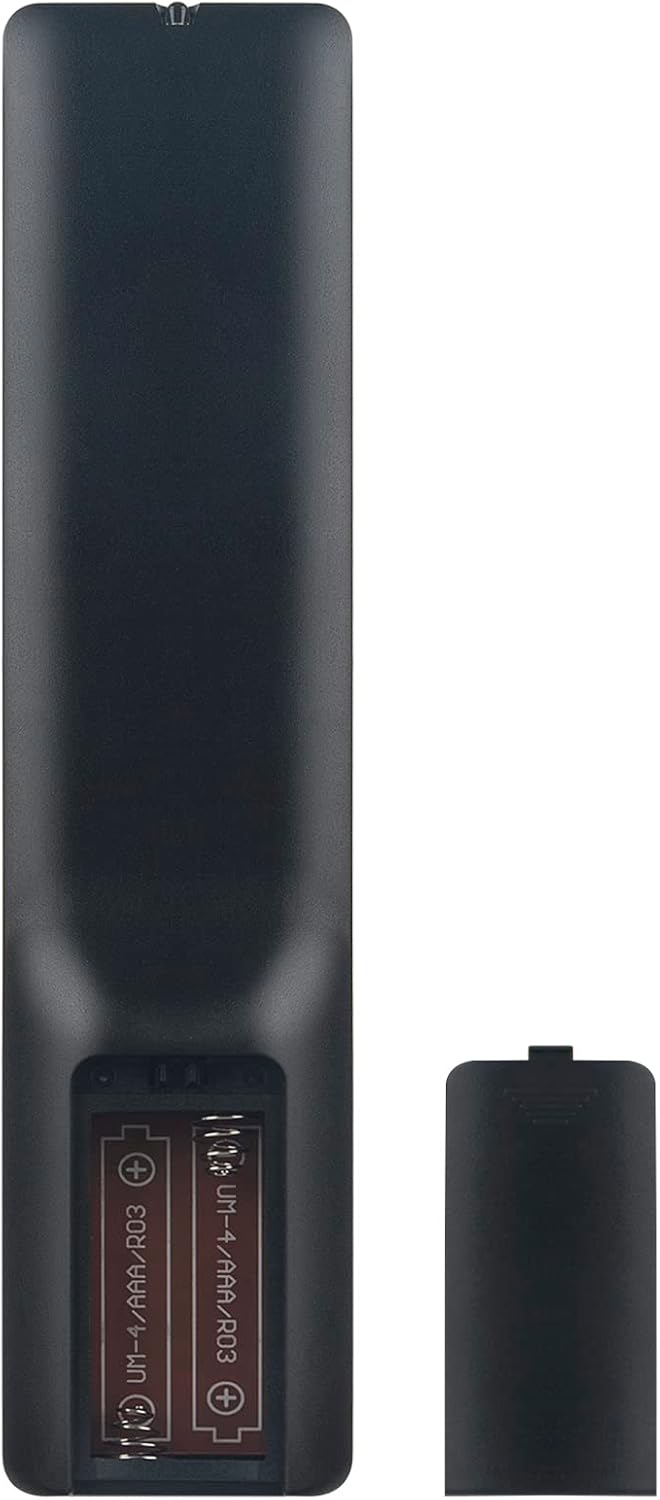
Image: Back of the remote control with the battery compartment open, illustrating correct battery placement.
אַפּערייטינג ינסטראַקשאַנז
Once batteries are installed, the remote control is ready for immediate use with compatible AKAI LCD/LED TVs. Point the remote directly at your television's infrared receiver.
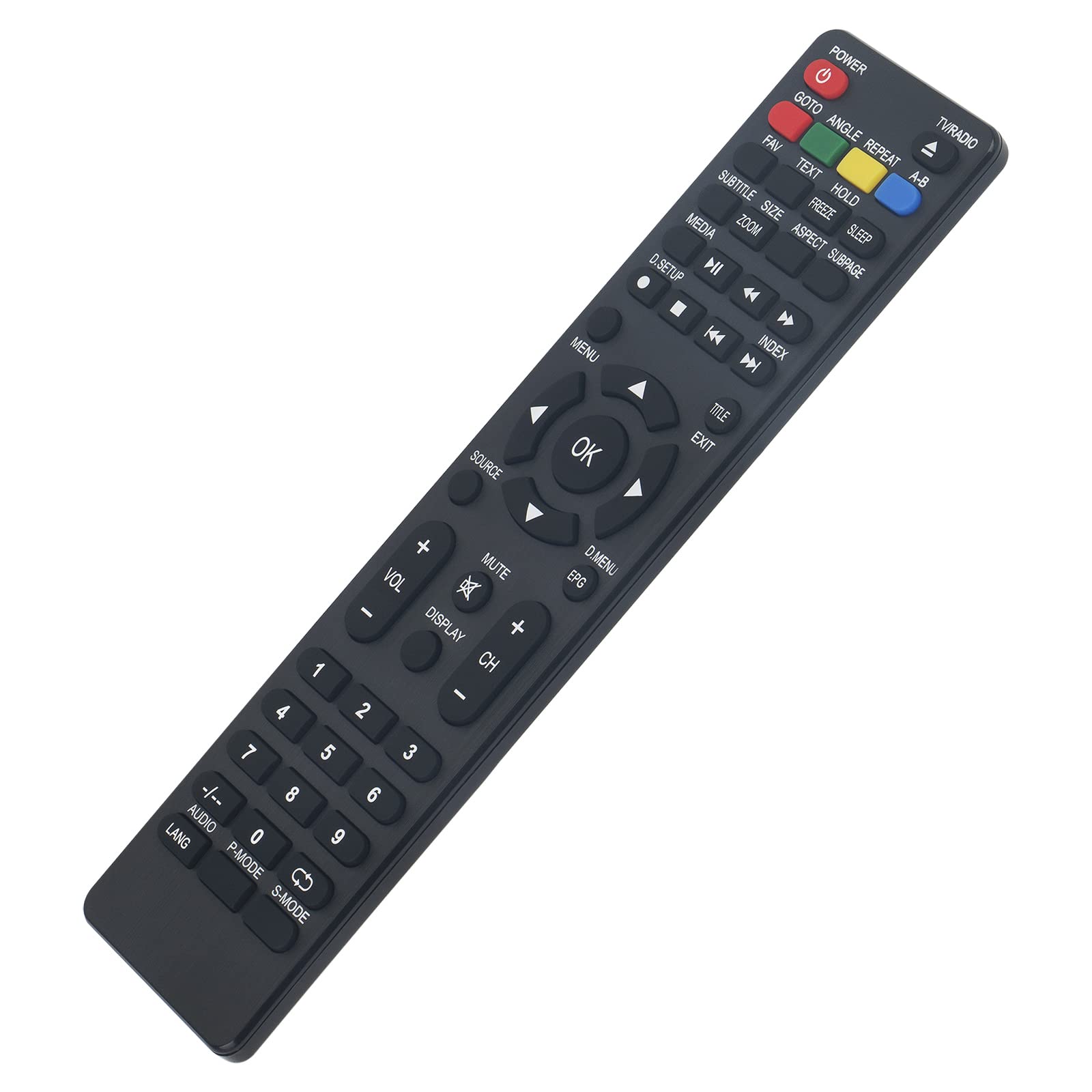
בילד: פראָנט view of the remote control, displaying all function buttons.
שליסל פאַנגקשאַנז איבערview
- מאַכט: טורנס די טעלעוויזיע אויף אָדער אַוועק.
- טעלעוויזיע / ראַדיאָ: טוישט צווישן טעלעוויזיע און ראַדיאָ מאָדעס.
- נומער קנעפּלעך (0-9): דירעקטע קאַנאַל אויסוואַל.
- VOL +/-: אַדזשאַסץ די באַנד מדרגה.
- CH +/-: ענדערונגען דעם קאַנאַל אַרויף אָדער אַראָפּ.
- שטיל: שטומט אדער אנשטומט דעם טעלעוויזיע קלאַנג.
- מעניו: גייט אריין אין דעם הויפּט מעניו פון דער טעלעוויזיע.
- אקעי: באַשטעטיקט אויסוואַלן אין מעניוז.
- נאַוויגאַציע פײַלן (אַרויף, אַראָפּ, לינקס, רעכטס): נאַוויגירט דורך מעניו אָפּציעס.
- אַרויסגאַנג: אַרויסגאַנג דעם קראַנט מעניו אָדער פֿונקציע.
- מקור: אויסקלייבט אריינגאנג קוועלער (HDMI, AV, אאז"וו).
- MEDIA Controls (Play, Pause, Stop, Rewind, Fast Forward, Skip): קאָנטראָלס מעדיע פּלייבאַק.
- EPG: דיספּלייז די עלעקטראָניש פּראָגראַם גייד.
- סאַבטייטאַל: מאַכט אונטערטיטלען אָן אָדער אויס.
- LANG / AUDIO: Changes audio language or track.
- פּ-מאָדע: Selects picture modes.
- S-מאָדע: Selects sound modes.
- אַרויסווייַז: ווייזט אינפֿאָרמאַציע אויף דעם עקראַן.
- Other Function Buttons (GOTO, ANGLE, REPEAT, A-B, FAV, TEXT, HOLD, FREEZE, SLEEP, SIZE, ZOOM, ASPECT, SUBPAGE, D.SETUP, INDEX, TITLE, D.MENU): Provide access to specific TV features as labeled.
וישאַלט
רייניקונג
צו רייניקן די ווײַטקאָנטראָל, ניצט אַ ווייכע, טרוקענע שטאָף. פֿאַר שווערע שמוץ, אַ ביסל ווייכער מאַכןampen the cloth with water or a mild cleaning solution. Avoid using abrasive cleaners, alcohol, or solvents, as these can damage the remote's surface or internal components.
באַטערי פאַרבייַט
Replace batteries when the remote control's response becomes sluggish or stops working. Always replace both batteries at the same time with new AAA alkaline batteries. Do not mix old and new batteries, or different types of batteries, as this can lead to leakage or malfunction.
טראָובלעשאָאָטינג
- די ווײַטקאָנטראָל רעאַגירט נישט:
- טשעק באַטעריז: Ensure batteries are inserted correctly with the correct polarity (+/-). Replace old batteries with new AAA alkaline batteries.
- שורה פון דערזען: Make sure there are no obstructions between the remote control and the TV's infrared sensor. Point the remote directly at the TV.
- ווייַט סענסאָר: זיכער מאַכן אַז דער טעלעוויזיע'ס אינפֿראַרעד סענסאָר איז ריין און נישט באַדעקט.
- עטלעכע קנעפּלעך אַרבעטן נישט:
- While this remote is designed for broad compatibility, some specific TV models might have unique functions not directly mapped to a button. Refer to your TV's original manual for specific feature access.
- Ensure the remote is in the correct mode (e.g., TV mode if applicable, though this remote is generally universal for the listed models).
ספּעסאַפאַקיישאַנז
| סאָרט | VINABTY |
| מאָדעל נומער | MBE741 |
| קאַמפּאַטאַבאַל דעוויסעס | AKAI ATE-48N1104K, ATE-55N1104K, ATE-55D1044K, Linsar LED LCD HDTV TV LS50UHD LS32CHD LS40CFHD LS24CFHD12V |
| קאַנעקטיוויטי טעכנאָלאָגיע | ינפרערעד |
| מאַקסימום קייט | 10 מעטער |
| באַטערי טיפּ | 2 x AAA (Alkaline recommended) |
| מאַטעריאַל | ABS |
| ספּעציעלע שטריך | ערגאַנאַמיק פּלאַן |
וואָראַנטי און שטיצן
VINABTY is committed to customer satisfaction. If you encounter any issues with your product or require assistance, please contact our customer support. We aim to provide a satisfactory response within 24 hours.
For support inquiries, please refer to the contact information provided with your purchase or on the VINABTY official webפּלאַץ.