
1. פּראָדוקט איבערview
The Cudy GS108D is an 8-port Gigabit Ethernet Network Switch designed for expanding your network connectivity. It offers high-speed data transfer for devices such as computers, IPTVs, printers, NAS, game consoles, and routers. Featuring a plug-and-play design, fanless operation, and energy-efficient technology, this switch provides a reliable and quiet solution for both home and office networks.

בילד: פראָנט view of the Cudy GS108D switch, highlighting its 8 Gigabit Ethernet ports and LED indicators.
שליסל פֿעיִקייטן:
- 8 Gigabit עטהערנעט פּאָרץ: גיט הויך-גיכקייט ווייערד קאַנעקשאַנז פֿאַר קייפל דעוויסעס.
- צאַפּן און שפּיל: Requires no software installation or configuration for immediate use.
- פאָכערלעסס פּלאַן: Ensures quiet operation, suitable for any environment.
- ענערגיע עפעקטיוו: Compliant with IEEE802.3az standard, saving power when ports are idle.
- ווערסאַטאַל מאַונטינג: Supports both desktop placement and wall mounting.
2. פּעקל אינהאַלט
באַשטעטיקן אַז דיין פּעקל כּולל די פאלגענדע זאכן:
- Cudy GS108D 8-Port Gigabit Ethernet Network Switch
- מאַכט אַדאַפּטער
- ינסטרוקטיאָן מאַנואַל (דעם דאָקומענט)
- Ethernet Cable (may vary by region/package)

Image: Contents of the Cudy GS108D package, showing the switch, power adapter, and an Ethernet cable.
3. גשמיות באַשרייַבונג
פראָנט פּאַנעל:
The front panel features eight 10/100/1000 Mbps RJ45 ports. Each port has an associated LED indicator to show link/activity status.
- Power LED: ינדיקייץ די מאַכט סטאַטוס פון די באַשטימען.
- Link/Act LEDs (1-8):
- שטאַרק גרין: A device is connected and the link is active.
- בליענדיק גרין: דאַטן ווערט טראַנסמיטירט אָדער באַקומען אויף דעם פּאָרט.
- אויסגעלאשן: No device is connected or the link is inactive.

בילד: דעטאַלירט view of the Cudy GS108D's front panel, showing the 8 RJ45 ports and their corresponding LED indicators.
ריר פּאַנעל:
The rear panel typically contains the power input port.
דימענסיעס:
The compact design of the GS108D allows for flexible placement. Approximate dimensions are 138mm (5.43") L x 61.5mm (2.42") W x 24mm (0.94") H.
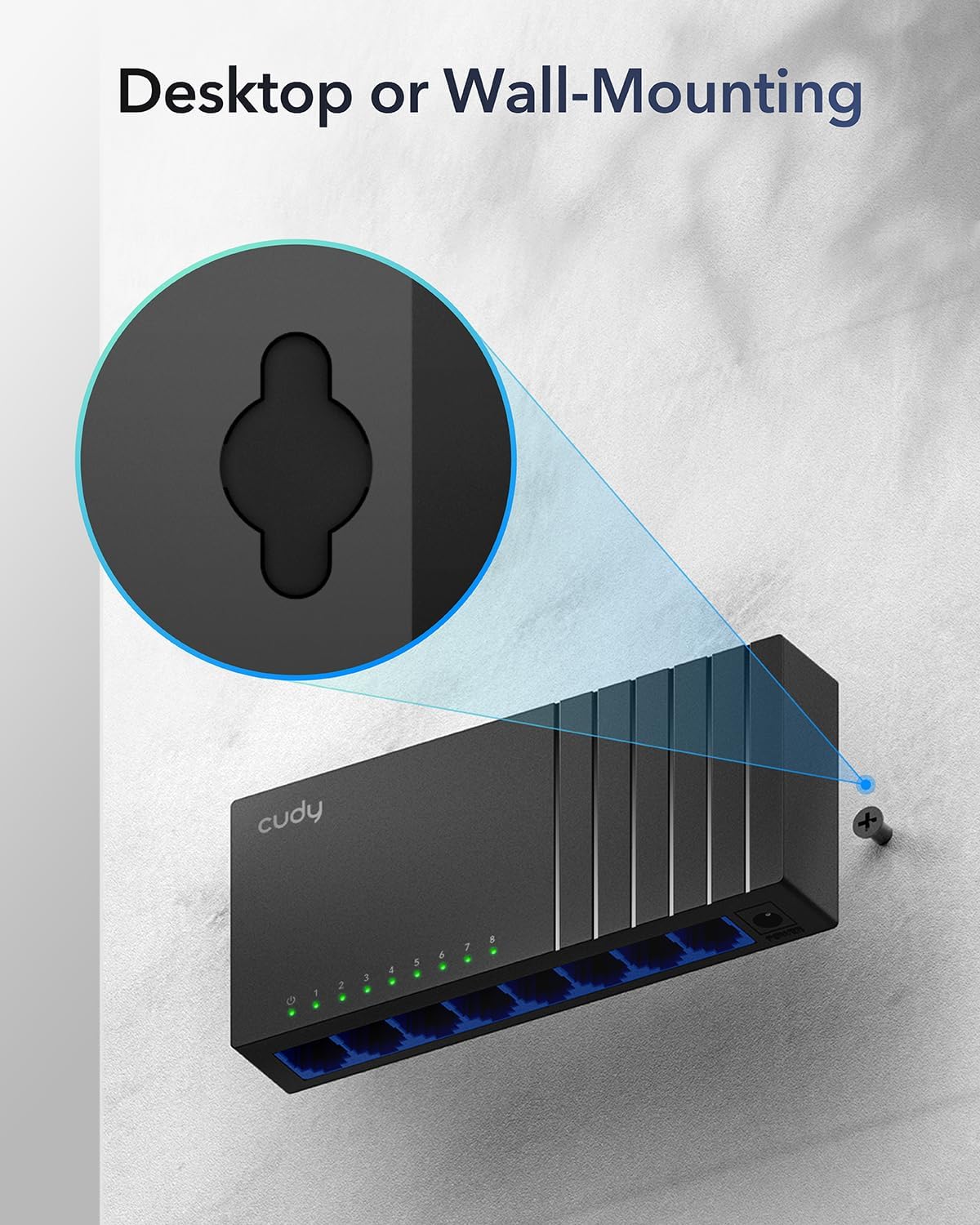
Image: The Cudy GS108D switch with its compact dimensions clearly indicated.
4. סעטאַפּ אינסטרוקציעס
The Cudy GS108D switch is designed for simple plug-and-play installation. No complex configuration is required.
שריט 1: מאַכט קאַנעקשאַן
- Connect one end of the provided power adapter to the power port on the rear panel of the GS108D switch.
- שטעקט אריין דעם אנדערן עק פונעם מאַכט אַדאַפּטער אין אַ נאָרמאַלן עלעקטרישן ווענטיל.
- וועריפיצירט אז די פּאַוער LED אויף דער פראָנט פּאַנעל צינדט זיך אָן, וואָס ווײַזט אָן אַז דער סוויטש באַקומט מאַכט.

Image: The Cudy GS108D switch with its power adapter connected and ready for use.
שריט 2: דיווייס קאַנעקשאַן
- Connect your network devices (e.g., computer, router, NAS, game console) to any of the 8 RJ45 ports on the front panel using standard Ethernet cables (Cat5e or higher recommended for Gigabit speeds).
- Ensure the Link/Act LED for each connected port illuminates, indicating a successful connection. If the LED is flashing, data is being transmitted.

Image: A laptop being connected to the Cudy GS108D switch with an Ethernet cable, demonstrating a typical setup.
שריט 3: מאָנטירונג אָפּציעס
The GS108D supports both desktop placement and wall mounting.
- דעסקטאַפּ פּלייסמאַנט: Simply place the switch on a flat, stable surface.
- וואַנט מאָונטינג: The switch features mounting slots on its underside. Use appropriate screws (not included) to secure the switch to a wall.

Image: The Cudy GS108D switch shown with its wall-mounting slots, illustrating how it can be securely attached to a wall.
5. אַפּערייטינג ינסטרוקטיאָנס
Once connected, the Cudy GS108D operates automatically without further user intervention.
אַוטאָ-נעגאָטיאַטיאָן
Each port on the switch automatically detects the network speed (10/100/1000 Mbps) and duplex mode (Half/Full Duplex) of the connected device and adjusts accordingly for optimal performance.
פאַרקער אָפּטימיזאַטיאָן
The switch features a 4 Mbit packet buffer to ensure stable and efficient data forwarding, reducing packet loss and improving overall network performance, especially during high traffic loads.
Energy Efficiency (IEEE 802.3az)
The GS108D incorporates energy-efficient Ethernet technology. It automatically adjusts power consumption based on cable length and network traffic, reducing energy usage when ports are idle or when connected devices are turned off.

Image: Visual representation of the power-saving feature, showing reduced energy consumption when ports are idle.
לאנג-דיסטאַנסע טראַנסמיסיע
The switch supports long-distance Ethernet cable runs, allowing for reliable data transmission up to 170 meters (557 feet) with Cat5e or higher Ethernet cables.

Image: Illustration of the Cudy GS108D's capability for long-distance transmission, up to 170 meters, requiring Cat5e or higher cables.
6. וישאַלט
To ensure optimal performance and longevity of your Cudy GS108D switch, follow these maintenance guidelines:
- אָרט: Place the switch in a cool, dry location away from direct sunlight, heat sources, and excessive moisture. Ensure adequate ventilation around the device.
- רייניקונג: ניצט אַ ווייכע, טרוקענע שטאָף צו רייניקן די אויסערלעכע זייט פון דעם סוויטש. ניצט נישט קיין פליסיקע אדער אַעראָזאָל רייניגער.
- מאַכט: Use only the provided power adapter. Disconnect the power adapter during electrical storms or when unused for long periods.
- קאַבלעס: Ensure all Ethernet cables are securely connected and free from damage.
7. טראָובלעשאָאָטינג
If you encounter issues with your Cudy GS108D switch, refer to the following common troubleshooting steps:
קיין מאַכט
- זיכער מאַכן אַז דער מאַכט אַדאַפּטער איז זיכער פארבונדן צו ביידע דעם סוויטש און אַ אַרבעטנדיק עלעקטריש ווענטיל.
- קאָנטראָלירט צי די עלעקטרישע אַוטלעט אַרבעט דורך אַרײַנשטעקן אַן אַנדער דעוויס.
- Verify that the Power LED on the switch is illuminated. If not, try a different power outlet.
No Link/Activity on a Port
- Ensure the Ethernet cable is securely plugged into both the switch port and the connected device.
- Try using a different Ethernet cable to rule out cable damage.
- פֿאַרבינדט דעם מיטל צו אַן אַנדער פּאָרט אויף דעם סוויטש.
- Verify that the connected device (e.g., computer, router) is powered on and its network adapter is enabled.
- If connecting to a router, ensure the router's port is active.
לאַנגזאַמע נעץ גיכקייט
- Ensure you are using Cat5e or higher Ethernet cables for Gigabit speeds. Older Cat5 cables may limit speed.
- Check the Link/Act LED for the port. A solid green light indicates a Gigabit connection. If it's amber or off, there might be a speed mismatch or connection issue.
- Verify that the connected devices also support Gigabit Ethernet.
- Reduce network congestion by limiting simultaneous high-bandwidth activities.
8. ספּעסאַפאַקיישאַנז
| שטריך | באַשרייַבונג |
|---|---|
| סאָרט | קודי |
| מאָדעל נומער | GS108D |
| נומער פון פּאָרץ | 8 |
| צובינד | RJ45 |
| דאַטאַ אַריבערפירן קורס | 1000 מעגאַביטן פּער סעקונדע (גיגאַביט) |
| באַשטימען טיפּ | עטהערנעט סוויטש |
| קאַמפּאַטאַבאַל דעוויסעס | Camera, Desktop, Laptop, Router |
| Voltage | 28 Volts (Input for power adapter) |
| אַפּערייטינג טעמפּעראַטור | 40°F צו 104°F (4.4°C צו 40°C) |
| Case Material Type | פּלאַסטיק |
| נומער דימענשאַנז (L X W X H) | 7.87" x 5.91" x 5.91" (Product packaging dimensions, actual device is smaller) |
| פּונקט וואָג | 200 גראַמז |
9. וואָראַנטי און שטיצן
וואָראַנטי אינפֿאָרמאַציע:
The Cudy GS108D 8-Port Gigabit Ethernet Network Switch comes with a 2-יאָר וואָראַנטי פֿון דעם קויפֿדאַטום. ביטע באַהאַלטן אייער קויפֿבאַווײַז פֿאַר וואָראַנטי־פֿאָדערונגען. די וואָראַנטי דעקט חסרונות אין מאַטעריאַלן און אַרבעט אונטער נאָרמאַלן באַנוץ.
טעכניש שטיצן:
For technical assistance, troubleshooting, or further inquiries, please visit the official Cudy website or contact Cudy customer support. Cudy is committed to delivering high-performance, user-friendly communication technology and provides resources to help you with your product.
איר קענט אָפט געפֿינען שטיצע רעסורסן, אָפֿט געשטעלטע פֿראַגעס, און קאָנטאַקט אינפֿאָרמאַציע אויף די Cudy Store on Amazon or the main Cudy webפּלאַץ.