
1. הקדמה
The UNI-T UT60S is a smart, true RMS digital multimeter designed for accurate and reliable electrical measurements. Featuring 9999 counts, this device can measure AC/DC voltage, AC/DC current, resistance, diode, capacitance, temperature, and frequency. Its fully automatic anti-burn intelligent design helps prevent operational errors and device damage, making it suitable for both professional technicians and everyday users.

פיגורע 1: פראָנט view of the UNI-T UT60S Digital Multimeter.
2. זיכערקייַט אינפֿאָרמאַציע
שטענדיק האַלטן זיך צו זיכערהייט מיטלען ווען איר ניצט דעם מולטימעטער. אויב איר טוט דאָס נישט, קען דאָס רעזולטירן אין עלעקטרישן קלאַפּ, שאָדן, אָדער שעדיקן דעם מעטער אָדער עקוויפּמענט וואָס ווערט געטעסט.
- לייענען דעם מאַנואַל: Before use, thoroughly read and understand all instructions and safety warnings in this manual.
- רייטאַד וואָלtage: דו זאלסט נישט צולייגן מער ווי די רייטאַד וואָלtage, as marked on the meter, between terminals or between any terminal and earth ground. The UT60S is capable of withstanding a maximum overvoltage impulse of 1000V.
- דורכקוקן איידער נוצן: Before each use, inspect the meter, test leads, and accessories for any damage. Do not use if damaged.
- Proper Terminals: Ensure test leads are connected to the correct input terminals for the measurement function selected.
- קרייז דע-ענערדזשיזיישאַן: Always de-energize the circuit and discharge all high-voltage קאַפּאַסיטאָרס איידער איר דורכפירן קעגנשטעל, קאָנטינויִטעט, דיאָד, אָדער קאַפּאַסאַטאַנס מעסטונגען.
- Live Circuit Work: When working on live circuits, work alone as little as possible, and ensure another person is present to provide assistance if needed.
- אָווערקוררענט שוץ: The meter features overcurrent alarms and protection functions. Do not exceed the maximum current ratings for the input terminals.
- ינווייראַנמענאַל טנאָים: Use the meter only as specified in this manual. Do not use the meter in explosive gas, vapor, or dusty environments.
- פערזענלעכע פּראַטעקטיוו עקוויפּמענט: טראָגט שטענדיק פּאַסיקע פּערזענלעכע שוץ-עקוויפּמענט (PPE), ווי זיכערהייטס-ברילן און איזאָלירטע הענטשקעס, ווען איר אַרבעט מיט עלעקטרישע קרייזן.
3. פּראָדוקט פֿעיִקייטן
The UNI-T UT60S Digital Multimeter offers a range of features for versatile and safe electrical testing:
- 9999 קאַונץ ווייַז: Provides high-resolution measurements for precision.
- אמת RMS מעזשערמאַנט: זיכערט גענויע לייענונגען פֿאַר נישט-סינוסאָידאַלע כוואַליעפאָרמען.
- Fully Automatic Anti-Burn Design: Intelligent protection against operational errors and potential device damage.
- Wide Measurement Capabilities: מיטלען AC/DC וואָלtage (up to 1000V), AC/DC current, resistance, diode, capacitance, temperature, and frequency.
- Large LCD Screen with Dual Display: Allows simultaneous display of AC voltage and frequency, enhancing readability.
- Full Button Design: Offers intuitive control and automatic recognition of current input jacks.
- Fast ADC (Analog to Digital Converter): Provides rapid measurement updates (3 times/second).
- Misoperation Protection: Capable of withstanding a maximum overvoltage impulse of 1000V, with overvoltage and overcurrent alarms.
- NCV (ניט-קאָנטאַקט Voltagה) פונקציע: דעטעקץ AC voltage without physical contact, featuring audible and visual alarms for safety.
- אָטאַמאַטיק מאַכט שפּאָרן: Low power consumption (7mA during operation, 5uA in sleep state) and automatic backlight display in dark environments, extending battery life. Automatic shut-down feature.

Figure 2: The UT60S display with 9999 counts for precise readings.
4. וואָס איז אין דער קעסטל
ווען איר עפֿענען דעם פּעקל, איר זאָל געפֿינען די פאלגענדע זאכן:
- UNI-T UT60S דיגיטאַל מולטימעטער
- Thermocouple (for temperature measurements)
- מולטימעטער טעסט דראָטן (רויט און שוואַרץ)
- 1.5V AAA Batteries (pre-installed or included separately)

Figure 3: Contents of the UNI-T UT60S package, including the multimeter, test leads, and thermocouple.
5. סעטאַפּ
5.1. באַטאַרייע ייַנמאָנטירונג
The UT60S typically uses 1.5V AAA batteries. To install or replace batteries:
- זייט זיכער אז דער מולטימעטער איז אויסגעלאשן און די טעסט דראטן זענען אפגעטיילט.
- געפינט די באַטעריע אָפּטייל אויף דער צוריקזייט פון דעם מעטער.
- ניצן אַ שרויפנ - ציער צו עפענען די באַטאַרייע אָפּטייל דעקן.
- Insert the AAA batteries, observing correct polarity (+ and -).
- פאַרבייַטן די דעקן פון די באַטאַרייע אָפּטייל און באַוואָרענען עס מיט די שרויף.
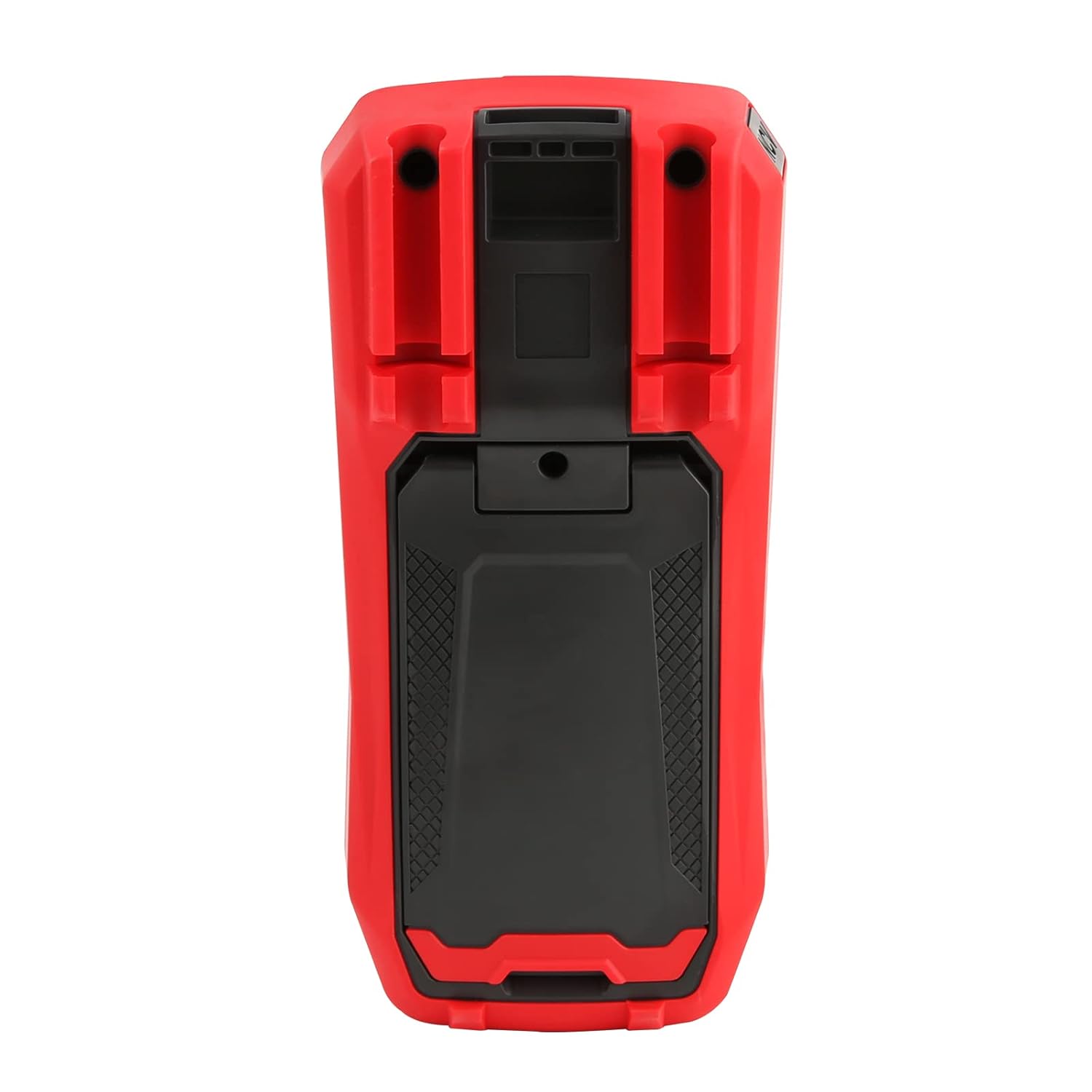
פיגורע 4: דערציען view of the UT60S, indicating the battery compartment location.
5.2. פֿאַרבינדן טעסט דראָטן
Connect the test leads to the appropriate input terminals:
- The black test lead (common) should always be connected to the COM וואָקזאַל.
- פֿאַר וואָלtage, resistance, capacitance, frequency, diode, and continuity measurements, connect the red test lead to the VΩHzCAP וואָקזאַל.
- For current measurements (mA/A), connect the red test lead to the mA/A וואָקזאַל.
- פֿאַר מיקראָampere current measurements (μA), connect the red test lead to the μA וואָקזאַל.

Figure 5: Input terminals of the UT60S for connecting test leads.
6. אַפּערייטינג ינסטרוקטיאָנס
The UT60S features a full button design for selecting measurement functions. The meter's intelligent anti-burn design automatically recognizes the input jack and selected function.
6.1. מאַכט אויף / אויסגעלאשן
דרוק די מאַכט button to turn the meter on or off. The meter will automatically shut down after a period of inactivity to save battery life.
6.2. אַוטאָ מאָדע
In Auto mode, the meter automatically identifies the measurement type (voltage, resistance, continuity) and selects the appropriate range. This simplifies operation for general troubleshooting.
6.3. מעסטן AC/DC וואָלומעןtage
צו מעסטן וואָלtage:
- פאַרבינדן די שוואַרץ פּרובירן פירן צו די COM וואָקזאַל און די רויט פּרובירן פירן צו די VΩHzCAP וואָקזאַל.
- דרוק די V~ / Hz button to select AC voltage measurement, or the V= / NCV button for DC voltage. The meter may automatically select the correct mode in Auto range.
- פֿאַרבינדט די טעסט פּראָובס אַריבער דעם קרייַז אָדער קאָמפּאָנענט וואָס דאַרף געמעסטן ווערן.
- לייענען דעם חלקtagדער ווערט אויפן דיספלעי. פאר AC וואָלומעןtage, the frequency may also be displayed simultaneously.

פיגור 6: מעסטן AC וואָלומעןtage and frequency with the UT60S.
6.4. מעסטן AC/DC קראַנט
צו מעסטן קראַנט:
- וויכטיק: To measure current, the meter must be connected in series with the circuit. Always turn off power to the circuit before connecting the meter.
- פאַרבינדן די שוואַרץ פּרובירן פירן צו די COM וואָקזאַל.
- For current up to 10A, connect the red test lead to the mA/A terminal. For microampere current, connect to the μA וואָקזאַל.
- דרוק די ACA / DCA קנעפּל צו אויסקלייבן AC אדער DC קראַנט מעסטונג.
- Break the circuit and connect the test leads in series with the load.
- Apply power to the circuit and read the current value on the display.
6.5. Measuring Resistance, Diode, and Continuity
צו מעסטן קעגנשטעל, דיאד, אדער קאנטינעואיטעט:
- Ensure the circuit is de-energized and capacitors are discharged.
- פאַרבינדן די שוואַרץ פּרובירן פירן צו די COM וואָקזאַל און די רויט פּרובירן פירן צו די VΩHzCAP וואָקזאַל.
- דרוק די Ω→+ button to cycle through resistance, diode, and continuity functions.
- פֿאַרבינדט די טעסט פּראָובז אַריבער דעם קאָמפּאָנענט.
- Read the measurement. For continuity, an audible buzzer will sound if continuity is detected.
6.6. מעסטן קאַפּאַסיטאַנס
צו מעסטן קאַפּאַסאַטאַנס:
- זיכער מאַכן אַז דער קאַפּאַסיטאָר איז גאָר אויסגעלאָדן איידער איר טעסט.
- פאַרבינדן די שוואַרץ פּרובירן פירן צו די COM וואָקזאַל און די רויט פּרובירן פירן צו די VΩHzCAP וואָקזאַל.
- דרוק די mV~°C°F button to select temperature measurement.
- פֿאַרבינדט די טעסט פּראָובז אַריבער די קאַפּאַסיטאָר טערמינאַלס.
- לייענען די קאַפּאַסאַטאַנס ווערט אויף די אַרויסווייַזן.

Figure 7: The UT60S performing a capacitance measurement.
6.7. מעאַסורינג טעמפּעראַטור
צו מעסטן טעמפּעראַטור:
- Connect the thermocouple to the appropriate input terminals (usually the VΩHzCAP און COM terminals, or dedicated temperature inputs if available).
- דרוק די mV~°C°F button to select temperature measurement.
- Place the thermocouple probe at the point where temperature needs to be measured.
- Read the temperature value on the display in Celsius or Fahrenheit.
6.8. NCV (ניט-קאָנטאַקט חלקtagה) פונקציע
The NCV function allows detection of AC voltagע אָן דירעקטן קאָנטאַקט מיט קאָנדוקטאָרן.
- דרוק די V= / NCV קנעפּל צו אַקטיווירן די NCV פונקציע.
- Move the top of the meter close to the conductor or outlet.
- The meter will provide an audible alarm and visual indication (flashing light) if AC voltage is detected. The intensity of the alarm and light may vary with voltagע שטאַרקייט.

Figure 8: Using the NCV function to detect live AC voltage.
6.9. Data Hold
דרוק די האַלטן קנעפל צו איינפרירן די איצטיקע לייענונג אויפן דיספלעי. דריק עס נאכאמאל צו באפרייען די האלט פונקציע.
6.10. אויסוואל פון קייט
While the meter typically operates in Auto range, you can manually select a range by pressing the קייט button. This can be useful for specific applications or to speed up measurements in stable conditions. Press and hold the קייט button to return to Auto range.
6.11. USB Communication (if applicable)
The UT60S series may support USB communication for data logging and analysis on a computer. If your model includes this feature, connect the meter to your computer using the provided USB cable and install the UNI-T software. Refer to the software manual for detailed instructions.
Video 1: Demonstration of features like NCV, LoZ, and USB communication on a UNI-T UT161 series multimeter. The UT60S shares similar functionalities.
7. וישאַלט
7.1. רייניקונג
ווישט אויס דעם מעטער'ס קעסטל מיט אדווערטייזמענטamp שטאָף און מילדן וואַשפּולווער. ניצט נישט קיין שוואַרצע מאַטעריאַלן אָדער סאָלווענטן. מאַכט זיכער אַז דער מעטער איז גאָר טרוקן איידער נוצן.
7.2. באַטערי פאַרבייַט
טוישט די באַטעריעס ווען דער נידעריק באַטעריע אינדיקאַטאָר דערשיינט אויפן עקראַן. זעט סעקציע 5.1 פֿאַר באַטעריע ינסטאַלירונג אינסטרוקציעס.
7.3. קאָריק פאַרבייַט
If the current measurement function stops working, the fuse may need replacement. Refer to the full user manual for specific fuse ratings and replacement procedures. Always use fuses with the specified voltagE און קראַנט רייטינגז.
8. טראָובלעשאָאָטינג
If you encounter issues with your UNI-T UT60S, try the following basic troubleshooting steps:
- קיין דיספּלעי/אײַנשטאַרקן: קאָנטראָלירט די אינסטאַלאַציע פון די באַטעריעס און זיכערט זיך אַז זיי זענען נישט אויסגעשעפּט. טוישט אויס אויב נייטיק.
- פאַלש רידינגז: Verify that the test leads are correctly connected to the appropriate terminals for the selected function. Ensure the function dial is set correctly. Check for damaged test leads.
- קראַנט מעסטונג אַרבעט נישט: Check the fuse. If blown, replace it with a fuse of the correct rating. Ensure the meter is connected in series with the circuit.
- "OL" אדער איבערלאסטונג אינדיקאציע: This indicates that the measured value is outside the selected range or the maximum capability of the meter. Try selecting a higher range (if in manual range mode) or ensure the component is within the meter's specifications.
- NCV נישט דעטעקטירט: Ensure the NCV function is activated and the meter is brought close enough to the AC voltagE מקור.
For more complex issues, refer to the detailed troubleshooting section in the complete user manual or contact UNI-T customer support.
9. ספּעסאַפאַקיישאַנז
Key specifications for the UNI-T UT60S Digital Multimeter:
| שטריך | באַשרייַבונג |
|---|---|
| ווייַז גראף | 9999 |
| אמת RMS | יא |
| אַק/דק חלקtage | אַרויף צו 1000 וו |
| אַק / דק קראַנט | Up to 10A (mA/A terminals), Up to 1000μA (μA terminal) |
| קעגנשטעל | 0.1Ω - 40MΩ |
| קאַפּאַסיטאַנס | 1nF - 4000μF |
| טעמפּעראַטור | יא (מיט טערמאָקאָפּל) |
| אָפטקייַט | יא |
| דייאָוד טעסט | יא |
| קאָנטינויטי טעסט | יא |
| NCV (ניט-קאָנטאַקט Voltage) | יא |
| מאַכט מקור | Battery Powered (1.5V AAA batteries) |
| פּונקט וואָג | 370 גראַמז |
| זיכערקייַט קאָמפּליאַנסע | UL 61010-1, IEC 61010-2-030, CAT III 1000V, CAT II 600V |
10. וואָראַנטי און שטיצן
UNI-T provides customer support for their products. If you encounter any problems during use, please contact UNI-T customer service directly via email. They offer 7/24 1-to-1 user support to address your concerns promptly.
For specific warranty details, please refer to the warranty card included with your product or visit the official UNI-T webפּלאַץ.